# Accessibility
What the storefront components do for keyboard, focus and screen reader users, and what stays your shop's to set.
The components aim at WCAG 2.2 AA. Underneath they are links and GET forms, so search, filters, sort and paging work before the script loads, and without it. Every state a shopper reaches is a URL:
```text title="URLs the components write"
/suche?q=couch the search box's form
/wohnen/sofas?color=grey a color ticked in the filters' form
/wohnen/sofas?color=grey&sort=price_asc a sort chosen in its select
```
`/suche` is the home store's search page (suche: search). With script, the components add what the sections below say.
## Announcements
`StorefrontProvider` renders a polite and an assertive live region after the page. A message is said once it has held for 500 ms and differs from the last; what a page says while it loads is not, since a screen reader reads the page. Say your own with `useAnnouncement`, urgently only for a failure:
```tsx twoslash title="app/unavailable.tsx"
import { useAnnouncement } from "@orbsearch/react";
// "Search is not available right now"
export function Unavailable() {
useAnnouncement("Die Suche ist gerade nicht erreichbar", true);
return Die Suche ist gerade nicht erreichbar ;
}
```
## Search box
- **A labelled combobox** in a `` landmark, with a submit button. The list opens when suggestions arrive for typed text, never on focus.
- **Groups read by name:** text suggestions, the text in a category, each section's links and the products, each named as the arrow keys enter it.
- **Focus stays in the box** while the arrow keys move, and a highlighted text suggestion shows in it. Escape closes the list and restores what was typed.
- **One count** of the suggestions is announced once typing settles.
- **What a suggestion adds** to the typed text is semibold, while its name reads as plain text; `SuggestionText` does the same for a row of your own.
## Listing and results
- **The title is the one `h1`.** When results arrive, the polite region says their count and order, after what the search left out. A page without results is said urgently and offers a next step.
- **A tile is an ``** whose heading is its one link. Its photo has empty alt text, since the name says what it shows.
- **Facts are words:** a reduced price reads "was … now …", a rating its stars and reviews, and badges, delivery and stock are text. A sponsored product's heading starts with "Anzeige" (ad).
- **A banner is no article,** so moving by articles meets the products alone. Its heading is its one link, and its image's alt text follows the words.
- **`busy`,** set by your router on `ListingPage`, marks the results `aria-busy` while the next page loads; their photos dim, their text keeps its contrast.
- **"Load more" is a link** to the next page. It appends the page, moves focus to the first new item and says how many came. There is no infinite scroll.
- **The trail** is a labelled `` with `aria-current="page"` on its last step, and a rail a section with named arrow buttons.
## Facets and filters
- **A [facet](/docs/reference/glossary#facet) is a button** with `aria-expanded` inside a heading. A closed facet stays in the page, so the browser's find opens it.
- **Values are native checkboxes or radios** in a fieldset named by the facet, the count in each label. They keep their order while focus is inside, and a swatch shows its name.
- **A range is two named number inputs** that apply on Enter or blur. A minimum above the maximum is announced urgently and applies nothing.
- **A finder** is a fieldset of labelled native selects, "Any" first.
- **A facet that loads** says so in a status, and a failure in an alert.
- **The panel** is a labelled `` whose choices apply at once, focus staying on the control.
- **A quick filter** opens a popover named by its facet, focus on its first value. A choice applies after a short pause; closing keeps it and returns focus to the chip, and one visit is one step back in the history.
- **The sheet is a modal.** Escape or the close button discard the pending choice and return focus to its button, which says how many filters are active.
- **A chip is a link** named for what it does: "Filter entfernen: Farbe Grau" (remove filter: color grey). A rule's filter is text that says the shop set it. After a removal, focus moves to the next chip, else the previous, else the results' heading.
- **The sort** is a native select with a label.
## Product page
- **Each choice is a fieldset** named by its detail, such as "Farbe" (color), with native radios. A swatch is named by its value.
- **A value no variant has** beside the others chosen reads "in dieser Kombination nicht erhältlich" (not available in this combination).
- **The chosen value** is ringed twice as thick and set heavier, never marked by color alone.
- **A pick's price and stock** are said in the polite region, since they change away from the radio.
## Motion and focus
- **Focus rings** sit on each control's own classes, so a reset does not remove them. Controls and chips are at least `--orb-spacing-target` (2.75rem) high.
- **Nothing fades in** front of an answer: results and suggestions show the moment they arrive.
- **Moving and scaling** run only under `prefers-reduced-motion: no-preference`; otherwise a pressed button dims instead of shrinking.
- **Photos dim** only once `--orb-motion-wait` has passed, so a quick answer never flickers.
- **On a touch screen,** hover styles stay off and a field's text is at least 16 px, so the browser does not zoom. Under forced colors the system draws the checkboxes and radios.
## What stays the shop's
The document's title, its `lang` and a skip link are yours to set in your root:
```tsx title="app/root.tsx (trimmed)"
Zum Inhalt springen
{children}
```
The link skips to the content. In a layout of your own, the heading you name in `AppliedFilters`' `resultsHeading` takes `tabIndex={-1}`, so focus can land there after the last chip; `ListingPage` sets it on its title.
## Next
- [Theming](/docs/theming): keep the contrast pairs the defaults meet.
- [React components](/docs/react): swap a part and keep its semantics.
- [Clicks and views](/docs/clicks-and-views): what the components report.
# Agents
Shoppers, merchants and developers act through AI agents too, so every surface of OrbSearch answers an agent as it answers a person.
An agent is a user of OrbSearch like any other. Every surface answers it with structured data that explains itself, never with meaning that lives only in markup.
## Where agents connect
| Who | Connects to | Through |
| -------------------- | ------------------------------------------- | --------------------------------------------------------------------------------------------------------------------------------------------------------------------------------------------------------------------------------------------------------------------------------------------------------------- |
| A shopper's agent | The storefront, in the browser | The `search`, `get_facets` and `set_filters` tools the storefront registers with WebMCP, [below](#in-the-shoppers-browser) |
| Any agent or service | The Query API, without a key | Searches, products and URLs, each with its trace on request: [Search](/docs/search) |
| A merchant's agent | The management API, with the management key | Every change to search the panel makes, through the same actions: catalog, imports, releases, index runs. [Management API](/docs/reference/management-api) |
| A coding agent | These docs, as Markdown | Each page at its path plus `.md`, such as [`/docs/quickstart.md`](/docs/quickstart.md), the overview at `/docs/index.md`; [`/docs/llms.txt`](/docs/llms.txt) lists every page with its description, [`/docs/llms-full.txt`](/docs/llms-full.txt) holds them all, and [`/docs/openapi.json`](/docs/openapi.json) describes both APIs |
## In the shopper's browser
`registerAgentTools` from `@orbsearch/client` lets an agent in the browser search the shop, read the page's filters, and filter and sort the page the way the shopper does. Call it once the page runs, with the client the storefront uses and the router's `navigate`, and abort its signal when the page goes away:
```tsx title="app/root.tsx, in the layout"
const navigate = useNavigate();
useEffect(() => {
const registration = new AbortController();
registerAgentTools(search, {
locale: "de",
signal: registration.signal,
navigate: (href) => navigate(href, { preventScrollReset: true }),
}).catch(reportError);
return () => registration.abort();
}, [navigate]);
```
| Tool | Input | What it does |
| ------------- | ------------------------------------------------------------------- | ---------------------------------------------------------------------------------------------------------------------------------------------------------------------------------------------------------------------------------- |
| `search` | `{ "query": "grey sofa", "filters"?, "sort"?, "page"?, "facets"? }` | Searches like the search box without changing the page; answers with the search response as JSON text |
| `get_facets` | `{ "facets"?: ["brand"] }` | Reads the listing the shopper sees, through resolve: URL, total, chosen filters and sort, the sorts on offer, each facet with its value codes, labels and counts, and the banners on the page with their slot, title, text and URL |
| `set_filters` | `{ "filters"?: { "color": ["grey"] }, "sort"?: "price_asc" }` | Moves the page through the router, as if the shopper chose it: chips, sort and URL change. `filters` replaces the selection, `{}` clears it |
The orders differ from page to page, so `get_facets` lists those the page offers and the one it starts in. A page counts only its first facets and a long list's most frequent values ([Facets and filters](/docs/facets#facets-counted-later)); `facets` names those to read with every value, counted under the page's choices. Filters take the codes `get_facets` lists: value codes for a list or swatch, `{ "gte": 100, "lte": 300 }` for a range, `true` for a toggle, category ids for `category`. A value or field the page does not offer fails with a sentence that names the ones it does, so the agent can correct itself. Where the browser offers no WebMCP, `registerAgentTools` does nothing.
What a tool hands the agent counts as the agent's view of it: each hit and banner it answers with, the whole search response for `search` and the listed products and banners for `get_facets` and `set_filters`, is reported as a view with `surface: "agent"` once the tool succeeds, once per answer and item, through the client's [clicks and views](/docs/clicks-and-views), so the merchant's [Insights](/docs/insights#clicks-and-views) tell an agent's views from a shopper's. A hit of a later page goes without its position, which the shop's page size decides. A client made with `report: false` reports none.
WebMCP is a draft browser API from the W3C Web Machine Learning group ([specification](https://webmachinelearning.github.io/webmcp/)), and it keeps changing. Browsers offer it only on trial. `registerAgentTools` uses the small part it needs: `registerTool` on `document.modelContext`, or on `navigator.modelContext`, where an earlier trial put it.
# Autocomplete
Suggest searches, categories and products while the shopper types, from one request after each pause in typing.
A shopper who has typed "ecks" wants to see where it leads before typing on. A request on the `autocomplete` surface completes it with the catalog's own words:
```sh title="Terminal"
curl -s 'http://127.0.0.1:7800/v1/search?on=autocomplete&query=ecks' | jq -c '.suggestions[]'
```
```json title="Answer: 200 · 10 ms · release b25a6aaa"
{"text":"Ecksofa"}
{"text":"Ecksofa","scope":{"category":"wohnen/sofas","title":"Sofas"}}
```
"Ecksofa" is a corner sofa. The first suggestion searches the word, the second searches it among the sofas.
## Text and scoped suggestions
The trace's `suggest` step says where each suggestion comes from:
```sh title="Terminal"
curl -s 'http://127.0.0.1:7800/v1/search?on=autocomplete&query=ecks&debug=1' \
| jq -r '.trace.steps[] | select(.step == "suggest") | .suggestions[].source'
```
```text title="Answer: 200 · 13 ms · release b25a6aaa"
the word "Ecksofa" of 1 product titles, a compound of the head "sofa"
the word "Ecksofa" of 1 product titles, a compound of the head "sofa", in the category wohnen/sofas, where 1 of them sit
```
- **Text suggestions** complete what was typed with category titles, brand names, the labels of the values a query is read for, and the words of product titles. Up to five come first, the one most products hold first.
- **Scoped suggestions** search the first text suggestion that sits in categories within up to two of them, the category most of its products sit in first.
A scoped suggestion searches its text with its category chosen:
```json title="POST /v1/search"
{ "query": "Ecksofa", "filters": { "category": { "within": "wohnen/sofas" } } }
```
**Reference:** [`suggestions`](/docs/reference/query-api#search.answer.suggestions) · [`suggest`](/docs/reference/trace#suggest)
## Products and categories at once
The answer carries a search's sections too, so one request fills a search box with suggestions, products, categories and guides:
```sh title="Terminal"
curl -s 'http://127.0.0.1:7800/v1/search?on=autocomplete&query=sof&per_page=3' \
| jq -c '.suggestions, (.sections[] | select(.total > 0) | {type, hits: [.hits[].entity]})'
```
```json title="Answer: 200 · 15 ms · release b25a6aaa"
[{"text":"Sofas"}]
{"type":"category","hits":["category:wohnen/sofas"]}
{"type":"product","hits":["product:SOFA-ASKA-2","product:SOFA-LUND-3","product:SOFA-NIKO-SCHLAF"]}
{"type":"content","hits":["content:guide-sofa-finden","content:guide-teppichgroesse"]}
```
`per_page` sets how many products come along. The sections beside them show up to 6 hits each, in the order a search shows them.
**Reference:** [`sections`](/docs/reference/query-api#search.answer.sections) · [`per_page`](/docs/reference/query-api#search.per_page)
## No redirect while typing
A search for "sofa" lands on the sofa page. The same text in the search box stays where it is:
```sh title="Terminal"
curl -s 'http://127.0.0.1:7800/v1/search?query=sofa' | jq -c '.redirect'
curl -s 'http://127.0.0.1:7800/v1/search?on=autocomplete&query=sofa' | jq -c '.redirect'
```
```json title="Answer: 200 · 4.5 ms · release b25a6aaa"
{"url":"/wohnen/sofas?from=sofa","entity":"category:wohnen/sofas"}
null
```
A shopper reaches the page a query names when they submit it, never while typing. A rule's redirect follows the rule's own `when`: one without `on` answers in the search box too, so a rule meant for submitted searches names `"on": "search"`.
**Reference:** [`redirect`](/docs/reference/query-api#search.answer.redirect) · [`when.on`](/docs/reference/release-files/rules#when.on)
## In a storefront
The client's `suggestions` store asks after a 100 ms pause in typing and drops an answer for text the shopper has already typed past:
```ts twoslash title="app/search-box.ts"
import { createSearch } from "@orbsearch/client";
const search = createSearch({ endpoint: "http://127.0.0.1:7800" });
const box = search.suggestions({ locale: "de", per_page: 3 });
box.subscribe(() => {
const { response } = box.current();
for (const { text, scope } of response?.suggestions ?? []) {
console.log(scope ? `${text} in ${scope.title}` : text);
}
});
box.type("ecks");
```
`current()` and `subscribe()` have the shape React's `useSyncExternalStore` reads. `SearchBox` from the [React components](/docs/react) runs on this store and lists the suggestions, products and links in one list a keyboard moves through.
A search box has a tighter budget than a search: 15 ms at p95, measured at the server, against a search's 30 ms.
A suggestion ranks by the products that hold it in every channel, so a channel may be offered a brand it does not
sell.
**Reference:** [`Timings`](/docs/reference/trace#Timings)
## Next
- [Search and browse](/docs/search): what the search a suggestion leads to answers.
- [React components](/docs/react): the search box ready to use.
- [How search understands a query](/docs/query-understanding): what a submitted query names.
# Banners and teasers
Put a campaign's banner or a teaser to another page on a category page, with the condition, window, order and trace of a rule.
A sofa sale belongs on top of the sofa page, and a pointer to the armchairs among the sofas.
A banner is a [rule's](/docs/reference/glossary#rule) effect `place`, not an [entity](/docs/reference/glossary#entity) of the [catalog](/docs/reference/glossary#catalog), so it gets the rule's condition, window, order, [draft](/docs/reference/glossary#draft) and [trace](/docs/reference/glossary#trace). The home store's rule `home/sofa-sale` places two on the sofa page `wohnen/sofas` (wohnen: living):
```json title="tests/fixtures/home/rules.json (trimmed)"
{
"id": "home/sofa-sale",
"when": { "category": { "is": "wohnen/sofas" } },
"then": {
"place": [
{
"slot": "top",
"banner": {
"kind": "banner",
"title": { "de": "Sofas im Angebot", "en": "Sofas on sale" },
"link": { "to": "category:wohnen/sofas", "filters": { "on_sale": true } }
}
},
{
"slot": "grid",
"position": 4,
"banner": {
"kind": "teaser",
"title": {
"de": "Sessel aus Leder, Samt und Stoff",
"en": "Armchairs in leather, velvet and fabric"
},
"link": { "to": "category:wohnen/sessel" }
}
}
]
}
}
```
The banner leads to the sofas on sale, the teaser before the fourth sofa to the armchairs (Sessel). Each also carries a line of text and an image with the words that stand for it. The answer brings them as `placements` ([Category pages](/docs/category-pages#banners-and-teasers)).
**Reference:** [`place`](/docs/reference/release-files/rules#then.place) · [`link`](/docs/reference/release-files/rules#then.place.banner.link) · [`image`](/docs/reference/release-files/rules#then.place.banner.image)
## Where a banner stands
`slot` says where a banner stands, and on which page of the results:
| Slot | Stands | Shows on |
| -------- | ------------------------------------- | ----------------------------- |
| `top` | Above the results | The first page |
| `grid` | Before the tile at `position`, from 1 | The page that holds that tile |
| `bottom` | After the results | The last page |
`kind` says how wide: a `banner` spans the results, a `teaser` is the size of a tile. A banner is not a hit, so it changes no total, [facet](/docs/reference/glossary#facet) or order, and paging stays as it is. The search box shows no banners, and neither does an answer that redirects or a `count_only` one.
**Reference:** [`slot`](/docs/reference/release-files/rules#then.place.slot) · [`position`](/docs/reference/release-files/rules#then.place.position) · [`kind`](/docs/reference/release-files/rules#then.place.banner.kind)
## When banners compete
The rule order decides between banners. A preview takes any [release](/docs/reference/glossary#release) files, so you can try a clash without a draft. Put a teaser for the sofa guide, "Welches Sofa passt?" (which sofa fits?), on top of the order, before the fourth sofa:
```sh title="Terminal"
jq '.rules |= [{id: "sofa-guide", description: "Sofa guide before the fourth sofa",
when: {category: {is: "wohnen/sofas"}},
then: {place: [{slot: "grid", position: 4, banner: {kind: "teaser", title: "Welches Sofa passt?"}}]}}] + .
| {url: "/wohnen/sofas", files: {"rules.json": tojson}}' tests/fixtures/home/rules.json \
| curl -s -H "Authorization: Bearer $key" -H 'Content-Type: application/json' -d @- $api/preview/page \
| jq -r '.results.trace.steps[] | select(.step == "rules") | .rules[].effects[]? | select(.slot == "grid")
| "\(.target): asked \(.position), placed \(.placed), \(.reason // .outcome)"'
```
```text title="Answer: 200 · 55 ms · release 5471dabe"
teaser "Welches Sofa passt?": asked 4, placed 4, applied
teaser "Sessel aus Leder, Samt und Stoff": asked 4, placed 5, position 5 is past the last of 4 tiles
```
The new rule is higher, so its teaser takes position 4. The armchair teaser moves to the next free position, 5, which lies past the last of the four sofas, so the page leaves it out.
Top and bottom banners of several rules stand in rule order. A page shows at most 8 banners, the first in rule order, and the trace says why it left any out. The [panel](/docs/reference/glossary#panel) marks a banner that lost its position **In conflict**.
**Reference:** [`placements_per_page`](/docs/reference/limits#placements_per_page) · [`placed`](/docs/reference/trace#rules.rules.effects.placed)
## Add a banner
A new banner is a new rule at the top of the order, and it waits in a draft until you publish it. A campaign's window is its rule's schedule ([Rules](/docs/rules)).
**In the panel:**
**Merchandising → Banners** lists every banner the rules place, in rule order, with where and when it shows and its state: **Live**, **Scheduled**, **Ended**, **Off** or **In conflict**.
Click **New banner**, and fill in the sheet:
1. **Category page:** Sofas. **Other pages or searches** opens the whole condition instead.
2. **Place:** **Among the products**, **Before product** 2.
3. **Kind:** **Teaser, the size of a product**, then its **Title** in each language. An image needs its **Image description**.
4. **Leads to:** **A content page**, the sofa guide.
5. **Save**, which starts a draft if none is open.
The sheet draws the banner as the storefront will, and **Starts** and **Ends** under **When** give it a window. The bar above the list then says how the draft goes live, and **Publish** takes it there. On **Rules**, a rule that places banners leads here with **Change its banners**.
**Through the API:**
Start a draft and add the rule with the fields the panel edits; the API writes `rules.json` from them. The teaser stands before the second sofa:
```sh title="Terminal"
draft=$(curl -s -X POST -H "Authorization: Bearer $key" -H 'Content-Type: application/x-ndjson' \
--data-binary @tests/fixtures/home/catalog.jsonl "$api/imports?name=catalog.jsonl" | jq -r .import.id)
version=$(curl -s -H "Authorization: Bearer $key" $api/imports/$draft | jq -r .version)
jq -n --arg version "$version" '{version: $version, name: "Sofa guide among the sofas", fields: {
when: {trigger: {kind: "category", category: "wohnen/sofas"}},
then: {place: [{slot: "grid", position: 2, banner: {kind: "teaser",
title: {de: "Welches Sofa passt?", en: "Which sofa fits?"}, link: {to: "content:guide-sofa-finden"}}}]}}}' \
| curl -s -H "Authorization: Bearer $key" -H 'Content-Type: application/json' -d @- $api/imports/$draft/rules \
| jq -r '.rules.rules[:2][] | "\(.position). \(.summary)"'
```
```text title="Answer: 201 · 70 ms"
1. Places teaser "Welches Sofa passt?" at 2 on "Sofas"
2. Places banner "Sofas im Angebot" on top, places teaser "Sessel aus Leder, Samt und Stoff" at 4 on "Sofas"
```
Preview the sofa page with the draft's files:
```sh title="Terminal"
curl -s -H "Authorization: Bearer $key" $api/imports/$draft \
| jq '{url: "/wohnen/sofas", files}' \
| curl -s -H "Authorization: Bearer $key" -H 'Content-Type: application/json' -d @- $api/preview/page \
| jq -c '.results.placements[] | del(.text, .image, .link)'
```
```json title="Answer: 200 · 6.8 ms · release 6425cef5"
{"slot":"top","kind":"banner","title":"Sofas im Angebot","rule":"home/sofa-sale"}
{"slot":"grid","position":2,"kind":"teaser","title":"Welches Sofa passt?","rule":"sofa-guide-among-the-sofas"}
{"slot":"grid","position":4,"kind":"teaser","title":"Sessel aus Leder, Samt und Stoff","rule":"home/sofa-sale"}
```
Both teasers show now, the guide's before the second sofa. Publishing takes the draft live:
```sh title="Terminal"
curl -s -X POST -H "Authorization: Bearer $key" $api/imports/$draft/publish | jq -r .next
```
Here, discard it instead:
```sh title="Terminal"
curl -s -X DELETE -H "Authorization: Bearer $key" $api/imports/$draft | jq -r .state
```
```text title="Answer: 200 · 17 ms"
discarded
```
**Reference:** [`POST .../rules`](/docs/reference/management-api#create-rule) · [`POST /api/v1/preview/page`](/docs/reference/management-api#preview-page)
## Next
- [Category pages](/docs/category-pages): the placements an answer carries and where a storefront draws them.
- [Rules](/docs/rules): conditions, schedules and the rule order.
- [Pages and their filters](/docs/pages): the filters and sorting of the same sofa page.
# Category pages
Browse a category without words, with its products, its subcategories and the banners placed on it.
A category page is a search without text on the `category_page` surface, naming the category. The sofa page `wohnen/sofas` (wohnen: living) lists four sofas:
```sh title="Terminal"
curl -s 'http://127.0.0.1:7800/v1/search?on=category_page&category=wohnen/sofas' \
| jq -c '.listed, (.sections[] | {type, total, hits: [.hits[].entity]})'
```
```json title="Answer: 200 · 13 ms · release b25a6aaa"
"product"
{"type":"product","total":4,"hits":["product:SOFA-ASKA-2","product:SOFA-LUND-3","product:SOFA-NIKO-SCHLAF","product:SOFA-VIDAR-ECK"]}
```
The answer holds one [section](/docs/reference/glossary#section), the type the page lists, with the page's [facets](/docs/reference/glossary#facet). `listed` names that type: products, unless the category holds more of another type with offers, such as a workshop's services. Filters and pages work as in any search ([Facets and filters](/docs/facets)).
**Reference:** [`category`](/docs/reference/query-api#search.category) · [`listed`](/docs/reference/query-api#search.answer.listed)
## The category and below it
A page lists what the [catalog](/docs/reference/glossary#catalog) assigns to its category and to every category below it. `wohnen` lists the products of its five subcategories, and its `category` facet counts them:
```sh title="Terminal"
curl -s 'http://127.0.0.1:7800/v1/search?on=category_page&category=wohnen' \
| jq -c '.sections[] | select(.type == "product")
| .total, (.facets[] | select(.field == "category") | .values[] | {value, label, count})'
```
```json title="Answer: 200 · 12 ms · release b25a6aaa"
11
{"value":"wohnen/sofas","label":"Sofas","count":4}
{"value":"wohnen/tische","label":"Tische","count":3}
{"value":"wohnen/sessel","label":"Sessel","count":2}
{"value":"wohnen/regale","label":"Regale","count":1}
{"value":"wohnen/stuehle","label":"Stühle","count":1}
```
The category facet is `hierarchical`: it lists the subcategories one level down, such as Sessel (armchairs) and Tische (tables). Choosing one, as `{ "category": { "within": "wohnen/sofas" } }`, narrows this page. Link it to its own page instead where the shopper should get that page's own facets and banners.
A category's `where` in `categories.json` is checked but not applied: a page lists only what the catalog assigns to
it and below it.
## Banners and teasers
`placements` holds the banners [rules](/docs/reference/glossary#rule) place on the page, in the order the page draws them. [Banners and teasers](/docs/banners) shows how a merchant places one:
```sh title="Terminal"
curl -s 'http://127.0.0.1:7800/v1/search?on=category_page&category=wohnen/sofas' \
| jq -c '.placements[] | del(.text, .image, .link)'
```
```json title="Answer: 200 · 8.0 ms · release b25a6aaa"
{"slot":"top","kind":"banner","title":"Sofas im Angebot","rule":"home/sofa-sale"}
{"slot":"grid","position":4,"kind":"teaser","title":"Sessel aus Leder, Samt und Stoff","rule":"home/sofa-sale"}
```
The home store's rule `home/sofa-sale` puts a banner on `top`, "Sofas im Angebot" (sofas on sale), and a teaser to the armchairs in the `grid` before the fourth tile. Each comes with its text, image and link in the request's [locale](/docs/reference/glossary#locale).
A banner is not a hit: totals, facets and hits are the same without it, so paging stays as it is. A grid banner's `position` counts tiles across pages:
```sh title="Terminal"
curl -s 'http://127.0.0.1:7800/v1/search?on=category_page&category=wohnen/sofas&per_page=2&page=2' \
| jq -c '[.placements[] | {slot, position}], (.sections[] | {total, hits: [.hits[].entity]})'
```
```json title="Answer: 200 · 7.2 ms · release b25a6aaa"
[{"slot":"grid","position":4}]
{"total":4,"hits":["product:SOFA-NIKO-SCHLAF","product:SOFA-VIDAR-ECK"]}
```
With two tiles per page, the teaser stands before the second tile of page 2, at `position - (page - 1) * per_page`. A top banner comes with the first page only, a bottom one with the last. A `count_only` request carries none.
**Reference:** [`placements`](/docs/reference/query-api#search.answer.placements) · [`position`](/docs/reference/query-api#search.answer.placements.position)
## Where the page starts sorting
A page without words starts in the default sort of its category's [node](/docs/reference/glossary#node), the nearest up the tree, and the answer's `sorts` marks it. The home store's pages start by relevance, labeled "Beste Treffer" (best matches). [Sorting](/docs/sorting) shows how to offer the others.
## An unknown category
A category the catalog does not hold answers an empty product section, not an error. A storefront that serves pages by their URL learns of it earlier: [resolve](/docs/urls#resolve-a-url) answers its path with `not_found`.
## Breadcrumbs and the page's URL
The page's path comes from the catalog, per locale, and resolve answers it with the trail above the page:
```sh title="Terminal"
curl -s -G http://127.0.0.1:7800/v1/resolve --data-urlencode 'url=/wohnen/sofas' -d results=0 \
| jq -c '{entity, canonical}, .breadcrumbs'
```
```json title="Answer: 200 · 2.4 ms · release b25a6aaa"
{"entity":"category:wohnen/sofas","canonical":"/wohnen/sofas"}
[{"title":"Wohnen","url":"/wohnen"},{"title":"Sofas","url":"/wohnen/sofas"}]
```
The same page sits at `/en/living/sofas` in English. Without `results=0`, resolve brings the page's results in the same call, so a storefront renders a category page from one request ([URLs and redirects](/docs/urls)).
**Reference:** [`breadcrumbs`](/docs/reference/query-api#resolve.answer.breadcrumbs) · [`canonical`](/docs/reference/query-api#resolve.answer.canonical)
## Next
- [Facets and filters](/docs/facets): the facets a page answers with and how a shopper chooses.
- [Sorting](/docs/sorting): the orders a page offers.
- [URLs and redirects](/docs/urls): serve every page from its own URL.
# Channels
Set up the markets a shop sells in, each with its languages, currency, countries and the products it carries.
A [channel](/docs/reference/glossary#channel) is a market: the [locales](/docs/reference/glossary#locale) its pages speak, the currency its prices are in and the countries it serves. The home store sells in one channel, `de`, in German and English:
```json title="tests/fixtures/home/channels.json (trimmed)"
{
"channels": [
{
"id": "de",
"label": { "de": "Deutschland", "en": "Germany" },
"locales": ["de", "en"],
"currency": "EUR",
"countries": ["DE"]
}
]
}
```
Labels, URLs and slugs exist per locale, prices per channel. `countries` guards privacy: the search log masks a phone number a shopper types into search, read as written there, before it keeps the query.
A release without `channels.json` derives it from the catalog: the locales its texts are keyed by or written in, the channels its offers name, and the currency their prices write. Changing `channels.json` rebuilds the indexes.
**Reference:** [`channels.json`](/docs/reference/release-files/channels) · [`locales`](/docs/reference/release-files/channels#locales) · [`currency`](/docs/reference/release-files/channels#currency)
## The channel and locale a request gets
A request without `channel` is answered in the first channel, and without `locale` in that channel's first locale. The trace says which it got:
```sh title="Terminal"
curl -s 'http://127.0.0.1:7800/v1/search?query=sofa&debug=1' | jq -c '.trace.request | {channel, locale}'
```
```json title="Answer: 200 · 4.9 ms · release b25a6aaa"
{"channel":"de","locale":"de"}
```
A locale the channel does not serve is refused, and the answer names the ones it does:
```sh title="Terminal"
curl -s 'http://127.0.0.1:7800/v1/search?query=sofa&locale=fr' | jq -r '.violations[].message'
```
```text title="Answer: 400 · 1.4 ms"
The channel de serves de and en, not fr.
```
[Channel, locale and context](/docs/search#channel-locale-and-context) shows the same search in English.
**Reference:** [`channel`](/docs/reference/query-api#search.channel) · [`locale`](/docs/reference/query-api#search.locale)
## Prices in the channel's currency
Every offer is in its channel's currency. An offer without `currency` takes the channel's, and a catalog line whose offer names another currency is left out and reported, since the shopper would see a wrong price.
Offer fields written on a variant, such as `"price": 749.0`, are its offer in the only channel. A shop with several channels gives each variant one offer per channel instead:
```json title="catalog.jsonl, one variant (trimmed)"
{ "id": "SOFA-ASKA-2-GRAU", "offers": [{ "channel": "de", "price": 749.0, "availability": "in_stock" }] }
```
**Reference:** [`offers`](/docs/reference/catalog/entity#variants.offers) · [`currency`](/docs/reference/catalog/entity#variants.offers.currency)
## What a channel sells
An `assortment` is a selector for the products a channel sells. This one leaves out the lamps by Lumivo, such as the pendant lamp `LEUCHTE-KUGEL`:
```json title="channels.json"
{
"channels": [
{ "id": "de", "locales": ["de", "en"], "currency": "EUR", "assortment": { "not": { "brand": "Lumivo" } } }
]
}
```
The [index run](/docs/reference/glossary#index-run) applies it to every variant. A variant it leaves out has no offer in the channel, so searches, facet counts, suggestions and the product page all leave it out, and no request can bring it back. The selector reads attributes, the brand and the offer fields of its own channel, never a relation.
[`POST $api/preview/find`](/docs/reference/management-api#preview-find) names the assortment when it is why a product is missing.
**Reference:** [`assortment`](/docs/reference/release-files/channels#assortment)
## Context for rules
`context` declares the keys a request may carry, with the values each allows, so business customers can get rules of their own:
```json title="channels.json"
{
"channels": [{ "id": "de", "locales": ["de", "en"], "currency": "EUR" }],
"context": { "customer_group": ["b2c", "b2b"] }
}
```
A request then sends `"context": { "customer_group": "b2b" }`, and a rule's `when.context` matches it ([Rules](/docs/rules)). A rule that names an undeclared key fails validation, and a request that sends one is refused with a `400`. Context never carries personal data. The home store declares none.
**Reference:** [`context`](/docs/reference/release-files/channels#context) · [`when.context`](/docs/reference/release-files/rules#when.context)
## Next
- [Search and browse](/docs/search): send the channel, locale and context with a request.
- [Types and attributes](/docs/types-and-attributes): the labels each locale shows.
- [Live prices and stock](/docs/prices-and-stock): change an offer in a channel between two catalogs.
# Clicks and views
Report what shoppers click and see after a search, so Insights shows the searches that find what nobody opens.
A search with results is not yet a good search. [Insights](/docs/insights) counts what shoppers click and see per query, so a search that finds products nobody opens shows as one. The React components report by themselves. A shop that draws its own results reports through the client, with the hit the answer named:
```ts twoslash title="app/results.ts"
import { createSearch } from "@orbsearch/client";
const search = createSearch({ endpoint: "http://127.0.0.1:7800" });
const answer = await search.query("", { on: "category_page", category: "wohnen/sofas" });
const sofa = { query_id: answer.query_id, entity: "product:SOFA-ASKA-2", position: 1 };
export function reportTile(tile: Element) {
tile.addEventListener("click", () => search.report.click(sofa)); // sent at once
return search.report.watch(tile, sofa); // a view, once half of it was visible for a second
}
search.report.view({ query_id: answer.query_id, placement: "home/sofa-sale" }); // seen now, such as a banner
search.report.flush(); // the waiting views, before the shop replaces the page itself
```
Each report is an [event](/docs/reference/glossary#event) naming the [query ID](/docs/reference/glossary#query-id) of its answer, here the sofa page's, and the hit by its [entity](/docs/reference/glossary#entity) or the banner by its [rule](/docs/reference/glossary#rule). `watch` returns the call that stops watching.
## What the components report
A tile, a banner, a suggestion and a link to a hit beside the products each report two things:
- **A click** on a link in them, a middle click included. It goes at once by `navigator.sendBeacon`, so a navigation never waits for it.
- **A view** once half of the item was visible for a second, once per answer and item. Views wait in memory and go together when the page is hidden, or once 100 have gathered.
A tile "Load more" brought names the answer of the first page, with its position counted across the pages, and a sponsored one names its campaign. The query ID never goes into a link, and nothing is written to the shopper's device.
## Lists of your own in React
A React list of your own names its answer with ``, and each item reports through `useReport`, whose `ref` and click handlers go on the item's element:
```tsx twoslash title="app/sofa-link.tsx"
import { Answer, useReport } from "@orbsearch/react";
export function SofaLinks({ queryId }: { queryId: string }) {
return (
);
}
function SofaLink({ entity, position }: { entity: string; position: number }) {
const report = useReport({ entity, position });
return (
Aska 2-Sitzer-Sofa aus Samt
);
}
```
Both need a `StorefrontProvider` above them, whose client sends the reports.
## Send nothing
Make the client with `report: false`, and every report call does nothing, the components' included. The demo storefront does so for a browser that sends [Global Privacy Control](https://globalprivacycontrol.org/):
```ts twoslash title="app/search.ts"
import { createSearch } from "@orbsearch/client";
const privacyAsked =
typeof navigator !== "undefined" && "globalPrivacyControl" in navigator && navigator.globalPrivacyControl === true;
export const search = createSearch({ endpoint: "http://127.0.0.1:7800", report: !privacyAsked });
```
A shop that asks for consent makes its client with `report: false` until the shopper agrees. If they take it back, a client made again for the same `pageView` with `report: false` also drops the views still waiting. On a server, where no beacon can go, the calls do nothing either.
## The Events API underneath
The client posts each batch to `POST /v1/events` on the Query API, with no key and no cookie. Here is a click on the first hit of a search for "graues Sofa" (grey sofa):
```sh title="Terminal"
query_id=$(curl -s 'http://127.0.0.1:7800/v1/search?query=graues%20Sofa' | jq -r .query_id)
curl -s http://127.0.0.1:7800/v1/events -H 'Content-Type: text/plain' \
-d '{"events": [{"type": "click", "query_id": "'"$query_id"'", "entity": "product:SOFA-ASKA-2", "position": 1}]}'
```
```json title="Answer: 202 · 2.8 ms"
{"accepted":1,"late":0}
```
The answer is `202`: `accepted`, and `late` for events whose answer is older than 48 hours. The body is read as JSON whatever its content type, since a beacon posts `text/plain`. A batch holds 1 to 100 events in at most 64 kB, and one malformed event refuses it whole with `400`.
**Reference:** [`POST /v1/events`](/docs/reference/events-api#events) · [`events_per_call`](/docs/reference/limits#events_per_call) · [`event_hours`](/docs/reference/limits#event_hours)
## Next
- [Insights](/docs/insights): what the merchant reads from clicks and views.
- [React components](/docs/react): the parts that report by themselves.
- [The client](/docs/client): one client per page load, and its page view.
# The client
Call the Query API from any storefront with typed requests and answers, and read and write a listing's URL.
`@orbsearch/client` calls the [Query API](/docs/reference/glossary#query-api) with typed requests and answers. It needs no framework, and the [React components](/docs/react) build on it:
```ts twoslash title="app/search.ts"
import { createSearch } from "@orbsearch/client";
export const search = createSearch({ endpoint: "http://127.0.0.1:7800" });
const answer = await search.query("graues Sofa");
const sofa = await search.product({ id: "SOFA-ASKA-2" });
const page = await search.resolve("/wohnen/sofas?color=grey");
```
The calls search for "graues Sofa" (grey sofa), fetch one sofa and ask what the sofa page `/wohnen/sofas` (wohnen: living) with grey chosen is. Hover a call to read what it answers.
The packages are not on npm yet. A shop inside this repository's pnpm workspace depends on them as `workspace:*`, as the demo storefront in `apps/demo` does, and its bundler compiles their TypeScript source:
```json title="package.json (trimmed)"
{
"dependencies": {
"@orbsearch/client": "workspace:*",
"@orbsearch/react": "workspace:*"
}
}
```
## The calls
Each call is one request. The second argument is the request without its text, with `filters` in the shape a listing's URL holds, and the third cancels the call when the shopper moves on:
```ts twoslash title="app/search.ts"
import { createSearch } from "@orbsearch/client";
const search = createSearch({ endpoint: "http://127.0.0.1:7800" });
// ---cut---
const navigation = new AbortController();
const sofas = await search.query(
"",
{ on: "category_page", category: "wohnen/sofas", filters: { color: ["grey"] }, sort: "price_asc" },
{ signal: navigation.signal },
);
```
- `query` searches or browses a category ([Search and browse](/docs/search)).
- `product` fetches one product by `id` or `url`, or `null` when the channel sells none ([Product pages](/docs/product-pages)).
- `resolve` says what one of the merchant's URLs is: a listing with its results, a product, a redirect or nothing ([URLs and redirects](/docs/urls)).
- `facets` counts named [facets](/docs/reference/glossary#facet) in full, without products, for a facet that [loads when opened](/docs/react#facets-that-load-when-opened).
- `suggestions` returns the store a search box runs on ([Autocomplete](/docs/autocomplete)).
In the browser, `registerAgentTools` offers the same client to agents as WebMCP tools ([Agents](/docs/agents)).
**Reference:** [`POST /v1/search`](/docs/reference/query-api#search) · [`GET /v1/product`](/docs/reference/query-api#product) · [`GET /v1/resolve`](/docs/reference/query-api#resolve)
## One client per page load
A client's searches name one page view, which Insights counts queries by. Make one client per page the shopper loads: once in the browser, and once per request on a server, with the shopper's `User-Agent`:
```ts twoslash title="app/search.server.ts"
import { createSearch } from "@orbsearch/client";
export function searchFor(request: Request) {
const userAgent = request.headers.get("user-agent");
return createSearch({ endpoint: "http://127.0.0.1:7800", ...(userAgent && { userAgent }) });
}
```
The user agent tells a crawler from a shopper, which the server's own would hide. The page view lives in memory only: pass the server's to the browser's client as `pageView`, and a page load counts once. `traffic: "test"` or `"bench"` marks searches the merchant's reports leave out.
The management key never belongs in a storefront. The Query API needs no key and allows every origin, so the browser
calls it directly ([Conventions](/docs/reference/conventions#query-api)).
**Reference:** [`page_view`](/docs/reference/query-api#search.page_view) · [`traffic`](/docs/reference/query-api#search.traffic)
## Errors
A call the Query API refuses throws a `SearchError`, whose `problem` says why in words a person can read:
```ts twoslash title="app/search.ts"
import { createSearch, SearchError } from "@orbsearch/client";
const search = createSearch({ endpoint: "http://127.0.0.1:7800" });
try {
await search.query("sofa", { sort: "cheapest" });
} catch (error) {
if (!(error instanceof SearchError)) throw error;
console.error(error.problem.status, error.problem.detail);
}
```
- **400** means the request cannot be answered as sent, such as the unknown sort above, and `problem.violations` names each wrong field.
- **503** means nothing is searchable yet or the engine is unreachable. Offer the shopper the same page again.
**Reference:** [Problems](/docs/reference/problems)
## Types from the contract
Every request, answer, release file and catalog entity is a type generated from the contract, such as `SearchResponse`, `FacetResult` or `PageResponse`. Hover one to read its fields:
```ts twoslash title="app/hits.ts"
import type { SearchResponse } from "@orbsearch/client";
export function entitiesOf(answer: SearchResponse): string[] {
return (answer.sections ?? []).flatMap((section) => section.hits.map((hit) => hit.entity));
}
```
The contract's values come as constants, such as `SEARCH_PATH`, `RELEVANCE_SORT` and `LATENCY_BUDGETS`. Mind one name: `Product` from the client is a product page's product, `Product` from `@orbsearch/react` a tile's.
**Reference:** [Query API](/docs/reference/query-api)
## A listing's URL
A search, category or brand page keeps its whole state in its URL, so a link, the back button and a crawler see what the shopper sees. `listingHref` writes it:
```ts twoslash title="app/links.ts"
import { listingHref } from "@orbsearch/client";
listingHref("/suche", {
query: "sofa",
filters: { color: ["grey", "green"], price: { gte: 100, lte: 300 }, on_sale: true },
sort: "price_asc",
page: 2,
});
// "/suche?q=sofa&color=green&color=grey&on_sale=1&price.gte=100&price.lte=300&sort=price_asc&page=2"
```
Fields stand in alphabetical order and values sorted, so one choice has one URL. Leave `page` out after a change of filters or sort, and the page starts at 1. Three helpers read a listing back:
- `listingOf(page)` reads it from `resolve`'s answer, since the merchant may rename parameters.
- `keptParams(listing)` holds what a form that changes filters or sort keeps as hidden fields, such as `q`.
- `filtersOf(url, facets)` reads filters for facets you hold yourself. It needs the facets, since `seats=1` is a value where `on_sale=1` is a toggle.
The helpers write each parameter by its code, as a [release](/docs/reference/glossary#release) without `parameters` in `routes.json` does; [URLs and redirects](/docs/urls) says what renamed parameters change.
**Reference:** [`routes.json`](/docs/reference/release-files/routes)
## Next
- [React components](/docs/react): the search box and the pages built on this client.
- [Your storefront](/docs/your-storefront): a whole shop on the client in a few minutes.
- [Clicks and views](/docs/clicks-and-views): report what shoppers open and see.
# Concepts
How OrbSearch is shaped, from what a merchant sends to what a shopper gets back.
The write path: a shop's export becomes a snapshot and its release files a release, and an index run builds both into Meilisearch's indexes while the Query API loads the release. The read path: the Query API turns a shopper's query into one call to Meilisearch and assembles the answer with its trace.
OrbSearch has two paths. What a merchant sends is built ahead of time, into Meilisearch's indexes and the release the Query API holds, so a search only has to compute and ask the engine once.
## The write path
A merchant sends two things, and OrbSearch keeps each as a version that never changes:
- The [catalog](/docs/reference/glossary#catalog) is the export the shop already writes. Each upload is kept byte for byte as a [snapshot](/docs/reference/glossary#snapshot).
- The [release](/docs/reference/glossary#release) is the whole search configuration, one JSON file per area. Storing one changes nothing; [publishing](/docs/reference/glossary#publish) makes it the active one.
An [index run](/docs/reference/glossary#index-run) then takes one snapshot and one release live, doing only what the change needs. A new catalog is built into new indexes beside the live ones and swapped in, so shoppers never see half a catalog.
A run starts when a catalog arrives, when a release or an import is published, when a feed's export changed, when you ask for a rebuild, and when a sale window opens or closes.
## The read path
A search is computed from the request and the live release, then sent to Meilisearch as one call. The Query API [resolves](/docs/reference/glossary#resolution) the query in the shop's own words and applies the merchant's [rules](/docs/reference/glossary#rule), then plans the searches. After the engine answers, it ranks and assembles the answer.
Every step writes what it decided into the [trace](/docs/reference/glossary#trace), and every answer names the release and snapshot it came from:
```sh title="Terminal"
curl -s 'http://127.0.0.1:7800/v1/search?query=couch' | jq -c '{release, snapshot}'
```
```json title="Answer: 200 · 4.6 ms · release b25a6aaa"
{"release":"b25a6aaac6a46319b4ee3d25","snapshot":"753be49b9a9a503b3affac97"}
```
Two exceptions: a query that named something and found nothing is searched again, without parts of what it named, and a redirect to a fixed URL asks the engine nothing.
## The parts
- **Control plane:** the management API and the panel. It keeps releases and index runs in Postgres, and each snapshot's bytes in its storage.
- **Indexer:** runs the index runs, building a snapshot and a release into Meilisearch.
- **Query API:** answers searches, products and URLs without a key. A search never waits on a database.
- **Meilisearch:** holds the indexes, per entity type and locale.
## Why it is shaped this way
- **Fast without a cache.** What follows from the configuration is compiled when a release goes live, so a search is computation plus one engine call.
- **Every answer explains itself.** Releases and snapshots are named by their content and never change, so an answer's names say which configuration and catalog answered.
- **A rollback is a publish.** Publishing an earlier release takes it live again.
- **The engine holds nothing of its own.** Its indexes are built from a snapshot and a release, so a rebuild restores them.
## Next
- [Glossary](/docs/reference/glossary): every term, one sentence each.
- [Quickstart](/docs/quickstart): both paths on your machine in a few minutes.
- [Search](/docs/search): what a search request asks and what comes back.
# Customize
Give the storefront your shop's look and parts in four steps, from a few tokens to components of your own.
The components bring the behavior, the semantics and a plain look. Your shop brings the rest, as far as it needs: each step goes one deeper than the one before, and most shops stop after the first two. The examples build on [Your storefront](/docs/your-storefront).
### Set the tokens
Every component draws its colors, corners and type from `--orb-*` custom properties. A theme sets their values:
```css title="apps/shop/app/theme.css"
:root {
--orb-color-accent: #2f4636;
--orb-color-accent-soft: #e8efe9;
--orb-color-focus: #2f4636;
--orb-radius-control: 999px;
--orb-font-sans: "Inter", system-ui, sans-serif;
}
```
Import it after the components' styles, so your values win:
```tsx title="apps/shop/app/root.tsx (trimmed)"
import "@orbsearch/react/orbsearch.css";
import "./theme.css";
```
Actions, focus rings and chosen values turn dark green, and fields, buttons and chips get round ends. Tokens apply at runtime, so a second look is the same tokens under a selector such as `[data-theme="dark"]`.
The default colors meet WCAG 2.2 AA in pairs, such as `accent` text on `accent-soft`. Change both of a pair
together; [Theming](/docs/theming#contrast-the-defaults-meet) lists them.
### Style a part by its slot
Where a token is not enough, select the part by its `data-slot` attribute. This sets every tile's price heavier, and quieter on a tile that is sold out:
```css title="apps/shop/app/theme.css"
[data-slot="tile-price"] {
font-weight: 600;
}
[data-slot="product-tile"][data-sold-out] [data-slot="tile-price"] {
color: var(--orb-color-ink-muted);
}
```
Some parts say their state too, such as `data-field` on a [facet](/docs/reference/glossary#facet): `[data-slot="facet"][data-field="color"]` is the color facet alone. [Theming](/docs/theming#slots-and-states) lists the slots and states.
### Swap a part
To change what a part holds, build your own from its parts. This tile adds a badge for what arrives within two days:
```tsx twoslash title="apps/shop/app/tile.tsx"
import { ProductTile, useTile, type TileProps } from "@orbsearch/react";
export function ShopTile(props: TileProps) {
return (
);
}
function QuickBadge() {
const { product } = useTile();
if (product.delivery === null || product.delivery.max > 2) return null;
return Schnell bei dir ;
}
```
"Schnell bei dir" means quick to you. Pass it as `
(
)}
/>
);
}
// Three full rows of three before "Show N more".
ColorTiles.shown = 9;
```
Register it once, in a module-level object, as ``. The filter bar, the panel and the sheet then draw the color facet with it. `getValueProps` makes each value a native checkbox or radio, so keyboard and screen readers keep working.
To own a whole part, copy its source into your shop with the shadcn CLI. The buy box is the part the registry holds today:
```sh title="Terminal"
npx shadcn@latest add ./node_modules/@orbsearch/react/registry/r/buy-box.json
```
The copy is yours to change, and it imports the rest from `@orbsearch/react`. Pass it to `ProductPage` as `buyBox={- ` per product, or Atom with an `
`. `g:price` reads as the column `price`.
- **JSON** starts with `[`: an array of records in a shape of your own. A nested object becomes columns such as `dimensions.width`.
- **OrbSearch JSON Lines** starts with `{`: one entity per line, [below](#orbsearch-json-lines).
- **CSV, TSV and TXT** are anything else, delimited by comma, semicolon, tab or pipe, in UTF-8, UTF-16 or Windows-1252. Merchant Center's TSV is one of them.
The delimiter comes from the first 50 rows, the encoding from a byte order mark or the bytes themselves, and the column names from the first row that looks like a header. Any format may arrive gzipped, up to 2 GB unpacked.
**Reference:** [`format.kind`](/docs/reference/catalog/feed#format.kind) · [`POST /api/v1/imports`](/docs/reference/management-api#create-import)
## Pin what it would guess wrong
Where recognizing would guess wrong, the [release's](/docs/reference/glossary#release) `feed.json` pins the format:
```json title="feed.json"
{ "format": { "kind": "json" } }
```
JSON records written one object per line need this pin: they start with `{`, so they would read as OrbSearch JSON Lines. An `.xls` workbook from before Excel 2007 is not read; save it as `.xlsx`.
**Reference:** [`format`](/docs/reference/catalog/feed#format)
## OrbSearch JSON Lines
The format of its own holds one [entity](/docs/reference/glossary#entity) per line, as JSON, and needs no mapping. A category, a product and a guide of the home store:
```jsonl title="tests/fixtures/home/catalog.jsonl (trimmed)"
{"type":"category","id":"wohnen/sofas","parent":"wohnen","title":{"de":"Sofas","en":"Sofas"},"path":{"de":"/wohnen/sofas","en":"/en/living/sofas"}}
{"type":"product","id":"SOFA-ASKA-2","title":{"de":"Aska 2-Sitzer-Sofa aus Samt","en":"Aska two-seater velvet sofa"},"brand":"Halvard","categories":["wohnen/sofas"],"attributes":{"width":"164 cm","upholstery":"Samt"},"varies_by":["color"],"variants":[{"id":"SOFA-ASKA-2-GRAU","attributes":{"color":"Grau"},"price":749.0,"currency":"EUR","availability":"in_stock"},{"id":"SOFA-ASKA-2-SALBEI","attributes":{"color":"Salbei"},"price":749.0,"sale_price":649.0,"currency":"EUR","availability":"in_stock"}]}
{"type":"content","id":"guide-samt-pflege","kind":"guide","title":"Samt richtig pflegen","url":"/ratgeber/samt-pflege","body":"Saugen Sie Samt mit einer weichen Bürste in Strichrichtung ab."}
```
- The category `wohnen/sofas` (living, sofas) names its parent and its path per language.
- The sofa `SOFA-ASKA-2` writes its attributes as the shop does, "164 cm" and "Samt" (velvet). It varies by color, and each [variant](/docs/reference/glossary#variant) carries its own price: Grau (grey) at 749 €, Salbei (sage) on sale at 649 €.
- The guide "Samt richtig pflegen" (caring for velvet) is content, with its full text in `body`.
A plain text is in the first language of the shop's first channel; an object holds one value per [locale](/docs/reference/glossary#locale). What a value means comes from `attributes.json` ([Types and attributes](/docs/types-and-attributes)).
**Reference:** [`entity.json`](/docs/reference/catalog/entity) · [`variants`](/docs/reference/catalog/entity#variants) · [`offers`](/docs/reference/catalog/entity#offers)
## A row that does not fit
A row with a broken field is left out whole, and the rest goes live. Line 27 of the home store's catalog writes a price as text:
```json title="tests/fixtures/home/catalog.jsonl, line 27 (trimmed and spread out)"
{
"type": "product",
"id": "TEPPICH-SILO",
"variants": [
{ "id": "TEPPICH-SILO-120", "price": 159.0 },
{ "id": "TEPPICH-SILO-160", "price": "249,00 €" }
]
}
```
So the rug `TEPPICH-SILO` (Teppich: rug) is left out with both its sizes, and the [index run's](/docs/reference/glossary#index-run) [report](/docs/import-report) names the line, the field and why.
In the CSV export each row is one variant. It writes "ab 249 €" (from 249 €) for the larger size, so only that size is left out. A value that does not fit its attribute is dropped instead, and its entity kept.
A file in which no row can be indexed fails its run, and what was live stays live.
## Next
- [Importing and mapping](/docs/importing): see what an export becomes and correct how its columns are read.
- [The import report](/docs/import-report): what every index run took in and what it left out.
- [Types and attributes](/docs/types-and-attributes): what the values of a catalog mean.
# The import report
Read what every index run took in and what it left out: each row and value with its reason, and each setting it derived.
Every [index run](/docs/reference/glossary#index-run) reports what it took in from the [catalog](/docs/reference/glossary#catalog) and what it left out, each with its reason. So no row goes missing unseen, and a broken one never takes the rest of the catalog with it.
**In the panel:**
**Releases** lists the **Index runs**, newest first, each with its state, the entries it indexed and how many it **Left out**. **Report** on a run's row opens what it read and left out: each problem with its row, the entity, the column or field, and why.
**Through the API:**
`GET /api/v1/index-runs` lists the runs newest first, each with its report. Here are the latest run's counts:
```sh title="Terminal"
curl -s -H "Authorization: Bearer $key" $api/index-runs \
| jq -c '.data[0] | {state} + (.report | {rows, entities, rejected})'
```
```json title="Answer: 200 · 15 ms"
{"state":"succeeded","rows":40,"entities":39,"rejected":1}
```
The home store's run read 40 rows, made 39 [entities](/docs/reference/glossary#entity) live and left one row out.
**Reference:** [`GET /api/v1/index-runs`](/docs/reference/management-api#list-index-runs) · [`GET /api/v1/index-runs/{index_run}`](/docs/reference/management-api#show-index-run) · [`RunReport`](/docs/reference/management-api#RunReport)
## Rows left out
A row with a broken field is left out whole, with its variants. The report groups the rows by what is wrong, and lists the first ten of each:
```sh title="Terminal"
curl -s -H "Authorization: Bearer $key" $api/index-runs \
| jq -c '.data[0].report.rejections[] | {code, count}, (.examples[] | {row, id, pointer, message})'
```
```json title="Answer: 200 · 12 ms"
{"code":"invalid_field","count":1}
{"row":27,"id":"TEPPICH-SILO","pointer":"/variants/1/price","message":"Invalid type: string \"249,00 €\", expected a JSON number."}
```
Row 27 is the rug `TEPPICH-SILO` (Teppich: rug), whose second variant writes its price as text. The `pointer` names the field, and `row` is numbered as the file counts it. In an export, each example also names its `column`.
A value that does not fit its [attribute](/docs/reference/glossary#attribute) is dropped instead, and its entity kept. Those are counted apart, under `values.rejected`. Before an export goes live, its import lists the same problems ([Importing and mapping](/docs/importing)).
**Reference:** [`rejections`](/docs/reference/management-api#RunReport.rejections) · [`RejectionGroup`](/docs/reference/management-api#RejectionGroup) · [`values.rejected`](/docs/reference/management-api#ValuesReport.rejected)
## Settings it derived
The run derives each file the [release](/docs/reference/glossary#release) leaves out from the catalog, and gives every setting its reason:
```sh title="Terminal"
curl -s -H "Authorization: Bearer $key" $api/index-runs \
| jq -c '.data[0].report.defaults.reasons[] | {setting, file, reason}'
```
```json title="Answer: 200 · 12 ms"
{"setting":"product.no_typos.model_number","file":"types.json","reason":{"by":"few","values":0}}
{"setting":"product.no_typos.gtin","file":"types.json","reason":{"by":"few","values":0}}
```
The home store's release writes all of these files, but its `types.json` leaves open which identifiers a search must match exactly. So the run decided: the catalog holds no model numbers or GTINs, too few to tell whether each names one product, so typos still find them.
A catalog sent with an empty release derives far more, such as why "Farbe" (color) became a color filter ([Your own catalog](/docs/your-own-catalog)).
**Reference:** [`defaults`](/docs/reference/management-api#RunReport.defaults) · [`Derived`](/docs/reference/management-api#Derived)
## Values attributes.json does not list
A value the catalog spells that `attributes.json` does not list becomes a value of its own, as the catalog spells it. The report names each one:
```sh title="Terminal"
curl -s -H "Authorization: Bearer $key" $api/index-runs \
| jq -c '.data[0].report.values | {new, ungrouped}, (.derived[] | {attribute, label, groups})'
```
```json title="Answer: 200 · 12 ms"
{"new":4,"ungrouped":1}
{"attribute":"color","label":"Klarglas","groups":["clear"]}
{"attribute":"color","label":"Rauchglas","groups":null}
{"attribute":"features","label":"abnehmbarer Bezug","groups":null}
{"attribute":"material","label":"Polypropylen","groups":null}
```
"Klarglas" (clear glass) is a color the built-in colors know, so it shows under clear. "Rauchglas" (smoked glass) holds no color word, so it stays without a group. The other two, "abnehmbarer Bezug" (removable cover) and "Polypropylen" (polypropylene), need none. List a value in `attributes.json` to give it the label and group you want ([Types and attributes](/docs/types-and-attributes)).
**Reference:** [`values`](/docs/reference/management-api#RunReport.values) · [`DerivedValue`](/docs/reference/management-api#DerivedValue)
## Index run states
A run builds fresh indexes beside the live ones and swaps them in, so shoppers never see half a catalog:
- `queued`: it waits for the indexer.
- `running`: it builds the indexes, and `progress` says how far it got.
- `succeeded`: it is live, and searches read its snapshot and release.
- `failed`: `error` says why, and nothing it built went live.
- `superseded`: a newer run took its place before it went live.
A failed run changes nothing shoppers see: the last run that succeeded stays live. A file in which no row can be
indexed fails this way.
**Reference:** [`state`](/docs/reference/management-api#IndexRun.state) · [`error`](/docs/reference/management-api#IndexRun.error) · [`progress`](/docs/reference/management-api#IndexRun.progress)
## Next
- [Importing and mapping](/docs/importing): see the problems before an export goes live, and correct how it is read.
- [Formats we read](/docs/formats): the files an index run reads, and OrbSearch JSON Lines.
- [Releases](/docs/releases): publish, roll back, and the runs they queue.
# Importing and mapping
Keep an export as an import, see what it becomes, correct how its columns are read, then publish it.
An [import](/docs/reference/glossary#import) keeps your shop's [export](/docs/reference/glossary#export) without making it live. You see the products it becomes, correct how its columns are read, and only then [publish](/docs/reference/glossary#publish) it. The home store's export, a German Excel CSV, needs two corrections.
## See what an export becomes
The import reads the export with the published [release](/docs/reference/glossary#release) and shows where each column goes, why, and what it would leave out.
**In the panel:**
Open **Catalog → Imports** and drop the file anywhere on the page, or **Choose a file**:
The import opens on its first step, **Columns**:
- the counts of **Products**, **Variants**, **Categories**, **Rows** and **Problems**;
- each problem, the costliest first;
- every column with its values, where it goes and why, below the **Essentials** a product tile needs;
- **Set up for you**, the settings derived from the file, each with **Why**.
Beside them, the first products show as tiles.
**Through the API:**
Start the import, then read its inspection. Here are four of its 43 columns:
```sh title="Terminal"
draft=$(curl -s -X POST -H "Authorization: Bearer $key" -H 'Content-Type: text/csv' \
--data-binary @tests/fixtures/feeds/home/export.csv "$api/imports?name=export.csv" | jq -r .import.id)
curl -s -H "Authorization: Bearer $key" $api/imports/$draft/inspection | jq -c '.columns[]
| select(.name | IN("Vater", "Preis", "Lieferstatus", "Verkäufe 30 Tage")) | {name, mapping, reason}'
```
```json title="Answer: 200 · 33 ms"
{"name":"Vater","mapping":"group","reason":{"by":"alias","alias":"vater"}}
{"name":"Preis","mapping":"sale_price","reason":{"by":"reduced_price","beside":"Streichpreis"}}
{"name":"Lieferstatus","mapping":"availability","reason":{"by":"alias","alias":"lieferstatus"}}
{"name":"Verkäufe 30 Tage","mapping":"attributes.verkaeufe_30_tage","reason":{"by":"name"}}
```
And what it would leave out:
```sh title="Terminal"
curl -s -H "Authorization: Bearer $key" $api/imports/$draft/inspection | jq -c '{products, rejected},
(.rejections[], .values.rejections[] | {column, count, value: .examples[0].value})'
```
```json title="Answer: 200 · 33 ms"
{"products":23,"rejected":1}
{"column":"Preis","count":1,"value":"ab 249 €"}
{"column":"Lieferstatus","count":3,"value":"in Kürze lieferbar"}
```
Each column goes where its name or values say. "Vater" (parent) groups the rows of one product into its [variants](/docs/reference/glossary#variant), and "Preis" (price) is the reduced price beside "Streichpreis" (struck-through price). "Verkäufe 30 Tage" (sales in 30 days) matches nothing, so it would become an [attribute](/docs/reference/glossary#attribute) named after the column.
The import finds 23 products and four problems. The rug `TEPPICH-SILO` writes "ab 249 €" (from 249 €) as a price, so that row is left out. "In Kürze lieferbar" (available soon) is no availability OrbSearch knows, so three variants would go without one.
**Reference:** [`GET .../inspection`](/docs/reference/management-api#inspect-import) · [`columns`](/docs/reference/management-api#inspect-import.answer.columns) · [`rejections`](/docs/reference/management-api#inspect-import.answer.rejections)
## Correct the mapping
A correction changes how the file is read, never the file. Map the shop's word to an availability, and the sales column to a ranking signal, which the import's own rules never pick.
**In the panel:**
In the problem "in Kürze lieferbar", choose what it means: **Backorder**. Then open where **Verkäufe 30 Tage** goes and choose `sales_30d` under **Ranking signals**. Each choice is saved into the draft at once, and the counts follow.
**Through the API:**
Take the proposed mapping from the inspection, correct it, and send it back as the draft's `feed.json`:
```sh title="Terminal"
version=$(curl -s -H "Authorization: Bearer $key" $api/imports/$draft | jq -r .version)
curl -s -H "Authorization: Bearer $key" $api/imports/$draft/inspection \
| jq --arg version "$version" '{version: $version, files: {"feed.json": (.mapping
| .columns.Lieferstatus = {to: "availability", values: {"in Kürze lieferbar": "backorder"}}
| .columns["Verkäufe 30 Tage"] = "signals.sales_30d")}}' \
| curl -s -X PATCH -H "Authorization: Bearer $key" -H 'Content-Type: application/json' -d @- $api/imports/$draft >/dev/null
curl -s -H "Authorization: Bearer $key" $api/imports/$draft/inspection \
| jq -c '{mapping: .feed.mapping, rejected, values_rejected: (.values.rejected // 0)}'
```
```json title="Answer: 200 · 33 ms"
{"mapping":"file","rejected":1,"values_rejected":0}
```
`version` is the draft as you read it: a draft someone changed since refuses the write with `409`, so nobody overwrites another.
The mapping is now the draft's own `feed.json`, and the three variants keep their availability. The rug's price stays a problem until the shop's export writes a number.
**Reference:** [`PATCH /api/v1/imports/{import}`](/docs/reference/management-api#change-import) · [`columns.values`](/docs/reference/catalog/feed#columns.values) · [`columns.to`](/docs/reference/catalog/feed#columns.to)
### Suggestions from a model
Once `.env` gives the Query API an `AI_GATEWAY_API_KEY`, a decision model suggests where columns go; without one, nothing leaves your stack. The Query API asks `typesafe-ai/jev` through Vercel AI Gateway once per export, with the column names and values from the first rows.
A suggestion it is at least 98 % sure of, for a column the import could only guess, goes into the draft's `feed.json`. The panel shows the others as **AI suggests**, each with **Use**; the API answers them at `GET $api/imports/$draft/suggestions`.
**Reference:** [`GET .../suggestions`](/docs/reference/management-api#suggest-mapping)
## Review and publish
Before it goes live, compare the draft with what is live.
**In the panel:**
**Review and go live** shows the products that are **New**, **Gone** and **Staying**, and the attributes and filters that change. **Go live** publishes the draft. **Discard**, next to **Review and go live**, drops it instead.
**Through the API:**
```sh title="Terminal"
curl -s -H "Authorization: Bearer $key" $api/imports/$draft/changes | jq -c '.products, .attributes'
```
```json title="Answer: 200 · 36 ms"
{"draft":23,"live":23,"added":0,"removed":0}
{"added":["anzahl_bewertungen","bewertung","erschienen_am"],"removed":[]}
```
Publish it with the version you reviewed:
```sh title="Terminal"
version=$(curl -s -H "Authorization: Bearer $key" $api/imports/$draft | jq -r .version)
curl -s -X POST -H "Authorization: Bearer $key" "$api/imports/$draft/publish?version=$version" | jq -r .next
```
Or discard it:
```sh title="Terminal"
curl -s -X DELETE -H "Authorization: Bearer $key" $api/imports/$draft | jq -r .state
```
```text title="Answer: 200 · 18 ms"
discarded
```
All 23 products stay. Three columns would still become attributes of their own: "Bewertung" (rating), "Anzahl Bewertungen" (number of ratings) and "Erschienen am" (released on). The home store's `feed.json` maps them to ranking signals as well.
A draft that removes half the live products or more waits until you confirm the number it removes. Publishing queues an [index run](/docs/reference/glossary#index-run), whose [report](/docs/import-report) says what went live.
**Reference:** [`GET .../changes`](/docs/reference/management-api#show-import-changes) · [`POST .../publish`](/docs/reference/management-api#publish-import) · [`DELETE /api/v1/imports/{import}`](/docs/reference/management-api#discard-import)
## The mapping file
`feed.json` is a release file that says where each column goes. With it, the mapping is exactly what it says: a column it does not name is reported as unmapped, never guessed, so a new column in the export cannot change the shop on its own.
```json title="tests/fixtures/feeds/home/feed.json (trimmed)"
{
"columns": {
"Vater": "group",
"Kategorie": { "to": "categories", "levels": " > " },
"Lieferstatus": { "to": "availability", "values": { "in Kürze lieferbar": "backorder" } },
"Breite (cm)": { "to": "attributes.width", "unit": "cm" },
"Name EN": { "to": "title", "locale": "en" },
"Verkäufe 30 Tage": "signals.sales_30d"
}
}
```
A column says where a value goes, and `attributes.json` what it means: "Breite" (width) goes to `width`, whose unit and filters live there ([Types and attributes](/docs/types-and-attributes)).
**Reference:** [`feed.json`](/docs/reference/catalog/feed) · [`columns`](/docs/reference/catalog/feed#columns)
## On the command line
`orbsearch feed inspect` prints the same inspection for a file on your machine, without a stack. It needs the Rust toolchain:
```sh title="Terminal"
cargo run -p orbsearch -- feed inspect tests/fixtures/feeds/home/export.csv --release tests/fixtures/home
```
It reads the export with the folder's release files. `--write` saves the mapping there as `feed.json`, and `--json` prints the inspection for scripts and agents.
## Without a look
Automation that needs no look sends the export straight to `PUT /api/v1/catalog`, and its index run takes it live:
```sh title="Terminal"
curl -s -X PUT -H "Authorization: Bearer $key" -H 'Content-Type: text/csv' \
--data-binary @tests/fixtures/feeds/home/export.csv $api/catalog | jq -r .next
```
The file is read with the published release's `feed.json` and kept byte for byte as a [snapshot](/docs/reference/glossary#snapshot).
An upload replaces the whole catalog, and nothing holds it back: a product missing from the file is gone once its
run is live. Only an import and a [feed](/docs/feeds) wait when half the live products would go.
**Reference:** [`PUT /api/v1/catalog`](/docs/reference/management-api#upload-catalog)
## Next
- [The import report](/docs/import-report): what every index run took in and what it left out.
- [Feeds on a schedule](/docs/feeds): fetch the export from your shop's URL.
- [Formats we read](/docs/formats): the files an import takes, and OrbSearch JSON Lines.
# Overview
OrbSearch is open-source search and discovery for commerce. Meilisearch retrieves; OrbSearch understands the query, applies the merchant's rules and explains every result.
## Build a storefront
Search, filters and product pages in React.
- [Your storefront](/docs/your-storefront)
- [Customize](/docs/customize)
- [Search and browse](/docs/search)
## Run it yourself
One machine, Docker Compose, your catalog.
- [Self-hosting](/docs/self-hosting)
- [Importing and mapping](/docs/importing)
- [Status](/docs/status)
## Shape results
Synonyms, pins and facets, published as a release.
- [Synonyms](/docs/synonyms)
- [Rules](/docs/rules)
- [Releases](/docs/releases)
## Connect an agent
Every page as Markdown, every endpoint in OpenAPI.
- [Agents](/docs/agents)
- [Management API](/docs/reference/management-api)
- [llms.txt](/docs/llms.txt)
## One search, and why
"graues Sofa" (grey sofa) names a category and a color. The answer says what OrbSearch understood, and its trace says why.
[Run it in the quickstart](/docs/quickstart)
```sh title="Terminal"
curl -s 'http://127.0.0.1:7800/v1/search?query=graues%20Sofa&debug=1' | jq '{
resolution: .resolution | {category, filters},
trace: [.trace.steps[].detections[]? | {(.words): .entry}] | add
}'
```
```json title="Answer: 200 · 6.9 ms · release b25a6aaa"
{
"resolution": {
"category": "wohnen/sofas",
"filters": {
"color": "grey"
}
},
"trace": {
"Sofa": "the title \"Sofas\" of the category wohnen/sofas",
"graues": "the label \"Grau\" of the color grey"
}
}
```
# Insights
What shoppers search and click, what finds nothing and the filters they choose, from a search log the Query API keeps off the read path, masked before it is stored.
Every search already passes through the Query API, so the merchant's most useful numbers need no shop integration: how many searches, the queries searched most, those that found nothing, and the filters chosen on each page. The Query API logs what it answers, the control plane rolls the log up per day, and the management API reports it.
## What is logged
The Query API logs every answer on its public routes: `POST` and `GET /v1/search`, and `GET /v1/resolve` when it answers a listing with its results. It logs after the answer, never inside it, so a preview in the panel, which shares the search, is never counted, and neither is a request for totals alone (`count_only`), which a filter sheet sends while the shopper chooses. One row per answer holds:
| Field | What |
| ------------------------ | --------------------------------------------------------------------------------------------------------------------------------------- |
| Query ID and time | The `query_id` of the response, which clicks name, and when it was answered, which the ID carries |
| Release and snapshot | What answered |
| Channel, locale, surface | Where: `search`, `category_page` or `autocomplete`, with the category of a category page |
| Path | The merchant's URL a resolved page was asked for, without its query string |
| Query | As typed, and its words as the engine reads them |
| Filters, sort and page | The shopper's choices |
| Results | Each section's total, the listed section and its total, whether it redirected, and whether nothing was found: no result and no redirect |
| Placements and sponsored | The rules whose banners the answer placed, and each sponsored product it served with its campaign |
| Took | How long the Query API took, from the request's arrival to its answer |
| Page view and traffic | Which page load asked, and whose traffic it is |
Logging never makes a search wait. The handler puts the answer into a buffer of 10,000 without waiting, and one writer inserts up to 500 rows at a time, or what arrived within a second, as the Query API's own database role, which may insert into the log and do nothing else there. A full buffer, or a write Postgres refuses, loses those searches; the log counts them, and every report says how many went unrecorded. A crash loses what the buffer held, a few seconds of searches at most.
### Personal data
Before a query or a path is stored, email addresses and phone numbers in it are replaced with `[email]` and `[phone]`. Email addresses are found by [linkify](https://github.com/robinst/linkify), phone numbers by libphonenumber's metadata ([phonenumber](https://github.com/whisperfish/rust-phonenumber)), written internationally or nationally in a country the channel sells to, never by patterns of OrbSearch's own; sizes such as `160 200` are no phone numbers. A masked query never reaches a report. Names and street addresses are the known miss, which the rule below covers: a query reaches the reports only once two page views typed it that day.
Nothing is stored on the shopper's device. The storefront names each page load with a random page view id, in memory, and sends it with that page's searches; `@orbsearch/client` makes one per client, so a storefront makes one client per page load, and on a server one per request; a page rendered on the server hands its page view to the browser's client, as the demo does, so the page load counts once.
## Clicks and views
A search with results is not yet a good search: clicks say which searches fail although they find something, and where in the list shoppers find what they want. A storefront reports them to `POST /v1/events`, on the Query API's public port like the search, with no key, no cookie and nothing stored on the shopper's device:
```json title="POST /v1/events"
{
"page_view": "0199c4a2-7b1e-4d3a-9f2c-5e8b1a4d6c70",
"events": [
{
"type": "click",
"query_id": "0199c4a2-7c02-7d3a-9f2c-5e8b1a4d6c70",
"entity": "product:SOFA-LUND-3",
"position": 3
},
{ "type": "view", "query_id": "0199c4a2-7c02-7d3a-9f2c-5e8b1a4d6c70", "placement": "sofa-week" }
]
}
```
- **`query_id`** is the one the answer carried, of the search's first page: a hit a later page brought names the search it continues, and its `position` counts from 1 across the pages, as a grid banner's does. The ID does not go into product links; the results page knows it when the shopper clicks.
- **`entity`** names a hit, whose type names its section, or **`placement`** the rule whose banner it was, never both. A sponsored hit carries its `campaign`.
- **`type`** is `click`, or `view` once half of the hit or banner was visible for a second; a storefront reports one view per query ID and hit or banner.
- **`surface`** is `storefront` by default, or `agent` for an agent's tool call, such as WebMCP. `page_view` and `traffic` are the page's, as its searches sent them, so a test's events are left out with its searches and a bot's user agent marks them as a bot's: a click joins only a search of its own traffic.
A batch holds 1 to 100 events (`LIMITS.events_per_call`) in at most 64 kB, what a browser's `navigator.sendBeacon` may carry: a click goes at once, views together when the page is hidden. The body is read as JSON whatever its content type, since a beacon posts `text/plain` and so needs no preflight. The answer is `202` with `{ "accepted": 2, "late": 0 }`, which a beacon never reads.
The Query API checks a batch by its query IDs alone and looks nothing up: a query ID is a UUIDv7 that carries the millisecond it was answered. A batch is refused whole with `400` when an event names both or neither of an entity and a placement, a position past the 1,000 hits pages reach, or its query ID is not a UUIDv7 or names a time still to come. An event whose answer is older than 48 hours (`EVENT_HOURS`) is refused alone and counted as late; an event whose search is not logged yet is taken, and joined when the log rolls up. Events pass the same buffer as searches, so a full buffer drops and counts them too. Taking a batch has its own latency budget, 2 ms at p95 and 5 ms at p99, since it only reads the body and hands it over; nothing new runs on the search's path.
### Tests, benchmarks and bots
A request says whose traffic it is with `traffic`: `test` for end-to-end tests and `bench` for a benchmark, `shopper` by default. The Query API marks a shopper's request as a bot's when [uap-core](https://github.com/ua-parser/uap-core)'s maintained user agent rules call its `User-Agent` a spider. A storefront that searches from its server passes the shopper's user agent on, since its own would hide every crawler:
```ts title="On the server, once per request"
const search = createSearch({ endpoint, userAgent: request.headers.get("user-agent") ?? undefined });
```
Reports count shoppers by default, and say how many answers to the others they left out.
## How it is counted
The control plane rolls the log up about once a minute, so a search or a click shows in the reports within a minute or two. A day is counted again from the raw log until a roll-up a quarter of an hour after the last click on its searches may arrive, 48 hours after its end; from then on its numbers stand. Days are UTC days, and an event counts on the day of the answer it names.
- **A search** is the first page of an answer: on the search page only one with words typed, since a storefront's own rails ask the search page without any. The pages after the first, category pages and autocomplete are counted apart.
- **No results** is the searches that found nothing, of all searches, and every report gives both numbers.
- **Click-through** is the searches with a click, of all searches; a click joins its search by query ID, whenever within the 48 hours it arrives.
- **No click** is the searches with results and no click, of the searches with results: a search that found nothing or sent the shopper elsewhere could not be clicked, so it does not count here.
- **Average position** is where the clicked hits of the listed section stood, counted from 1 across the pages; a click on a banner or a hit beside the listing counts as a click, not here.
- **A query** is its words as the engine reads them, so `Sofa` and `sofa` are one. It is listed on a day once two distinct page views typed it that day, and never when it is longer than 200 characters; until then it counts among the searches, never by its words.
- **Filters per page** count the searches on a category page, or on the search page, that chose each filter, of the searches on that page.
- **Took** is the 50th, 95th and 99th percentile per day of the answers on the search page, the later pages included.
The raw log and the events live in daily partitions, kept 60 days and then dropped; the daily rollups stay.
The same roll-up counts each banner, by the rule that placed it, and each campaign of [sponsored products](/docs/sponsored-products), per day and traffic:
- **Served** is the answers that placed it, every page counted.
- **Views** is the query IDs it was seen in: a view or a click names the first page's query ID wherever the tile stood, and counts once per query ID and banner or product, since a shopper clicks only what they saw.
- **Clicks** is the views that drew a click, so the click-through of a campaign is its clicks of its views.
An event counts only where an answer of its page and its traffic placed what it names, a sponsored product with that campaign or the banner's rule: the answer its query ID names, or a later page of the same page view, since events name the first page's query ID wherever the tile stood. An event that names a product or a campaign no answer placed counts for no one.
## In the panel
**Insights**, above Releases in the sidebar, shows the report for shoppers over today, the last 7, 30 or 90 days, in two tabs: **Searches** and **Campaigns**, which keep the days when you move between them. On **Searches**, on top are the searches, the share that found nothing and the click-through, each with the numbers it is made of, the distinct queries and a line of searches per day, with the searches that drew a click as a lighter line under it. Before the first click in the range the click-through says **No clicks yet** instead of 0 %, since the storefront may not report clicks yet. Below, every table ends in what to do about a row:
- **Found nothing** lists the queries that found nothing most often. **Add a synonym** opens Synonyms with the query's words on its line, waiting for the word your catalog uses; the list icon starts a rule for the query on Rules, in a draft, and the flask opens the search in the Playground.
- **Found something, no click** lists the queries whose searches had results and drew no click most often, under the share of searches with results that went without one. The flask opens the search in the Playground to see what shoppers saw, and the list icon starts a rule that puts the right products first. Without a click in the range it says instead that clicks count once the storefront reports them, since until then every query with results is listed.
- **Searched most** lists the queries searched most with what their latest search listed, each opening in the Playground on the search page of the channel and language in the top bar. Once shoppers click, it adds the share of each query's searches that drew a click and, on a wide screen, the average position of the results clicked, counted from 1, with the average over every search under its title.
- **Filters per page** lists the category pages and the search page with the share of searches that chose a filter and the filters chosen most, each opening the page in Pages.
A line under the tables says what each rule left out: the searches the Query API could not record always, and clicks and views that came late, matched no search of these shoppers or could not be recorded, once there are any. Before the first roll-up the screen says that searches show within a minute or two; a range up to today is read again with each roll-up while the screen is open. **Overview** shows the same four numbers for the last 30 days and the three queries that found nothing most often, each leading to its synonym.
## Campaigns
`GET /api/v1/insights/campaigns` answers each campaign of sponsored products between two UTC days, both included, from the rollups, so a campaign's report reaches back past the 60 days of raw searches: by default the last 30 days and shoppers, the most viewed campaign first.
```sh title="Terminal"
curl -s -H "Authorization: Bearer $key" "$api/insights/campaigns?from=2026-10-01&to=2026-10-31"
```
```json
{
"from": "2026-10-01",
"to": "2026-10-31",
"traffic": "shopper",
"rolled_up_at": "2026-10-31T10:41:00.402113Z",
"campaigns": [
{
"campaign": "Michelin spring",
"served": 4210,
"views": 3120,
"click_through": { "count": 132, "of": 3120 },
"days": [{ "day": "2026-10-01", "served": 140, "views": 101, "clicks": 4 }]
}
]
}
```
`days` lists the days a campaign was served or seen. With `Accept: text/csv` the same report comes as the CSV a merchant sends the brand, one row per campaign: `campaign`, `from`, `to`, `days` (how many), `served`, `views`, `clicks` and `click_through` as a share such as `0.0423`, empty without views. A campaign name that starts like a formula is written with a leading `'`, so a spreadsheet shows it as text.
**Insights → Campaigns** in the panel shows this report for shoppers over the same days as **Searches**: a row per campaign, the most viewed first, with how often answers served it, its views and clicks, its click-through beside the views it is a share of, and the days it was served or seen; a phone keeps the campaign, its views and its click-through. **Download CSV** downloads the CSV above for the same days, written by the control plane, so it always says what the table says. Without a campaign in the range the screen says to mark a pinned product as sponsored in Rules, and that its numbers show within a minute or two of shoppers seeing it; a range up to today is read again with each roll-up.
## The report
`GET /api/v1/insights` answers what one kind of traffic searched between two UTC days, both included: by default the last 30 days, shoppers, and 20 rows in each list.
```sh title="Terminal"
curl -s -H "Authorization: Bearer $key" "$api/insights?from=2026-10-01&to=2026-10-09&limit=3"
```
```json
{
"from": "2026-10-01",
"to": "2026-10-09",
"traffic": "shopper",
"rolled_up_at": "2026-10-09T10:41:00.402113Z",
"releases": ["5f0c…", "9a71…"],
"searches": 1240,
"no_results": { "count": 87, "of": 1240 },
"click_through": { "count": 702, "of": 1240 },
"no_click": { "count": 421, "of": 1123 },
"average_position": 4.2,
"category_pages": 3310,
"autocomplete": 5402,
"distinct_queries": 214,
"days": [
{
"day": "2026-10-01",
"searches": 131,
"no_results": 9,
"clicked": 77,
"category_pages": 360,
"autocomplete": 570,
"took_ms": { "p50": 4.1, "p95": 7.9, "p99": 11.2 }
}
],
"queries": [
{
"query": "sofa",
"searches": 96,
"no_results": 0,
"clicked": 71,
"with_results": 96,
"no_click": 25,
"average_position": 3.1,
"page_views": 88,
"results": 23
}
],
"no_result_queries": [
{
"query": "couch",
"searches": 31,
"no_results": 31,
"clicked": 0,
"with_results": 0,
"no_click": 0,
"page_views": 29,
"results": 0
}
],
"no_click_queries": [
{
"query": "sofa grau",
"searches": 40,
"no_results": 0,
"clicked": 2,
"with_results": 40,
"no_click": 38,
"average_position": 11,
"page_views": 37,
"results": 40
}
],
"pages": [
{
"category": "wohnen/sofas",
"searches": 820,
"filtered": 301,
"filters": [{ "field": "color", "searches": 190 }]
}
],
"left_out": {
"traffic": { "test": 0, "bench": 0, "bot": 412 },
"rare_queries": 380,
"personal_data": 2,
"not_recorded": 0,
"events": { "late": 3, "unmatched": 1, "not_recorded": 0 }
}
}
```
`days` lists every day of the range, a day without searches included. `results` is what the query's latest search listed. A page without `category` is the search page. `no_click_queries` lists the queries whose searches had results and drew no click most often, and `average_position` is left out where nothing of the listing was clicked. `left_out` says what each rule kept out: answers to the other kinds of traffic, searches whose query fewer than two page views typed, searches whose query held personal data, and searches the Query API could not log; under `events`, the events refused as late by the day they arrived, those naming an answer the log holds nothing of their traffic for (a preview's, an unrecorded search's, another traffic's or a made-up ID), and those the Query API could not log. Before the first roll-up, `rolled_up_at` is left out and every number is 0.
# When nothing is found
A search whose named filters match nothing steps back until it finds products, and says what it left out.
"Gelbes Sofa" (yellow sofa) names the sofas and the color yellow, and the shop sells no yellow sofa. Instead of an empty page, the search steps back and shows the sofas:
```sh title="Terminal"
curl -s 'http://127.0.0.1:7800/v1/search?query=gelbes%20Sofa' \
| jq -c '.relaxed, (.resolution | del(.left_out)), .resolution.left_out,
[.sections[] | select(.type == "product") | .hits[].entity]'
```
```json title="Answer: 200 · 15 ms · release b25a6aaa"
true
{"category":"wohnen/sofas","filters":{"color":"yellow"},"text":"","complete":true}
[{"where":{"color":"yellow"},"source":"query","label":"Farbe","labels":{"yellow":"Gelb"}}]
["product:SOFA-ASKA-2","product:SOFA-LUND-3","product:SOFA-NIKO-SCHLAF","product:SOFA-VIDAR-ECK"]
```
`relaxed` says the search stepped back. The [resolution](/docs/reference/glossary#resolution) still says what the query named, and `left_out` lists what the results leave out, labeled in the request's locale.
**Reference:** [`relaxed`](/docs/reference/query-api#search.answer.relaxed) · [`left_out`](/docs/reference/query-api#search.answer.resolution.left_out)
## The ladder
A search that named something and found nothing steps down a ladder, one more call to Meilisearch per step, and only while the step before found nothing:
1. Without the filters the query named, within the category it named, searching the words left over.
2. Without the category too, searching the query's words again.
"Rotes Regal Eiche" (red shelf, oak) takes both steps. The [trace](/docs/reference/glossary#trace) has a `relax` step for each, with what it `dropped` and the `text` it searched:
```sh title="Terminal"
curl -s 'http://127.0.0.1:7800/v1/search?query=rotes%20Regal%20Eiche&debug=1' \
| jq -c '(.trace.steps[] | select(.step == "relax")), [.sections[] | select(.type == "product") | .hits[].entity]'
```
```json title="Answer: 200 · 12 ms · release b25a6aaa"
{"step":"relax","dropped":[{"color":"red"}],"text":"Eiche"}
{"step":"relax","dropped":[{"category":{"within":"wohnen/regale"}}],"text":"rotes Regal Eiche"}
["product:REGAL-STEG"]
```
No shelf is red, and none holds "Eiche", so the second step searches the query's words and finds the Steg bookshelf. A query that named only a category takes the second step at once. A relaxed search never redirects to the page the query named.
**Reference:** [`relax`](/docs/reference/trace#relax)
## Say what was left out
Tell the shopper what the results leave out, from the labels `left_out` carries:
```sh title="Terminal"
curl -s 'http://127.0.0.1:7800/v1/search?query=gelbes%20Sofa' \
| jq -r '.resolution.left_out[] | "without \(.label) \(.labels[])"'
```
```text title="Answer: 200 · 7.4 ms · release b25a6aaa"
without Farbe Gelb
```
"Farbe Gelb" is color yellow, in the store's German. `ListingPage` from the [React components](/docs/react) says so above the results. Its empty states always offer a next step: `NoResults` offers the way to every product, tips and the shop's departments, and `NoMatches` offers to remove the filters that leave nothing.
**Reference:** [`AppliedFilter`](/docs/reference/query-api#AppliedFilter)
## Nothing at all
A query that names nothing and matches nothing, such as "Fahrrad" (bicycle) in a furniture store, is not an error. It answers empty sections:
```sh title="Terminal"
curl -s 'http://127.0.0.1:7800/v1/search?query=Fahrrad' | jq -c '[.sections[] | {type, total}]'
```
```json title="Answer: 200 · 12 ms · release b25a6aaa"
[{"type":"category","total":0},{"type":"product","total":0},{"type":"content","total":0},{"type":"brand","total":0}]
```
Nothing was named, so nothing is left out and the answer has no `relaxed`.
## Teach the shop the words
The panel's [Insights](/docs/insights) lists the queries that found nothing most often. Such a query is often a word the shop does not know yet:
- A word for something it sells, such as "couch" for a sofa, is a [synonym](/docs/reference/glossary#synonym).
- A phrase with a number, such as "bis 220 cm" (up to 220 cm), is a [pattern](/docs/reference/glossary#pattern).
[Synonyms](/docs/synonyms) and [Patterns](/docs/patterns) show how to add them.
## Next
- [Insights](/docs/insights): the searches that found nothing, day by day.
- [Synonyms](/docs/synonyms): teach the shop the words its shoppers use.
- [React components](/docs/react): the empty states ready to use.
# Overlays
Correct the catalog's data for search, add search words or give products badges, and keep it all when the next export arrives.
An [overlay](/docs/reference/glossary#overlay) corrects catalog data for search, or gives it badges, without touching the [catalog](/docs/reference/glossary#catalog). It lives in the [release](/docs/reference/glossary#release), so it stays when the next upload arrives. The home store marks its three bestsellers this way, such as the sofa `SOFA-ASKA-2`:
```json title="tests/fixtures/home/overlays.json (trimmed)"
{
"overlays": [
{
"id": "bestseller-sofa-aska-2",
"target": { "type": "product", "id": "SOFA-ASKA-2" },
"badges": { "de": ["Bestseller"], "en": ["Best seller"] },
"note": "One of the three products that sold most in the last 30 days"
}
]
}
```
The product lookup answers with the badge in the request's language:
```sh title="Terminal"
curl -s 'http://127.0.0.1:7800/v1/product?id=SOFA-ASKA-2' | jq -c '.product | {id, badges}'
curl -s 'http://127.0.0.1:7800/v1/product?id=SOFA-ASKA-2&locale=en' | jq -c '.product.badges'
```
```json title="Answer: 200 · 2.4 ms · release b25a6aaa"
{"id":"SOFA-ASKA-2","badges":["Bestseller"]}
["Best seller"]
```
A search hit carries the badges too where its type's `result` lists `badges`, as the home store's product type does. `note` is for the people who keep the file.
**Reference:** [`badges`](/docs/reference/release-files/overlays#badges) · [`Product.badges`](/docs/reference/query-api#Product.badges) · [`result`](/docs/reference/release-files/types#result)
## Fill what the catalog lacks
`fill` writes an attribute value only where a product has none. Three of the home store's four sofas name no room, so this overlay gives them `Wohnzimmer` (living room):
```json title="overlays.json"
{
"id": "sofas-wohnzimmer",
"target": { "type": "product", "where": { "category": { "within": "wohnen/sofas" } } },
"fill": { "attributes": { "room": "Wohnzimmer" } }
}
```
`target` names one entity by its `id` or every entity of its `type` that matches `where`, never both. `where` is a [selector](/docs/reference/query-api#Selector) over attributes, the category and fields such as `brand` or `price`. Values are read as the export's are, so "zwei Meter" (two meters) for a width is a violation, not a value that vanishes.
Once the export names a sofa's room, `fill` steps aside for it. `set`, written as `"set": { "attributes": { "room": "Wohnzimmer" } }`, replaces the export's values instead, the variants' own included.
`set` keeps replacing the export's value after the shop has fixed it, until you remove the overlay. Where the export
lacks a value, use `fill`.
**Reference:** [`target`](/docs/reference/release-files/overlays#target) · [`fill`](/docs/reference/release-files/overlays#fill) · [`set`](/docs/reference/release-files/overlays#set) · [`Selector`](/docs/reference/query-api#Selector)
## Add search words
`keywords` adds search terms to a product's own. A shopper who types "Balkonteppich" (balcony rug) misses the outdoor rug `TEPPICH-MARE`. The why-not answer, which the Playground shows under **Why isn't it here?**, says what to do:
```sh title="Terminal"
curl -s -H "Authorization: Bearer $key" -H 'Content-Type: application/json' \
-d '{"request": {"query": "Balkonteppich"}, "entity": "product:TEPPICH-MARE"}' $api/preview/find \
| jq -r '.sentence, .next[].step'
```
```text title="Answer: 200 · 15 ms · release b25a6aaa"
The query's words do not find it: no searched field of it holds “balkonteppich”, as typed, through a synonym or with a typo. Add a synonym that leads “balkonteppich” to what it holds, or add it to its search words.
add_synonym
add_keywords
```
A [synonym](/docs/reference/glossary#synonym) would lead the word to what another word finds, such as every rug. A keyword adds it to this rug alone:
```json title="overlays.json"
{
"id": "mare-balkonteppich",
"target": { "type": "product", "id": "TEPPICH-MARE" },
"keywords": { "de": ["Balkonteppich"] }
}
```
A plain list instead of the map adds the words in every language.
**Reference:** [`keywords`](/docs/reference/release-files/overlays#keywords) · [`POST /api/v1/preview/find`](/docs/reference/management-api#preview-find)
## Hide a product everywhere
`hide` takes its targets out of every request in every channel: search, category pages and the product lookup alike.
```json title="overlays.json"
{ "id": "hide-sessel-tarn", "target": { "type": "product", "id": "SESSEL-TARN" }, "hide": true }
```
To hide a product from some searches or pages only, write a [rule](/docs/rules) instead, and to leave it out of one channel, change that channel's [assortment](/docs/channels). When a shopper misses a hidden product, the why-not answer names the overlay.
**Reference:** [`hide`](/docs/reference/release-files/overlays#hide)
## End at a time
`until` ends an overlay at a moment, and the search is rebuilt without it then, on its own. This badge, "Neu" (new), lasts until December:
```json title="overlays.json"
{
"id": "neu-stuhl-riga",
"target": { "type": "product", "id": "STUHL-RIGA" },
"badges": { "de": ["Neu"], "en": ["New"] },
"until": "2026-12-01T00:00:00+01:00"
}
```
Without `until`, an overlay holds until you remove it. One whose product left the catalog waits, and applies again when it returns.
**Reference:** [`until`](/docs/reference/release-files/overlays#until)
## How a change goes live
Overlays change what the search's documents are built from, so publishing a change to `overlays.json` rebuilds the search, even for a `note`. Add the sofa overlay to a [draft](/docs/reference/glossary#draft) and ask how it would go live:
```sh title="Terminal"
draft=$(curl -s -X POST -H "Authorization: Bearer $key" -H 'Content-Type: application/x-ndjson' \
--data-binary @tests/fixtures/home/catalog.jsonl "$api/imports?name=catalog.jsonl" | jq -r .import.id)
version=$(curl -s -H "Authorization: Bearer $key" $api/imports/$draft | jq -r .version)
jq --arg version "$version" '{version: $version, files: {"overlays.json": (.overlays += [{id: "sofas-wohnzimmer",
target: {type: "product", where: {category: {within: "wohnen/sofas"}}}, fill: {attributes: {room: "Wohnzimmer"}}}])}}' \
tests/fixtures/home/overlays.json \
| curl -s -X PATCH -H "Authorization: Bearer $key" -H 'Content-Type: application/json' -d @- $api/imports/$draft >/dev/null
curl -s -H "Authorization: Bearer $key" $api/imports/$draft/publication | jq -r .course.sentence
```
```text title="Answer: 200 · 23 ms"
Rebuilds the search: overlays.json changed what its documents are built from.
```
A draft's file replaces the published one whole, so it holds the home store's three badges and the new overlay. Publishing builds new indexes beside the live ones while the shop keeps answering ([Releases](/docs/releases#how-a-publish-goes-live)). This draft is discarded:
```sh title="Terminal"
curl -s -X DELETE -H "Authorization: Bearer $key" $api/imports/$draft | jq -r .state
```
```text title="Answer: 200 · 18 ms"
discarded
```
**Reference:** [`overlays.json`](/docs/reference/release-files/overlays) · [`PATCH /api/v1/imports/{import}`](/docs/reference/management-api#change-import)
## Next
- [Rules](/docs/rules): hide, pin or bury a product for some searches and pages only.
- [Importing and mapping](/docs/importing): fix how the export itself is read.
- [Releases](/docs/releases): preview, publish and roll back the draft.
# Pages and their filters
Choose the filters and sorting of each page, so the sofa page offers width and seats and the lamp page the light source.
Shoppers on the sofa page narrow by width and seats, on the lamp page by the light source. `categories.json` lays out each page's [facets](/docs/reference/glossary#facet) and sorting: `default` for every page, `nodes` for the categories that differ.
```json title="tests/fixtures/home/categories.json (trimmed)"
{
"default": {
"facets": ["category", { "field": "price", "display": "histogram" }, "style", "on_sale", "availability"]
},
"nodes": [
{
"category": "wohnen/sofas",
"facets": [
"width",
{ "field": "seats", "kind": "list", "display": "buttons" },
"color",
"upholstery",
"price"
]
},
{ "category": "leuchten", "facets": ["room", "light_source", "material", "color", "price"] }
]
}
```
A [node](/docs/reference/glossary#node) names a category of the [catalog](/docs/reference/glossary#catalog), such as the sofas `wohnen/sofas` (wohnen: living) or the lamps `leuchten`. Its list replaces the one the page would inherit, whole and in its order.
A node's `where`, a smart category such as `{ "on_sale": true }`, is checked when the
[release](/docs/reference/glossary#release) is stored but not applied: a page lists only what the catalog assigns to it
and below it.
**Reference:** [`default`](/docs/reference/release-files/categories#default.facets) · [`nodes`](/docs/reference/release-files/categories#nodes.facets) · [`where`](/docs/reference/release-files/categories#nodes.where)
## Where a page's settings come from
A page takes its facets from the nearest node up the tree that lists some, else from `default`. The [management API](/docs/reference/glossary#management-api) says which, for any page:
```sh title="Terminal"
curl -s -H "Authorization: Bearer $key" -H 'Content-Type: application/json' \
-d '{"category": "wohnen/sofas"}' $api/pages/settings | jq -c '.facets | .origin, [.facets[].field]'
curl -s -H "Authorization: Bearer $key" -H 'Content-Type: application/json' \
-d '{"category": "leuchten/stehleuchten"}' $api/pages/settings | jq -c '.facets | .origin, [.facets[].field]'
```
```json title="Answer: 200 · 5.5 ms · release b25a6aaa"
{"from":"page"}
["width","seats","color","upholstery","shape","features","seat_height","price","delivery_days","brand"]
{"from":"category","category":"leuchten","title":"Leuchten"}
["room","light_source","color_temperature","features","material","color","price","energy_class"]
```
The sofa page sets its own. The floor lamps (Stehleuchten) have no node, so they take those of the lamps (Leuchten) above them. A page with no node above it takes `default`, and so does the search page, unless its query names a category.
Groups, the default sort and the sort options are inherited the same way, each on its own: a node that sets only its sort keeps the facets above it.
**Reference:** [`POST /api/v1/pages/settings`](/docs/reference/management-api#show-page-settings) · [`origin`](/docs/reference/management-api#show-page-settings.answer.facets.origin)
## How a facet is shown
A facet is a field code, or an object that says how to count and draw it:
```json title="tests/fixtures/home/categories.json (trimmed)"
[
{ "field": "seats", "kind": "list", "display": "buttons" },
{ "field": "price", "display": "histogram" },
{
"field": "color_temperature",
"kind": "buckets",
"buckets": [
{ "to": 3300, "label": { "de": "Warmweiß", "en": "Warm white" } },
{ "from": 3300, "to": 5300, "label": { "de": "Neutralweiß", "en": "Neutral white" } },
{ "from": 5300, "label": { "de": "Tageslichtweiß", "en": "Daylight" } }
]
}
]
```
`kind` decides what is counted: a `list`, `swatch`es, a `range`, `buckets`, a `toggle` or the `hierarchical` category tree. `display` decides how the storefront draws it, such as the seats as `buttons`. The lamps count color temperature in three buckets, and the price is a range drawn as a [histogram](/docs/facets#the-price-histogram), which no other field has.
A field code alone is shown as `default` shows it, else in its natural kind: a list for options, a range for numbers. The settings answer marks such a facet `shown_as_default`.
**Reference:** [`kind`](/docs/reference/release-files/categories#nodes.facets.kind) · [`display`](/docs/reference/release-files/categories#nodes.facets.display) · [`buckets`](/docs/reference/release-files/categories#nodes.facets.buckets) · [every key of a facet](/docs/reference/release-files/categories#nodes.facets) · [`shown_as_default`](/docs/reference/management-api#show-page-settings.answer.facets.facets.shown_as_default)
## Groups
A group draws several facets of a page under one heading. The home store has none, but the sofa page could gather width and seat height under "Maße" (measures):
```json title="categories.json, the sofa node (trimmed)"
{
"category": "wohnen/sofas",
"groups": [{ "group": "measures", "label": { "de": "Maße", "en": "Measures" }, "facets": ["width", "seat_height"] }]
}
```
A group stands where its first facet stands, and its facets keep their own settings. With `"display": "finder"`, they stand side by side as selects, so each must be shown as `select`. The panel shows a group as one row; you write groups in `categories.json`.
**Reference:** [`groups`](/docs/reference/release-files/categories#nodes.groups) · [`finder`](/docs/reference/release-files/categories#nodes.groups.display.finder)
## Sorting
`sort.default` sets the order a page without words starts in, and `sort.options` the orders shoppers can choose:
```json title="categories.json, the sofa node (trimmed)"
{
"category": "wohnen/sofas",
"sort": { "default": "price_asc", "options": ["relevance", "price_asc", "price_desc"] }
}
```
The options are `relevance` and the sorts of `ranking.json`. A search with words starts by relevance, and the shopper's own choice wins over both. The home store starts every page by relevance; [Sorting](/docs/sorting) shows the storefront's side.
**Reference:** [`sort`](/docs/reference/release-files/categories#nodes.sort) · [`default.sort`](/docs/reference/release-files/categories#default.sort)
## The grid
A category page's first places can hold products the merchant chooses: the page's grid. It is a [rule](/docs/reference/glossary#rule) that [pins](/docs/reference/glossary#pin) products while nothing is typed:
```json title="rules.json"
{
"id": "grid-of-sofas",
"description": "Grid of Sofas",
"when": { "category": { "is": "wohnen/sofas" }, "query": { "empty": true } },
"then": {
"pin": [
{ "entity": "product:SOFA-NIKO-SCHLAF", "position": 1 },
{ "entity": "product:SOFA-VIDAR-ECK", "position": 2 }
]
}
}
```
The pins hold within the shopper's filters, and the page's own order follows them. A grid pins up to 100 places. The panel arranges it on the page, and [Rules](/docs/rules) lists it among the other rules.
**Reference:** [`then.pin`](/docs/reference/release-files/rules#then.pin) · [`grid`](/docs/reference/management-api#ListedRule.grid)
## What the run derives
Write only what differs. Whatever the release leaves out of `categories.json` is derived from the catalog on every [index run](/docs/reference/glossary#index-run):
```json title="categories.json"
{ "nodes": [{ "category": "wohnen/sofas", "facets": ["width", "seats", "color", "price"] }] }
```
From this file, the run derives the `default` facets from what the products carry, and the sorting from relevance and the sorts of `ranking.json`. It adds a node for each category of 24 products or more whose products carry other filters than it would inherit. The sofa node stays as written.
A [derived setting](/docs/reference/glossary#derived-setting) says `derived: true` in the settings answer, with the run's reason, and the panel marks it **Chosen for you**.
**Reference:** [`derived`](/docs/reference/management-api#show-page-settings.answer.facets.origin.page.derived) · [`reason`](/docs/reference/management-api#show-page-settings.answer.facets.facets.reason)
## Change a page
A change waits in a [draft](/docs/reference/glossary#draft) until you publish it, whether you make it in the [panel](/docs/reference/glossary#panel) or through the API.
**In the panel:**
**Merchandising → Pages** shows the shop's pages as a tree, the **Search page** on top. Choose **Sofas**: its **Filters** and **Sorting** say where they come from, **Set here**, **From Leuchten**, **From all pages** or **Chosen for you**.
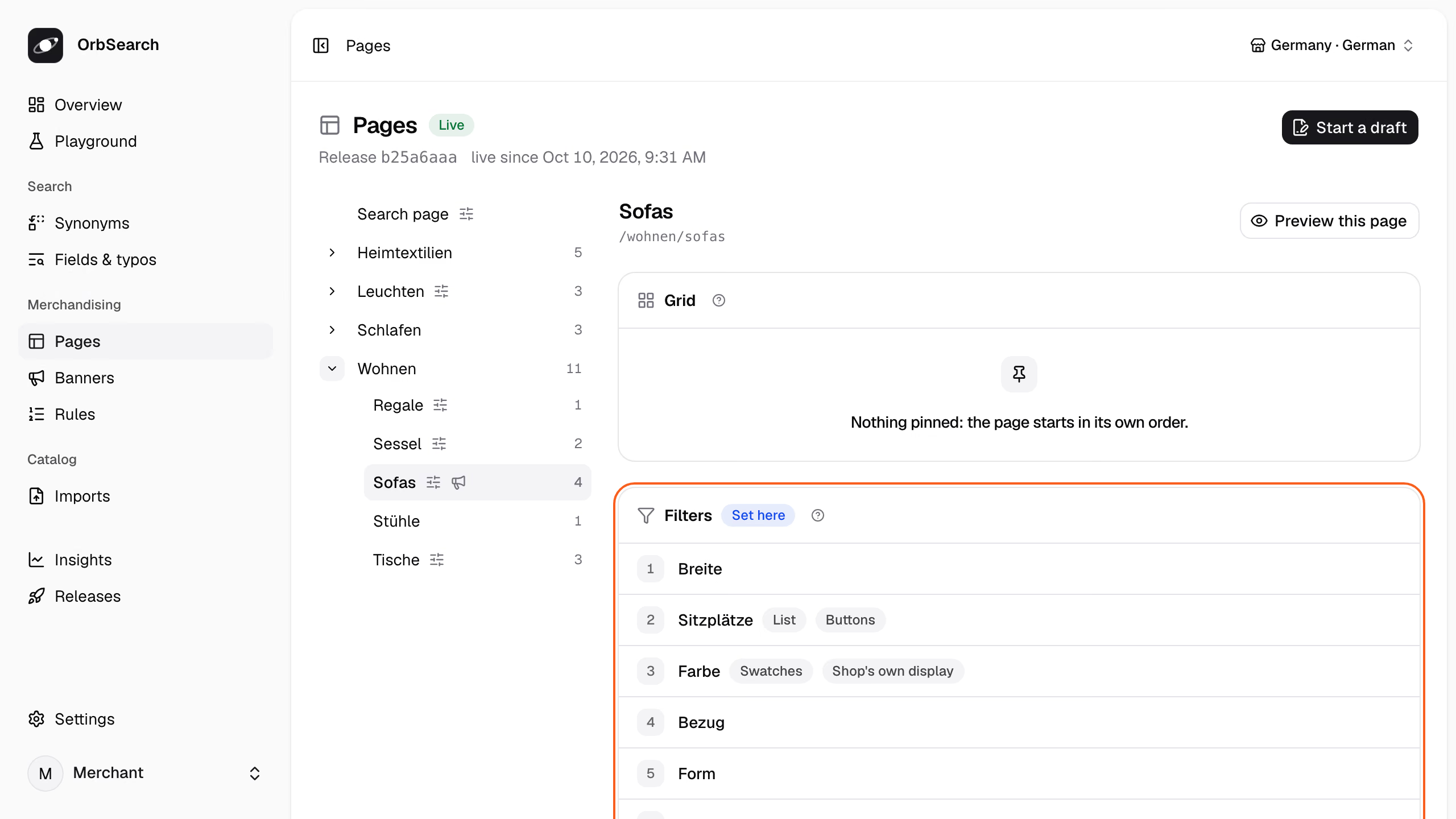
Panel · Merchandising → Pages
Click **Start a draft**, then change the page:
- **Filters:** drag a filter, or press ↑ and ↓ on its handle. **Add a filter** adds one, and its pencil opens **Kind**, **Display** and the rest, each **Automatic** until you choose.
- **Sorting:** **Starts with** sets the default sort, and **Shoppers can choose** lists the options in their order.
- **Grid:** **Pin a product** puts it on the page's first places, and the tiles reorder like the filters.
On a page that inherits, **Write my own** takes a card's settings over, and **Reset** hands them back.
**Preview this page** shows the page as shoppers will see it, with the draft's filters and sorting over the live products; the draft's pins show once it is live. **Review and publish** opens the draft's review, which publishes it.
**Through the API:**
Start a draft from the home store's export, and put the sale toggle first on the sofa page:
```sh title="Terminal"
draft=$(curl -s -X POST -H "Authorization: Bearer $key" -H 'Content-Type: application/x-ndjson' \
--data-binary @tests/fixtures/home/catalog.jsonl "$api/imports?name=catalog.jsonl" | jq -r .import.id)
version=$(curl -s -H "Authorization: Bearer $key" $api/imports/$draft | jq -r .version)
jq --arg version "$version" '{version: $version, files: {"categories.json":
((.nodes[] | select(.category == "wohnen/sofas") | .facets) |= ["on_sale"] + .)}}' \
tests/fixtures/home/categories.json \
| curl -s -X PATCH -H "Authorization: Bearer $key" -H 'Content-Type: application/json' -d @- $api/imports/$draft \
| jq -c '.files | keys'
```
```json title="Answer: 200 · 37 ms"
["categories.json"]
```
The draft now holds a `categories.json` of its own. Send its files with the page to see the sofa page as the draft lays it out:
```sh title="Terminal"
curl -s -H "Authorization: Bearer $key" $api/imports/$draft \
| jq '{category: "wohnen/sofas", files}' \
| curl -s -H "Authorization: Bearer $key" -H 'Content-Type: application/json' -d @- $api/pages/settings \
| jq -c '[.facets.facets[].field]'
```
```json title="Answer: 200 · 28 ms"
["on_sale","width","seats","color","upholstery","shape","features","seat_height","price","delivery_days","brand"]
```
Ask how publishing it would go live:
```sh title="Terminal"
curl -s -H "Authorization: Bearer $key" $api/imports/$draft/publication | jq -r .course.sentence
```
```text title="Answer: 200 · 27 ms"
Goes live at once: only categories.json changed what the Query API reads.
```
Publishing takes the draft live:
```sh title="Terminal"
curl -s -X POST -H "Authorization: Bearer $key" $api/imports/$draft/publish | jq -r .next
```
Here, discard it instead:
```sh title="Terminal"
curl -s -X DELETE -H "Authorization: Bearer $key" $api/imports/$draft | jq -r .state
```
```text title="Answer: 200 · 18 ms"
discarded
```
## How a change goes live
Most changes to a page go live at once. A change to what the release counts rebuilds the search, such as buckets for the seat height, which no page counts yet:
```json title="A facet of the sofa node"
{ "field": "seat_height", "kind": "buckets", "buckets": [{ "to": 45 }, { "from": 45 }] }
```
The order of facets, labels, groups, the sorting and every display but the histogram change only what the [Query API](/docs/reference/glossary#query-api) reads, so publishing them is a switch.
A field, kind, `show` or set of buckets no other page counts changes what the documents hold. So does a price histogram where none was, or removing the last facet over a field. Publishing those rebuilds the search, while the shop answers from the live release.
The draft's publication and **Preview this page** say which way a draft goes live; [Releases](/docs/releases) has the rest.
**Reference:** [`GET .../publication`](/docs/reference/management-api#show-import-publication)
## Next
- [Facets and filters](/docs/facets): read the facets in an answer and send the shopper's choices.
- [Banners and teasers](/docs/banners): put a campaign on the sofa page.
- [Releases](/docs/releases): draft, preview, publish and roll back.
# Patterns
Turn a phrase of the query, such as "bis 220 cm", into a filter, so shoppers find what fits.
A shopper who types "Sofa bis 220 cm" (sofa up to 220 cm) wants a sofa that fits the wall. A [pattern](/docs/reference/glossary#pattern) reads such a phrase and turns it into a filter:
```sh title="Terminal"
curl -s 'http://127.0.0.1:7800/v1/search?query=Sofa%20bis%20220%20cm&debug=1' \
| jq -c '(.trace.steps[] | select(.step == "resolve") | .detections[] | select(.pattern) | {words, as, pattern}),
[.sections[] | select(.type == "product") | .hits[].entity]'
```
```json title="Answer: 200 · 5.6 ms · release b25a6aaa"
{"words":"bis 220 cm","as":{"width":{"lte":220}},"pattern":"width-at-most"}
["product:SOFA-ASKA-2","product:SOFA-LUND-3","product:SOFA-NIKO-SCHLAF"]
```
The home store's pattern `width-at-most` read "bis 220 cm" as a width up to 220 cm. Three sofas fit; the Vidar corner sofa, 268 cm wide, does not.
## Write a pattern
A pattern is an entry of `patterns.json`, a [release](/docs/reference/glossary#release) file that no panel screen edits. Here is `width-at-most`, trimmed:
```json title="tests/fixtures/home/patterns.json (trimmed)"
{
"patterns": [
{
"id": "width-at-most",
"phrases": {
"de": ["bis {width} cm", "unter {width} cm", "{width} cm breit"],
"en": ["up to {width} cm", "under {width} cm"]
},
"captures": "at_most"
}
]
}
```
- `{width}` captures a number for the attribute `width`, in its unit. A placeholder can also name `price`, `delivery_days` or `rating`, or an option attribute, whose values it reads by code, label or alias.
- `phrases` lists the phrases per locale, or in one list for every language. They match whatever the case.
- `captures` says how the number filters.
**Reference:** [`phrases`](/docs/reference/release-files/patterns#phrases) · [`captures`](/docs/reference/release-files/patterns#captures)
## How the number filters
`captures` makes the number a value or a range. The home store has a pattern of each kind:
| `captures` | Pattern | Reads | As |
| -------------------- | ---------------- | -------------------------------- | ---------------------------------------- |
| `exact`, the default | `seats-number` | "3-sitzer" (3-seater) | `{"seats": 3}` |
| `at_most` | `width-at-most` | "bis 220 cm" | `{"width": {"lte": 220}}` |
| `at_least` | `width-at-least` | "ab 200 cm" (from 200 cm) | `{"width": {"gte": 200}}` |
| `{"within": 5}` | `round-diameter` | "durchmesser 120" (diameter 120) | `{"diameter": {"gte": 115, "lte": 125}}` |
**Reference:** [`captures`](/docs/reference/release-files/patterns#captures)
## Add fixed values
`filter` adds what a phrase means without saying it. `round-diameter` reads a diameter, and its `"filter": { "shape": "round" }` adds the shape:
```sh title="Terminal"
curl -s 'http://127.0.0.1:7800/v1/search?query=Tisch%20Durchmesser%20120' \
| jq -c '.resolution.filters, [.sections[] | select(.type == "product") | .hits[].entity]'
```
```json title="Answer: 200 · 6.3 ms · release b25a6aaa"
{"diameter":{"lte":125,"gte":115},"shape":"round"}
["product:TISCH-RUNA"]
```
"Tisch" (table) names the tables, and the phrase adds a diameter of 115 to 125 cm and the shape round: the Runa dining table. A pattern without a placeholder is a filter alone, such as `on-sale`, which reads "im Angebot" (on sale) as `on_sale: true`.
**Reference:** [`filter`](/docs/reference/release-files/patterns#filter)
## Built-in patterns
Two patterns are built in. `quantity` reads a number with a unit and filters the one attribute that measures it, and `price` reads an amount in the channel's currency. Here they read "Leuchte 3000 Kelvin" (lamp, 3000 kelvin) and "Sofa unter 1000 €" (sofa under 1000 €):
```sh title="Terminal"
for q in 'Leuchte 3000 Kelvin' 'Sofa unter 1000 €'; do
curl -s -G http://127.0.0.1:7800/v1/search --data-urlencode "query=$q" -d debug=1 \
| jq -c '.trace.steps[] | select(.step == "resolve") | .detections[] | select(.pattern) | {words, as, pattern}'
done
```
```json title="Answer: 200 · 5.6 ms · release b25a6aaa"
{"words":"3000 Kelvin","as":{"color_temperature":{"lte":3150,"gte":2850}},"pattern":"built-in:quantity"}
{"words":"unter 1000 €","as":{"price":{"lte":1000}},"pattern":"built-in:price"}
```
A number without a bound means about that much, 5 % either way. Bounds such as "bis" and "under" are read in German and English, whatever the shop's language.
When phrases overlap, the longer one wins, and on the same words the release's own pattern beats a built-in one. Words that are exactly a value's label or alias stay that value: the home store lists "rund 120" as an alias of a size, so the size wins over `round-diameter`. `"built_in": { "quantity": false }` switches a built-in pattern off.
**Reference:** [`built_in`](/docs/reference/release-files/patterns#built_in)
## A length that could mean several things
A shelf has a width, a depth and a height, so the built-in pattern cannot tell what "80 cm" means. It keeps the phrase as text and says why in the resolve step's `kept`:
```sh title="Terminal"
curl -s 'http://127.0.0.1:7800/v1/search?query=Regal%2080%20cm&debug=1' \
| jq -rc '(.trace.steps[] | select(.step == "resolve") | .kept[].reason),
[.sections[] | select(.type == "product") | .total]'
```
```text title="Answer: 200 · 6.8 ms · release b25a6aaa"
"80 cm" could be width, depth, height, seat_height or diameter; only a pattern of the merchant's own can tell which.
[0]
```
| Step | Decision |
| --------- | -------------------------------------------------------------------- |
| `resolve` | “Regal” → category wohnen/regale |
| `relax` | Nothing matched, so it searches again without category wohnen/regale |
OrbSearch's own steps took 0.56 ms and the engine's call 4.87 ms, 5.43 ms in all.
"Regal" (shelf) names the shelves, but no shelf holds the words "80 cm", so the search finds nothing, even without the category. Only a pattern of your own can say what a length means. In the home store a length in cm is the width, so start a draft and add a pattern that says so:
```sh title="Terminal"
draft=$(curl -s -X POST -H "Authorization: Bearer $key" -H 'Content-Type: application/x-ndjson' \
--data-binary @tests/fixtures/home/catalog.jsonl "$api/imports?name=catalog.jsonl" | jq -r .import.id)
version=$(curl -s -H "Authorization: Bearer $key" $api/imports/$draft | jq -r .version)
jq --arg version "$version" '{version: $version, files: {"patterns.json":
(.patterns += [{id: "width-about", phrases: {de: ["{width} cm"]}, captures: {within: 5}}])}}' \
tests/fixtures/home/patterns.json \
| curl -s -X PATCH -H "Authorization: Bearer $key" -H 'Content-Type: application/json' -d @- $api/imports/$draft \
| jq -c '.files | keys'
```
```json title="Answer: 200 · 36 ms"
["patterns.json"]
```
Open the search page with the draft's files in place of the live ones:
```sh title="Terminal"
body=$(curl -s -H "Authorization: Bearer $key" $api/imports/$draft | jq '{url: "/suche?q=Regal+80+cm", files}')
curl -s -H "Authorization: Bearer $key" -H 'Content-Type: application/json' -d "$body" $api/preview/page \
| jq -c '.results.resolution.filters, [.results.sections[] | select(.type == "product") | .hits[].entity]'
```
```json title="Answer: 200 · 35 ms · release bc860b8f"
{"width":{"lte":85,"gte":75}}
["product:REGAL-STEG"]
```
"80 cm" is now a width of 75 to 85 cm, and the search finds the Steg bookshelf.
**Reference:** [`PATCH /api/v1/imports/{import}`](/docs/reference/management-api#change-import) · [`POST /api/v1/preview/page`](/docs/reference/management-api#preview-page) · [`kept`](/docs/reference/trace#resolve.kept)
## How patterns go live
Only the Query API reads `patterns.json`, so a draft that changes only patterns goes live at once, without a rebuild ([Releases](/docs/releases)). The draft says so before it is published; this one is discarded instead:
```sh title="Terminal"
curl -s -H "Authorization: Bearer $key" $api/imports/$draft/publication | jq -r .course.sentence
curl -s -X DELETE -H "Authorization: Bearer $key" $api/imports/$draft | jq -r .state
```
```text title="Answer: 200 · 17 ms"
Goes live at once: only patterns.json changed what the Query API reads.
discarded
```
`POST $api/imports/$draft/publish` would make it live.
**Reference:** [`GET .../publication`](/docs/reference/management-api#show-import-publication)
## Next
- [Synonyms](/docs/synonyms): words that mean the same, such as "couch" and "sofa".
- [How search understands a query](/docs/query-understanding): everything a query can name.
- [Releases](/docs/releases): draft, preview, publish and roll back.
# Live prices and stock
Change a price, a sale or the stock between two catalogs, and search shows it within seconds, without an index run.
Prices and stock change all day, while the catalog may arrive once a night. `PUT /api/v1/offers` writes such changes into the live search in between. This page changes the price of the pendant lamp `LEUCHTE-KUGEL` (Kugel: globe) and puts it back. Its two variants first:
```sh title="Terminal"
curl -s 'http://127.0.0.1:7800/v1/product?id=LEUCHTE-KUGEL' | jq -c '.product.variants[] | {id, price: .offer.price}'
```
```json title="Answer: 200 · 4.1 ms · release b25a6aaa"
{"id":"LEUCHTE-KUGEL-KLAR","price":149.0}
{"id":"LEUCHTE-KUGEL-RAUCH","price":159.0}
```
The lamp comes in Klarglas (clear glass) and Rauchglas (smoked glass), at 149 € and 159 €.
## Change a price
Send each change as its product, its [variant](/docs/reference/glossary#variant), the [channel](/docs/reference/glossary#channel) and the fields that change. Each change is answered on its own:
```sh title="Terminal"
changed=$(curl -s -X PUT -H "Authorization: Bearer $key" -H 'Content-Type: application/json' $api/offers -d '{"offers": [
{"product": "LEUCHTE-KUGEL", "variant": "LEUCHTE-KUGEL-KLAR", "channel": "de", "price": 129},
{"product": "LEUCHTE-KUGEL", "channel": "de", "price": 129}
]}')
revision=$(jq .revision <<< "$changed")
jq -c '.rows[]' <<< "$changed"
```
```json title="Answer: 202 · 23 ms"
{"state":"accepted"}
{"state":"rejected","code":"variant_needed","message":"\"LEUCHTE-KUGEL\" has variants, so name the one whose offer changes in `variant`."}
```
The first change is kept. The second is left out, since a product with variants names the one that changes; a product the live catalog lacks is left out too, as new products come with the catalog. The kept changes make one revision, the answer's `revision`.
No [index run](/docs/reference/glossary#index-run) is queued. The indexer waits a second for changes that follow, compiles the changed products again and replaces their documents in the live indexes. Every answer's [trace](/docs/reference/glossary#trace) names the revision it reads in `live.offers`, so wait until it names this one:
```sh title="Terminal"
for _ in {1..30}; do
curl -s 'http://127.0.0.1:7800/v1/product?id=LEUCHTE-KUGEL&debug=1' \
| jq -e ".trace.live.offers >= $revision" >/dev/null && break
sleep 1
done
curl -s 'http://127.0.0.1:7800/v1/product?id=LEUCHTE-KUGEL' | jq -c '.product.variants[] | {id, price: .offer.price}'
```
```json title="Answer: 200 · 13 ms · release b25a6aaa"
{"id":"LEUCHTE-KUGEL-KLAR","price":129}
{"id":"LEUCHTE-KUGEL-RAUCH","price":159.0}
```
The clear lamp now costs 129 € on its tile and its product page alike. Release and [snapshot](/docs/reference/glossary#snapshot) stay as they were, and with the revision they name what answered. `GET $api/live` names the revision too, with when it arrived, and the panel shows that time as **Prices and stock** on **Overview** and **Releases**.
**Reference:** [`PUT /api/v1/offers`](/docs/reference/management-api#change-offers) · [`rows`](/docs/reference/management-api#change-offers.answer.rows) · [`GET /api/v1/live`](/docs/reference/management-api#live)
## Put it back
A change replaces only the fields it names, so the old price is one more change away:
```sh title="Terminal"
revision=$(curl -s -X PUT -H "Authorization: Bearer $key" -H 'Content-Type: application/json' $api/offers \
-d '{"offers": [{"product": "LEUCHTE-KUGEL", "variant": "LEUCHTE-KUGEL-KLAR", "channel": "de", "price": 149}]}' \
| jq .revision)
for _ in {1..30}; do
curl -s 'http://127.0.0.1:7800/v1/product?id=LEUCHTE-KUGEL&debug=1' \
| jq -e ".trace.live.offers >= $revision" >/dev/null && break
sleep 1
done
curl -s 'http://127.0.0.1:7800/v1/product?id=LEUCHTE-KUGEL' | jq -c '.product.variants[] | {id, price: .offer.price}'
```
```json title="Answer: 200 · 6.5 ms · release b25a6aaa"
{"id":"LEUCHTE-KUGEL-KLAR","price":149}
{"id":"LEUCHTE-KUGEL-RAUCH","price":159.0}
```
Both lamps cost what the catalog says again.
## Sales, stock and availability
A change may name any field of an offer, and the fields it leaves out stay as they are. This one puts the smoked lamp on sale for a weekend and sells out the clear one:
```sh title="Terminal"
curl -s -X PUT -H "Authorization: Bearer $key" -H 'Content-Type: application/json' $api/offers -d '{"offers": [
{"product": "LEUCHTE-KUGEL", "variant": "LEUCHTE-KUGEL-RAUCH", "channel": "de", "sale_price": 139,
"sale_window": {"from": "2026-11-27T00:00:00+01:00", "until": "2026-11-30T00:00:00+01:00"}},
{"product": "LEUCHTE-KUGEL", "variant": "LEUCHTE-KUGEL-KLAR", "channel": "de", "availability": "out_of_stock", "stock": 0}
]}'
```
`end_sale: true` ends a sale, and `delivery_days` changes the delivery time. A sale window that opens or closes rebuilds the search at that moment, as it does for a sale the catalog sets. Prices are what search shows; the checkout decides what the shopper pays.
**Reference:** [`sale_price`](/docs/reference/management-api#change-offers.offers.sale_price) · [`end_sale`](/docs/reference/management-api#change-offers.offers.end_sale) · [`availability`](/docs/reference/management-api#change-offers.offers.availability)
## When the next catalog arrives
A change applies to every catalog that first arrived before it. Another catalog supersedes it, since the shop says what holds now:
| What comes next | The change |
| ---------------------------------- | --------------------------------------------- |
| The same catalog, sent again | Stays |
| Another catalog | Goes, and the catalog's offer holds |
| A rebuild, such as after a publish | Stays, as does every change since its catalog |
A change sent while a new catalog's index run builds applies to that catalog too.
Another catalog undoes every change sent before it. Keep the shop's export current, so it carries the new prices
too.
Until the next index run, what the run derived from the whole catalog stays as it was: the dictionary's counts, derived price buckets and how many values each facet counts.
## Limits
- **1,000 changes per call.** A larger batch is refused whole with a `422`, so send a large sync in calls of 1,000, back to back.
- **One write a second.** Changes that arrive close together become one write, so a burst batches itself.
- **A catalog first.** Before any catalog is live, the call answers `409`.
**Reference:** [`offers_per_call`](/docs/reference/limits#offers_per_call) · [`409`](/docs/reference/management-api#change-offers.409)
## Next
- [Variants](/docs/variants): what a variant's offer holds.
- [Channels](/docs/channels): the channels and currencies an offer belongs to.
- [Importing and mapping](/docs/importing): send the whole catalog.
# Product pages
Fetch one product as its page shows it, with its offer, details and variants, by its id or its URL.
`GET /v1/product` answers one product as its page shows it: text, photos, categories, its offer, its details with labels and units, and its variants. The offer and badges are those its tile shows, so a page and a tile never disagree:
```sh title="Terminal"
curl -s 'http://127.0.0.1:7800/v1/product?id=SOFA-ASKA-2' \
| jq -c '.product | .title, .badges, .signals, .offer, (.details[] | select(.attribute == "width"))'
```
```json title="Answer: 200 · 5.4 ms · release b25a6aaa"
"Aska 2-Sitzer-Sofa aus Samt"
["Bestseller"]
{"rating":4.3,"rating_count":118}
{"price":749.0,"sale_price":649.0,"currency":"EUR","availability":"in_stock","stock":16,"delivery_days":{"min":3,"max":5}}
{"attribute":"width","label":"Breite","values":[164],"unit":"cm"}
```
The `offer` sums up the [variants](/docs/reference/glossary#variant). It takes the lowest price a shopper pays among those with the best availability, here the sage variant's sale price, and adds up the stock of both.
"Bestseller" is a badge the [release](/docs/reference/glossary#release) gives it in its [overlays](/docs/reference/glossary#overlay), and 4.3 stars from 118 ratings are the catalog's signals. Each detail carries its label in the request's [locale](/docs/reference/glossary#locale) and its unit: Breite (width), 164 cm.
**Reference:** [`GET /v1/product`](/docs/reference/query-api#product) · [`Product`](/docs/reference/query-api#Product) · [`ProductOffer`](/docs/reference/query-api#ProductOffer)
## Variants
Each variant carries what sets it apart and its own offer:
```sh title="Terminal"
curl -s 'http://127.0.0.1:7800/v1/product?id=SOFA-ASKA-2' \
| jq -c '.product.variants[] | {id, details: [.details[] | {label, values, swatch}],
offer: (.offer | {price, sale_price, stock} | del(..|nulls))}'
```
```json title="Answer: 200 · 6.2 ms · release b25a6aaa"
{"id":"SOFA-ASKA-2-GRAU","details":[{"label":"Farbe","values":["Grau"],"swatch":"#9B9B9B"}],"offer":{"price":749.0,"stock":12}}
{"id":"SOFA-ASKA-2-SALBEI","details":[{"label":"Farbe","values":["Salbei"],"swatch":"#9CAF92"}],"offer":{"price":749.0,"sale_price":649.0,"stock":4}}
```
The Aska comes in grey (Grau) and sage (Salbei), and only sage is on sale. A color of one value carries the swatch its facet draws, its own or its color group's, so the page draws the same swatches as the filter. What every variant sold in the [channel](/docs/reference/glossary#channel) shares stands in the product's `details`, such as the width.
**Reference:** [`ProductVariant`](/docs/reference/query-api#ProductVariant) · [`ProductDetail`](/docs/reference/query-api#ProductDetail)
## Name it by its URL
A storefront that knows the page's path asks by `url`, in the locale the path belongs to:
```sh title="Terminal"
curl -s 'http://127.0.0.1:7800/v1/product?url=/en/p/aska-two-seater-sofa&locale=en' \
| jq -c '.product | {id, title, url, alternates, badges}'
```
```json title="Answer: 200 · 5.1 ms · release b25a6aaa"
{"id":"SOFA-ASKA-2","title":"Aska two-seater velvet sofa","url":"/en/p/aska-two-seater-sofa","alternates":{"de":"/p/aska-2-sitzer-sofa"},"badges":["Best seller"]}
```
The English page answers in English, badge included. `alternates` holds the product's URL in each other locale of the channel, for a language switch and `hreflang`. A URL matches only as the catalog writes it: another case or a trailing slash is not found.
**Reference:** [`url`](/docs/reference/query-api#product.url) · [`alternates`](/docs/reference/query-api#Product.alternates)
## When the channel sells no such product
The rug `TEPPICH-SILO` never went live: the [index run](/docs/reference/glossary#index-run) left it out for its broken price. So the channel sells no product by that id:
```sh title="Terminal"
curl -s 'http://127.0.0.1:7800/v1/product?id=TEPPICH-SILO' | jq -c '{status, detail}'
```
```json title="Answer: 404 · 3.8 ms"
{"status":404,"detail":"The channel de sells no product with the id TEPPICH-SILO."}
```
Answer the shopper with your own 404 page; the client's `product` call returns `null` here ([The client](/docs/client)). An engine that does not answer is a `503`, never a `404`, so a crawler is never told a product is gone while Meilisearch is down.
**Reference:** [`404`](/docs/reference/query-api#product.404)
## A product's URL through resolve
A storefront that serves every page by its URL asks resolve, which answers the product with the status, canonical and robots its page needs, in one call:
```sh title="Terminal"
curl -s -G http://127.0.0.1:7800/v1/resolve --data-urlencode 'url=/p/aska-2-sitzer-sofa' \
| jq -c '{type, status, canonical, robots, product: .product.id}'
```
```json title="Answer: 200 · 5.9 ms · release b25a6aaa"
{"type":"product","status":200,"canonical":"/p/aska-2-sitzer-sofa","robots":"index,follow","product":"SOFA-ASKA-2"}
```
`product` is what `GET /v1/product` answers for it. [URLs and redirects](/docs/urls) shows the route that serves it.
## Next
- [URLs and redirects](/docs/urls): serve product and category pages from the merchant's own URLs.
- [Category pages](/docs/category-pages): the listings a product page links back to.
- [React components](/docs/react): a product page with its gallery, details and variant choice.
# How search understands a query
OrbSearch reads what a query names in the shop's own words, such as a category, a color or a width, and searches only the words that are left.
A shopper who types "graues Sofa bis 220 cm" (grey sofa up to 220 cm) means a page, not five words. OrbSearch reads what the query names before it searches, and the answer says what it read.
## What the query named
The answer's [resolution](/docs/reference/glossary#resolution) holds what the query named: a `category`, `filters`, the `text` left over, and whether the query is `complete`:
```sh title="Terminal"
curl -s 'http://127.0.0.1:7800/v1/search?query=graues%20Sofa%20bis%20220%20cm' \
| jq -c '.resolution, [.sections[] | select(.type == "product") | .hits[].entity]'
```
```json title="Answer: 200 · 23 ms · release b25a6aaa"
{"category":"wohnen/sofas","filters":{"color":"grey","width":{"lte":220}},"text":"","complete":true}
["product:SOFA-ASKA-2","product:SOFA-NIKO-SCHLAF"]
```
"Sofa" named the category `wohnen/sofas` (living/sofas), "graues" the color grey and "bis 220 cm" a width. No word is left as text, so the listing holds the two grey sofas up to 220 cm. Such a query names a whole page, so the answer also carries a `redirect` to it ([URLs and redirects](/docs/urls)).
**Reference:** [`resolution`](/docs/reference/query-api#search.answer.resolution)
## Where the names come from
Every name comes from the shop itself, and the [trace](/docs/reference/glossary#trace) says which entry each word matched:
```sh title="Terminal"
curl -s 'http://127.0.0.1:7800/v1/search?query=graues%20Sofa%20bis%20220%20cm&debug=1' \
| jq -c '.trace.steps[] | select(.step == "resolve") | .detections[] | {words, entry, pattern}'
```
```json title="Answer: 200 · 13 ms · release b25a6aaa"
{"words":"Sofa","entry":"the title \"Sofas\" of the category wohnen/sofas","pattern":null}
{"words":"bis 220 cm","entry":"width up to 220 cm","pattern":"width-at-most"}
{"words":"graues","entry":"the label \"Grau\" of the color grey","pattern":null}
```
| Step | Decision |
| --------- | ----------------------------------------------------------------------------------- |
| `resolve` | “Sofa” → category wohnen/sofas · “bis 220 cm” → width ≤ 220 · “graues” → color grey |
OrbSearch's own steps took 1.36 ms and the engine's call 8.71 ms, 10.07 ms in all.
A query is read with four kinds of entry:
- **The catalog's own words:** category titles, brand names and the labels of attribute values, such as "Grau" (grey), also in their inflected forms ("graues").
- **Aliases** a value lists in `attributes.json`, such as "gray" for grey.
- **[Synonyms](/docs/reference/glossary#synonym):** "couch" names the sofas through the group of `couch` and `sofa`, and its detection names that group in `synonym`.
- **[Patterns](/docs/reference/glossary#pattern):** the shop's phrases, such as `bis {width} cm`, `{seats}-sitzer` (seater) or "im Angebot" (on sale), and built-in ones for a price or a size with its unit.
Values are read only for attributes marked `detect_in_query`. A word that names two things stays text, and the step's `kept` says why. Merchants add [synonyms](/docs/synonyms) and [patterns](/docs/patterns).
**Reference:** [`resolve`](/docs/reference/trace#resolve) · [`Detection`](/docs/reference/trace#Detection) · [`detect_in_query`](/docs/reference/release-files/attributes#detect_in_query)
## Take back what the query named
A shopper who meant the word, not the filter, removes its chip. Send the detection back in `dismissed`, and its words stay text however often the query is sent again:
```sh title="Terminal"
curl -s http://127.0.0.1:7800/v1/search -H 'Content-Type: application/json' \
-d '{ "query": "graues Sofa", "dismissed": [{ "field": "color", "value": "grey" }] }' \
| jq -c '.resolution'
```
```json title="Answer: 200 · 4.3 ms · release b25a6aaa"
{"category":"wohnen/sofas","text":"graues","complete":false}
```
"graues" is searched as a word again, within the sofas. Without a `value`, every detection of the field is taken back, such as `{ "field": "width" }`.
Only `POST` carries `dismissed`. The search page keeps it in its URL as `ignore`, such as `/suche?q=graues+Sofa&ignore=color:grey`, which `/v1/resolve` reads back as `dismissed` ([URLs and redirects](/docs/urls)).
A filter a rule sets is the merchant's, so no request takes it back. A filter the shopper chose leaves `filters`
instead.
**Reference:** [`dismissed`](/docs/reference/query-api#search.dismissed)
## How the words match
The words left as text are searched rarest first. Where no product holds every word, the words most products hold give way:
```sh title="Terminal"
curl -s 'http://127.0.0.1:7800/v1/search?query=Lund%20Samt&debug=1' \
| jq -r '.trace.steps[] | select(.step == "rank") | .sections[] | select(.type == "product")
| .hits[] | .entity, (.why[] | select(.because.kind == "text") | .sentence)'
```
```text title="Answer: 200 · 12 ms · release b25a6aaa"
product:SOFA-LUND-3
Found by 1 of the query's 2 words, without typos, in title.
```
No product is both the Lund sofa and "Samt" (velvet). Three products hold "Samt" and one holds "Lund", so the search finds the Lund sofa instead of every velvet product. Products that hold every word still rank first. The sections beside the products drop words from the end instead.
Which fields a type's words are looked for in, and how many typos they forgive, is set per type in `types.json`.
**Reference:** [`rank`](/docs/reference/trace#rank) · [`search`](/docs/reference/release-files/types#search) · [`typos`](/docs/reference/release-files/types#typos)
## Other languages
The shop's own words resolve in every locale it writes them in. The same query in English names the same page:
```sh title="Terminal"
curl -s 'http://127.0.0.1:7800/v1/search?query=grey%20sofa%20up%20to%20220%20cm&locale=en' | jq -c '.resolution'
```
```json title="Answer: 200 · 6.2 ms · release b25a6aaa"
{"category":"wohnen/sofas","filters":{"color":"grey","width":{"lte":220}},"text":"","complete":true}
```
The built-in knowledge covers German and English only: inflected forms, color words, and the price and quantity bounds such as "bis" and "under". A shop in another language writes what it needs as synonyms and patterns.
**Reference:** [`patterns.json`](/docs/reference/release-files/patterns) · [`synonyms.json`](/docs/reference/release-files/synonyms)
## Next
- [Search and browse](/docs/search): the request and the answer around the resolution.
- [When nothing is found](/docs/no-results): what happens when what a query named matches nothing.
- [Synonyms](/docs/synonyms) and [Patterns](/docs/patterns): teach the shop its shoppers' words.
# Quickstart
Run OrbSearch on your machine, load a small furniture store and read why a search found what it found.
From a fresh clone to a search that explains itself. You need Docker, `make`, `curl` and [jq](https://jqlang.org), and every command runs from the repository root.
The example store sells furniture in German, so its queries are German: "graues Sofa" is a grey sofa.
### Start the stack
```sh title="Terminal"
make .env
docker compose up --detach --wait
```
`make .env` writes your settings with fresh secrets. The first start builds the images from source and takes a few minutes.
Search answers at once, with nothing to find yet:
```sh title="Terminal"
curl -s 'http://127.0.0.1:7800/v1/search?query=sofa' | jq .detail
```
```json title="Answer: 503 · 3.2 ms"
"Nothing is searchable yet: upload a catalog and publish a release; the first index run makes it searchable."
```
The next steps do what the answer asks.
### Keep the management key at hand
Searching needs no key, but changing what search finds does. Keep the key and the management API's address in two variables:
```sh title="Terminal"
key=$(sed -n 's/^ORBSEARCH_MANAGEMENT_KEY=//p' .env)
api=http://127.0.0.1:8000/api/v1
```
The commands on every other page reuse `$key` and `$api`.
### Publish a release
A [release](/docs/reference/glossary#release) is the store's whole search configuration, one JSON file per area, such as `synonyms.json`. Store the example store's files as a release and publish it:
```sh title="Terminal"
id=$(jq -n '{files: [inputs | {(input_filename | split("/") | last): .}] | add}' tests/fixtures/home/*.json \
| curl -s -H "Authorization: Bearer $key" -H 'Content-Type: application/json' -d @- $api/releases \
| jq -r .id)
curl -s -X POST -H "Authorization: Bearer $key" $api/releases/$id/publish | jq -r .next
```
```text title="Answer: 202 · 21 ms"
The release is published and indexed once a catalog arrives: send one with PUT /api/v1/catalog.
```
jq gathers the files into one request body, keyed by file name. The release now waits for a catalog to build the search from.
### Upload the catalog
The [catalog](/docs/reference/glossary#catalog) holds the store's products, categories and guides, one JSON object per line. Upload it and wait for the [index run](/docs/reference/glossary#index-run) that makes it searchable:
```sh title="Terminal"
run=$(curl -s -X PUT -H "Authorization: Bearer $key" -H 'Content-Type: application/x-ndjson' \
--data-binary @tests/fixtures/home/catalog.jsonl $api/catalog | jq -r .run.id)
until curl -s -H "Authorization: Bearer $key" $api/index-runs/$run \
| jq -e '.state | IN("queued", "running") | not' >/dev/null; do sleep 1; done
curl -s -H "Authorization: Bearer $key" $api/index-runs/$run \
| jq '{state, rejected: [.report.rejections[]?.examples[] | {id, message}]}'
```
```json title="Answer: 200 · 13 ms"
{
"state": "succeeded",
"rejected": [
{
"id": "TEPPICH-SILO",
"message": "Invalid type: string \"249,00 €\", expected a JSON number."
}
]
}
```
The run left one row out on purpose: the rug `TEPPICH-SILO` writes a price as text. Everything else is live.
### Search
Search the store for "graues Sofa":
```sh title="Terminal"
curl -s 'http://127.0.0.1:7800/v1/search?query=graues%20Sofa' \
| jq -c '.resolution, [.sections[] | select(.type == "product") | .hits[].entity]'
```
```json title="Answer: 200 · 19 ms · release b25a6aaa"
{"category":"wohnen/sofas","filters":{"color":"grey"},"text":"","complete":true}
["product:SOFA-ASKA-2","product:SOFA-NIKO-SCHLAF"]
```
The query was [resolved](/docs/reference/glossary#resolution), not matched as text: "Sofa" named the category `wohnen/sofas` and "graues" the color grey. So the answer lists the two grey sofas and nothing else.
### Read the trace
Add `debug=1`, and the answer says why each product is where it is. Here is the first one:
```sh title="Terminal"
curl -s 'http://127.0.0.1:7800/v1/search?query=graues%20Sofa&debug=1' \
| jq -r '.trace.steps[] | select(.step == "rank")
| .sections[] | select(.type == "product")
| .hits[0] | .entity, .why[].sentence'
```
```text title="Answer: 200 · 5.3 ms · release b25a6aaa"
product:SOFA-ASKA-2
In the results because “Sofa” named the category “Sofas”, read by the title "Sofas" of the category wohnen/sofas.
In the results because “graues” named Farbe “Grau”, read by the label "Grau" of the color grey.
Its business score of 0.58 orders it among the hits that match as well; sales_30d adds the most, scoring 0.86 at weight 0.5.
```
The [trace](/docs/reference/glossary#trace) holds every step of the search, from reading the query to assembling the answer, each with what it decided:
| Step | Decision |
| ----------- | ------------------------------------------------------ |
| `normalize` | Reads “graues Sofa” |
| `resolve` | “Sofa” → category wohnen/sofas · “graues” → color grey |
| `rules` | 1 rule checked, none applied |
| `sort` | The request has words, which rank by relevance. |
| `plan` | 5 searches, listing products |
| `execute` | One call to Meilisearch: 5 searches |
| `facets` | 10 facets counted |
| `rank` | SOFA-ASKA-2 first of 2 products |
| `assemble` | 2 products |
OrbSearch's own steps took 0.55 ms and the engine's call 3.31 ms, 3.86 ms in all.
[The trace](/docs/search#the-trace) walks through them.
### Open the panel
Open [localhost:8000](http://localhost:8000) and create your account: the first person to open the panel becomes its owner. Its **Playground** shows any search as shoppers see it, with the reasons beside every product.
## Stop the stack
```sh title="Terminal"
docker compose down
```
The data stays, and `docker compose up --detach --wait` brings the store back as you left it. To start over from nothing, delete the data too:
```sh title="Terminal"
docker compose down --volumes
```
## If something fails
Most failures are a busy port or an index run that did not succeed.
### A port is busy
`docker compose up` stops when another program holds 8000, 7800, 7700 or 5432. Move the port in `.env` and start again:
```sh title=".env"
CONTROL_PORT=8001
APP_URL=http://localhost:8001
```
Then use the new port in the commands above. [Self-hosting](/docs/self-hosting) lists every port.
### Search still finds nothing
List the index runs. A failed run says why in `error`, and no run at all means the release is not published or the catalog not uploaded:
```sh title="Terminal"
curl -s -H "Authorization: Bearer $key" $api/index-runs | jq -c '.data[] | {id, state, error}'
```
## Next
- [Your own catalog](/docs/your-own-catalog): send your shop's export instead of the example store.
- [Concepts](/docs/concepts): releases, snapshots and index runs, and how they meet.
- [Search and browse](/docs/search): what a search asks and what comes back.
# Ranking
How OrbSearch orders the products that match equally well, by a business score from your catalog's sales, ratings and dates, and how to read why a product stands where it does.
Relevance comes first: a product that holds more of the query's words, with fewer typos, ranks higher, and a sort the shopper chose comes next. Among the hits still tied, and on a category page where every product matches, the business score decides. `ranking.json` builds it from the catalog's signals, and the home store weighs sales most:
```json title="tests/fixtures/home/ranking.json (trimmed)"
{
"signals": [
{ "code": "sales_30d", "direction": "higher_is_better", "normalize": "percentile" },
{
"code": "rating",
"direction": "higher_is_better",
"normalize": { "damped": { "count_signal": "rating_count", "prior_count": 10 } }
},
{ "code": "released_at", "direction": "newer_is_better", "normalize": { "half_life_days": 180 } }
],
"weights": { "product": { "sales_30d": 0.5, "rating": 0.3, "released_at": 0.2 } }
}
```
- `sales_30d` counts by its percentile in the catalog, so the best seller scores close to 1.
- `rating` is pulled towards the catalog's mean while few votes back it: with 10 votes in `rating_count`, it counts half its own and half the mean.
- `released_at` loses half its score every 180 days, so a new product starts near 1.
- `weights` mix them per type into one weighted mean from 0 to 1, half of it sales here.
Each product brings its signals in the catalog, such as `"sales_30d": 61` for `SOFA-ASKA-2`. A signal a product lacks counts 0, and a rating without votes counts the mean.
**Reference:** [`signals`](/docs/reference/release-files/ranking#signals) · [`weights`](/docs/reference/release-files/ranking#weights) · [catalog `signals`](/docs/reference/catalog/entity#signals)
## Why a product is where it is
The [trace](/docs/reference/glossary#trace)'s `rank` step lists each hit's signals beside its place. On the sofa page, where nothing is typed, they alone decide:
```sh title="Terminal"
curl -s 'http://127.0.0.1:7800/v1/search?on=category_page&category=wohnen/sofas&debug=1' \
| jq -r '.trace.steps[] | select(.step == "rank") | .sections[] | select(.type == "product") | .hits[]
| "\(.entity) " + ([.signals | sort_by(.signal)[] | "\(.signal) \(.value)"] | join(", "))'
```
```text title="Answer: 200 · 12 ms · release b25a6aaa"
product:SOFA-ASKA-2 rating 4.3, released_at 2025-09-01, sales_30d 61
product:SOFA-LUND-3 rating 4.6, released_at 2026-02-15, sales_30d 37
product:SOFA-NIKO-SCHLAF rating 4.2, released_at 2026-06-08, sales_30d 15
product:SOFA-VIDAR-ECK rating 4.1, released_at 2026-05-20, sales_30d 12
```
Aska sold the most, so it leads Lund, which rates higher and is newer. Each hit's `why` says it in a sentence: its business score and the signal that adds the most. In the panel's **Playground**, **Why here?** under each product gives the same reasons.
**Reference:** [`rank`](/docs/reference/trace#rank) · [`signals`](/docs/reference/trace#rank.sections.hits.signals) · [`why`](/docs/reference/trace#rank.sections.hits.why)
## Boost and bury strengths
A rule's [boost or bury](/docs/reference/glossary#boost-and-bury) weighs a hit by the factor of its strength. `strengths` sets the factors, and these are the defaults:
```json title="ranking.json"
{
"strengths": {
"boost": { "slight": 1.5, "medium": 2, "strong": 4 },
"bury": { "slight": 0.67, "medium": 0.5, "strong": 0.25 }
}
}
```
The hit's `why` names the factor it got, such as "The rule “Out-of-stock products last” buries it, weighing it ×0.25." [Rules](/docs/rules#effects) choose what to boost or bury.
**Reference:** [`strengths`](/docs/reference/release-files/ranking#strengths)
## The order of sections
A search answers in sections, one per type, and `sections` puts them in order:
```sh title="Terminal"
curl -s 'http://127.0.0.1:7800/v1/search?query=sofa&redirect=false' | jq -c '[.sections[].type]'
```
```json title="Answer: 200 · 18 ms · release b25a6aaa"
["category","product","content","brand"]
```
The home store writes `"sections": ["category", "product", "content"]`. Brands, which it leaves out, follow in the order of `types.json`. A rule's `sections` effect reorders them for the requests it matches, as `home/guides-for-questions` would put guides first for a question.
**Reference:** [`sections`](/docs/reference/release-files/ranking#sections) · [rule `sections`](/docs/reference/release-files/rules#then.sections)
## Sorts
`ranking.json` also defines the orders a shopper can choose, such as `price_asc`, and a chosen order comes before the business score. [Sorting](/docs/sorting) shows how a page offers them.
**Reference:** [`sorts`](/docs/reference/release-files/ranking#sorts)
## How a change goes live
The business score is computed when the indexes are built, so a change to the signals or weights rebuilds them. Change the weights in a draft, and ask how it would go live:
```sh title="Terminal"
draft=$(curl -s -X POST -H "Authorization: Bearer $key" -H 'Content-Type: application/x-ndjson' \
--data-binary @tests/fixtures/home/catalog.jsonl "$api/imports?name=catalog.jsonl" | jq -r .import.id)
version=$(curl -s -H "Authorization: Bearer $key" $api/imports/$draft | jq -r .version)
jq --arg version "$version" '{version: $version, files: {"ranking.json": (.weights.product.rating = 0.5
| .weights.product.sales_30d = 0.3)}}' tests/fixtures/home/ranking.json \
| curl -s -X PATCH -H "Authorization: Bearer $key" -H 'Content-Type: application/json' -d @- $api/imports/$draft >/dev/null
curl -s -H "Authorization: Bearer $key" $api/imports/$draft/publication | jq -r .course.sentence
```
```text title="Answer: 200 · 25 ms"
Rebuilds the search: ranking.json changed what its documents are built from.
```
New indexes are built beside the live ones, and the shop answers with the live release meanwhile. A change to the strengths, the sections or the labels of sorts goes live at once.
A draft's preview searches the live index, whose scores the live weights made. A new weight shows once the draft is
live.
Publish the draft with `POST $api/imports/$draft/publish`, or discard it:
```sh title="Terminal"
curl -s -X DELETE -H "Authorization: Bearer $key" $api/imports/$draft | jq -r .state
```
```text title="Answer: 200 · 17 ms"
discarded
```
**Reference:** [`PATCH .../imports/{import}`](/docs/reference/management-api#change-import) · [`GET .../publication`](/docs/reference/management-api#show-import-publication)
## Next
- [Rules](/docs/rules): pin, boost or bury products for the searches you choose.
- [Sorting](/docs/sorting): the orders a shopper chooses.
- [Releases](/docs/releases): how each change goes live.
# React components
The search box, listing and product pages for React 19, built on the client, with every part yours to restyle or swap.
`@orbsearch/react` draws a storefront in React 19.3 or a later React 19: the search box, a page for every listing, a product page and the parts they are made of. It brings the behavior, the semantics and a plain look, and reads every answer through [the client](/docs/client):
```tsx twoslash title="app/page.tsx"
import { createSearch, isListing, type PageResponse } from "@orbsearch/client";
import { ListingPage, ProductPage, StorefrontProvider, listingView } from "@orbsearch/react";
import type { ReactNode } from "react";
const search = createSearch({ endpoint: "http://127.0.0.1:7800" });
export function Storefront({ children }: { children: ReactNode }) {
return (
{children}
);
}
export function Page({ page, path }: { page: PageResponse; path: string }) {
if (isListing(page)) return
} />;
```
`Root`, `SponsoredLabel`, `Media`, `Badges`, `Badge`, `Brand`, `Price` and `Facts` take `render`; `Title`, `Image` and `Rating` take a `className`. The search box takes `groups` to reorder or add groups of suggestions, and `suggestion` for a row of your own built on `SuggestionItem`. To change what a part holds, [swap it](/docs/customize#swap-a-part).
## Every ad is marked
A product a [sponsored pin](/docs/sponsored-products) placed starts its name with "Anzeige" (ad) or "Sponsored", `messages.sponsored`, so the tile marks the ad where its name is seen and read. Restyle the label through the title:
```tsx twoslash title="app/tile.tsx"
import { ProductTile } from "@orbsearch/react";
// ---cut---
);
}
```
A facet the shopper opens, or whose "Show more" they press, asks for its values with `search.facets`, under the choices the page shows, and again when they change. Meanwhile it says "Loading values …", or that they could not be loaded. A facet in a popover of your own calls `useLoadWhenOpen`. Without `LateFacets`, facets draw as given.
**Reference:** [`deferred`](/docs/reference/query-api#search.answer.sections.facets.deferred) · [`more`](/docs/reference/query-api#search.answer.sections.facets.more) · [`counted_facets`](/docs/reference/limits#counted_facets)
## Words and photos
The components speak German for `de` and its regions and English for every other locale. Pass your own `messages` to change a word or add a language, and `images` to load photos through your image host's widths:
```tsx twoslash title="app/storefront.tsx"
import type { Search } from "@orbsearch/client";
import { messagesFor, StorefrontProvider, type ImageHost } from "@orbsearch/react";
import type { ReactNode } from "react";
const messages = { ...messagesFor("de"), searchPlaceholder: "Sofas, Teppiche, Leuchten" };
const images: ImageHost = { widths: [320, 640, 1024], url: (src, width) => `${src}?w=${width}` };
export function Storefront({ search, children }: { search: Search; children: ReactNode }) {
return (
{children}
);
}
```
The placeholder lists sofas, rugs and lights. Without `images`, photos load at the size the catalog's URL gives, and `nouns` names in your words the types a listing counts.
## Next
- [Customize](/docs/customize): tokens, slots, swapped parts and components of your own.
- [Recipes](/docs/recipes): one facet in a layout of your own, filters in a sheet on a phone.
- [Accessibility](/docs/accessibility): what the components do for keyboard and screen reader users.
# Recipes
Complete storefront code for two common layouts, one facet of your own and filters in a sheet on a phone.
Each recipe is complete code for the home store, built on [Your storefront](/docs/your-storefront) and the [React components](/docs/react).
## One facet in a layout of your own
`FacetFilter` draws one [facet](/docs/reference/glossary#facet) of an answer and hands the shopper's choice back to you. Here it draws the sofa page's colors; pick one to see the filters a storefront would send:
*Preview: the real `` of @orbsearch/react, drawn from the answer recorded on this page.*
```tsx twoslash title="app/color-filter.tsx"
import type { FacetResult } from "@orbsearch/client";
import { FacetFilter, withField, type Filters } from "@orbsearch/react";
type Props = {
facets: readonly FacetResult[];
filters: Filters;
apply: (filters: Filters) => void;
};
export function ColorFilter({ facets, filters, apply }: Props) {
const colors = facets.find((facet) => facet.field === "color");
if (colors === undefined) return null;
return (
apply(withField(filters, "color", color))}
/>
);
}
```
The facet comes from the listed section's `facets`, as the sofa page answers it:
```sh title="Terminal"
curl -s 'http://127.0.0.1:7800/v1/search?on=category_page&category=wohnen/sofas' \
| jq '.sections[] | select(.type == "product") | .facets[] | select(.field == "color")'
```
```json title="Answer: 200 · 14 ms · release b25a6aaa"
{
"field": "color",
"kind": "swatch",
"label": "Farbe",
"values": [
{
"value": "anthracite",
"label": "Anthrazit",
"count": 2,
"swatch": "#3B3F42"
},
{
"value": "beige",
"label": "Beige",
"count": 2,
"swatch": "#D9C4A3"
},
{
"value": "grey",
"label": "Grau",
"count": 2,
"swatch": "#9B9B9B"
},
{
"value": "green",
"label": "Grün",
"count": 2,
"swatch": "#5F7A4A"
}
],
"custom_display": "color_tiles"
}
```
`withField` sets one field of the filters and drops it when the shopper clears it. The color facet names its own display in `custom_display`, which a storefront draws with yours ([Facet displays](/docs/react#facet-displays)).
**Reference:** [`facets` in an answer](/docs/reference/query-api#search.answer.sections.facets)
## Filters in a sheet on a phone
`ListingPage` moves its filters into a sheet on a phone by itself. With `filters="sidebar"`, the panel beside the results gives way to a "Filter" button below 64rem:
```tsx twoslash title="app/routes/shop.tsx"
import { ListingPage, type ListingView } from "@orbsearch/react";
declare const listing: ListingView;
// ---cut---
, attributes.\* (the code made from what the column name's \* matched), attributes (with name or pairs), signals.\, or ignore.
- `split` (string or array of strings): Lists: the text between the values of one cell, such as `,` in "bild1.jpg,bild2.jpg" or `|` in "Holz|Metall"; or several, any of which separates them, such as `["|", ";"]` in "Blau;Schwarz|Grau".
- `levels` (string): Categories: the text between the levels of one path, such as ` > ` in "Wohnen \> Sofas".
- `values` (map of strings): Availability: the shop's words for each state, such as `{ "sofort lieferbar": "in_stock" }`. One of `in_stock`, `out_of_stock`, `preorder` or `backorder`.
- `unit` (string): Attributes: the unit of plain numbers in the column, such as `cm` for a column "Breite" holding "218".
- `mm`: Attributes: the unit of plain numbers in the column, such as `cm` for a column "Breite" holding "218".
- `cm`: Attributes: the unit of plain numbers in the column, such as `cm` for a column "Breite" holding "218".
- `m`: Attributes: the unit of plain numbers in the column, such as `cm` for a column "Breite" holding "218".
- `in`: Attributes: the unit of plain numbers in the column, such as `cm` for a column "Breite" holding "218".
- `ft`: Attributes: the unit of plain numbers in the column, such as `cm` for a column "Breite" holding "218".
- `g`: Attributes: the unit of plain numbers in the column, such as `cm` for a column "Breite" holding "218".
- `kg`: Attributes: the unit of plain numbers in the column, such as `cm` for a column "Breite" holding "218".
- `lb`: Attributes: the unit of plain numbers in the column, such as `cm` for a column "Breite" holding "218".
- `oz`: Attributes: the unit of plain numbers in the column, such as `cm` for a column "Breite" holding "218".
- `ml`: Attributes: the unit of plain numbers in the column, such as `cm` for a column "Breite" holding "218".
- `l`: Attributes: the unit of plain numbers in the column, such as `cm` for a column "Breite" holding "218".
- `w`: Attributes: the unit of plain numbers in the column, such as `cm` for a column "Breite" holding "218".
- `kw`: Attributes: the unit of plain numbers in the column, such as `cm` for a column "Breite" holding "218".
- `wh`: Attributes: the unit of plain numbers in the column, such as `cm` for a column "Breite" holding "218".
- `kwh`: Attributes: the unit of plain numbers in the column, such as `cm` for a column "Breite" holding "218".
- `mah`: Attributes: the unit of plain numbers in the column, such as `cm` for a column "Breite" holding "218".
- `v`: Attributes: the unit of plain numbers in the column, such as `cm` for a column "Breite" holding "218".
- `lm`: Attributes: the unit of plain numbers in the column, such as `cm` for a column "Breite" holding "218".
- `kelvin`: Attributes: the unit of plain numbers in the column, such as `cm` for a column "Breite" holding "218".
- `celsius`: Attributes: the unit of plain numbers in the column, such as `cm` for a column "Breite" holding "218".
- `hz`: Attributes: the unit of plain numbers in the column, such as `cm` for a column "Breite" holding "218".
- `mb`: Attributes: the unit of plain numbers in the column, such as `cm` for a column "Breite" holding "218".
- `gb`: Attributes: the unit of plain numbers in the column, such as `cm` for a column "Breite" holding "218".
- `tb`: Attributes: the unit of plain numbers in the column, such as `cm` for a column "Breite" holding "218".
- `day`: Attributes: the unit of plain numbers in the column, such as `cm` for a column "Breite" holding "218".
- `month`: Attributes: the unit of plain numbers in the column, such as `cm` for a column "Breite" holding "218".
- `year`: Attributes: the unit of plain numbers in the column, such as `cm` for a column "Breite" holding "218".
- `locale` (string): Texts, categories and localized attributes: the locale the column is written in. Default: the source locale, the first channel's first locale.
- `channel` (string): Offer fields: the channel the column's prices or stock belong to. Default: the first channel in channels.json.
- `name` (string): Attributes written as name and value in two columns: the column holding each value's attribute name, with the same `*` as this column's name, such as `"Attribute * name"` beside `"Attribute * value(s)"`.
- `pairs` (string): Attributes written as pairs in one cell, such as "Farbe: Rot | Breite: 218 cm": the text between the pairs.
- `assign` (string): With `pairs`: the text between an attribute's name and its value. Default: `:`.
## `uses`
object
What the export's product details are for, as a decision model judged them when the export arrived. The import follows it where the release leaves `categories.json` or `types.json` out, so it never freezes the shop: a detail it does not name is derived as if it were not there, and the next export's answer replaces it.
What each product detail is for: a filter, found by search, or neither. A detail is named in one list at most.
- `filter` (array of strings): Filters, the one shoppers need most first. Each is still a filter only where it passes the import's own test on a page, half the page's products and a choice of values.
- `search` (array of strings): Details whose words find their products when shoppers type them, beside title, brand and description.
- `none` (array of strings): Details shoppers neither filter by nor search, though the import would make them a filter.
## `$schema`
string
The JSON Schema an editor checks this file against; kept as written.
## Example
```json title="tests/fixtures/feeds/home/feed.json (trimmed)"
{
"$schema": "../../../../contracts/schema/feed.json",
"columns": {
"Anzahl Bewertungen": "signals.rating_count",
"Artikelnummer": "id",
"Ausstattung": { "to": "attributes.features", "split": "|" },
"Belastbarkeit (kg)": { "to": "attributes.max_load", "unit": "kg" },
"Beschreibung": "description",
"Beschreibung EN": { "to": "description", "locale": "en" },
"Bestand": "stock",
"Bewertung": "signals.rating"
}
}
```
**Guide:** [The mapping file](/docs/importing#the-mapping-file)
# Conventions
What the Query API and the management API share, from JSON and ids to keys, problems and the OpenAPI document.
OrbSearch has two HTTP APIs. The **Query API** answers storefronts: searches, product pages, URLs, and the clicks and views of the [Events API](/docs/reference/events-api). The **management API** belongs to the control plane, the service that also serves the panel, and takes the catalog and the search configuration. One OpenAPI 3.1 document describes both.
| API | Base URL in the compose stack | Authentication | Called by |
| ------------------------------------------- | ------------------------------ | ----------------------------- | --------------------------------- |
| [Query API](/docs/reference/query-api) | `http://127.0.0.1:7800` | None | Storefronts, browsers, agents |
| [Management API](/docs/reference/management-api) | `http://127.0.0.1:8000/api/v1` | `Authorization: Bearer ` | The merchant's scripts and agents |
Both listen on 127.0.0.1 for a proxy on the same machine that terminates TLS, so in production the base URLs are the addresses your proxy gives them ([Self-hosting](/docs/self-hosting#tls)).
## JSON, times and sources
- **JSON in, JSON out.** Requests and answers are `application/json`, errors `application/problem+json`. The one exception is a shop's export, which is sent as the file the shop wrote.
- **Absent means left out.** A value that is not there is missing from the object, never `null`.
- **Times** are RFC 3339 strings with an offset, such as `2026-11-27T00:00:00+01:00`.
- **Answers name their sources.** Every search, product and page answer carries the `release` and the `snapshot` it came from.
## Ids
| Id | Example from the home store | What it is |
| ----------------- | --------------------------- | -------------------------------------------------------------------------------------------------- |
| Release id | `b25a6aaac6a46319b4ee3d25` | Named by the release's content: the same files are the same release. Treat it as an opaque string. |
| Snapshot id | `753be49b9a9a503b3affac97` | Named by the uploaded bytes: the same export is the same snapshot. Opaque. |
| Import, index run | `1` | Integers the control plane counts up. |
| Query id | `01a11223-7c46-72b3-…` | Names one answered search. Opaque. |
| Entity reference | `product:SOFA-ASKA-2` | An entity's type and the merchant's own id, which OrbSearch never rewrites. |
## Authentication
The Query API takes no key: it only reads, and search results are public data. The management API changes what shoppers find, so every call sends the management key, `ORBSEARCH_MANAGEMENT_KEY` from the stack's `.env`, as a bearer token. With `$key` and `$api` from the [Quickstart](/docs/quickstart#keep-the-management-key-at-hand):
```sh title="Terminal"
curl -s -H "Authorization: Bearer $key" "$api/live"
```
A missing or wrong key answers 401 with `WWW-Authenticate: Bearer`; while the control plane has no key set, it refuses every call. Keep the key on servers and never ship it to a browser: a storefront needs only the Query API. [Self-hosting](/docs/self-hosting#security) says how to rotate it.
## Problems
Every error of either API is an RFC 9457 problem. `detail` says what happened and what to do next; for invalid input, each entry of `violations` names the field with a JSON `pointer` and, for a release, the file.
```json title="GET /v1/search?query=sofa&per_page=500"
{
"type": "about:blank",
"title": "Bad Request",
"status": 400,
"detail": "The request cannot be answered as sent; each violation names the field.",
"violations": [{ "pointer": "/per_page", "message": "A page holds 1 to 100 hits." }]
}
```
`type` is always `about:blank`, and `title` is the status's own phrase. Tell problems apart by `status`, and show `detail` and each violation's `message` to the person who can fix it. [Problems](/docs/reference/problems) lists every status each endpoint answers with, and when.
## Query API
The Query API is public and read-only. Any origin may call it from a browser: CORS allows `GET` and `POST` with a `Content-Type` header and without credentials. Answers arrive compressed with zstd or gzip when the client accepts them.
```sh title="Terminal"
curl -s 'http://127.0.0.1:7800/v1/search?query=sofa&debug=1'
curl -s http://127.0.0.1:7800/v1/search -H 'Content-Type: application/json' \
-d '{ "query": "sofa", "filters": { "color": ["grey"] } }'
```
- **`GET` or `POST` search.** `GET /v1/search` takes the plain fields as URL parameters, enough for a link or `curl`. Filters, `dismissed` and `context` need the JSON body of `POST /v1/search`.
- **Paging.** `page` counts from 1; `per_page` defaults to 24 and goes up to 100. Each section's `total` counts every match exactly unless the section says `upper_bound` ([Upper bounds](/docs/facets#upper-bounds)), and pages reach the first 1,000, which each section states as `reachable`.
- **The trace.** `debug=1` (or `"debug": true`) adds the [trace](/docs/reference/trace): one entry per step, explaining why the answer is what it is.
- **The time is stamped on arrival.** A request that brings its own `time` is refused with a 400, so nobody sees a scheduled rule early.
- **Before the first index run** every endpoint but `/health` answers 503 with a problem that says what is missing.
## Management API
- **Catalog uploads are files, not JSON.** `PUT /api/v1/catalog` and `POST /api/v1/imports` take the shop's export as the body and keep it byte for byte. The import recognizes the format from the bytes, so the `Content-Type` only documents the file.
- **Releases are JSON.** `POST /api/v1/releases` takes `{ "files": { "rules.json": { … } } }`, each file as its JSON or as text. Storing checks the release and queues nothing; the same files make the same release, 201 the first time and 200 after.
- **Work happens in index runs.** A catalog upload, the publish of a release or of an import, and a rebuild (`POST /api/v1/index-runs`) answer 202 with a `next` sentence that says what happens, and with the queued index run. An upload before any release is published, or a publish before any catalog, queues none, and `next` says what is missing. Follow `GET /api/v1/index-runs/{id}` until the run succeeds or fails ([Catalog](/docs/import-report#index-run-states)); a publish takes only the way its change needs, and `GET /api/v1/releases/{id}/publication` says which before it does ([Releases](/docs/releases#how-a-publish-goes-live)).
- **Scripts and agents, not browsers.** The management API sends no CORS headers, so a page on another site cannot call it with a key a browser holds.
- **Repeating is safe.** The same bytes make the same snapshot and the same files the same release, though uploading a catalog or publishing a release again still queues a fresh index run.
- **Lists are paged.** `GET /api/v1/imports`, `/releases` and `/index-runs` answer newest first, 15 per page unless `?per_page=` (1 to 100) says otherwise, with `?page=` counting from 1. The answer holds `data`, `links` (`first`, `last`, and `prev` and `next` where they exist) and `meta` (`current_page`, `last_page`, `per_page`, `total`).
## The OpenAPI document
The contract is written once, as Rust types in `crates/contract`. The OpenAPI document, the JSON Schemas of the [release files](/docs/reference/release-files/channels), the [limits](/docs/reference/limits) and the types of `@orbsearch/client` are generated from it, the Query API builds its routes from the same table, and a test holds the control plane's routes to the document. Every other page of this reference is generated from them too. [`/docs/openapi.json`](/docs/openapi.json) serves the document with these docs; in the repository it is `contracts/openapi.json`. Any OpenAPI 3.1 generator makes a client in another language from it. Three things to know when you do:
- Its `servers` are the local stack's addresses. Point the client at your own.
- It declares no security scheme, so a generated client sends no key: add `Authorization: Bearer ` to management calls yourself.
- Its `/internal/...` operations, tagged `internal`, are not part of the public API: they are served on a port only the control plane reaches inside the stack.
# Environment variables
Every setting of the stack's .env, what it does, its default and the services that read it.
Settings for docker compose. `make .env` copies this file to .env and fills in the empty secrets; run again after this file gains a setting, it adds only what .env lacks. By hand, generate each secret with `openssl rand -hex 32` (APP_KEY: "base64:" followed by `openssl rand -base64 32`).
- `APP_KEY` (required): The control plane's encryption key. Read by [`control`](/docs/reference/services#control).
- `APP_URL` (default: `http://localhost:8000`): Where merchants open the panel. Read by [`control`](/docs/reference/services#control).
Postgres: the superuser only sets up the roles; the control plane, the indexer and the Query API have one each.
- `POSTGRES_PASSWORD` (required): Read by [`postgres`](/docs/reference/services#postgres).
- `DB_PASSWORD` (required): Read by [`postgres`](/docs/reference/services#postgres), [`control`](/docs/reference/services#control).
- `INDEXER_DB_PASSWORD` (required): Read by [`postgres`](/docs/reference/services#postgres), [`indexer`](/docs/reference/services#indexer).
- `QUERY_DB_PASSWORD` (required): Read by [`postgres`](/docs/reference/services#postgres), [`orbsearch`](/docs/reference/services#orbsearch).
- `MEILI_MASTER_KEY` (required): At least 16 bytes. Only the indexer holds it. Read by [`meilisearch`](/docs/reference/services#meilisearch), [`indexer`](/docs/reference/services#indexer).
- `MEILI_SEARCH_KEY` (required): The Query API's key, which may only search and list indexes; the indexer creates it from the master key at start. `make .env` derives it; by hand, it is the master key's HMAC of the key's uid: `printf %s 5e7d2c4a-8f1b-4c3e-9a6d-0b2f4e6a8c1d | openssl dgst -sha256 -hmac "$MEILI_MASTER_KEY"` Read by [`orbsearch`](/docs/reference/services#orbsearch).
- `ORBSEARCH_MANAGEMENT_KEY` (required): Authorizes the management API: `Authorization: Bearer `. Read by [`control`](/docs/reference/services#control).
The panel and the Query API listen on this host address. 127.0.0.1 keeps them for a proxy on this machine, which also terminates TLS; 0.0.0.0 opens them to the network.
- `PUBLISH_ADDRESS` (default: `127.0.0.1`): Read by [`orbsearch`](/docs/reference/services#orbsearch), [`control`](/docs/reference/services#control).
- `CONTROL_PORT` (default: `8000`): Read by [`control`](/docs/reference/services#control).
- `ORBSEARCH_PORT` (default: `7800`): Read by [`orbsearch`](/docs/reference/services#orbsearch).
Postgres and Meilisearch listen on 127.0.0.1 only.
- `POSTGRES_PORT` (default: `5432`): Read by [`postgres`](/docs/reference/services#postgres).
- `MEILISEARCH_PORT` (default: `7700`): Read by [`meilisearch`](/docs/reference/services#meilisearch).
- `DEMO_PORT` (default: `3000`): The demo storefront, which `make e2e` serves on the host for its browser tests. Read by [`control`](/docs/reference/services#control).
- `SHOP_URL` (default: `http://localhost:${DEMO_PORT:-3000}` · example: `https://shop.example`): Where the shop answers, so the panel's previews show its photos; the demo storefront at DEMO_PORT when unset. Read by [`control`](/docs/reference/services#control).
- `ORBSEARCH_FEEDS_FROM_PRIVATE_NETWORKS` (default: `false`): The catalog source's feed is fetched from the public internet only. true also fetches from private, loopback and link-local addresses, such as a feed on this machine or on the shop's own network; `make stack` sets it. Read by [`control`](/docs/reference/services#control).
- `TRUSTED_PROXIES`: Behind a proxy that terminates TLS: its addresses, comma-separated. Never `*`. Read by [`control`](/docs/reference/services#control).
A real mailer turns on email verification; without one, mail goes to the log.
- `MAIL_MAILER` (example: `smtp`): Read by [`control`](/docs/reference/services#control).
- `MAIL_SCHEME`: Read by [`control`](/docs/reference/services#control).
- `MAIL_HOST`: Read by [`control`](/docs/reference/services#control).
- `MAIL_PORT`: Read by [`control`](/docs/reference/services#control).
- `MAIL_USERNAME`: Read by [`control`](/docs/reference/services#control).
- `MAIL_PASSWORD`: Read by [`control`](/docs/reference/services#control).
- `MAIL_FROM_ADDRESS`: Read by [`control`](/docs/reference/services#control).
- `AI_GATEWAY_API_KEY`: Optional: a Vercel AI Gateway key turns on mapping suggestions in the import panel (model typesafe-ai/jev). Without it, the panel maps with the import's own rules only. Read by [`orbsearch`](/docs/reference/services#orbsearch).
**Guide:** [Settings](/docs/self-hosting#settings)
# Events API
Clicks on and views of an answer's hits and banners, as a storefront reports them for Insights.
Base URL in the compose stack: `http://127.0.0.1:7800`. It is served by the Query API and, like it, takes no key.
| Endpoint | What it does |
| --- | --- |
| [`POST /v1/events`](#events) | Report clicks on and views of an answer's hits and banners |
## Report clicks on and views of an answer's hits and banners
`POST /v1/events`
Takes a batch of clicks and views from one page load, each naming the query ID of the answer it belongs to, and hands it to the search log without waiting for it, as a search is: Insights joins each to its search at the next roll-up. A browser sends it with `navigator.sendBeacon`, which posts it as `text/plain`, so no preflight precedes it; it carries no cookie and the answer sets none. An event whose answer is older than [`event_hours`](/docs/reference/limits#event_hours) is refused by its query ID's time alone and counted as late; the others are accepted. Events marked as test or bench traffic, or sent by a browser the bot list names, are left out of the reports as their searches are.
### Body
The events of one page load, as a storefront sends them: a click at once, views together when the page is hidden.
Sent as `application/json` or `text/plain`.
- `page_view` (string): The page the events happened on, as its searches named it.
- `traffic` (string): Whose events these are, as the searches said. Default: `shopper`.
- `shopper`: Everyone a storefront serves that none of the below is.
- `test`: End-to-end tests, which mark their requests so.
- `bench`: A latency benchmark, which marks its requests so.
- `bot`: A crawler or another bot, as uap-core's maintained user agent rules name it; the Query API decides this from the `User-Agent` header of a request that says it is a shopper's.
- `events` (array of objects · 1 to 100 items · required): One or more, up to the limit [`events_per_call`](/docs/reference/limits#events_per_call).
A click on or a view of one hit or banner of an answer. It names the hit by its entity or the banner by its rule, never both.
- `type` (string · required): - `click`: The shopper opened the hit or followed the banner.
- `view`: Half of the hit or banner was visible for a second. A storefront reports one per query ID and hit or banner.
- `query_id` (string · required): The query ID of the answer whose first page the shopper saw: a hit that a later page brought names the search it continues. The Query API takes it for [`event_hours`](/docs/reference/limits#event_hours) after the answer; the id says when that was.
- `entity` (string): The hit, such as `product:SOFA-LUND-3`. Its type names the section it stood in.
- `placement` (string): The banner, by the rule that placed it.
- `position` (integer · 1 to 1000): Where the hit stood, counted from 1: in the listed section across the pages, as a grid banner's position counts, and in a section beside it among the hits it shows, up to the limit [`reachable_hits`](/docs/reference/limits#reachable_hits). Left out for a banner.
- `campaign` (string): The campaign of a sponsored hit, as the answer names it.
- `surface` (string): Who acted. Default: `storefront`.
- `storefront`: The shopper, on the storefront's page.
- `agent`: An agent acting for the shopper through a tool the storefront offers, such as a WebMCP tool call.
### Answers
- `202` (object): What it took; the events show after the next roll-up.
- `accepted` (integer · required)
- `late` (integer · required): Events whose answer is older than [`event_hours`](/docs/reference/limits#event_hours), refused by their query ID's time alone; the report counts them as late.
- `400` ([problem](/docs/reference/problems#400)): The body is not a batch of events: no events or more than [`events_per_call`](/docs/reference/limits#events_per_call), an event naming both or neither of an entity and a placement, a position no page reaches, or a query ID that is not a UUIDv7 or names a time still to come. Nothing of it is taken.
- `413` ([problem](/docs/reference/problems#413)): The body is larger than the 64 kB a beacon may carry.
```sh title="Terminal"
query_id=$(curl -s 'http://127.0.0.1:7800/v1/search?query=sofa&traffic=test' | jq -r .query_id)
curl -s http://127.0.0.1:7800/v1/events -H 'Content-Type: application/json' \
-d '{ "traffic": "test", "events": [{ "type": "click", "query_id": "'"$query_id"'", "entity": "product:SOFA-ASKA-2", "position": 1 }] }'
```
```json title="Answer: 202 · 1.6 ms"
{"accepted":1,"late":0}
```
**Guide:** [Clicks and views](/docs/clicks-and-views)
# Glossary
Every term the API, the panel and these docs share, in one sentence each, with the page that explains it.
The first group is the vocabulary every page uses. The rest follow from A to Z.
## Words every page uses
### Release
The whole search configuration, one JSON file per area such as `synonyms.json`, stored as a version that never changes and named by its content. See [Releases](/docs/releases).
### Snapshot
One upload of the catalog, kept byte for byte and named by its content, so the same bytes sent again are the same snapshot. See [The write path](/docs/concepts#the-write-path).
### Index run
The indexer's work of taking one snapshot and one release live in Meilisearch; the latest run that succeeded is what searches read. See [Index run states](/docs/import-report#index-run-states).
### Resolution
What a query names in the shop's own words, such as "graues Sofa" (grey sofa) read as the category `wohnen/sofas` and the color grey, with the rest left as text. See [How search understands a query](/docs/query-understanding#what-the-query-named).
### Trace
What `debug=1` adds to an answer: every decision behind it, step by step, as the Query API made it. See [The trace](/docs/reference/trace).
### Section
The results of one entity type in an answer, such as its products or its categories. See [Sections and hits](/docs/search#sections-and-hits).
### Channel
A market the shop sells in, with its currency, countries and locales, such as the example store's `de`; every search is answered in one channel. See [Channels](/docs/channels).
### Locale
The language a channel's texts are read and answered in, such as `de` or `en`; every search is answered in one locale. See [Channels](/docs/channels).
### Facet
A filter shoppers choose from, over an attribute or a field such as price or brand, with the count each value would find. See [Facets and filters](/docs/facets).
### Node
One category's settings in `categories.json`, such as its facets and sorts; a node inherits from its parent and overrides only what differs. See [Where a page's settings come from](/docs/pages#where-a-pages-settings-come-from).
### Rule
A change to answers, such as a pin, a boost, a redirect or a banner, and when it applies, in `rules.json`. See [Rules](/docs/rules).
### Pin
A rule's effect that puts an entity at a fixed position, such as `SOFA-NIKO-SCHLAF` first on `wohnen/sofas`; a sponsored product is a pin with a campaign. See [Effects](/docs/rules#effects) and [Sponsored products](/docs/sponsored-products).
### Draft
An import that is not live yet: an export with release files that the panel or the management API changes and previews before publishing it. See [Change in a draft](/docs/releases#change-in-a-draft).
## More terms
### Attribute
A defined property of entities, such as a product's color or seats, with a type such as `option`, `quantity` or `boolean`, in `attributes.json`. See [Attributes](/docs/types-and-attributes#attributes).
### Boost and bury
Rule effects that move matching entities up or down without fixing their places. See [Effects](/docs/rules#effects).
### Catalog
Everything shoppers can find, as the shop exports it: products with their variants, categories, brands and content. See [Formats we read](/docs/formats).
### Control plane
The service with the management API and the panel, which keeps catalogs, releases and index runs. See [The parts](/docs/concepts#the-parts).
### Derived setting
A setting an index run reads from the catalog because the release leaves its file out, with its evidence in the run's report. See [Your own catalog](/docs/your-own-catalog).
### Entity
Anything a shopper can find, of exactly one type, named `type:id` as in `product:SOFA-ASKA-2`. See [OrbSearch JSON Lines](/docs/formats#orbsearch-json-lines).
### Event
A click or a view a storefront reports to `POST /v1/events`, naming the query ID of the answer it belongs to. See [Clicks and views](/docs/clicks-and-views).
### Export
The file the shop already writes, such as a CSV or a Merchant Center feed, which OrbSearch reads as its catalog. See [Your own catalog](/docs/your-own-catalog).
### Hide
A rule's effect that removes entities from an answer; a hide beats a pin. See [Effects](/docs/rules#effects).
### Import
An export kept without going live, so you see what it becomes and correct how it is read before you publish it. See [Importing and mapping](/docs/importing).
### Indexer
The service that runs the index runs. See [The parts](/docs/concepts#the-parts).
### Insights
The panel's reports of what shoppers search, click and choose, from the Query API's search log. See [Insights](/docs/insights).
### Management API
The control plane's API under `/api/v1`, called with the management key; the panel does nothing it cannot. See [Management API](/docs/reference/management-api).
### Meilisearch
The search engine underneath, which holds the indexes and answers each search's call; OrbSearch decides everything around it. See [Concepts](/docs/concepts).
### Overlay
A correction or a badge for catalog data in `overlays.json`, applied when documents are built and never written into the catalog. See [Overlays](/docs/overlays).
### Panel
The merchant's web interface, part of the control plane. See [Open the panel](/docs/quickstart#open-the-panel).
### Pattern
A phrase that captures a number for a filter, such as `{seats}-sitzer` (seater), in `patterns.json`. See [Patterns](/docs/patterns).
### Playground
The panel's screen that shows any search or page as shoppers get it, with why each product is where it is. See [Preview](/docs/releases#preview).
### Publish
Make a release the active configuration, which the next index run takes live. See [How a publish goes live](/docs/releases#how-a-publish-goes-live).
### Query API
The service that answers searches, products and URLs, without a key. See [Query API](/docs/reference/query-api).
### Query ID
The id every search answer carries, which events name to join a click to its search. See [Clicks and views](/docs/clicks-and-views).
### Redirect
Where an answer tells the storefront to send the shopper, because the query names a whole page or a rule says so. See [URLs and redirects](/docs/urls).
### Rollback
Publishing an earlier release again. See [Roll back](/docs/releases#roll-back).
### Synonym
Words that find each other, such as "couch" and "sofa", in `synonyms.json`. See [Synonyms](/docs/synonyms).
### Type
The kind of an entity, such as `product`, `category`, `content` or `brand`, set up in `types.json`. See [Types](/docs/types-and-attributes#types).
### Upper bound
A count marked `upper_bound`, which may be higher than the true count where a product's variants differ. See [Upper bounds](/docs/facets#upper-bounds).
### Variant
One buyable version of a product, such as a color or a size, with its own price and stock. See [Variants](/docs/variants).
# Limits
What one request, rule, release or call may hold at most, and why each limit sits where it does.
- `rules_per_release` (`10000`): Rules one `rules.json` may hold.
- `description_length` (`200`): Characters in a rule's description.
- `pins_per_rule` (`100`): Pins one rule may hold, at unique positions.
- `pins_per_query` (`100`): Pins one engine query may place.
- `targets_per_query` (`4`): Boost and bury targets in one engine query, which is one section of a response. The engine pays 2^n - 1 sub-searches for n targets and silently drops weights beyond its scale fuel, which `compose.yaml` sets to pay for exactly this many.
- `keys_per_query` (`96`): Engine rules one query switches on, pins and targets together. Each key costs the engine one unit of filter fuel; beyond this many, it drops rules.
- `hidden_per_query` (`100`): Entity ids one query may hide; hiding more for every request is an overlay.
- `phrases_per_operator` (`100`): Phrases in one `is`, `contains` or `starts_with`.
- `nesting_depth` (`3`): Levels of `any`, `all` and `not` in one expression.
- `per_page` (`100`): Hits one page of a response may hold.
- `reachable_hits` (`1000`): Hits one search's pages reach, however many match: the engine ranks every hit up to the page asked for, so a page's time grows with its depth, and the deepest stays within the search latency budget. Totals are counted exactly past it; a response says how many hits are reachable.
- `token_dimensions` (`8`): Fields one type's combination tokens combine: the variant-level values its facets count. A variant holds up to 2^n - 1 tokens for n of them, so twenty would make a million.
- `filter_combinations` (`1000`): Combinations of chosen values one request's filters may name across the variant-level fields they narrow, such as three colors in two sizes for six.
- `redirect_patterns` (`500`): Patterns in `redirects.json`. Every URL no exact entry matches runs through all of them; a table of exact entries has no limit of its own.
- `counted_facets` (`30`): Facets a page counts on every request before the shopper opens any: the first of its layout, and every one a choice or a request's `facets` names. The engine pays for each facet it counts each time, and the cost grows with the facets, not with the values they hold, so a page of a hundred facets counts the first thirty and lists the rest without values (`deferred`).
- `facet_values` (`50`): Values a counted list or swatch facet carries before `more` says there are others: the most frequent ones, and every chosen one. A request that names the facet in `facets` gets all of them, and a layout may set another number per facet (`limit`).
- `offers_per_call` (`1000`): Offer changes one `PUT /api/v1/offers` carries. A larger batch is refused whole, so a shop sends its changes in batches of this size; each batch is one revision.
- `placements_per_page` (`8`): Banners one page of a response shows, top, grid and bottom together. Placements past it are left out in rule order, and the trace says so.
- `synonyms_per_call` (`1000`): Synonym entries one add carries, such as the lines of one paste. A larger batch is refused whole.
- `words_per_check` (`50`): Words one synonym check searches for; an entry with more is refused whole.
- `events_per_call` (`100`): Clicks and views one `POST /v1/events` carries, well within the 64 kB a browser's beacon may send. A larger batch is refused whole.
- `event_hours` (`48`): Hours after an answer that its clicks and views are taken and joined to its search; an event for an older answer is refused by its query ID's time, without a lookup, and counted as late.
**Guide:** [Limits](/docs/rules#limits)
# Management API
The control plane's API for catalogs, imports, releases, rules, synonyms and index runs, called with the management key.
Base URL in the compose stack: `http://127.0.0.1:8000`. Every call sends the management key as `Authorization: Bearer ` ([Authentication](/docs/reference/conventions#authentication)). [Conventions](/docs/reference/conventions) covers what both APIs share.
| Endpoint | What it does |
| --- | --- |
| [`PUT /api/v1/catalog`](#upload-catalog) | Replace the catalog |
| [`GET /api/v1/catalog-source`](#show-catalog-source) | Show the feed the catalog is fetched from, with its latest fetches |
| [`PUT /api/v1/catalog-source`](#set-catalog-source) | Fetch the catalog from a feed URL on a schedule |
| [`DELETE /api/v1/catalog-source`](#remove-catalog-source) | Stop fetching the catalog from its feed URL |
| [`POST /api/v1/catalog-source/fetch`](#fetch-catalog-source) | Fetch the catalog source now |
| [`GET /api/v1/imports`](#list-imports) | List the imports, newest first |
| [`POST /api/v1/imports`](#create-import) | Start an import: keep an export without making it live |
| [`GET /api/v1/imports/{import}`](#show-import) | Show an import with its files and its run |
| [`PATCH /api/v1/imports/{import}`](#change-import) | Change the release files an import is read with |
| [`DELETE /api/v1/imports/{import}`](#discard-import) | Discard an import that has not gone live |
| [`GET /api/v1/imports/{import}/inspection`](#inspect-import) | Show what the import makes of its export |
| [`GET /api/v1/imports/{import}/suggestions`](#suggest-mapping) | Show where a decision model would send the export's columns |
| [`GET /api/v1/imports/{import}/changes`](#show-import-changes) | Show what making an import live changes |
| [`POST /api/v1/imports/{import}/publish`](#publish-import) | Make an import live, or go back to an earlier one |
| [`GET /api/v1/imports/{import}/publication`](#show-import-publication) | Show how publishing the import would go live, before it does |
| [`GET /api/v1/rules`](#list-rules) | List the live rules in order, each with its state and its conflicts |
| [`GET /api/v1/imports/{import}/rules`](#list-draft-rules) | List a draft's rules in order, each with its state and its conflicts |
| [`POST /api/v1/imports/{import}/rules`](#create-rule) | Add a rule to a draft |
| [`PATCH /api/v1/imports/{import}/rules/{rule}`](#change-rule) | Change one rule of a draft |
| [`DELETE /api/v1/imports/{import}/rules/{rule}`](#delete-rule) | Remove one rule from a draft |
| [`PUT /api/v1/imports/{import}/rules/{rule}/position`](#move-rule) | Move one rule of a draft to another place in the order |
| [`GET /api/v1/synonyms`](#list-synonyms) | List the live synonyms of every language |
| [`GET /api/v1/imports/{import}/synonyms`](#list-draft-synonyms) | List a draft's synonyms of every language |
| [`POST /api/v1/imports/{import}/synonyms`](#add-synonyms) | Add synonym entries to a draft, one or many at once |
| [`PATCH /api/v1/imports/{import}/synonyms/{synonym}`](#change-synonym) | Change one synonym entry of a draft |
| [`DELETE /api/v1/imports/{import}/synonyms/{synonym}`](#delete-synonym) | Remove one synonym entry from a draft |
| [`POST /api/v1/imports/{import}/synonyms/check`](#check-synonym) | Say what an entry's words find today and what adding it to a draft would clash with |
| [`GET /api/v1/search-settings`](#show-search-settings) | Show how each type is searched now: its fields, typo settings and exempt attributes |
| [`GET /api/v1/imports/{import}/search-settings`](#show-draft-search-settings) | Show how each type of a draft is searched |
| [`PATCH /api/v1/imports/{import}/search-settings/{type}`](#change-search-settings) | Change how one type of a draft is searched |
| [`GET /api/v1/releases`](#list-releases) | List the releases, newest first |
| [`POST /api/v1/releases`](#create-release) | Store a release |
| [`GET /api/v1/releases/{release}`](#show-release) | Show a release with its files |
| [`POST /api/v1/releases/{release}/publish`](#publish-release) | Publish a release, or roll back to an earlier one |
| [`GET /api/v1/releases/{release}/publication`](#show-release-publication) | Show how publishing the release would go live, before it does |
| [`GET /api/v1/index-runs`](#list-index-runs) | List the index runs, newest first |
| [`POST /api/v1/index-runs`](#rebuild) | Index the current catalog with the published release again |
| [`GET /api/v1/index-runs/{index_run}`](#show-index-run) | Show an index run with its report |
| [`GET /api/v1/live`](#live) | Show what searches read now |
| [`PUT /api/v1/offers`](#change-offers) | Change prices and stock without sending the catalog |
| [`GET /api/v1/storage`](#show-storage) | Show what the storage keeps and the disk it takes |
| [`PATCH /api/v1/storage`](#change-storage) | Change how many earlier catalogs are kept |
| [`GET /api/v1/insights`](#show-insights) | Show what shoppers searched and clicked, what found nothing and the filters they chose |
| [`GET /api/v1/insights/campaigns`](#show-campaigns) | Show the views and clicks of each sponsored products' campaign |
| [`GET /api/v1/categories`](#list-categories) | Show the category tree of what is live |
| [`POST /api/v1/pages/settings`](#show-page-settings) | Show what a page shows and where each setting comes from |
| [`POST /api/v1/preview/search`](#preview-search) | Search as a shopper would, in any context and at any time, with the trace |
| [`POST /api/v1/preview/page`](#preview-page) | Open one of the shop's URLs as a shopper would, in any context and at any time |
| [`POST /api/v1/preview/compare`](#preview-compare) | Say why one hit of a preview sits above another |
| [`POST /api/v1/preview/find`](#preview-find) | Say why a product is not on a preview's page, or where it is |
## Replace the catalog
`PUT /api/v1/catalog`
The body is the whole catalog as the shop exported it, in any of the media types listed. It is kept byte for byte as a snapshot named by its content; the published release's feed.json says how its columns map, and a later release reads the same snapshot again. With a release published, an index run makes it searchable, and `next` says what happens.
### Body
file · required
Sent as `application/x-ndjson`, `text/csv`, `text/tab-separated-values`, `application/xml`, `application/vnd.openxmlformats-officedocument.spreadsheetml.sheet`, `application/json`, `application/gzip`, `application/octet-stream`.
### Answers
- `202` (object): The catalog is kept.
- `snapshot` ([Snapshot](#Snapshot) · required): A catalog as it was uploaded, named by its content.
- `run` ([IndexRun](#IndexRun)): The index run that makes it searchable; none before a release is published.
- `next` (string · required): What happens next, as a sentence.
- `401` ([problem](/docs/reference/problems#401)): The management key is missing or wrong.
- `413` ([problem](/docs/reference/problems#413)): The body is larger than the control plane accepts.
- `422` ([problem](/docs/reference/problems#422)): The body holds no catalog.
## Show the feed the catalog is fetched from, with its latest fetches
`GET /api/v1/catalog-source`
The feed URL, how it signs in without its secret, its schedule, when it is fetched next, and its last ten fetches, newest first, each with how it ended and why. `needs_attention` is set while the latest changed feed is held back or the last three fetches failed.
### Answers
- `200` (object): The catalog source.
- `url` (string · required)
- `authentication` (object): How the fetch signs in, without its secret; left out when it does not.
How a catalog source signs in, as it is shown: its secret never is.
- `basic` (kind: "basic"): HTTP basic authentication.
- `username` (string · required)
- `header` (kind: "header"): A header that carries a token, such as `Authorization` or `X-Api-Key`.
- `name` (string · required)
- `interval_minutes` (integer · required): How often the feed is fetched.
- `on_change` (string · required): What a fetch does with a feed that changed.
- `publish`: It goes live at once, unless it would remove half the live products or more.
- `draft`: It waits as a draft import to review and publish.
- `next_fetch_at` (string · required): When the schedule fetches next: at once after a fetch was asked for, otherwise one interval after the last one started.
- `fetch_requested_at` (string): When a fetch was asked for that has not started yet.
- `needs_attention` (boolean): The latest changed feed is held back, or the last three fetches failed; Overview lists the source then. Left out otherwise.
- `fetches` ([array of CatalogFetch](#CatalogFetch) · required): The last ten fetches, newest first.
- `401` ([problem](/docs/reference/problems#401)): The management key is missing or wrong.
- `404` ([problem](/docs/reference/problems#404)): There is none.
## Fetch the catalog from a feed URL on a schedule
`PUT /api/v1/catalog-source`
The control plane fetches the feed every `interval_minutes`, asking whether it changed since the last fetch. A feed that changed becomes an import and goes live as publishing it would, or waits as a draft when `on_change` is `draft`; one that would remove half the live products or more is held back as a draft to confirm. The same bytes again queue nothing. A new URL or new credentials are fetched at once. The credentials are kept encrypted and never answered; left out, the kept ones stay, and `null` removes them. A URL in a private, loopback or link-local network is refused at fetch time unless the stack allows it.
### Body
The feed to fetch the catalog from, and how.
- `url` (string · required): An `http` or `https` URL, without a user or password in it.
- `interval_minutes` (integer · 5 to 1440): How often to fetch it. Default: 60.
- `on_change` (string): What a feed that changed does. Default: `publish`.
- `publish`: It goes live at once, unless it would remove half the live products or more.
- `draft`: It waits as a draft import to review and publish.
- `authentication` (object or null): How to sign in, kept encrypted and sent only to the feed's own host. Left out, the kept credentials stay; `null` removes them.
- `basic` (kind: "basic"): HTTP basic authentication.
- `username` (string · required)
- `password` (string · required)
- `header` (kind: "header"): A header that carries a token. Its name holds letters, digits and hyphens.
- `name` (string · required)
- `value` (string · required)
### Answers
- `200` (object): The catalog source is changed.
- `url` (string · required)
- `authentication` (object): How the fetch signs in, without its secret; left out when it does not.
How a catalog source signs in, as it is shown: its secret never is.
- `basic` (kind: "basic"): HTTP basic authentication.
- `username` (string · required)
- `header` (kind: "header"): A header that carries a token, such as `Authorization` or `X-Api-Key`.
- `name` (string · required)
- `interval_minutes` (integer · required): How often the feed is fetched.
- `on_change` (string · required): What a fetch does with a feed that changed.
- `publish`: It goes live at once, unless it would remove half the live products or more.
- `draft`: It waits as a draft import to review and publish.
- `next_fetch_at` (string · required): When the schedule fetches next: at once after a fetch was asked for, otherwise one interval after the last one started.
- `fetch_requested_at` (string): When a fetch was asked for that has not started yet.
- `needs_attention` (boolean): The latest changed feed is held back, or the last three fetches failed; Overview lists the source then. Left out otherwise.
- `fetches` ([array of CatalogFetch](#CatalogFetch) · required): The last ten fetches, newest first.
- `201` (object): The catalog source is set.
- `url` (string · required)
- `authentication` (object): How the fetch signs in, without its secret; left out when it does not.
How a catalog source signs in, as it is shown: its secret never is.
- `basic` (kind: "basic"): HTTP basic authentication.
- `username` (string · required)
- `header` (kind: "header"): A header that carries a token, such as `Authorization` or `X-Api-Key`.
- `name` (string · required)
- `interval_minutes` (integer · required): How often the feed is fetched.
- `on_change` (string · required): What a fetch does with a feed that changed.
- `publish`: It goes live at once, unless it would remove half the live products or more.
- `draft`: It waits as a draft import to review and publish.
- `next_fetch_at` (string · required): When the schedule fetches next: at once after a fetch was asked for, otherwise one interval after the last one started.
- `fetch_requested_at` (string): When a fetch was asked for that has not started yet.
- `needs_attention` (boolean): The latest changed feed is held back, or the last three fetches failed; Overview lists the source then. Left out otherwise.
- `fetches` ([array of CatalogFetch](#CatalogFetch) · required): The last ten fetches, newest first.
- `401` ([problem](/docs/reference/problems#401)): The management key is missing or wrong.
- `422` ([problem](/docs/reference/problems#422)): A setting is missing or out of range.
## Stop fetching the catalog from its feed URL
`DELETE /api/v1/catalog-source`
The source and its fetches go; the imports its fetches made stay in the history.
### Answers
- `200` (object): The source is removed, as it was.
- `url` (string · required)
- `authentication` (object): How the fetch signs in, without its secret; left out when it does not.
How a catalog source signs in, as it is shown: its secret never is.
- `basic` (kind: "basic"): HTTP basic authentication.
- `username` (string · required)
- `header` (kind: "header"): A header that carries a token, such as `Authorization` or `X-Api-Key`.
- `name` (string · required)
- `interval_minutes` (integer · required): How often the feed is fetched.
- `on_change` (string · required): What a fetch does with a feed that changed.
- `publish`: It goes live at once, unless it would remove half the live products or more.
- `draft`: It waits as a draft import to review and publish.
- `next_fetch_at` (string · required): When the schedule fetches next: at once after a fetch was asked for, otherwise one interval after the last one started.
- `fetch_requested_at` (string): When a fetch was asked for that has not started yet.
- `needs_attention` (boolean): The latest changed feed is held back, or the last three fetches failed; Overview lists the source then. Left out otherwise.
- `fetches` ([array of CatalogFetch](#CatalogFetch) · required): The last ten fetches, newest first.
- `401` ([problem](/docs/reference/problems#401)): The management key is missing or wrong.
- `404` ([problem](/docs/reference/problems#404)): There is none.
## Fetch the catalog source now
`POST /api/v1/catalog-source/fetch`
The schedule starts the fetch within seconds; `showCatalogSource` lists it once it has started, and how it ended once it has.
### Answers
- `202` (object): The fetch is asked for.
- `url` (string · required)
- `authentication` (object): How the fetch signs in, without its secret; left out when it does not.
How a catalog source signs in, as it is shown: its secret never is.
- `basic` (kind: "basic"): HTTP basic authentication.
- `username` (string · required)
- `header` (kind: "header"): A header that carries a token, such as `Authorization` or `X-Api-Key`.
- `name` (string · required)
- `interval_minutes` (integer · required): How often the feed is fetched.
- `on_change` (string · required): What a fetch does with a feed that changed.
- `publish`: It goes live at once, unless it would remove half the live products or more.
- `draft`: It waits as a draft import to review and publish.
- `next_fetch_at` (string · required): When the schedule fetches next: at once after a fetch was asked for, otherwise one interval after the last one started.
- `fetch_requested_at` (string): When a fetch was asked for that has not started yet.
- `needs_attention` (boolean): The latest changed feed is held back, or the last three fetches failed; Overview lists the source then. Left out otherwise.
- `fetches` ([array of CatalogFetch](#CatalogFetch) · required): The last ten fetches, newest first.
- `401` ([problem](/docs/reference/problems#401)): The management key is missing or wrong.
- `404` ([problem](/docs/reference/problems#404)): There is none.
## List the imports, newest first
`GET /api/v1/imports`
A page of imports; `links` and `meta` lead to the others. Every import keeps the release it went live with, so any one of them can go live again while its export is kept.
### Parameters
- `page` (integer · at least 1): The page, counted from 1. Default: 1.
- `per_page` (integer · 1 to 100): How many to a page. Default: 15.
### Answers
- `200` (object): The imports.
- `data` ([array of Import](#Import) · required)
- `links` ([PageLinks](#PageLinks) · required): The pages around this one, as URLs to fetch.
- `meta` ([PageMeta](#PageMeta) · required): Where this page stands in the whole list.
- `401` ([problem](/docs/reference/problems#401)): The management key is missing or wrong.
## Start an import: keep an export without making it live
`POST /api/v1/imports`
The body is the export as the shop wrote it, in any of the media types listed, kept byte for byte as a snapshot. Nothing goes live: inspect it, correct the files it is read with, then publish it. `PUT /api/v1/catalog` is the one-step path for automation that needs no look first.
### Parameters
- `name` (string): The file's name, such as `export.csv`, so the panel and the history can tell imports apart.
### Body
file · required
Sent as `application/x-ndjson`, `text/csv`, `text/tab-separated-values`, `application/xml`, `application/vnd.openxmlformats-officedocument.spreadsheetml.sheet`, `application/json`, `application/gzip`, `application/octet-stream`.
### Answers
- `201` (object): The export is kept as a draft import.
- `import` ([Import](#Import) · required): An export on its way to live: the file as the shop wrote it, the release files it is read with, and once published, the release and the index run that make it live. Imports are never deleted, so every export that went live can go live again while its file is kept.
- `next` (string · required): What to do next, as a sentence.
- `401` ([problem](/docs/reference/problems#401)): The management key is missing or wrong.
- `413` ([problem](/docs/reference/problems#413)): The body is larger than the control plane accepts.
- `422` ([problem](/docs/reference/problems#422)): The body holds no export.
## Show an import with its files and its run
`GET /api/v1/imports/{import}`
Its state says where it stands; once published, `run` says how the index run goes.
### Parameters
- `import` (string · required)
### Answers
- `200` ([Import](#Import)): The import.
- `401` ([problem](/docs/reference/problems#401)): The management key is missing or wrong.
- `404` ([problem](/docs/reference/problems#404)): There is none.
## Change the release files an import is read with
`PATCH /api/v1/imports/{import}`
Each named file replaces the import's own version of it, as its JSON object or as text; `null` drops it, so the published release's file applies again. The Query API checks the release they make together. Only an import that has not been published can change. `version` is the import's version you read: a draft changed since, by a person or an agent, refuses the write with 409 and the draft as it is now, so nobody overwrites another silently.
### Parameters
- `import` (string · required)
### Body
Release files to read an import with, such as `{ "files": { "feed.json": { "columns": { "Preis": "price" } } } }`. A file given as `null` is dropped, so the base release's applies again.
- `version` (string · required): The import's `version` as read; a draft that changed since refuses the write.
- `files` (object · required)
### Answers
- `200` ([Import](#Import)): The files are changed.
- `401` ([problem](/docs/reference/problems#401)): The management key is missing or wrong.
- `404` ([problem](/docs/reference/problems#404)): There is none.
- `409` ([problem](/docs/reference/problems#draftconflict)): The draft changed since `version` was read, and `draft` is the draft as it is now; or it was published or discarded, and `draft` is left out.
- `422` ([problem](/docs/reference/problems#422)): The release the files make has violations.
- `502` ([problem](/docs/reference/problems#502)): The Query API could not check it.
## Discard an import that has not gone live
`DELETE /api/v1/imports/{import}`
The import leaves the list of drafts and stays in the history; the indexer's clean-up removes its export.
### Parameters
- `import` (string · required)
### Answers
- `200` ([Import](#Import)): The import is discarded.
- `401` ([problem](/docs/reference/problems#401)): The management key is missing or wrong.
- `404` ([problem](/docs/reference/problems#404)): There is none.
- `409` ([problem](/docs/reference/problems#409)): The import was published.
## Show what the import makes of its export
`GET /api/v1/imports/{import}/inspection`
What the import makes of the export with its files: the format, every column with samples, where it goes and why, the products it becomes, the first of them as they would be indexed, and the rows that would be left out, grouped by cause. With `sample`, the products and problems cover the first rows only, which answers a large export faster.
### Parameters
- `import` (string · required)
- `sample` (integer · at least 1): Map only the first rows, which answers faster for a large export; the columns and the mapping still describe the whole file. Default: every row.
### Answers
- `200` (object): The inspection.
- `feed` ([FeedReport](#FeedReport) · required): How the file was read and who placed its columns, with the columns whose values go nowhere.
- `rows` (integer · required): Rows in the file, the header and blank rows not counted.
- `sample` (integer): When the products, rejections and values cover the first rows only: how many it mapped. Left out when they cover the whole file. The columns and the mapping always describe the whole file.
- `columns` (array of objects): Every column of the file, in the file's order; empty for OrbSearch's own JSON Lines.
One column of an export: what it holds and where its values go.
- `name` (string · required): The column's name as the header writes it.
- `filled` (integer · required): Rows with a value in it.
- `samples` (array of strings): Its first different values as written, up to five.
- `mapping` (string or object): Where its values go; left out when they go nowhere.
- `reason` (object · required): Why a column goes where it goes.
- `file` (by: "file"): `feed.json` names it, by its name or by a pattern such as `Attribut_*`.
- `pattern` (string)
- `unmapped` (by: "unmapped"): `feed.json` does not name it, so its values are left out.
- `alias` (by: "alias"): Its name is one Merchant Center or a common shop export gives the field, such as `artikelnummer` for `id`.
- `alias` (string · required)
- `definition` (by: "definition"): Its name is the code, a label or a source name of an attribute in `attributes.json`.
- `attribute` (string · required): The code of an attribute definition, such as `color` or `seat_height`. The reserved words `any`, `all`, `not`, `category`, `brand`, `price`, `on_sale`, `availability`, `delivery_days` and `rating` cannot be attribute codes.
- `regular_price` (by: "regular_price"): A German shop's price pair: struck through beside the shop's price, this column is the regular price.
- `beside` (string · required)
- `reduced_price` (by: "reduced_price"): A German shop's price pair: beside a struck-through price, the column a shop calls its price is the reduced one.
- `beside` (string · required)
- `prefix` (by: "prefix"): It shares its prefix with other columns, and each of them is an attribute.
- `prefix` (string · required)
- `columns` (integer · required)
- `named_by` (by: "named_by"): It holds attribute values whose names stand in a sibling column, as WooCommerce and Shopify write them.
- `column` (string · required)
- `names_for` (by: "names_for"): It holds the attribute names for the values of another column.
- `column` (string · required)
- `names_missing` (by: "names_missing"): Its attribute names should stand in a column the file does not have, so its values are left out.
- `column` (string · required)
- `pairs` (by: "pairs"): Its cells hold several attributes as name and value pairs, such as "Farbe: Rot | Breite: 218 cm".
- `name` (by: "name"): No alias knows it, so it is an attribute under a code made from its name.
- `not_for_search` (by: "not_for_search"): Shipping, tax or ads data, or another column search does not use, such as `product_detail`'s section names.
- `empty` (by: "empty"): No row fills it.
- `proposed` (object): Where `feed.json` placed the column: where the import itself would send it, and why. Beside a merchant's change, it says what going back to the proposal means.
The import's own proposal for a column: where it would go without `feed.json`, and why.
- `mapping` (string or object): Left out when the import would leave its values out.
- `reason` (object · required): Why a column goes where it goes.
- `file` (by: "file"): `feed.json` names it, by its name or by a pattern such as `Attribut_*`.
- `pattern` (string)
- `unmapped` (by: "unmapped"): `feed.json` does not name it, so its values are left out.
- `alias` (by: "alias"): Its name is one Merchant Center or a common shop export gives the field, such as `artikelnummer` for `id`.
- `alias` (string · required)
- `definition` (by: "definition"): Its name is the code, a label or a source name of an attribute in `attributes.json`.
- `attribute` (string · required): The code of an attribute definition, such as `color` or `seat_height`. The reserved words `any`, `all`, `not`, `category`, `brand`, `price`, `on_sale`, `availability`, `delivery_days` and `rating` cannot be attribute codes.
- `regular_price` (by: "regular_price"): A German shop's price pair: struck through beside the shop's price, this column is the regular price.
- `beside` (string · required)
- `reduced_price` (by: "reduced_price"): A German shop's price pair: beside a struck-through price, the column a shop calls its price is the reduced one.
- `beside` (string · required)
- `prefix` (by: "prefix"): It shares its prefix with other columns, and each of them is an attribute.
- `prefix` (string · required)
- `columns` (integer · required)
- `named_by` (by: "named_by"): It holds attribute values whose names stand in a sibling column, as WooCommerce and Shopify write them.
- `column` (string · required)
- `names_for` (by: "names_for"): It holds the attribute names for the values of another column.
- `column` (string · required)
- `names_missing` (by: "names_missing"): Its attribute names should stand in a column the file does not have, so its values are left out.
- `column` (string · required)
- `pairs` (by: "pairs"): Its cells hold several attributes as name and value pairs, such as "Farbe: Rot | Breite: 218 cm".
- `name` (by: "name"): No alias knows it, so it is an attribute under a code made from its name.
- `not_for_search` (by: "not_for_search"): Shipping, tax or ads data, or another column search does not use, such as `product_detail`'s section names.
- `empty` (by: "empty"): No row fills it.
- `mapping` ([object](/docs/reference/catalog/feed) · required): The mapping as `feed.json` holds it: the release's own, or the derived one, ready to be saved and corrected.
- `defaults` ([Defaults](#Defaults)): The release files the release leaves out, derived from the export, each setting with its reason. Attribute definitions, types and channels describe the whole file, except an attribute a correction changed after the export's first look, which the rows mapped describe; facets, sorting and ranking describe the rows mapped.
- `products` (integer · required): Products the rows become.
- `variants` (integer · required): Their variants; a product without variants counts none.
- `categories` (integer · required): Categories made from the category paths.
- `preview` ([array of objects](/docs/reference/catalog/entity) · required): The first products as they would be indexed, their values read as their definitions say.
- `tiles` (array of objects): The same products as a search answers them in the first channel and its first locale: the hits a storefront draws as tiles. Empty while the release has no channel.
One result tile.
- `entity` (string · required): An entity named with its type, `type:id`, such as `product:SOFA-LUND-3`.
- `variant` (string): The variant the tile shows, when the listing grain is finer than the product or the shopper's choices on variant-level values pick one, such as the grey variant of a sofa under a grey filter.
- `fields` (object · required): The type's result fields, in the request's locale and channel.
- `sponsored` (object): A rule's paid pin placed it here: a storefront labels the tile as an ad and names the campaign in the tile's clicks and views.
The campaign a paid placement belongs to: `{ "campaign": "Michelin spring" }`.
- `campaign` (string · required): The merchant's name for it, which the campaign report counts by.
- `details` (array of objects): Every product detail shoppers could meet: the attributes the products carry and the fields every shop filters by, each a filter, found by search or not used, as the release completed with the derived files makes it. The filters come first, in the order pages show them; their values cover the sample, as the products do.
A product detail as shoppers meet it: what it is for, what else it could be, and why the import chose as it did.
- `field` (string · required): An attribute's code, or one of the fields every shop has: `category`, `brand`, `price`, `availability`, `delivery_days`, `on_sale` and `rating`.
- `label` (string): Its name in the shop's first language, as shoppers read it: an attribute's label, a field every shop has by the built-in words such as "Preis". The panel names the fields every shop has in the merchant's own language.
- `column` (string): The column it comes from, as the header writes it.
- `products` (integer · required): Products that carry it, on themselves or on a variant.
- `values` (object): An attribute's values, read as its definition says.
- `options` (as: "options"): Values a shopper ticks, the most common first, each with how many products carry it. An attribute with color groups shows its groups with their swatches; values no group took follow in `ungrouped`.
- `values` ([array of FacetValue](#FacetValue) · required)
- `ungrouped` ([array of FacetValue](#FacetValue))
- `range` (as: "range"): Numbers, quantities or ranges a shopper narrows: the lowest and highest, in the attribute's unit.
- `min` (number · required)
- `max` (number · required)
- `unit` (string): A unit OrbSearch converts between. The registry is built in: conversion factors are physics, not configuration.
- `mm`: A unit OrbSearch converts between. The registry is built in: conversion factors are physics, not configuration.
- `cm`: A unit OrbSearch converts between. The registry is built in: conversion factors are physics, not configuration.
- `m`: A unit OrbSearch converts between. The registry is built in: conversion factors are physics, not configuration.
- `in`: A unit OrbSearch converts between. The registry is built in: conversion factors are physics, not configuration.
- `ft`: A unit OrbSearch converts between. The registry is built in: conversion factors are physics, not configuration.
- `g`: A unit OrbSearch converts between. The registry is built in: conversion factors are physics, not configuration.
- `kg`: A unit OrbSearch converts between. The registry is built in: conversion factors are physics, not configuration.
- `lb`: A unit OrbSearch converts between. The registry is built in: conversion factors are physics, not configuration.
- `oz`: A unit OrbSearch converts between. The registry is built in: conversion factors are physics, not configuration.
- `ml`: A unit OrbSearch converts between. The registry is built in: conversion factors are physics, not configuration.
- `l`: A unit OrbSearch converts between. The registry is built in: conversion factors are physics, not configuration.
- `w`: A unit OrbSearch converts between. The registry is built in: conversion factors are physics, not configuration.
- `kw`: A unit OrbSearch converts between. The registry is built in: conversion factors are physics, not configuration.
- `wh`: A unit OrbSearch converts between. The registry is built in: conversion factors are physics, not configuration.
- `kwh`: A unit OrbSearch converts between. The registry is built in: conversion factors are physics, not configuration.
- `mah`: A unit OrbSearch converts between. The registry is built in: conversion factors are physics, not configuration.
- `v`: A unit OrbSearch converts between. The registry is built in: conversion factors are physics, not configuration.
- `lm`: A unit OrbSearch converts between. The registry is built in: conversion factors are physics, not configuration.
- `kelvin`: A unit OrbSearch converts between. The registry is built in: conversion factors are physics, not configuration.
- `celsius`: A unit OrbSearch converts between. The registry is built in: conversion factors are physics, not configuration.
- `hz`: A unit OrbSearch converts between. The registry is built in: conversion factors are physics, not configuration.
- `mb`: A unit OrbSearch converts between. The registry is built in: conversion factors are physics, not configuration.
- `gb`: A unit OrbSearch converts between. The registry is built in: conversion factors are physics, not configuration.
- `tb`: A unit OrbSearch converts between. The registry is built in: conversion factors are physics, not configuration.
- `day`: A unit OrbSearch converts between. The registry is built in: conversion factors are physics, not configuration.
- `month`: A unit OrbSearch converts between. The registry is built in: conversion factors are physics, not configuration.
- `year`: A unit OrbSearch converts between. The registry is built in: conversion factors are physics, not configuration.
- `toggle` (as: "toggle"): Yes or no.
- `yes` (integer · required)
- `no` (integer · required)
- `text` (as: "text"): Text, dates and identifiers, which nobody ticks: its first values as written. An attribute attributes.json does not define is kept as written and shows here.
- `samples` (array of strings · required)
- `defined` (boolean): attributes.json defines it.
- `use` (string · required): What it is for now.
- `filter`: Shoppers narrow the products by its values.
- `search`: Its words find the products when shoppers type them.
- `none`: Neither.
- `choices` (array of strings · required): What it can be for: the category is always a filter, the other fields every shop has are never searched, and text, codes and dates make no filter.
- `filter`: Shoppers narrow the products by its values.
- `search`: Its words find the products when shoppers type them.
- `none`: Neither.
- `facet` (string or object): The facet `categories.json` lists for it as a filter, in the shape the import gives it, such as the price's buckets or the color groups as swatches. Left out when it can be no filter.
- `look` (string): How a shop's filter column draws it as a filter; left out when it can be no filter.
- `tree`: The category tree.
- `list`: Values to tick.
- `swatches`: Colors as swatches.
- `tiles`: Sizes as tiles.
- `range`: A range of numbers or its buckets.
- `toggle`: Yes or no.
- `stars`: Stars from a rating.
- `unchosen` (object): Why the import would not make it a filter of search pages by itself, though it can be one.
Why the import would not make a detail a filter of search pages by itself. A merchant may still choose it; the reason says what shoppers who use it meet.
- `rare` (by: "rare"): Fewer than half the products carry it, so shoppers who use it hide the rest.
- `products` (integer · required)
- `of` (integer · required)
- `values` (by: "values"): More values than a filter lists, about fifty.
- `values` (integer · required)
- `single` (by: "single"): One value only, so there is nothing to choose.
- `count` (by: "count"): A number without a unit that is no short list of whole values, such as a sales count or a score.
- `variant_number` (by: "variant_number"): A number that differs between variants, which only buckets count exactly.
- `suggested` (by: "suggested"): The decision model judged it no filter, though the import's own test would make it one.
- `categories` (integer): A filter only of this many category pages, where most products carry it, and not of search pages.
- `buckets` (array of strings): How shoppers read the filter's ranges in the shop's first language, in the facet's order, such as "bis 10 €"; empty where the filter lists values.
- `suggested` (string): What the decision model judged it is for, as `feed.json`'s `uses` holds it.
- `filter`: Shoppers narrow the products by its values.
- `search`: Its words find the products when shoppers type them.
- `none`: Neither.
- `violations` (array of objects): What the release, completed with what this export derives, does not hold, such as a filter `categories.json` names over a column this export no longer has. The index run would fail with the same sentences.
One thing that is wrong with the input, and where.
- `file` (string): The file, such as `rules.json`, when the input is a release.
- `pointer` (string · required): A JSON pointer to the value, such as `/rules/3/then/pin/0/entity`.
- `message` (string · required): What is wrong, as a sentence.
- `rejected` (integer · required): Rows that would be left out.
- `rejections` ([array of RejectionGroup](#RejectionGroup)): Those rows grouped by what is wrong, the most common first.
- `values` ([ValuesReport](#ValuesReport)): What the import would make of the attribute values.
- `401` ([problem](/docs/reference/problems#401)): The management key is missing or wrong.
- `404` ([problem](/docs/reference/problems#404)): There is none.
- `422` ([problem](/docs/reference/problems#422)): The export cannot be read, or the release has violations.
- `502` ([problem](/docs/reference/problems#502)): The Query API could not inspect it.
## Show where a decision model would send the export's columns
`GET /api/v1/imports/{import}/suggestions`
For each column that holds values, the field, attribute or signal a decision model behind the AI gateway chose for it, with its probability. The model is asked once per import and the answer is kept, so asking again costs nothing. A suggestion changes nothing until it is chosen: send the column's new place in `feed.json` with `changeImport`. Off while the Query API has no AI gateway key.
### Parameters
- `import` (string · required)
### Answers
- `200` (object): The suggestions.
- `model` (string · required): The model that answered, as the AI gateway names it, such as `typesafe-ai/jev`.
- `columns` (array of objects · required): One per column that holds values, in the file's order.
Where the model would send one column, and how probable it finds that.
- `column` (string · required): The column's name as the header writes it.
- `target` (string · required): The model's choice among the fields, the release's attributes and signals, an attribute of the column's own, and `ignore`.
- `probability` (number · at most 1 · required): The model's probability for its choice.
- `taken` (boolean): Taken into the mapping without asking: the model is nearly certain, and the import could only guess the column, placed it by a shared prefix or left it out, or only a column's name chose the field. A column whose field another column took is taken to the model's choice for it, so no field is filled twice.
- `mapping` ([object](/docs/reference/catalog/feed)): The import's mapping with the taken suggestions in it, as `feed.json` holds it; left out when none was taken.
- `401` ([problem](/docs/reference/problems#401)): The management key is missing or wrong.
- `404` ([problem](/docs/reference/problems#404)): There is none.
- `422` ([problem](/docs/reference/problems#422)): The export cannot be read, or the release has violations.
- `502` ([problem](/docs/reference/problems#502)): The Query API or the AI gateway did not answer.
- `503` ([problem](/docs/reference/problems#503)): Mapping suggestions are off: the Query API has no AI gateway key.
## Show what making an import live changes
`GET /api/v1/imports/{import}/changes`
The import's export and files against what searches read now: the products added and removed, as each export names them, and the attributes and filters new and gone. Both exports are read whole, so a large one takes a few seconds per gigabyte. When the draft removes half the live products or more, `products.needs_confirmation` is set and publishing it needs `removing`.
### Parameters
- `import` (string · required)
### Answers
- `200` (object): The changes.
- `products` (object · required): Products as the exports name them: an export's product is its group, or the row's id where it has none. A row left out by a problem still names its product, so the problems are counted apart.
- `draft` (integer · required): Products the import's export names.
- `live` (integer · required): Products the live export names; 0 when nothing is live.
- `added` (integer · required): In the draft, not live.
- `removed` (integer · required): Live, not in the draft.
- `added_examples` (array of strings): The first ids added, up to `LISTED_CHANGES`.
- `removed_examples` (array of strings): The first ids removed, up to `LISTED_CHANGES`.
- `needs_confirmation` (boolean): The draft removes so large a share of the live products that publishing it needs the number confirmed: a broken export must not empty a shop.
- `attributes` (object · required): Attributes the export's columns go to by name, new and gone; attributes named inside cells, such as name and value pairs, are not compared.
What a draft adds and what it removes, against what is live; both lists are always written.
- `added` (array of strings · required)
- `removed` (array of strings · required)
- `facets` (object · required): The filters of search pages, as `categories.json` lists them.
What a draft adds and what it removes, against what is live; both lists are always written.
- `added` (array of strings · required)
- `removed` (array of strings · required)
- `401` ([problem](/docs/reference/problems#401)): The management key is missing or wrong.
- `404` ([problem](/docs/reference/problems#404)): There is none.
- `422` ([problem](/docs/reference/problems#422)): An export cannot be read, or the release has violations.
- `502` ([problem](/docs/reference/problems#502)): The Query API could not compare them.
## Make an import live, or go back to an earlier one
`POST /api/v1/imports/{import}/publish`
Stores the release its files make, publishes it and queues an index run with its export; `run` says how it goes. Publishing an import that was live before is how a merchant goes back to it. An import that would remove half the live products or more is published only with `removing` set to the number `showImportChanges` names, because a broken export must not empty a shop.
### Parameters
- `import` (string · required)
- `removing` (integer): How many live products the export leaves out, as `showImportChanges` counts them: the confirmation that an import removing half the live products or more is meant to.
- `version` (string): The draft's `version` as reviewed, so what goes live is what was looked at: a draft that changed since is refused. Default: the draft as it is.
### Answers
- `202` (object): The import is published.
- `import` ([Import](#Import) · required): An export on its way to live: the file as the shop wrote it, the release files it is read with, and once published, the release and the index run that make it live. Imports are never deleted, so every export that went live can go live again while its file is kept.
- `next` (string · required): What happens next, as a sentence.
- `401` ([problem](/docs/reference/problems#401)): The management key is missing or wrong.
- `404` ([problem](/docs/reference/problems#404)): There is none.
- `409` ([problem](/docs/reference/problems#draftconflict)): The draft changed since `version` was read, or while its release was built, and `draft` is the draft as it is now; or the import was discarded, is going live already, its export was removed, or it removes half the live products or more and `removing` does not name how many, and `draft` is left out.
- `422` ([problem](/docs/reference/problems#422)): The release the files make has violations.
- `502` ([problem](/docs/reference/problems#502)): The Query API could not check it.
## Show how publishing the import would go live, before it does
`GET /api/v1/imports/{import}/publication`
What publishing the import would do, decided by the decision the indexer takes: `course` says whether it goes live at once (a switch), after settings the engine applies without reindexing, or by a rebuild of the indexes, and why, as data and as a sentence. For a rebuild, `estimate_seconds` is about how long it takes, from the last rebuild; the shop keeps answering with the live release meanwhile. Nothing is published.
### Parameters
- `import` (string · required)
### Answers
- `200` (object): How publishing would go live.
- `course` ([Course](#Course) · required): The way a release goes live and why, as data and as a sentence.
- `estimate_seconds` (integer): For a rebuild: about how many seconds it takes, from the time of the last rebuild. It grows with the catalog, so a much larger catalog takes longer. Left out for any other way, and before a first rebuild.
- `401` ([problem](/docs/reference/problems#401)): The management key is missing or wrong.
- `404` ([problem](/docs/reference/problems#404)): There is none.
- `409` ([problem](/docs/reference/problems#409)): There is no catalog yet, so nothing can be indexed before one is uploaded.
- `422` ([problem](/docs/reference/problems#422)): The draft files make a release with violations; each names its file, a JSON pointer and what is wrong.
- `502` ([problem](/docs/reference/problems#502)): The Query API could not be reached.
## List the live rules in order, each with its state and its conflicts
`GET /api/v1/rules`
Every rule of the release searches read, in rule order. Each has what it does in one line, its state at `time` (active, scheduled, expired, disabled, or dormant because everything it acts on left the catalog), the conflicts with the rules above it, the entities it names that the catalog no longer holds, and the fields an editor sets. A rule the fields cannot express yet comes with its JSON, read only. States and conflicts are data with parameters, and a sentence that says the same, written once by the Query API.
### Parameters
- `channel` (string): The channel the catalog is read in. Default: the release's first channel.
- `locale` (string): The locale the products are named in. Default: the channel's first locale.
- `time` (string): The time the states are as at, so a scheduled rule can be seen on the day it starts. Default: now.
### Answers
- `200` ([RuleList](#RuleList)): The rules.
- `400` ([problem](/docs/reference/problems#400)): The channel, locale or time cannot be answered, such as a channel the release lacks.
- `401` ([problem](/docs/reference/problems#401)): The management key is missing or wrong.
- `502` ([problem](/docs/reference/problems#502)): The Query API could not be reached.
- `503` ([problem](/docs/reference/problems#503)): Nothing is searchable yet, or the engine is unreachable.
```sh title="Terminal"
curl -s -H "Authorization: Bearer $key" $api/rules | jq '[.rules[] | {id, state, summary}][:3]'
```
```json title="Answer: 200 · 11 ms · release b25a6aaa"
[
{
"id": "home/sofa-sale",
"state": {
"id": "active",
"sentence": "Active."
},
"summary": "Places banner \"Sofas im Angebot\" on top, places teaser \"Sessel aus Leder, Samt und Stoff\" at 4 on \"Sofas\""
},
{
"id": "home/out-of-stock-last",
"state": {
"id": "disabled",
"sentence": "Switched off."
},
"summary": "Buries availability is \"out_of_stock\" (strong)"
},
{
"id": "home/guides-for-questions",
"state": {
"id": "disabled",
"sentence": "Switched off."
},
"summary": "Orders the sections content, product, category when query starts with \"wie\" or \"welche\" or \"welcher\" or \"welches\" or \"how\" or \"which\" and on search"
}
]
```
## List a draft's rules in order, each with its state and its conflicts
`GET /api/v1/imports/{import}/rules`
The same answer for the rules a draft makes, with the draft's `version` to write on. A draft that changes no rules lists the live ones.
### Parameters
- `import` (string · required)
- `channel` (string): The channel the catalog is read in. Default: the release's first channel.
- `locale` (string): The locale the products are named in. Default: the channel's first locale.
- `time` (string): The time the states are as at, so a scheduled rule can be seen on the day it starts. Default: now.
### Answers
- `200` (object): The draft's rules.
- `version` (string · required): The draft's version this answer is of; the next write names it.
- `rules` ([RuleList](#RuleList) · required): The rules of a release in precedence order: the first rule is the highest.
- `rule` (string): After a write: the rule created, changed or moved; left out after a delete and in a list.
- `400` ([problem](/docs/reference/problems#400)): The channel, locale or time cannot be answered, such as a channel the release lacks.
- `401` ([problem](/docs/reference/problems#401)): The management key is missing or wrong.
- `404` ([problem](/docs/reference/problems#404)): There is none.
- `422` ([problem](/docs/reference/problems#422)): The draft files make a release with violations; each names its file, a JSON pointer and what is wrong.
- `502` ([problem](/docs/reference/problems#502)): The Query API could not be reached.
- `503` ([problem](/docs/reference/problems#503)): Nothing is searchable yet, or the engine is unreachable.
## Add a rule to a draft
`POST /api/v1/imports/{import}/rules`
Adds one rule through its fields; the first place in the order unless `position` says another. The Query API makes the rule, writes `rules.json` and checks the release as for `changeImport`, so violations come back with their JSON pointers. The answer is the draft's rules after the write.
### Parameters
- `import` (string · required)
### Body
A rule to add and the draft version it is written on.
- `version` (string · required): The version of a draft: it changes with every change of the draft's release files, and with the release the draft builds on. A write names the version it read, and is refused when the draft has moved on. Treat it as opaque.
- `id` (string): The rule's id. Default: made from the name, and made unique.
- `name` (string): The rule's name, one line up to 200 characters. Default: what the rule does, in a sentence.
- `enabled` (boolean): Default: on.
- `position` (integer): Its place in the order, counted from 1; a number past the end puts it last. Default: first, since a merchant's new rule outranks the older ones.
- `fields` ([RuleFields](#RuleFields) · required): The fields of a rule an editor sets.
### Answers
- `201` (object): The rule is added.
- `version` (string · required): The draft's version this answer is of; the next write names it.
- `rules` ([RuleList](#RuleList) · required): The rules of a release in precedence order: the first rule is the highest.
- `rule` (string): After a write: the rule created, changed or moved; left out after a delete and in a list.
- `401` ([problem](/docs/reference/problems#401)): The management key is missing or wrong.
- `404` ([problem](/docs/reference/problems#404)): There is none.
- `409` ([problem](/docs/reference/problems#draftconflict)): The draft changed since `version` was read, and `draft` is the draft as it is now; or it was published or discarded, and `draft` is left out.
- `422` ([problem](/docs/reference/problems#422)): The write has violations, or the release it makes does; each names a JSON pointer and what is wrong. A change of fields to a rule they cannot express is refused here.
- `502` ([problem](/docs/reference/problems#502)): The Query API could not be reached.
## Change one rule of a draft
`PATCH /api/v1/imports/{import}/rules/{rule}`
Changes the name, whether it is on, or its fields, all of them at once. A rule the fields cannot express yet keeps its name and switch changeable, and its fields are changed through the draft's files with `changeImport`. A rule id may hold slashes, which are sent as they are: `/api/v1/imports/3/rules/home/out-of-stock-last`.
### Parameters
- `import` (string · required)
- `rule` (string · required)
### Body
A change of one rule and the draft version it is written on.
- `version` (string · required): The version of a draft: it changes with every change of the draft's release files, and with the release the draft builds on. A write names the version it read, and is refused when the draft has moved on. Treat it as opaque.
- `name` (string)
- `enabled` (boolean)
- `fields` ([RuleFields](#RuleFields)): The new fields, all of them: the rule's condition, effects and window are replaced. Refused for a rule the fields cannot express, since the change would drop what they leave out.
### Answers
- `200` (object): The draft's rules after the write.
- `version` (string · required): The draft's version this answer is of; the next write names it.
- `rules` ([RuleList](#RuleList) · required): The rules of a release in precedence order: the first rule is the highest.
- `rule` (string): After a write: the rule created, changed or moved; left out after a delete and in a list.
- `401` ([problem](/docs/reference/problems#401)): The management key is missing or wrong.
- `404` ([problem](/docs/reference/problems#404)): There is none.
- `409` ([problem](/docs/reference/problems#draftconflict)): The draft changed since `version` was read, and `draft` is the draft as it is now; or it was published or discarded, and `draft` is left out.
- `422` ([problem](/docs/reference/problems#422)): The write has violations, or the release it makes does; each names a JSON pointer and what is wrong. A change of fields to a rule they cannot express is refused here.
- `502` ([problem](/docs/reference/problems#502)): The Query API could not be reached.
## Remove one rule from a draft
`DELETE /api/v1/imports/{import}/rules/{rule}`
Removes the rule from the draft. Publishing the draft removes it from searches; an earlier release still holds it.
### Parameters
- `import` (string · required)
- `rule` (string · required)
- `version` (string): The draft's `version` as read.
### Answers
- `200` (object): The draft's rules after the write.
- `version` (string · required): The draft's version this answer is of; the next write names it.
- `rules` ([RuleList](#RuleList) · required): The rules of a release in precedence order: the first rule is the highest.
- `rule` (string): After a write: the rule created, changed or moved; left out after a delete and in a list.
- `401` ([problem](/docs/reference/problems#401)): The management key is missing or wrong.
- `404` ([problem](/docs/reference/problems#404)): There is none.
- `409` ([problem](/docs/reference/problems#draftconflict)): The draft changed since `version` was read, and `draft` is the draft as it is now; or it was published or discarded, and `draft` is left out.
- `422` ([problem](/docs/reference/problems#422)): The write has violations, or the release it makes does; each names a JSON pointer and what is wrong. A change of fields to a rule they cannot express is refused here.
- `502` ([problem](/docs/reference/problems#502)): The Query API could not be reached.
## Move one rule of a draft to another place in the order
`PUT /api/v1/imports/{import}/rules/{rule}/position`
Puts the rule at `position` in the order; the rules between shift by one. Where two effects exclude each other, the higher rule wins, so the order is precedence.
### Parameters
- `import` (string · required)
- `rule` (string · required)
### Body
A move of one rule and the draft version it is written on.
- `version` (string · required): The version of a draft: it changes with every change of the draft's release files, and with the release the draft builds on. A write names the version it read, and is refused when the draft has moved on. Treat it as opaque.
- `position` (integer · at least 1 · required): Its new place, counted from 1; a number past the end puts it last.
### Answers
- `200` (object): The draft's rules after the write.
- `version` (string · required): The draft's version this answer is of; the next write names it.
- `rules` ([RuleList](#RuleList) · required): The rules of a release in precedence order: the first rule is the highest.
- `rule` (string): After a write: the rule created, changed or moved; left out after a delete and in a list.
- `401` ([problem](/docs/reference/problems#401)): The management key is missing or wrong.
- `404` ([problem](/docs/reference/problems#404)): There is none.
- `409` ([problem](/docs/reference/problems#draftconflict)): The draft changed since `version` was read, and `draft` is the draft as it is now; or it was published or discarded, and `draft` is left out.
- `422` ([problem](/docs/reference/problems#422)): The write has violations, or the release it makes does; each names a JSON pointer and what is wrong. A change of fields to a rule they cannot express is refused here.
- `502` ([problem](/docs/reference/problems#502)): The Query API could not be reached.
## List the live synonyms of every language
`GET /api/v1/synonyms`
Every synonym entry of the release searches read, by language: groups of words that mean the same, one-way entries, and words never merged. Each has its id, its words as the engine reads them, what it does in one line, and what it clashes with, as data and a sentence written once by the Query API. `locales` lists the languages the channels serve, the shop's first.
### Answers
- `200` ([SynonymList](#SynonymList)): The synonyms.
- `401` ([problem](/docs/reference/problems#401)): The management key is missing or wrong.
- `502` ([problem](/docs/reference/problems#502)): The Query API could not be reached.
- `503` ([problem](/docs/reference/problems#503)): Nothing is searchable yet.
```sh title="Terminal"
curl -s -H "Authorization: Bearer $key" $api/synonyms \
| jq '{locales, de: [.dictionaries[] | select(.locale == "de") | .entries[:2][] | {id, summary}]}'
```
```json title="Answer: 200 · 26 ms"
{
"locales": [
"de",
"en"
],
"de": [
{
"id": "de/groups/0",
"summary": "sofa and couch find each other."
},
{
"id": "de/groups/1",
"summary": "zweisitzer and 2-sitzer find each other."
}
]
}
```
## List a draft's synonyms of every language
`GET /api/v1/imports/{import}/synonyms`
The same answer for the synonyms a draft holds, with the draft's `version` to write on. A draft that changes no synonyms lists the live ones.
### Parameters
- `import` (string · required)
### Answers
- `200` (object): The draft's synonyms.
- `version` (string · required): The draft's version this answer is of; the next write names it.
- `synonyms` ([SynonymList](#SynonymList) · required): Every language's synonyms.
- `written` (array of strings): After a write: the entries added or changed, in the order sent.
- `refused` ([array of RefusedSynonym](#RefusedSynonym)): After an add: the entries that clash and were not written, each with why.
- `401` ([problem](/docs/reference/problems#401)): The management key is missing or wrong.
- `404` ([problem](/docs/reference/problems#404)): There is none.
- `422` ([problem](/docs/reference/problems#422)): The draft's synonyms.json cannot be read; change it through the draft's files.
- `502` ([problem](/docs/reference/problems#502)): The Query API could not be reached.
- `503` ([problem](/docs/reference/problems#503)): Nothing is searchable yet.
## Add synonym entries to a draft, one or many at once
`POST /api/v1/imports/{import}/synonyms`
Adds entries to one language, such as `{ "kind": "group", "words": ["couch", "sofa"] }`, one or up to [`synonyms_per_call`](/docs/reference/limits#synonyms_per_call) at once, as pasting lines does. Words are trimmed, lowercased and kept once. An entry that would put a word in a second group, start a second one-way entry from the same word, or merge words a `never` entry keeps apart is refused, naming the entry it clashes with so the word can be added there; `despite_never` writes the last kind anyway. The others are written, and the answer lists both. Synonyms go live as settings, without a rebuild.
### Parameters
- `import` (string · required)
### Body
Synonym entries to add to one language of a draft, and the version they are written on.
- `version` (string · required): The version of a draft: it changes with every change of the draft's release files, and with the release the draft builds on. A write names the version it read, and is refused when the draft has moved on. Treat it as opaque.
- `locale` (string · required): The language, such as `de`: the first of the list's `locales` is the shop's.
- `entries` (array of objects · 1 to 1000 items · required): One entry of a language's synonyms.
- `group` (kind: "group"): Words that mean the same, each way round, such as `["couch", "sofa"]`. A word or phrase is in one group at most.
- `words` (array of strings · required)
- `one_way` (kind: "one_way"): A word that also finds others, but not the other way round: `läufer` finds `teppich`. A word starts one such entry at most.
- `from` (string · required)
- `to` (array of strings · required)
- `never` (kind: "never"): Words that look alike but must never be merged, such as `["sessel", "sofa"]`. They change no search; an entry that would merge them is refused unless the write says `despite_never`.
- `words` (array of strings · required)
- `despite_never` (boolean): Writes an entry that merges words a `never` entry keeps apart, which is refused otherwise.
### Answers
- `201` (object): Entries are added; `refused` lists those that clash.
- `version` (string · required): The draft's version this answer is of; the next write names it.
- `synonyms` ([SynonymList](#SynonymList) · required): Every language's synonyms.
- `written` (array of strings): After a write: the entries added or changed, in the order sent.
- `refused` ([array of RefusedSynonym](#RefusedSynonym)): After an add: the entries that clash and were not written, each with why.
- `401` ([problem](/docs/reference/problems#401)): The management key is missing or wrong.
- `404` ([problem](/docs/reference/problems#404)): There is none.
- `409` ([problem](/docs/reference/problems#draftconflict)): The draft changed since `version` was read, and `draft` is the draft as it is now; or it was published or discarded, and `draft` is left out.
- `422` ([problem](/docs/reference/problems#synonymsrefused)): Nothing is written: every entry clashes, and `refused` says why for each; or the release the write makes has violations, each with a JSON pointer.
- `502` ([problem](/docs/reference/problems#502)): The Query API could not be reached.
## Change one synonym entry of a draft
`PATCH /api/v1/imports/{import}/synonyms/{synonym}`
Replaces the entry's words, checked as an add checks them. An entry id holds slashes, which are sent as they are: `/api/v1/imports/3/synonyms/de/groups/0`. An entry that changes its kind moves after the entries of its new kind, and the answer names its new id.
### Parameters
- `import` (string · required)
- `synonym` (string · required)
### Body
An entry's new words and the draft version they are written on.
- `version` (string · required): The version of a draft: it changes with every change of the draft's release files, and with the release the draft builds on. A write names the version it read, and is refused when the draft has moved on. Treat it as opaque.
- `entry` (object · required): One entry of a language's synonyms.
- `group` (kind: "group"): Words that mean the same, each way round, such as `["couch", "sofa"]`. A word or phrase is in one group at most.
- `words` (array of strings · required)
- `one_way` (kind: "one_way"): A word that also finds others, but not the other way round: `läufer` finds `teppich`. A word starts one such entry at most.
- `from` (string · required)
- `to` (array of strings · required)
- `never` (kind: "never"): Words that look alike but must never be merged, such as `["sessel", "sofa"]`. They change no search; an entry that would merge them is refused unless the write says `despite_never`.
- `words` (array of strings · required)
- `despite_never` (boolean): Writes an entry that merges words a `never` entry keeps apart, which is refused otherwise.
### Answers
- `200` (object): The draft's synonyms after the write.
- `version` (string · required): The draft's version this answer is of; the next write names it.
- `synonyms` ([SynonymList](#SynonymList) · required): Every language's synonyms.
- `written` (array of strings): After a write: the entries added or changed, in the order sent.
- `refused` ([array of RefusedSynonym](#RefusedSynonym)): After an add: the entries that clash and were not written, each with why.
- `401` ([problem](/docs/reference/problems#401)): The management key is missing or wrong.
- `404` ([problem](/docs/reference/problems#404)): There is none.
- `409` ([problem](/docs/reference/problems#draftconflict)): The draft changed since `version` was read, and `draft` is the draft as it is now; or it was published or discarded, and `draft` is left out.
- `422` ([problem](/docs/reference/problems#synonymsrefused)): Nothing is written: every entry clashes, and `refused` says why for each; or the release the write makes has violations, each with a JSON pointer.
- `502` ([problem](/docs/reference/problems#502)): The Query API could not be reached.
## Remove one synonym entry from a draft
`DELETE /api/v1/imports/{import}/synonyms/{synonym}`
Removes the entry from the draft; the entries after it of its kind move up one place, so their ids change and the next write reads the list again.
### Parameters
- `import` (string · required)
- `synonym` (string · required)
- `version` (string): The draft's `version` as read.
### Answers
- `200` (object): The draft's synonyms after the write.
- `version` (string · required): The draft's version this answer is of; the next write names it.
- `synonyms` ([SynonymList](#SynonymList) · required): Every language's synonyms.
- `written` (array of strings): After a write: the entries added or changed, in the order sent.
- `refused` ([array of RefusedSynonym](#RefusedSynonym)): After an add: the entries that clash and were not written, each with why.
- `401` ([problem](/docs/reference/problems#401)): The management key is missing or wrong.
- `404` ([problem](/docs/reference/problems#404)): There is none.
- `409` ([problem](/docs/reference/problems#draftconflict)): The draft changed since `version` was read, and `draft` is the draft as it is now; or it was published or discarded, and `draft` is left out.
- `422` ([problem](/docs/reference/problems#synonymsrefused)): Nothing is written: every entry clashes, and `refused` says why for each; or the release the write makes has violations, each with a JSON pointer.
- `502` ([problem](/docs/reference/problems#502)): The Query API could not be reached.
## Say what an entry's words find today and what adding it to a draft would clash with
`POST /api/v1/imports/{import}/synonyms/check`
For an entry being typed: how many results the search page lists for each word now, searched with the live release in one engine call, and what adding it to the draft would clash with, such as the group a word is in already. Nothing is written, and the draft is not indexed, so the counts are those of the live synonyms.
### Parameters
- `import` (string · required)
### Body
An entry being typed, to check before it is written.
- `locale` (string · required): A BCP 47 language tag such as `de`, `de-CH` or `en`. A locale falls back along its tag: `de-CH` to `de`.
- `channel` (string): The channel the words are searched in. Default: the first channel that serves a locale reading this language's synonyms, such as `de-CH` for `de`.
- `entry` (object · required): One entry of a language's synonyms.
- `group` (kind: "group"): Words that mean the same, each way round, such as `["couch", "sofa"]`. A word or phrase is in one group at most.
- `words` (array of strings · required)
- `one_way` (kind: "one_way"): A word that also finds others, but not the other way round: `läufer` finds `teppich`. A word starts one such entry at most.
- `from` (string · required)
- `to` (array of strings · required)
- `never` (kind: "never"): Words that look alike but must never be merged, such as `["sessel", "sofa"]`. They change no search; an entry that would merge them is refused unless the write says `despite_never`.
- `words` (array of strings · required)
- `id` (string): The entry being changed, whose own words clash with nothing.
### Answers
- `200` (object): The words' counts and the clashes.
- `channel` (string · required): A channel's id, such as `de` or `ch`: a market or storefront.
- `locale` (string · required): The locale the words were searched in.
- `entry` (object · required): The entry as it would be written: trimmed, lowercased and each word once.
One entry of a language's synonyms.
- `group` (kind: "group"): Words that mean the same, each way round, such as `["couch", "sofa"]`. A word or phrase is in one group at most.
- `words` (array of strings · required)
- `one_way` (kind: "one_way"): A word that also finds others, but not the other way round: `läufer` finds `teppich`. A word starts one such entry at most.
- `from` (string · required)
- `to` (array of strings · required)
- `never` (kind: "never"): Words that look alike but must never be merged, such as `["sessel", "sofa"]`. They change no search; an entry that would merge them is refused unless the write says `despite_never`.
- `words` (array of strings · required)
- `words` (array of objects · required): Each word with what a shopper's search for it finds now, with the live synonyms, in the entry's order.
A word and what searching for it finds.
- `word` (string · required)
- `total` (integer · required): How many results the search page lists for it.
- `conflicts` (array of objects): Why writing it would be refused, as an add says; none when it can be written.
A clash as data and as one sentence, such as "“sofa” is in the group couch, sofa, settee already."
- `too_few` (id: "too_few"): It names fewer than two different words; a one-way entry names a word and at least one other it finds.
- `taken` (id: "taken"): The word is in another group already, or starts another one-way entry: `entry` is the one to add to instead, with its words.
- `word` (string · required)
- `entry` (string · required): A synonym entry's place in `synonyms.json`: its language, its kind and its index there, such as `de/groups/0`, `de/one_way/2` or `de/never/0`. A delete moves the entries after it up, so a write names the draft version it read.
- `words` (array of strings · required)
- `never` (id: "never"): It merges two words the `never` entry `entry` keeps apart; for a `never` entry, `entry` is the one that merges them.
- `words` (array of strings · required)
- `entry` (string · required): A synonym entry's place in `synonyms.json`: its language, its kind and its index there, such as `de/groups/0`, `de/one_way/2` or `de/never/0`. A delete moves the entries after it up, so a write names the draft version it read.
- `400` ([problem](/docs/reference/problems#400)): The body names a channel or locale the release lacks.
- `401` ([problem](/docs/reference/problems#401)): The management key is missing or wrong.
- `404` ([problem](/docs/reference/problems#404)): There is none.
- `422` ([problem](/docs/reference/problems#422)): The draft's synonyms.json cannot be read, or the entry has more than [`words_per_check`](/docs/reference/limits#words_per_check) words.
- `502` ([problem](/docs/reference/problems#502)): The Query API could not be reached.
- `503` ([problem](/docs/reference/problems#503)): Nothing is searchable yet, or the engine is unreachable.
## Show how each type is searched now: its fields, typo settings and exempt attributes
`GET /api/v1/search-settings`
How each type searches read is searched: its fields in priority order, where a word found in an earlier field ranks a hit higher, the fields it could search besides, whether and from how many letters on its words find with a typo, and the attributes exempt from typos, whose words are found only as written or by their start. Each setting says whether `types.json` sets it, the index run derived it from the catalog, or it is OrbSearch's default. Exempt attributes are derived from the catalog: the identifiers a type searches whose values nearly always belong to one product alone; `open` lists the identifiers left open to typos, each with why.
### Parameters
- `locale` (string): Default: the first channel's first locale.
### Answers
- `200` ([SearchSettings](#SearchSettings)): The search settings.
- `400` ([problem](/docs/reference/problems#400)): The locale is not one the release serves.
- `401` ([problem](/docs/reference/problems#401)): The management key is missing or wrong.
- `502` ([problem](/docs/reference/problems#502)): The Query API could not be reached.
- `503` ([problem](/docs/reference/problems#503)): Nothing is searchable yet.
## Show how each type of a draft is searched
`GET /api/v1/imports/{import}/search-settings`
The same answer for the release a draft makes, with the draft's `version` to write on, its derived settings as the draft's run would derive them from the live catalog.
### Parameters
- `import` (string · required)
- `locale` (string): Default: the first channel's first locale.
### Answers
- `200` (object): The draft's search settings.
- `version` (string · required): The draft's version this answer is of; the next write names it.
- `settings` ([SearchSettings](#SearchSettings) · required): How every type of the release is searched.
- `400` ([problem](/docs/reference/problems#400)): The locale is not one the release serves.
- `401` ([problem](/docs/reference/problems#401)): The management key is missing or wrong.
- `404` ([problem](/docs/reference/problems#404)): There is none.
- `422` ([problem](/docs/reference/problems#422)): The release the draft makes has violations; change it through the draft's files.
- `502` ([problem](/docs/reference/problems#502)): The Query API could not be reached.
- `503` ([problem](/docs/reference/problems#503)): Nothing is searchable yet.
## Change how one type of a draft is searched
`PATCH /api/v1/imports/{import}/search-settings/{type}`
Changes the type's searched fields, its typo settings or its exempt attributes, each named setting replaced whole; a setting left out stays, and `null` sets it back to its default, the import's or OrbSearch's. The Query API writes `types.json` and the draft checks the release as for `changeImport`. A draft without its own `types.json` starts from the types the live run derived. How it goes live, `showImportPublication` says: the order of the fields and the typo settings as settings within moments, the fields searched and the exempt attributes by a rebuild, since the engine reads every document again for them.
### Parameters
- `import` (string · required)
- `type` (string · required)
### Body
A change of how one type is searched and the draft version it is written on.
- `version` (string · required): The version of a draft: it changes with every change of the draft's release files, and with the release the draft builds on. A write names the version it read, and is refused when the draft has moved on. Treat it as opaque.
- `fields` (array of strings or null): The searched fields in priority order, all of them, at least one.
- `typos` (object or null): Whether and from how many letters on words find with a typo.
- `enabled` (boolean · default: `true`): Off, a word finds only what holds it as written or starts with it. Default: on.
- `one_typo` (integer · default: `5`): The fewest letters a word needs to find with one typo. Default: 5.
- `two_typos` (integer · default: `9`): The fewest letters a word needs to find with two typos; at least `one_typo`. Default: 9.
- `exempt` (array of strings or null): The attributes exempt from typos, all of them; `[]` exempts none.
### Answers
- `200` (object): The draft's search settings after the write.
- `version` (string · required): The draft's version this answer is of; the next write names it.
- `settings` ([SearchSettings](#SearchSettings) · required): How every type of the release is searched.
- `401` ([problem](/docs/reference/problems#401)): The management key is missing or wrong.
- `404` ([problem](/docs/reference/problems#404)): There is none.
- `409` ([problem](/docs/reference/problems#draftconflict)): The draft changed since `version` was read, and `draft` is the draft as it is now; or it was published or discarded, and `draft` is left out.
- `422` ([problem](/docs/reference/problems#422)): The write has violations, or the release it makes does; each names a JSON pointer and what is wrong. A change of fields to a rule they cannot express is refused here.
- `502` ([problem](/docs/reference/problems#502)): The Query API could not be reached.
## List the releases, newest first
`GET /api/v1/releases`
A page of releases, newest first, each marked as the live one, the previous one a rollback goes back to, or the one going live; `links` and `meta` lead to the others.
### Parameters
- `page` (integer · at least 1): The page, counted from 1. Default: 1.
- `per_page` (integer · 1 to 100): How many to a page. Default: 15.
### Answers
- `200` (object): The releases.
- `data` ([array of StoredRelease](#StoredRelease) · required)
- `links` ([PageLinks](#PageLinks) · required): The pages around this one, as URLs to fetch.
- `meta` ([PageMeta](#PageMeta) · required): Where this page stands in the whole list.
- `401` ([problem](/docs/reference/problems#401)): The management key is missing or wrong.
```sh title="Terminal"
curl -s -H "Authorization: Bearer $key" $api/releases | jq '{data: [.data[] | {id, role, course}], meta}'
```
```json title="Answer: 200 · 18 ms"
{
"data": [
{
"id": "b25a6aaac6a46319b4ee3d25",
"role": "live",
"course": {
"way": "rebuild",
"because": {
"id": "nothing_live"
},
"sentence": "Builds the search: nothing is live yet."
}
}
],
"meta": {
"current_page": 1,
"last_page": 1,
"per_page": 15,
"total": 1
}
}
```
## Store a release
`POST /api/v1/releases`
Each file as its JSON object, or as text. The Query API checks the release and writes its files canonically; the same content is the same release. Storing does not publish.
### Body
A release to store: its files by name, each as its JSON object or as text, such as `{ "files": { "channels.json": { "channels": [...] } } }`.
- `files` (object · required)
### Answers
- `200` ([StoredRelease](#StoredRelease)): The same release was stored before.
- `201` ([StoredRelease](#StoredRelease)): The release is stored.
- `401` ([problem](/docs/reference/problems#401)): The management key is missing or wrong.
- `422` ([problem](/docs/reference/problems#422)): The release has violations.
- `502` ([problem](/docs/reference/problems#502)): The Query API could not check it.
## Show a release with its files
`GET /api/v1/releases/{release}`
Its files are the canonical text the Query API wrote, so the panel and Git hold the same bytes.
### Parameters
- `release` (string · required)
### Answers
- `200` ([StoredRelease](#StoredRelease)): The release.
- `401` ([problem](/docs/reference/problems#401)): The management key is missing or wrong.
- `404` ([problem](/docs/reference/problems#404)): There is none.
## Publish a release, or roll back to an earlier one
`POST /api/v1/releases/{release}/publish`
An index run takes it live with the current catalog, the one uploaded last that the indexer did not reject, the way `showReleasePublication` says: switched in at once, after settings, or by a rebuild. Searches read it once the run goes live, and the run's report says how it went. Publishing an earlier release again is a rollback.
### Parameters
- `release` (string · required)
### Answers
- `202` (object): The release is published.
- `release` ([StoredRelease](#StoredRelease) · required): A release as the control plane stores it, with when it was published. Storing does not publish it.
- `run` ([IndexRun](#IndexRun)): The index run that makes it live; none before a catalog is uploaded.
- `next` (string · required): What happens next, as a sentence.
- `401` ([problem](/docs/reference/problems#401)): The management key is missing or wrong.
- `404` ([problem](/docs/reference/problems#404)): There is none.
## Show how publishing the release would go live, before it does
`GET /api/v1/releases/{release}/publication`
What publishing the release would do with the catalog an index run would use now, decided by the decision the indexer takes: `course` says whether it goes live at once (a switch), after settings the engine applies without reindexing, or by a rebuild of the indexes, and why, as data and as a sentence. For a rebuild, `estimate_seconds` is about how long it takes, from the last rebuild; the shop keeps answering with the live release meanwhile. Publishing an earlier release again, a rollback, is decided the same way. Nothing is published.
### Parameters
- `release` (string · required)
### Answers
- `200` (object): How publishing would go live.
- `course` ([Course](#Course) · required): The way a release goes live and why, as data and as a sentence.
- `estimate_seconds` (integer): For a rebuild: about how many seconds it takes, from the time of the last rebuild. It grows with the catalog, so a much larger catalog takes longer. Left out for any other way, and before a first rebuild.
- `401` ([problem](/docs/reference/problems#401)): The management key is missing or wrong.
- `404` ([problem](/docs/reference/problems#404)): There is none.
- `409` ([problem](/docs/reference/problems#409)): There is no catalog yet, so nothing can be indexed before one is uploaded.
- `422` ([problem](/docs/reference/problems#422)): The draft files make a release with violations; each names its file, a JSON pointer and what is wrong.
- `502` ([problem](/docs/reference/problems#502)): The Query API could not be reached.
## List the index runs, newest first
`GET /api/v1/index-runs`
A page of index runs, newest first; `links` and `meta` lead to the others.
### Parameters
- `page` (integer · at least 1): The page, counted from 1. Default: 1.
- `per_page` (integer · 1 to 100): How many to a page. Default: 15.
### Answers
- `200` (object): The index runs.
- `data` ([array of IndexRun](#IndexRun) · required)
- `links` ([PageLinks](#PageLinks) · required): The pages around this one, as URLs to fetch.
- `meta` ([PageMeta](#PageMeta) · required): Where this page stands in the whole list.
- `401` ([problem](/docs/reference/problems#401)): The management key is missing or wrong.
## Index the current catalog with the published release again
`POST /api/v1/index-runs`
What brings search back after the engine lost its indexes.
### Answers
- `202` ([IndexRun](#IndexRun)): The run is queued.
- `401` ([problem](/docs/reference/problems#401)): The management key is missing or wrong.
- `409` ([problem](/docs/reference/problems#409)): There is no catalog or no published release yet.
## Show an index run with its report
`GET /api/v1/index-runs/{index_run}`
The report names every row of the feed the run left out, with its field and why.
### Parameters
- `index_run` (string · required)
### Answers
- `200` ([IndexRun](#IndexRun)): The index run.
- `401` ([problem](/docs/reference/problems#401)): The management key is missing or wrong.
- `404` ([problem](/docs/reference/problems#404)): There is none.
## Show what searches read now
`GET /api/v1/live`
The index run searches read, with its release and snapshot, and in its report the offer changes it applied with the time the latest arrived; 404 before any run went live.
### Answers
- `200` ([IndexRun](#IndexRun)): The index run.
- `401` ([problem](/docs/reference/problems#401)): The management key is missing or wrong.
- `404` ([problem](/docs/reference/problems#404)): There is none.
```sh title="Terminal"
curl -s -H "Authorization: Bearer $key" $api/live | jq '{id, state, release_id, snapshot_id, live}'
```
```json title="Answer: 200 · 11 ms"
{
"id": 1,
"state": "succeeded",
"release_id": "b25a6aaac6a46319b4ee3d25",
"snapshot_id": "753be49b9a9a503b3affac97",
"live": true
}
```
## Change prices and stock without sending the catalog
`PUT /api/v1/offers`
A batch of offer changes, each a product's price, sale, stock, availability or delivery days in one channel; the fields a change leaves out stay as they are. Each change is answered on its own: kept, or left out with a code and a sentence, such as for a product the live catalog lacks. The changes kept make one revision. Within seconds, the indexer compiles the changed products again and replaces their documents in the live indexes; batches sent close together are written together, and no index run is queued. Once searches read them, `GET /api/v1/live` and every trace name the revision. The same catalog sent again keeps the changes, another catalog supersedes them, and a rebuild never undoes a change that came after its catalog. Until the next run, what the run derived from the whole catalog stays as it was: the dictionary's counts, derived price buckets and the values each facet counts. A product an overlay hides because of its new offer leaves search at once, and a sale window that opens or closes builds the search again at that moment.
### Body
A batch of offer changes, such as `{ "offers": [{ "product": "SOFA-MALMO", "variant": "SOFA-MALMO-GREY", "channel": "de", "price": 899, "availability": "in_stock" }] }`, each answered on its own.
- `offers` (array of objects · required): At most [`offers_per_call`](/docs/reference/limits#offers_per_call).
A change of one product's offer in one channel. The fields given replace the offer's, the fields left out stay as they are. A product without variants is changed as itself; a product with variants names the variant. A channel the product has no offer in yet gets one.
- `product` (string · required): The product's id in the catalog.
- `variant` (string): The merchant's id of an entity, unique per type, such as `SOFA-LUND-3`. It travels unchanged; OrbSearch never rewrites it.
- `channel` (string · required): A channel's id, such as `de` or `ch`: a market or storefront.
- `price` (number): In the channel's currency, in its major unit.
- `sale_price` (number): The reduced price, valid within `sale_window` if one is given.
- `sale_window` (object): A window in time: from `from` (inclusive) until `until` (exclusive). Either end may be open.
- `from` (string): A point in time as RFC 3339 with an offset, such as `2026-11-27T00:00:00+01:00`.
- `until` (string): A point in time as RFC 3339 with an offset, such as `2026-11-27T00:00:00+01:00`.
- `end_sale` (boolean): Ends the sale: the sale price and its window go, and the price holds.
- `availability` (string): One of `in_stock`, `out_of_stock`, `preorder` or `backorder`.
- `stock` (integer)
- `delivery_days` (object): How many days delivery takes, from the earliest to the latest.
- `min` (integer · required)
- `max` (integer · required)
### Answers
- `202` (object): Each change is answered.
- `revision` (integer): The revision the kept changes make; left out when none was kept.
- `rows` (array of objects · required): One verdict per change, in the order sent.
What became of one change.
- `accepted` (state: "accepted"): Kept; it reaches search with the revision.
- `rejected` (state: "rejected"): Left out, and why; the other changes of the batch are kept.
- `code` (string · required): Why a change was left out. Codes are stable; the sentence beside them may change.
- `unreadable`: The change is not an object of the fields above, such as a price written as text.
- `unknown_product`: The live catalog has no product with this id; a new product arrives with the catalog.
- `unknown_variant`: The product has no variant with this id, or no variants at all.
- `variant_needed`: The product has variants, so the change names the one it changes.
- `unknown_channel`: The channel is not one of the live release.
- `invalid_value`: A value no offer can hold, such as a negative price, a sale window that ends before it starts, delivery days whose `min` is above their `max`, or a sale price beside `end_sale`.
- `nothing_changed`: The change names no field to change.
- `message` (string · required)
- `next` (string · required): What happens next, as a sentence.
- `401` ([problem](/docs/reference/problems#401)): The management key is missing or wrong.
- `409` ([problem](/docs/reference/problems#409)): Nothing is live yet, so no product is known; send a catalog first.
- `422` ([problem](/docs/reference/problems#422)): The body holds no list of offers, or more than [`offers_per_call`](/docs/reference/limits#offers_per_call).
- `502` ([problem](/docs/reference/problems#502)): The Query API could not check them.
## Show what the storage keeps and the disk it takes
`GET /api/v1/storage`
The indexer cleans up once it starts and after every run that goes live. It keeps the snapshot of the live run, of every run still queued or running, of every draft and of an import that failed since the live run went live, the current catalog, and the newest `kept_snapshots` others that went live. Every other file goes; its row stays with `removed_at`, and so do its runs. It also drops the dictionaries of runs that are not live and the engine indexes no run uses, then measures the engine.
### Answers
- `200` (object): The storage.
- `kept_snapshots` (integer · required): How many snapshots that went live are kept beside the live one, newest first. Default: 5.
- `snapshots` (object · required): The snapshot files in the storage.
Files and the bytes they take together.
- `count` (integer · required)
- `bytes` (integer · required)
- `engine` (object): The engine's indexes on disk, as the indexer measured them after it last cleaned up; left out before it did.
The engine's size on disk, when it was measured.
- `bytes` (integer · required)
- `measured_at` (string · required): A point in time as RFC 3339 with an offset, such as `2026-11-27T00:00:00+01:00`.
- `401` ([problem](/docs/reference/problems#401)): The management key is missing or wrong.
## Change how many earlier catalogs are kept
`PATCH /api/v1/storage`
Takes effect at the indexer's next clean-up, after the next run that goes live or when it starts. Keeping fewer removes files; keeping more brings none back.
### Body
A change of what the storage keeps.
- `kept_snapshots` (integer · at most 100 · required): How many snapshots that went live to keep beside the live one, newest first.
### Answers
- `200` (object): The storage, with the new setting.
- `kept_snapshots` (integer · required): How many snapshots that went live are kept beside the live one, newest first. Default: 5.
- `snapshots` (object · required): The snapshot files in the storage.
Files and the bytes they take together.
- `count` (integer · required)
- `bytes` (integer · required)
- `engine` (object): The engine's indexes on disk, as the indexer measured them after it last cleaned up; left out before it did.
The engine's size on disk, when it was measured.
- `bytes` (integer · required)
- `measured_at` (string · required): A point in time as RFC 3339 with an offset, such as `2026-11-27T00:00:00+01:00`.
- `401` ([problem](/docs/reference/problems#401)): The management key is missing or wrong.
- `422` ([problem](/docs/reference/problems#422)): The setting is out of range.
## Show what shoppers searched and clicked, what found nothing and the filters they chose
`GET /api/v1/insights`
From the search log's daily rollups, for UTC days `from` to `to`: the searches, those that found nothing, those with a click and those with results but no click, each with its denominator, per day too with the Query API's latency, where clicked hits stood, the queries searched most, those that found nothing and those that drew no click most often, the filters chosen per page, and the releases that answered. The Query API logs what it answers on `/v1/search` and on `/v1/resolve` with results, never a preview, and the clicks and views storefronts send to `/v1/events`; the control plane rolls the log up about once a minute and joins each click to its search by query ID for [`event_hours`](/docs/reference/limits#event_hours), so a search or a click shows within a minute or two, and late or unmatched events are counted. One kind of traffic is counted, shoppers by default; `left_out` says how many answers to tests, benchmarks and bots that left out, and how many searches each rule kept out of the queries: a query reaches them once two page views typed it that day, never with an email address or a phone number in it. Raw searches are kept 60 days; the rollups stay.
### Parameters
- `from` (string): The first UTC day counted. Default: 29 days before `to`.
- `to` (string): The last UTC day counted. Default: today.
- `traffic` (string): The kind of traffic counted. Default: `shopper`.
- `shopper`: Everyone a storefront serves that none of the below is.
- `test`: End-to-end tests, which mark their requests so.
- `bench`: A latency benchmark, which marks its requests so.
- `bot`: A crawler or another bot, as uap-core's maintained user agent rules name it; the Query API decides this from the `User-Agent` header of a request that says it is a shopper's.
- `limit` (integer · 1 to 100): Rows in each list. Default: 20.
### Answers
- `200` (object): The report.
- `from` (string · required): A UTC day, such as `2026-10-09`.
- `to` (string · required): A UTC day, such as `2026-10-09`.
- `traffic` (string · required): Whose searches these are. A report counts one kind and says how many answers to the others it left out.
- `shopper`: Everyone a storefront serves that none of the below is.
- `test`: End-to-end tests, which mark their requests so.
- `bench`: A latency benchmark, which marks its requests so.
- `bot`: A crawler or another bot, as uap-core's maintained user agent rules name it; the Query API decides this from the `User-Agent` header of a request that says it is a shopper's.
- `rolled_up_at` (string): When the log was last rolled up, about once a minute; a search shows at the next roll-up. Left out until the first.
- `releases` (array of strings · required): The releases that answered the searches counted, the latest first.
- `searches` (integer · required)
- `no_results` (object · required): The searches that found nothing: no section held a result and nothing redirected.
A count and what it is a share of, such as 12 searches that found nothing of 140.
- `count` (integer · required)
- `of` (integer · required)
- `click_through` (object · required): The searches with a click, of all searches.
A count and what it is a share of, such as 12 searches that found nothing of 140.
- `count` (integer · required)
- `of` (integer · required)
- `no_click` (object · required): The searches with results and no click, of the searches with results.
A count and what it is a share of, such as 12 searches that found nothing of 140.
- `count` (integer · required)
- `of` (integer · required)
- `average_position` (number): Where the clicked hits of the listed section stood, on average, counted from 1 across the pages; left out without such a click.
- `category_pages` (integer · required): First pages of category listings.
- `autocomplete` (integer · required): Answers to a search box while the shopper typed.
- `distinct_queries` (integer · required): The queries counted in `queries`, over every day.
- `days` (array of objects · required): Every day of the range, one without searches included.
- `day` (string · required): A UTC day, such as `2026-10-09`.
- `searches` (integer · required)
- `no_results` (integer · required): Of `searches`.
- `clicked` (integer · required): Of `searches`, those with a click.
- `category_pages` (integer · required)
- `autocomplete` (integer · required)
- `took_ms` (object): How long the Query API took for the day's answers on the search page, the pages after the first included; left out on a day without any.
- `p50` (number · required)
- `p95` (number · required)
- `p99` (number · required)
- `queries` ([array of QueryInsight](#QueryInsight) · required): The queries searched most, by their words as the engine reads them. A query is counted on a day once two page views typed it that day.
- `no_result_queries` ([array of QueryInsight](#QueryInsight) · required): The queries that found nothing most often, the same way counted.
- `no_click_queries` ([array of QueryInsight](#QueryInsight) · required): The queries whose searches had results and drew no click most often, the same way counted.
- `pages` (array of objects · required): The pages searched most, the search page among them, each with the filters chosen on it.
- `category` (string): The category page's category; left out for the search page.
- `searches` (integer · required): First pages of its results.
- `filtered` (integer · required): Of `searches`, those with a filter chosen.
- `filters` (array of objects · required): The filters chosen, the most chosen first: each with the searches that chose it, of `searches`.
- `field` (string · required): The facet's field, or `category` for the category facet.
- `searches` (integer · required)
- `left_out` (object · required): How many each rule of the log left out of this report.
- `traffic` (map of integers · required): The first pages answered to every other kind of traffic, on every surface.
- `rare_queries` (integer · required): Searches whose query fewer than two page views typed that day, or that is longer than 200 characters: counted in `searches`, never shown as a query.
- `personal_data` (integer · required): Searches whose query held an email address or a phone number, which the log masked: counted in `searches`, never shown as a query.
- `not_recorded` (integer · required): Searches of any traffic the Query API answered but could not log, since its buffer was full or Postgres did not take them.
- `events` (object · required): The clicks and views no search of the report counts.
- `late` (integer · required): Events of any traffic that arrived on one of the days more than [`event_hours`](/docs/reference/limits#event_hours) after their answer, which the Query API refused.
- `unmatched` (integer · required): Events of this traffic for an answer on one of the days that the log holds nothing of this traffic for: a preview's, one the log could not record, another traffic's, or a made-up query ID.
- `not_recorded` (integer · required): Events of any traffic the Query API took on one of the days but could not log, since its buffer was full or Postgres did not take them.
- `401` ([problem](/docs/reference/problems#401)): The management key is missing or wrong.
- `422` ([problem](/docs/reference/problems#422)): A day or the traffic is not one the report can count.
## Show the views and clicks of each sponsored products' campaign
`GET /api/v1/insights/campaigns`
From the daily rollups, for UTC days `from` to `to`: per campaign of the sponsored pins, the answers that served its products, the views of them and the share clicked, per day too. A view counts once per query ID and product, once a storefront reported half of the tile visible for a second or a click on it; an event counts only where an answer of its page, of its traffic, placed the product with the campaign it names, and for that answer's day, within [`event_hours`](/docs/reference/limits#event_hours). One kind of traffic is counted, shoppers by default. With `Accept: text/csv` the same report comes as a CSV to send to the brand, one row per campaign. The rollups outlive the 60 days of raw searches and events, so a campaign's report reaches back as far as the shop has run it.
### Parameters
- `from` (string): The first UTC day counted. Default: 29 days before `to`.
- `to` (string): The last UTC day counted. Default: today.
- `traffic` (string): The kind of traffic counted. Default: `shopper`.
- `shopper`: Everyone a storefront serves that none of the below is.
- `test`: End-to-end tests, which mark their requests so.
- `bench`: A latency benchmark, which marks its requests so.
- `bot`: A crawler or another bot, as uap-core's maintained user agent rules name it; the Query API decides this from the `User-Agent` header of a request that says it is a shopper's.
### Answers
- `200` (object): The report.
- `from` (string · required): A UTC day, such as `2026-10-09`.
- `to` (string · required): A UTC day, such as `2026-10-09`.
- `traffic` (string · required): Whose searches these are. A report counts one kind and says how many answers to the others it left out.
- `shopper`: Everyone a storefront serves that none of the below is.
- `test`: End-to-end tests, which mark their requests so.
- `bench`: A latency benchmark, which marks its requests so.
- `bot`: A crawler or another bot, as uap-core's maintained user agent rules name it; the Query API decides this from the `User-Agent` header of a request that says it is a shopper's.
- `rolled_up_at` (string): When the log was last rolled up, about once a minute. Left out until the first.
- `campaigns` (array of objects · required): Every campaign served or seen in the range, the most viewed first.
- `campaign` (string · required): A sponsored placement's campaign, the merchant's name for it, such as `Michelin spring`: one line of up to 200 characters, which reports and their CSV group views and clicks by.
- `served` (integer · required): The answers that placed one of its products, every page counted.
- `views` (integer · required): Its products seen: each once per query ID, once half of its tile was visible for a second or it was clicked.
- `click_through` (object · required): The views clicked, of `views`.
A count and what it is a share of, such as 12 searches that found nothing of 140.
- `count` (integer · required)
- `of` (integer · required)
- `days` (array of objects · required): The days of the range it was served or seen on, the earliest first.
- `day` (string · required): A UTC day, such as `2026-10-09`.
- `served` (integer · required)
- `views` (integer · required)
- `clicks` (integer · required): Of `views`, those clicked.
- `401` ([problem](/docs/reference/problems#401)): The management key is missing or wrong.
- `422` ([problem](/docs/reference/problems#422)): A day or the traffic is not one the report can count.
## Show the category tree of what is live
`GET /api/v1/categories`
Every category of the live catalog with its parent, titles, paths and channels, and the type its page lists with how many entities that is, named by the release and the catalog snapshot that answered. The nodes name their parents, so the caller arranges the tree.
### Answers
- `200` (object): The categories.
- `release` (string · required): The configuration that is live.
- `snapshot` (string · required): The catalog the categories are read from.
- `categories` (array of objects · required): Every category, by id. Each names its parent, so a client arranges the tree itself; a parent does not necessarily come before its children.
One category node of the live catalog.
- `id` (string · required): The id of a category node, such as `wohnen/sofas`: the merchant's id of a `category` entity.
- `parent` (string): The parent node; left out for a root.
- `title` (string or map of strings): What the node is called per locale; left out where the catalog gives no title.
- `path` (string or map of strings): The page's path in the merchant's shop per locale, such as `/wohnen/sofas`; left out where the catalog gives none.
- `channels` (array of strings): The channels the node exists in; left out where it exists in every channel.
- `lists` (string · required): The type its page lists: the type with offers most of the entities in it or below it are, `product` where it holds nothing.
- `listed` (integer · required): How many entities of that type sit in it or below it.
- `401` ([problem](/docs/reference/problems#401)): The management key is missing or wrong.
- `502` ([problem](/docs/reference/problems#502)): The Query API could not be reached.
- `503` ([problem](/docs/reference/problems#503)): Nothing is searchable yet.
```sh title="Terminal"
curl -s -H "Authorization: Bearer $key" $api/categories | jq '.categories[:2]'
```
```json title="Answer: 200 · 7.6 ms · release b25a6aaa"
[
{
"id": "leuchten",
"title": {
"de": "Leuchten",
"en": "Lighting"
},
"path": {
"de": "/leuchten",
"en": "/en/lighting"
},
"lists": "product",
"listed": 3
},
{
"id": "leuchten/stehleuchten",
"parent": "leuchten",
"title": {
"de": "Stehleuchten",
"en": "Floor lamps"
},
"path": {
"de": "/leuchten/stehleuchten",
"en": "/en/lighting/floor-lamps"
},
"lists": "product",
"listed": 2
}
]
```
## Show what a page shows and where each setting comes from
`POST /api/v1/pages/settings`
A category page, or the search page without `category`, as a search on it reads it: its facets in display order with their groups, the order it starts in and the orders it offers, and every order a page can offer. Each setting names where it comes from: the page itself, the nearest category above it that sets it (`Sort: price, from Wohnen`), the default layout, or nothing; and whether the merchant wrote it or the index run derived it from the catalog, with the run's reason. Labels are in the locale, and `url` is the page's address. With `files`, such as a draft's `categories.json`, the settings are read from them over the live release, so a draft's page is seen before it is published; what the live index run derived stays as it derived it until then.
### Body
The page whose settings to show.
- `category` (string): The category whose page it is, such as `wohnen/sofas`. Default: the search page.
- `channel` (string): The channel. Default: the release's first channel.
- `locale` (string): The locale the labels and the address are in. Default: the channel's first locale.
- `files` (map of strings): Release files by name in place of the live release's own, such as a draft's `categories.json`: the settings are read from them, completed with what the live index run derived, so a draft's page is seen before it is published. What the run derived stays as it derived it until the draft is published, also where the draft changes what it was derived from, such as the default facets the categories follow.
### Answers
- `200` (object): The page's settings.
- `release` (string · required): The configuration that decided: the live release, or the draft the files make.
- `snapshot` (string · required): The catalog the categories are read from.
- `channel` (string · required): A channel's id, such as `de` or `ch`: a market or storefront.
- `locale` (string · required): A BCP 47 language tag such as `de`, `de-CH` or `en`. A locale falls back along its tag: `de-CH` to `de`.
- `category` (string): The category whose page it is; left out for the search page.
- `title` (string): The category's title in the locale; left out for the search page.
- `url` (string): Where the shop shows the page in the locale: the category's path, or the search page's. Left out where the category has no page in the channel.
- `facets` (object · required): The facets a page shows, in display order, a group's facets together.
- `origin` (object · required): The list is taken whole from one place.
Where a setting of a page comes from. A page takes each setting from the nearest category up the tree that sets it, else from the default layout of `categories.json`.
- `page` (from: "page"): The page's own category sets it.
- `derived` (boolean): The release leaves it out, so the index run derived it from the catalog.
- `category` (from: "category"): The nearest category above the page that sets it, which the page inherits it from.
- `category` (string · required): The id of a category node, such as `wohnen/sofas`: the merchant's id of a `category` entity.
- `title` (string · required): The category's title in the locale, or its id where the catalog gives none.
- `derived` (boolean): The release leaves it out, so the index run derived it from the catalog.
- `default` (from: "default"): The default layout, which every page that sets none inherits.
- `derived` (boolean): The release leaves it out, so the index run derived it from the catalog.
- `built_in` (from: "built_in"): Nothing sets it, so the page has none, or starts by relevance.
- `facets` (array of objects · required): One facet of a page.
- `field` (string · required): A field a selector, filter or facet reads: an attribute code, or one of the built-in fields `category`, `brand`, `price`, `on_sale`, `availability`, `delivery_days` and `rating`.
- `label` (string · required): The field's name in the locale.
- `kind` (string · required): How the facet is shown, its natural kind where the layout names none.
- `list`
- `swatch`
- `hierarchical`
- `range`
- `buckets`
- `toggle`
- `relative`: Dates relative to the request's time, such as "new in the last 30 days". Bucket bounds are days.
- `shown` ([ShownFacet](#ShownFacet) · required): How the list writes it, or for a field code alone, how the default layout shows the field.
- `shown_as_default` (boolean): The list names the field alone, so `shown` is how the default layout shows it.
- `group` (object): The group the page draws it in.
The group a facet stands in, as every facet of it says.
- `group` (string · required): The code of a group of facets on a page, such as `tyre_size`.
- `label` (string · required): The heading, in the request's locale.
- `display` (string): How a group of facets is drawn.
- `finder`: One select beside the next, each with "Any" first and every value counted under the choices of the others, such as a tyre's width, ratio and rim. Each of its facets is shown as `select`.
- `reason` (object): Why the index run chose it, where the list is derived.
What in the catalog decided a derived setting. Codes are stable, so the panel translates them.
- `entities` (by: "entities"): The catalog holds entities of this built-in type, or the export makes them, such as categories from paths.
- `count` (integer · required)
- `language` (by: "language"): Most words that tell languages apart are this language's, in this share of them, in percent.
- `locale` (string · required): A BCP 47 language tag such as `de`, `de-CH` or `en`. A locale falls back along its tag: `de-CH` to `de`.
- `share` (integer · required)
- `keyed` (by: "keyed"): Texts are keyed by this locale in this many entities.
- `locale` (string · required): A BCP 47 language tag such as `de`, `de-CH` or `en`. A locale falls back along its tag: `de-CH` to `de`.
- `entities` (integer · required)
- `currency` (by: "currency"): Prices name this currency, written as in `written`, in this many values.
- `currency` (string · required): An ISO 4217 currency code, such as `EUR`.
- `written` (string · required)
- `count` (integer · required)
- `language_currency` (by: "language_currency"): No price names a currency, so the one the language usually pays in is taken.
- `currency` (string · required): An ISO 4217 currency code, such as `EUR`.
- `locale` (string · required): A BCP 47 language tag such as `de`, `de-CH` or `en`. A locale falls back along its tag: `de-CH` to `de`.
- `values` (by: "values"): This share of the values, in percent, reads as this type; a quantity also names the unit most of them use.
- `type` (string · required): - `boolean`
- `text`: Free text: searchable, never a filter.
- `identifier`: GTIN, MPN, ISBN and similar: exact match after normalization.
- `option`: Enumerated values with labels, aliases, order, groups and swatches.
- `number`: A number without a unit.
- `quantity`: A number with a unit of one dimension.
- `range`: A minimum and a maximum with a unit, such as age 3 to 6.
- `date`: A date or a point in time.
- `unit` (string): A unit OrbSearch converts between. The registry is built in: conversion factors are physics, not configuration.
- `mm`: A unit OrbSearch converts between. The registry is built in: conversion factors are physics, not configuration.
- `cm`: A unit OrbSearch converts between. The registry is built in: conversion factors are physics, not configuration.
- `m`: A unit OrbSearch converts between. The registry is built in: conversion factors are physics, not configuration.
- `in`: A unit OrbSearch converts between. The registry is built in: conversion factors are physics, not configuration.
- `ft`: A unit OrbSearch converts between. The registry is built in: conversion factors are physics, not configuration.
- `g`: A unit OrbSearch converts between. The registry is built in: conversion factors are physics, not configuration.
- `kg`: A unit OrbSearch converts between. The registry is built in: conversion factors are physics, not configuration.
- `lb`: A unit OrbSearch converts between. The registry is built in: conversion factors are physics, not configuration.
- `oz`: A unit OrbSearch converts between. The registry is built in: conversion factors are physics, not configuration.
- `ml`: A unit OrbSearch converts between. The registry is built in: conversion factors are physics, not configuration.
- `l`: A unit OrbSearch converts between. The registry is built in: conversion factors are physics, not configuration.
- `w`: A unit OrbSearch converts between. The registry is built in: conversion factors are physics, not configuration.
- `kw`: A unit OrbSearch converts between. The registry is built in: conversion factors are physics, not configuration.
- `wh`: A unit OrbSearch converts between. The registry is built in: conversion factors are physics, not configuration.
- `kwh`: A unit OrbSearch converts between. The registry is built in: conversion factors are physics, not configuration.
- `mah`: A unit OrbSearch converts between. The registry is built in: conversion factors are physics, not configuration.
- `v`: A unit OrbSearch converts between. The registry is built in: conversion factors are physics, not configuration.
- `lm`: A unit OrbSearch converts between. The registry is built in: conversion factors are physics, not configuration.
- `kelvin`: A unit OrbSearch converts between. The registry is built in: conversion factors are physics, not configuration.
- `celsius`: A unit OrbSearch converts between. The registry is built in: conversion factors are physics, not configuration.
- `hz`: A unit OrbSearch converts between. The registry is built in: conversion factors are physics, not configuration.
- `mb`: A unit OrbSearch converts between. The registry is built in: conversion factors are physics, not configuration.
- `gb`: A unit OrbSearch converts between. The registry is built in: conversion factors are physics, not configuration.
- `tb`: A unit OrbSearch converts between. The registry is built in: conversion factors are physics, not configuration.
- `day`: A unit OrbSearch converts between. The registry is built in: conversion factors are physics, not configuration.
- `month`: A unit OrbSearch converts between. The registry is built in: conversion factors are physics, not configuration.
- `year`: A unit OrbSearch converts between. The registry is built in: conversion factors are physics, not configuration.
- `share` (integer · required)
- `values` (integer · required): Values read, and how many of them differ, up to a cap.
- `distinct` (integer · required)
- `varies` (by: "varies"): The variants carry the value in this many products, so it is the variants': an export puts there what differs inside a group, JSON Lines what the merchant wrote on the variants.
- `products` (integer · required)
- `lists` (by: "lists"): This many values arrive as lists, which only an attribute that takes several values reads.
- `count` (integer · required)
- `colors` (by: "colors"): This share of the values, in percent, are color words, so the import places them in color groups.
- `share` (integer · required)
- `codes` (by: "codes"): This share of the values, in percent, are machine codes such as `HOME_FURNITURE_AND_DECOR`: data for rules, not words a shopper filters by, so the attribute is no filter.
- `share` (integer · required)
- `faceted` (by: "faceted"): The search pages filter by this option, so a query that names one of its values or groups is read as that filter (`detect_in_query`), within the token dimensions its facet already spends.
- `carried` (by: "carried"): A facet: this many of the page's products carry the field, with this many different values.
- `products` (integer · required)
- `of` (integer · required)
- `values` (integer · required)
- `always` (by: "always"): Every shop offers it: relevance and price sorting, the price and category facets.
- `offers` (by: "offers"): Offers carry what it reads, such as delivery days or sale prices, in this many items.
- `count` (integer · required)
- `signal` (by: "signal"): The catalog carries this signal in this many entities.
- `signal` (string · required): The code of a signal, such as `sales_30d` or `rating`.
- `entities` (integer · required)
- `unique` (by: "unique"): This share of an identifier's values, in percent, of this many, belong to one product alone: a typo in one names another product, so the attribute is exempt from typos.
- `share` (integer · required)
- `values` (integer · required)
- `shared` (by: "shared"): Only this share of an identifier's values, in percent, of this many, belong to one product alone: products share them, as cross-reference numbers are, so typos still find them.
- `share` (integer · required)
- `values` (integer · required)
- `few` (by: "few"): Too few of an identifier's values, this many, tell whether they belong to one product each, so typos still find them.
- `values` (integer · required)
- `groups` (object · required): The groups of facets a page draws under one heading.
- `origin` (object · required): Where a setting of a page comes from. A page takes each setting from the nearest category up the tree that sets it, else from the default layout of `categories.json`.
- `page` (from: "page"): The page's own category sets it.
- `derived` (boolean): The release leaves it out, so the index run derived it from the catalog.
- `category` (from: "category"): The nearest category above the page that sets it, which the page inherits it from.
- `category` (string · required): The id of a category node, such as `wohnen/sofas`: the merchant's id of a `category` entity.
- `title` (string · required): The category's title in the locale, or its id where the catalog gives none.
- `derived` (boolean): The release leaves it out, so the index run derived it from the catalog.
- `default` (from: "default"): The default layout, which every page that sets none inherits.
- `derived` (boolean): The release leaves it out, so the index run derived it from the catalog.
- `built_in` (from: "built_in"): Nothing sets it, so the page has none, or starts by relevance.
- `groups` (array of objects · required): Every group the page's layout sets; one whose page lists fewer than two of its facets is drawn apart.
A group of facets as the layout sets it.
- `group` (string · required): The code of a group of facets on a page, such as `tyre_size`.
- `label` (string · required): The heading, in the locale.
- `facets` (array of strings · required)
- `display` (string): How a group of facets is drawn.
- `finder`: One select beside the next, each with "Any" first and every value counted under the choices of the others, such as a tyre's width, ratio and rim. Each of its facets is shown as `select`.
- `sort` (object · required): The order a page starts in and the orders it offers.
- `default` (object · required): The order the page starts in while the shopper chooses none and types no words.
The order a page starts in.
- `sort` ([SortOption](#SortOption) · required): An order a page offers.
- `origin` (object · required): Where a setting of a page comes from. A page takes each setting from the nearest category up the tree that sets it, else from the default layout of `categories.json`.
- `page` (from: "page"): The page's own category sets it.
- `derived` (boolean): The release leaves it out, so the index run derived it from the catalog.
- `category` (from: "category"): The nearest category above the page that sets it, which the page inherits it from.
- `category` (string · required): The id of a category node, such as `wohnen/sofas`: the merchant's id of a `category` entity.
- `title` (string · required): The category's title in the locale, or its id where the catalog gives none.
- `derived` (boolean): The release leaves it out, so the index run derived it from the catalog.
- `default` (from: "default"): The default layout, which every page that sets none inherits.
- `derived` (boolean): The release leaves it out, so the index run derived it from the catalog.
- `built_in` (from: "built_in"): Nothing sets it, so the page has none, or starts by relevance.
- `reason` (object): Why the index run chose it, where it is derived.
What in the catalog decided a derived setting. Codes are stable, so the panel translates them.
- `entities` (by: "entities"): The catalog holds entities of this built-in type, or the export makes them, such as categories from paths.
- `count` (integer · required)
- `language` (by: "language"): Most words that tell languages apart are this language's, in this share of them, in percent.
- `locale` (string · required): A BCP 47 language tag such as `de`, `de-CH` or `en`. A locale falls back along its tag: `de-CH` to `de`.
- `share` (integer · required)
- `keyed` (by: "keyed"): Texts are keyed by this locale in this many entities.
- `locale` (string · required): A BCP 47 language tag such as `de`, `de-CH` or `en`. A locale falls back along its tag: `de-CH` to `de`.
- `entities` (integer · required)
- `currency` (by: "currency"): Prices name this currency, written as in `written`, in this many values.
- `currency` (string · required): An ISO 4217 currency code, such as `EUR`.
- `written` (string · required)
- `count` (integer · required)
- `language_currency` (by: "language_currency"): No price names a currency, so the one the language usually pays in is taken.
- `currency` (string · required): An ISO 4217 currency code, such as `EUR`.
- `locale` (string · required): A BCP 47 language tag such as `de`, `de-CH` or `en`. A locale falls back along its tag: `de-CH` to `de`.
- `values` (by: "values"): This share of the values, in percent, reads as this type; a quantity also names the unit most of them use.
- `type` (string · required): - `boolean`
- `text`: Free text: searchable, never a filter.
- `identifier`: GTIN, MPN, ISBN and similar: exact match after normalization.
- `option`: Enumerated values with labels, aliases, order, groups and swatches.
- `number`: A number without a unit.
- `quantity`: A number with a unit of one dimension.
- `range`: A minimum and a maximum with a unit, such as age 3 to 6.
- `date`: A date or a point in time.
- `unit` (string): A unit OrbSearch converts between. The registry is built in: conversion factors are physics, not configuration.
- `mm`: A unit OrbSearch converts between. The registry is built in: conversion factors are physics, not configuration.
- `cm`: A unit OrbSearch converts between. The registry is built in: conversion factors are physics, not configuration.
- `m`: A unit OrbSearch converts between. The registry is built in: conversion factors are physics, not configuration.
- `in`: A unit OrbSearch converts between. The registry is built in: conversion factors are physics, not configuration.
- `ft`: A unit OrbSearch converts between. The registry is built in: conversion factors are physics, not configuration.
- `g`: A unit OrbSearch converts between. The registry is built in: conversion factors are physics, not configuration.
- `kg`: A unit OrbSearch converts between. The registry is built in: conversion factors are physics, not configuration.
- `lb`: A unit OrbSearch converts between. The registry is built in: conversion factors are physics, not configuration.
- `oz`: A unit OrbSearch converts between. The registry is built in: conversion factors are physics, not configuration.
- `ml`: A unit OrbSearch converts between. The registry is built in: conversion factors are physics, not configuration.
- `l`: A unit OrbSearch converts between. The registry is built in: conversion factors are physics, not configuration.
- `w`: A unit OrbSearch converts between. The registry is built in: conversion factors are physics, not configuration.
- `kw`: A unit OrbSearch converts between. The registry is built in: conversion factors are physics, not configuration.
- `wh`: A unit OrbSearch converts between. The registry is built in: conversion factors are physics, not configuration.
- `kwh`: A unit OrbSearch converts between. The registry is built in: conversion factors are physics, not configuration.
- `mah`: A unit OrbSearch converts between. The registry is built in: conversion factors are physics, not configuration.
- `v`: A unit OrbSearch converts between. The registry is built in: conversion factors are physics, not configuration.
- `lm`: A unit OrbSearch converts between. The registry is built in: conversion factors are physics, not configuration.
- `kelvin`: A unit OrbSearch converts between. The registry is built in: conversion factors are physics, not configuration.
- `celsius`: A unit OrbSearch converts between. The registry is built in: conversion factors are physics, not configuration.
- `hz`: A unit OrbSearch converts between. The registry is built in: conversion factors are physics, not configuration.
- `mb`: A unit OrbSearch converts between. The registry is built in: conversion factors are physics, not configuration.
- `gb`: A unit OrbSearch converts between. The registry is built in: conversion factors are physics, not configuration.
- `tb`: A unit OrbSearch converts between. The registry is built in: conversion factors are physics, not configuration.
- `day`: A unit OrbSearch converts between. The registry is built in: conversion factors are physics, not configuration.
- `month`: A unit OrbSearch converts between. The registry is built in: conversion factors are physics, not configuration.
- `year`: A unit OrbSearch converts between. The registry is built in: conversion factors are physics, not configuration.
- `share` (integer · required)
- `values` (integer · required): Values read, and how many of them differ, up to a cap.
- `distinct` (integer · required)
- `varies` (by: "varies"): The variants carry the value in this many products, so it is the variants': an export puts there what differs inside a group, JSON Lines what the merchant wrote on the variants.
- `products` (integer · required)
- `lists` (by: "lists"): This many values arrive as lists, which only an attribute that takes several values reads.
- `count` (integer · required)
- `colors` (by: "colors"): This share of the values, in percent, are color words, so the import places them in color groups.
- `share` (integer · required)
- `codes` (by: "codes"): This share of the values, in percent, are machine codes such as `HOME_FURNITURE_AND_DECOR`: data for rules, not words a shopper filters by, so the attribute is no filter.
- `share` (integer · required)
- `faceted` (by: "faceted"): The search pages filter by this option, so a query that names one of its values or groups is read as that filter (`detect_in_query`), within the token dimensions its facet already spends.
- `carried` (by: "carried"): A facet: this many of the page's products carry the field, with this many different values.
- `products` (integer · required)
- `of` (integer · required)
- `values` (integer · required)
- `always` (by: "always"): Every shop offers it: relevance and price sorting, the price and category facets.
- `offers` (by: "offers"): Offers carry what it reads, such as delivery days or sale prices, in this many items.
- `count` (integer · required)
- `signal` (by: "signal"): The catalog carries this signal in this many entities.
- `signal` (string · required): The code of a signal, such as `sales_30d` or `rating`.
- `entities` (integer · required)
- `unique` (by: "unique"): This share of an identifier's values, in percent, of this many, belong to one product alone: a typo in one names another product, so the attribute is exempt from typos.
- `share` (integer · required)
- `values` (integer · required)
- `shared` (by: "shared"): Only this share of an identifier's values, in percent, of this many, belong to one product alone: products share them, as cross-reference numbers are, so typos still find them.
- `share` (integer · required)
- `values` (integer · required)
- `few` (by: "few"): Too few of an identifier's values, this many, tell whether they belong to one product each, so typos still find them.
- `values` (integer · required)
- `note` (string): Why the page starts in another order than the layout names, such as a sort `ranking.json` no longer defines.
- `options` (object · required): The orders the page offers, as its answers list them.
The orders a page offers.
- `origin` (object · required): The list is taken whole from one place.
Where a setting of a page comes from. A page takes each setting from the nearest category up the tree that sets it, else from the default layout of `categories.json`.
- `page` (from: "page"): The page's own category sets it.
- `derived` (boolean): The release leaves it out, so the index run derived it from the catalog.
- `category` (from: "category"): The nearest category above the page that sets it, which the page inherits it from.
- `category` (string · required): The id of a category node, such as `wohnen/sofas`: the merchant's id of a `category` entity.
- `title` (string · required): The category's title in the locale, or its id where the catalog gives none.
- `derived` (boolean): The release leaves it out, so the index run derived it from the catalog.
- `default` (from: "default"): The default layout, which every page that sets none inherits.
- `derived` (boolean): The release leaves it out, so the index run derived it from the catalog.
- `built_in` (from: "built_in"): Nothing sets it, so the page has none, or starts by relevance.
- `reason` (object): Why the index run chose them, where they are derived.
What in the catalog decided a derived setting. Codes are stable, so the panel translates them.
- `entities` (by: "entities"): The catalog holds entities of this built-in type, or the export makes them, such as categories from paths.
- `count` (integer · required)
- `language` (by: "language"): Most words that tell languages apart are this language's, in this share of them, in percent.
- `locale` (string · required): A BCP 47 language tag such as `de`, `de-CH` or `en`. A locale falls back along its tag: `de-CH` to `de`.
- `share` (integer · required)
- `keyed` (by: "keyed"): Texts are keyed by this locale in this many entities.
- `locale` (string · required): A BCP 47 language tag such as `de`, `de-CH` or `en`. A locale falls back along its tag: `de-CH` to `de`.
- `entities` (integer · required)
- `currency` (by: "currency"): Prices name this currency, written as in `written`, in this many values.
- `currency` (string · required): An ISO 4217 currency code, such as `EUR`.
- `written` (string · required)
- `count` (integer · required)
- `language_currency` (by: "language_currency"): No price names a currency, so the one the language usually pays in is taken.
- `currency` (string · required): An ISO 4217 currency code, such as `EUR`.
- `locale` (string · required): A BCP 47 language tag such as `de`, `de-CH` or `en`. A locale falls back along its tag: `de-CH` to `de`.
- `values` (by: "values"): This share of the values, in percent, reads as this type; a quantity also names the unit most of them use.
- `type` (string · required): - `boolean`
- `text`: Free text: searchable, never a filter.
- `identifier`: GTIN, MPN, ISBN and similar: exact match after normalization.
- `option`: Enumerated values with labels, aliases, order, groups and swatches.
- `number`: A number without a unit.
- `quantity`: A number with a unit of one dimension.
- `range`: A minimum and a maximum with a unit, such as age 3 to 6.
- `date`: A date or a point in time.
- `unit` (string): A unit OrbSearch converts between. The registry is built in: conversion factors are physics, not configuration.
- `mm`: A unit OrbSearch converts between. The registry is built in: conversion factors are physics, not configuration.
- `cm`: A unit OrbSearch converts between. The registry is built in: conversion factors are physics, not configuration.
- `m`: A unit OrbSearch converts between. The registry is built in: conversion factors are physics, not configuration.
- `in`: A unit OrbSearch converts between. The registry is built in: conversion factors are physics, not configuration.
- `ft`: A unit OrbSearch converts between. The registry is built in: conversion factors are physics, not configuration.
- `g`: A unit OrbSearch converts between. The registry is built in: conversion factors are physics, not configuration.
- `kg`: A unit OrbSearch converts between. The registry is built in: conversion factors are physics, not configuration.
- `lb`: A unit OrbSearch converts between. The registry is built in: conversion factors are physics, not configuration.
- `oz`: A unit OrbSearch converts between. The registry is built in: conversion factors are physics, not configuration.
- `ml`: A unit OrbSearch converts between. The registry is built in: conversion factors are physics, not configuration.
- `l`: A unit OrbSearch converts between. The registry is built in: conversion factors are physics, not configuration.
- `w`: A unit OrbSearch converts between. The registry is built in: conversion factors are physics, not configuration.
- `kw`: A unit OrbSearch converts between. The registry is built in: conversion factors are physics, not configuration.
- `wh`: A unit OrbSearch converts between. The registry is built in: conversion factors are physics, not configuration.
- `kwh`: A unit OrbSearch converts between. The registry is built in: conversion factors are physics, not configuration.
- `mah`: A unit OrbSearch converts between. The registry is built in: conversion factors are physics, not configuration.
- `v`: A unit OrbSearch converts between. The registry is built in: conversion factors are physics, not configuration.
- `lm`: A unit OrbSearch converts between. The registry is built in: conversion factors are physics, not configuration.
- `kelvin`: A unit OrbSearch converts between. The registry is built in: conversion factors are physics, not configuration.
- `celsius`: A unit OrbSearch converts between. The registry is built in: conversion factors are physics, not configuration.
- `hz`: A unit OrbSearch converts between. The registry is built in: conversion factors are physics, not configuration.
- `mb`: A unit OrbSearch converts between. The registry is built in: conversion factors are physics, not configuration.
- `gb`: A unit OrbSearch converts between. The registry is built in: conversion factors are physics, not configuration.
- `tb`: A unit OrbSearch converts between. The registry is built in: conversion factors are physics, not configuration.
- `day`: A unit OrbSearch converts between. The registry is built in: conversion factors are physics, not configuration.
- `month`: A unit OrbSearch converts between. The registry is built in: conversion factors are physics, not configuration.
- `year`: A unit OrbSearch converts between. The registry is built in: conversion factors are physics, not configuration.
- `share` (integer · required)
- `values` (integer · required): Values read, and how many of them differ, up to a cap.
- `distinct` (integer · required)
- `varies` (by: "varies"): The variants carry the value in this many products, so it is the variants': an export puts there what differs inside a group, JSON Lines what the merchant wrote on the variants.
- `products` (integer · required)
- `lists` (by: "lists"): This many values arrive as lists, which only an attribute that takes several values reads.
- `count` (integer · required)
- `colors` (by: "colors"): This share of the values, in percent, are color words, so the import places them in color groups.
- `share` (integer · required)
- `codes` (by: "codes"): This share of the values, in percent, are machine codes such as `HOME_FURNITURE_AND_DECOR`: data for rules, not words a shopper filters by, so the attribute is no filter.
- `share` (integer · required)
- `faceted` (by: "faceted"): The search pages filter by this option, so a query that names one of its values or groups is read as that filter (`detect_in_query`), within the token dimensions its facet already spends.
- `carried` (by: "carried"): A facet: this many of the page's products carry the field, with this many different values.
- `products` (integer · required)
- `of` (integer · required)
- `values` (integer · required)
- `always` (by: "always"): Every shop offers it: relevance and price sorting, the price and category facets.
- `offers` (by: "offers"): Offers carry what it reads, such as delivery days or sale prices, in this many items.
- `count` (integer · required)
- `signal` (by: "signal"): The catalog carries this signal in this many entities.
- `signal` (string · required): The code of a signal, such as `sales_30d` or `rating`.
- `entities` (integer · required)
- `unique` (by: "unique"): This share of an identifier's values, in percent, of this many, belong to one product alone: a typo in one names another product, so the attribute is exempt from typos.
- `share` (integer · required)
- `values` (integer · required)
- `shared` (by: "shared"): Only this share of an identifier's values, in percent, of this many, belong to one product alone: products share them, as cross-reference numbers are, so typos still find them.
- `share` (integer · required)
- `values` (integer · required)
- `few` (by: "few"): Too few of an identifier's values, this many, tell whether they belong to one product each, so typos still find them.
- `values` (integer · required)
- `options` ([array of SortOption](#SortOption) · required): In display order. A page that lists any offers the order it starts in too, marked `default`.
- `choices` ([array of SortOption](#SortOption) · required): Every order a page can offer, `relevance` first, in the locale.
- `400` ([problem](/docs/reference/problems#400)): The body names a category the live catalog lacks, or a channel or locale the release lacks.
- `401` ([problem](/docs/reference/problems#401)): The management key is missing or wrong.
- `422` ([problem](/docs/reference/problems#422)): The draft files make a release with violations; each names its file, a JSON pointer and what is wrong.
- `502` ([problem](/docs/reference/problems#502)): The Query API could not be reached.
- `503` ([problem](/docs/reference/problems#503)): Nothing is searchable yet.
## Search as a shopper would, in any context and at any time, with the trace
`POST /api/v1/preview/search`
The request as `POST /v1/search` takes it, answered against what searches read now, except that it may fix `time`: a scheduled rule or sale is checked on the day it starts. Without `time` it is answered now. The response always carries the trace, which names the rule behind every pin, boost and bury of each hit; the panel's playground shows the same answer.
### Body
[object](/docs/reference/query-api#search.body) · required
One search, category page or autocomplete request.
### Answers
- `200` ([object](/docs/reference/query-api#search.answer)): The answer, with the trace.
- `400` ([problem](/docs/reference/problems#400)): The request cannot be answered as sent, such as a channel or context key the release lacks.
- `401` ([problem](/docs/reference/problems#401)): The management key is missing or wrong.
- `502` ([problem](/docs/reference/problems#502)): The Query API could not be reached.
- `503` ([problem](/docs/reference/problems#503)): Nothing is searchable yet, or the engine is unreachable.
```sh title="Terminal"
curl -s -H "Authorization: Bearer $key" -H 'Content-Type: application/json' \
-d '{ "query": "graues Sofa", "redirect": false, "per_page": 2 }' $api/preview/search \
| jq '{resolution, sections: [.sections[] | select(.hits != []) | {type, hits: [.hits[].entity]}]}'
```
```json title="Answer: 200 · 12 ms · release b25a6aaa"
{
"resolution": {
"category": "wohnen/sofas",
"filters": {
"color": "grey"
},
"text": "",
"complete": true
},
"sections": [
{
"type": "product",
"hits": [
"product:SOFA-ASKA-2",
"product:SOFA-NIKO-SCHLAF"
]
}
]
}
```
## Open one of the shop's URLs as a shopper would, in any context and at any time
`POST /api/v1/preview/page`
A URL of the shop, such as a category page with its filters, answered as `GET /v1/resolve` answers it, with its results, in the channel, locale and context and at the time the body names. The page and its results always carry their traces; the panel's playground shows the same answer. With `files`, such as a draft's `categories.json`, the page is planned with them in place of the live release's own, so a draft's facets, sorting and URLs are seen before it is published.
### Body
A URL to preview as a shopper would meet it in a context and at a time, such as `{ "url": "/reifen?saison=winter", "channel": "de", "time": "2026-11-27T00:00:00+01:00" }`. The page always comes with its results and traces.
- `url` (string · required): The URL as `resolve` reads it: a path with its query string, or a whole URL, whose scheme and host are ignored.
- `channel` (string): The channel. Default: the release's first channel.
- `locale` (string): The locale. Default: the channel's first locale.
- `per_page` (integer · 1 to 100): Hits per page of a listing, up to the limit [`per_page`](/docs/reference/limits#per_page). Default: 24.
- `context` (map of strings): Declared context keys and their values, as a search request carries them, such as `{ "customer_group": "b2b" }`.
- `time` (string): The time the page is answered at. Default: now.
- `files` (map of strings): Release files by name that replace the live release's own for this preview alone, such as a draft's `categories.json`: the page is planned with them over the live catalog and index, so a draft's facets, sorting and URLs can be seen before it is published. What a file changes in the compiled index (a new attribute, a rule's pins) is not in the index until it is published, so such a preview shows the page as the live index can answer it.
### Answers
- `200` ([object](/docs/reference/query-api#resolve.answer)): The answer, with the trace.
- `400` ([problem](/docs/reference/problems#400)): The request cannot be answered as sent, such as a channel or context key the release lacks.
- `401` ([problem](/docs/reference/problems#401)): The management key is missing or wrong.
- `422` ([problem](/docs/reference/problems#422)): The draft files make a release with violations; each names its file, a JSON pointer and what is wrong.
- `502` ([problem](/docs/reference/problems#502)): The Query API could not be reached.
- `503` ([problem](/docs/reference/problems#503)): Nothing is searchable yet, or the engine is unreachable.
## Say why one hit of a preview sits above another
`POST /api/v1/preview/compare`
The trace a preview answered with, sent back whole, the section and two places on its page. The answer names what put the higher hit above the other, from the trace alone and in the order the engine decides: a pin, boosts and buries that outweighed the text, or the first criterion they differ in, with each hit's value. Every hit of a preview also carries `why`, its own reasons, in the rank step.
### Body
Two hits of a trace's rank step to compare: which sits above the other, and why. The trace is the one a debug or preview response carried, sent back whole, so the answer is about exactly what was shown.
- `trace` ([object](/docs/reference/trace#search) · required)
- `type` (string · required): The section both hits are in.
- `positions` (array of integers · 2 items · required): Their places on the page, counted from 1, in either order.
### Answers
- `200` (object): Why one sits above the other.
- `above` ([HitAt](#HitAt) · required): A hit of a section and its place on the page.
- `below` ([HitAt](#HitAt) · required): A hit of a section and its place on the page.
- `sentence` (string · required): The first thing that separated them, in a sentence.
- `separated` (object · required): What put one hit above the other, in the order the engine decides: pins, then boosts and buries against the text, then the first criterion they differ in.
- `pin` (by: "pin"): A rule pinned one of them.
- `rule` (string · required): A rule's id, unique per release, such as `home/out-of-stock-last`. It appears in traces, tests, diffs and filter chips, so it is visible to storefronts and holds no secrets.
- `description` (string · required)
- `position` (integer · required)
- `pinned` (string · required): One of `above` or `below`.
- `weight` (by: "weight"): Boosts and buries weighed them apart: they count before every criterion but a better match of the query's words, and the lower one matches those as well or better.
- `above` ([array of Weight](#Weight))
- `below` ([array of Weight](#Weight))
- `criterion` (by: "criterion"): The first criterion they differ in, with each one's value.
- `above` (object · required): One criterion the engine compared hits by, with this hit's value. Hits are compared criterion by criterion in the order the engine ranks by, and the first criterion two hits differ in decides which comes first.
- `words` (criterion: "words"): How many of the query's words it was found by, as typed, through a synonym or with a typo; more come first.
- `matched` (integer · required)
- `of` (integer · required)
- `typos` (criterion: "typos"): How many typos it took to find those words; fewer come first.
- `typos` (integer · required)
- `sort` (criterion: "sort"): The sort the request chose, and the hit's value in it; a hit without a value comes last.
- `sort` (string · required): The code of a sort option, such as `price_asc`. `relevance` is built in.
- `by` (string · required): A field of an entity as search and result settings name it: a core field such as `title`, or an attribute as `attributes.`; sort options also read `signals.`.
- `direction` (string · required): One of `asc` or `desc`.
- `value` (any)
- `business_score` (criterion: "business_score"): Its business score from 0 to 1; higher comes first.
- `score` (number · required)
- `proximity` (criterion: "proximity"): How close together the query's words stand in it, from 0 to 1; closer comes first.
- `score` (number · required)
- `fields` (criterion: "fields"): How early among the type's searched fields, and how early in a field, the words were found, from 0 to 1.
- `score` (number · required)
- `exactness` (criterion: "exactness"): Whether a field holds the query as a whole, starts with it, or neither, from 0 to 1.
- `exact` (string · required): - `whole`: A field holds exactly the query.
- `start`: A field starts with the query.
- `no`: No field holds the query as it was written.
- `score` (number · required)
- `below` (object · required): One criterion the engine compared hits by, with this hit's value. Hits are compared criterion by criterion in the order the engine ranks by, and the first criterion two hits differ in decides which comes first.
- `words` (criterion: "words"): How many of the query's words it was found by, as typed, through a synonym or with a typo; more come first.
- `matched` (integer · required)
- `of` (integer · required)
- `typos` (criterion: "typos"): How many typos it took to find those words; fewer come first.
- `typos` (integer · required)
- `sort` (criterion: "sort"): The sort the request chose, and the hit's value in it; a hit without a value comes last.
- `sort` (string · required): The code of a sort option, such as `price_asc`. `relevance` is built in.
- `by` (string · required): A field of an entity as search and result settings name it: a core field such as `title`, or an attribute as `attributes.`; sort options also read `signals.`.
- `direction` (string · required): One of `asc` or `desc`.
- `value` (any)
- `business_score` (criterion: "business_score"): Its business score from 0 to 1; higher comes first.
- `score` (number · required)
- `proximity` (criterion: "proximity"): How close together the query's words stand in it, from 0 to 1; closer comes first.
- `score` (number · required)
- `fields` (criterion: "fields"): How early among the type's searched fields, and how early in a field, the words were found, from 0 to 1.
- `score` (number · required)
- `exactness` (criterion: "exactness"): Whether a field holds the query as a whole, starts with it, or neither, from 0 to 1.
- `exact` (string · required): - `whole`: A field holds exactly the query.
- `start`: A field starts with the query.
- `no`: No field holds the query as it was written.
- `score` (number · required)
- `tie` (by: "tie"): They are equal in everything the engine compares, so it keeps the order of its index.
- `unknown` (by: "unknown"): By everything the trace records, the lower one comes first; what put the other above is not recorded.
- `400` ([problem](/docs/reference/problems#400)): The body is not a trace and two places.
- `401` ([problem](/docs/reference/problems#401)): The management key is missing or wrong.
- `422` ([problem](/docs/reference/problems#422)): The trace's rank step holds no hit of the section at one of the places.
- `502` ([problem](/docs/reference/problems#502)): The Query API could not be reached.
## Say why a product is not on a preview's page, or where it is
`POST /api/v1/preview/find`
The request a preview's trace holds, its time included, and the entity to find, such as `{ "request": { "query": "ecksofa" }, "entity": "product:SOFA-MALMO" }`. The answer walks the stages a search passes it through and names the first that drops it: not in the live index, not searched on the page, not sold in the channel, outside the channel's assortment, outside the category, a rule's filter or hide, a filter the shopper chose or the query named, the query's words, which words match in which fields and which do not, or ranked after the page, with its place and why the page's last hit sits above it. Every answer ends in what to do: open the rule, remove the filter, add a synonym, pin it. The panel's playground shows the same answer.
### Body
An entity to find on the page a request answers, such as `{ "request": { "query": "ecksofa" }, "entity": "product:SOFA-MALMO" }`.
- `request` ([object](/docs/reference/query-api#search.body) · required): The request of the page, as a preview's trace holds it with its time, so the answer is about the page shown.
- `entity` (string · required): An entity named with its type, `type:id`, such as `product:SOFA-LUND-3`.
### Answers
- `200` (object): Where it is, or the stage that kept it off the page.
- `release` (string · required): The configuration that answered.
- `snapshot` (string · required): The catalog that was searched.
- `entity` (string · required): An entity named with its type, `type:id`, such as `product:SOFA-LUND-3`.
- `passed` (array of objects): The stages it passed, in the order a search runs them.
A stage the entity passed, in a sentence.
- `stage` (string · required): The stages a search passes an entity through on its way onto a page, in order.
- `index`: The live index holds it.
- `section`: The page searches its type.
- `channel`: It is sold in the channel.
- `assortment`: It is in the channel's assortment.
- `category`: It is in the page's category, or the one the query named.
- `rules`: No rule's filter or hide removes it.
- `filters`: It matches the filters the shopper chose and the query named.
- `text`: The query's words find it.
- `rank`: Its place among the hits.
- `sentence` (string · required): Such as "It is sold in the channel de."
- `verdict` (object · required): The first stage that kept the entity off the page, with what it found, or the entity's place on it.
- `index` (stage: "index"): The live index holds no entity of this type and id: the catalog snapshot lacks it, or a hide overlay removes it from every search. `overlays` are the release's hide overlays of its type that name it or may match it.
- `overlays` (array of strings)
- `section` (stage: "section"): The page searches no section of its type: a category page and a search without words list one type alone.
- `redirect` (stage: "redirect"): A rule's redirect sends the shopper elsewhere, so the page searches nothing.
- `rule` (string · required): A rule's id, unique per release, such as `home/out-of-stock-last`. It appears in traces, tests, diffs and filter chips, so it is visible to storefronts and holds no secrets.
- `description` (string · required)
- `url` (string · required)
- `channel` (stage: "channel"): It is not sold in the channel: no offer of it is there.
- `channel` (string · required): A channel's id, such as `de` or `ch`: a market or storefront.
- `assortment` (stage: "assortment"): It has an offer in the channel, but the channel's assortment leaves it out: it does not match the selector.
- `channel` (string · required): A channel's id, such as `de` or `ch`: a market or storefront.
- `where` ([object](/docs/reference/query-api#Selector) · required): Picks entities (`where`). Attribute codes and the built-in fields `brand`, `price`, `on_sale`, `availability` and `delivery_days` are keys of the same object; `category` takes `is` or `within`.
`{ "any": [{ "brand": "bosch" }, { "quality": "oe" }], "not": { "availability": "out_of_stock" } }`
- `category` (stage: "category"): It is not in the category the page shows, or the one the query named.
- `category` (string · required): The id of a category node, such as `wohnen/sofas`: the merchant's id of a `category` entity.
- `words` (string): The query's words named the category; otherwise it is the page's own.
- `rule_filter` (stage: "rule_filter"): A rule's filter narrows the section to what it is not.
- `rule` (string · required): A rule's id, unique per release, such as `home/out-of-stock-last`. It appears in traces, tests, diffs and filter chips, so it is visible to storefronts and holds no secrets.
- `description` (string · required)
- `where` ([object](/docs/reference/query-api#Selector) · required): Picks entities (`where`). Attribute codes and the built-in fields `brand`, `price`, `on_sale`, `availability` and `delivery_days` are keys of the same object; `category` takes `is` or `within`.
`{ "any": [{ "brand": "bosch" }, { "quality": "oe" }], "not": { "availability": "out_of_stock" } }`
- `hidden` (stage: "hidden"): A rule hides it: by its id, or by a selector it matches.
- `rule` (string · required): A rule's id, unique per release, such as `home/out-of-stock-last`. It appears in traces, tests, diffs and filter chips, so it is visible to storefronts and holds no secrets.
- `description` (string · required)
- `where` ([object](/docs/reference/query-api#Selector)): Picks entities (`where`). Attribute codes and the built-in fields `brand`, `price`, `on_sale`, `availability` and `delivery_days` are keys of the same object; `category` takes `is` or `within`.
`{ "any": [{ "brand": "bosch" }, { "quality": "oe" }], "not": { "availability": "out_of_stock" } }`
- `filter` (stage: "filter"): A filter the shopper chose, or the query's words named, keeps what it is not.
- `where` ([object](/docs/reference/query-api#Selector) · required): With exactly one field or `category`, as the chip writes it.
- `source` (string · required): - `shopper`: The shopper chose it.
- `query`: The query named it.
- `rule`: A rule added it.
- `words` (string): The query's words that named it.
- `together` (stage: "together"): It has each chosen value in some variant, but no variant has them all.
- `where` ([object](/docs/reference/query-api#Selector) · required): Picks entities (`where`). Attribute codes and the built-in fields `brand`, `price`, `on_sale`, `availability` and `delivery_days` are keys of the same object; `category` takes `is` or `within`.
`{ "any": [{ "brand": "bosch" }, { "quality": "oe" }], "not": { "availability": "out_of_stock" } }`
- `text` (stage: "text"): The query's words do not find it.
- `text` (string · required): The text the section searched, after rules and what the query named took their words.
- `matched` (array of objects): The words that find it alone, with the fields they are in and the synonym that found them.
A word of the query and how the hit was found by it.
- `word` (string · required): The word as the engine reads the query.
- `synonym` (string): The synonym it was found through, when the hit holds the synonym and not the word itself.
- `entry` (string): The entry of `synonyms.json` that leads the word to its synonym, such as `de/groups/0`; with `synonym` only.
- `typo` (string): The word of the hit it was found by with a typo, as its field writes it, such as `Bremsbelag` for `bremsbelg`.
- `fields` (array of strings · required): The searched fields it was found in, in the type's order, such as `title`; `words` holds what the index adds, such as the titles of its categories.
- `missing` (array of strings · required): The words no field of it holds, as typed, through a synonym or with a typo.
- `held` (array of objects): Missing words a field of it holds where the search does not look for them: a field its type does not search, or an attribute exempt from typos that holds the word with a typo.
A word of the query that a field of the entity holds where the search does not look for it.
- `word` (string · required): The word as the engine reads the query.
- `field` (string · required): The field, such as `attributes.mpn` or `brand`.
- `holds` (string · required): The field's word, as it writes it, such as `1K0615301`.
- `why` (string · required): Why the search does not find a word a field holds.
- `not_searched`: The type does not search the field; it holds the word as typed.
- `exempt_from_typos`: The attribute is exempt from typos, and holds the word with as many typos as its length would allow elsewhere.
- `ranked` (stage: "ranked"): It is found, and ranks on another page: after this one, or before it on a later page.
- `position` (integer · required): Its place among the hits, counted from 1.
- `page` (integer · required): The page it is on, at the request's page size.
- `why` (array of objects): Why it sits there, as a hit on its page would say.
One reason a hit sits where it does, in a sentence and as data.
- `sentence` (string · required): The reason in a sentence, such as "Pinned to position 1 by the rule “Sommer-Sale”."
- `because` (object · required): - `pin` (kind: "pin"): A rule pinned it to its place, which comes before everything else; a paid pin names its campaign, and the sentence calls it a sponsored placement of that campaign.
- `rule` (string · required): A rule's id, unique per release, such as `home/out-of-stock-last`. It appears in traces, tests, diffs and filter chips, so it is visible to storefronts and holds no secrets.
- `description` (string · required)
- `position` (integer · required)
- `sponsored` (object): The campaign a paid placement belongs to: `{ "campaign": "Michelin spring" }`.
- `campaign` (string · required): The merchant's name for it, which the campaign report counts by.
- `weight` (kind: "weight"): A rule's boost or bury weighed it against the hits beside it.
- `rule` (string · required): A rule's id, unique per release, such as `home/out-of-stock-last`. It appears in traces, tests, diffs and filter chips, so it is visible to storefronts and holds no secrets.
- `description` (string · required)
- `effect` (string · required): One of `resolve`, `rewrite`, `redirect`, `filter`, `hide`, `pin`, `boost`, `bury`, `sections` or `place`.
- `factor` (number · required)
- `named` (kind: "named"): Words of the query named something it is or has, which narrowed the results to it.
- `words` (string · required)
- `as` ([object](/docs/reference/query-api#Selector) · required): Picks entities (`where`). Attribute codes and the built-in fields `brand`, `price`, `on_sale`, `availability` and `delivery_days` are keys of the same object; `category` takes `is` or `within`.
`{ "any": [{ "brand": "bosch" }, { "quality": "oe" }], "not": { "availability": "out_of_stock" } }`
- `entry` (string · required): Where the meaning comes from, such as "the alias \"graues\" of the color group Grau".
- `rule` (string): A rule's id, unique per release, such as `home/out-of-stock-last`. It appears in traces, tests, diffs and filter chips, so it is visible to storefronts and holds no secrets.
- `pattern` (string)
- `synonym` (string): The entry of `synonyms.json` that let the words name it, such as `de/groups/0`, when a synonym did.
- `synonym` (kind: "synonym"): A word of the query found it only through a synonym, which the entry of `synonyms.json` holds.
- `word` (string · required)
- `synonym` (string · required)
- `entry` (string): A synonym entry's place in `synonyms.json`: its language, its kind and its index there, such as `de/groups/0`, `de/one_way/2` or `de/never/0`. A delete moves the entries after it up, so a write names the draft version it read.
- `text` (kind: "text"): How well it matches the query's text, and where.
- `matched` (integer · required)
- `of` (integer · required)
- `typos` (integer · required)
- `fields` (array of strings · required)
- `sort` (kind: "sort"): The sort the request chose orders the page.
- `sort` (string · required): The code of a sort option, such as `price_asc`. `relevance` is built in.
- `by` (string · required): A field of an entity as search and result settings name it: a core field such as `title`, or an attribute as `attributes.`; sort options also read `signals.`.
- `direction` (string · required): One of `asc` or `desc`.
- `value` (any)
- `business_score` (kind: "business_score"): Its business score orders it among the hits that match as well as it does; `signal` adds the most to it.
- `score` (number · required)
- `signal` (object): One signal of a hit's business score.
- `signal` (string · required): The code of a signal, such as `sales_30d` or `rating`.
- `value` (any): The signal as the catalog sends it, when it does.
- `score` (number · required): Normalized to 0..1, the better the higher.
- `weight` (number · required): Its weight in the type's business score.
- `below` (object): Why the last hit of the asked page sits above it, when it ranks after the page.
Why one hit sits above another of the same section.
- `above` ([HitAt](#HitAt) · required): A hit of a section and its place on the page.
- `below` ([HitAt](#HitAt) · required): A hit of a section and its place on the page.
- `sentence` (string · required): The first thing that separated them, in a sentence.
- `separated` (object · required): What put one hit above the other, in the order the engine decides: pins, then boosts and buries against the text, then the first criterion they differ in.
- `pin` (by: "pin"): A rule pinned one of them.
- `rule` (string · required): A rule's id, unique per release, such as `home/out-of-stock-last`. It appears in traces, tests, diffs and filter chips, so it is visible to storefronts and holds no secrets.
- `description` (string · required)
- `position` (integer · required)
- `pinned` (string · required): One of `above` or `below`.
- `weight` (by: "weight"): Boosts and buries weighed them apart: they count before every criterion but a better match of the query's words, and the lower one matches those as well or better.
- `above` ([array of Weight](#Weight))
- `below` ([array of Weight](#Weight))
- `criterion` (by: "criterion"): The first criterion they differ in, with each one's value.
- `above` (object · required): One criterion the engine compared hits by, with this hit's value. Hits are compared criterion by criterion in the order the engine ranks by, and the first criterion two hits differ in decides which comes first.
- `words` (criterion: "words"): How many of the query's words it was found by, as typed, through a synonym or with a typo; more come first.
- `matched` (integer · required)
- `of` (integer · required)
- `typos` (criterion: "typos"): How many typos it took to find those words; fewer come first.
- `typos` (integer · required)
- `sort` (criterion: "sort"): The sort the request chose, and the hit's value in it; a hit without a value comes last.
- `sort` (string · required): The code of a sort option, such as `price_asc`. `relevance` is built in.
- `by` (string · required): A field of an entity as search and result settings name it: a core field such as `title`, or an attribute as `attributes.`; sort options also read `signals.`.
- `direction` (string · required): One of `asc` or `desc`.
- `value` (any)
- `business_score` (criterion: "business_score"): Its business score from 0 to 1; higher comes first.
- `score` (number · required)
- `proximity` (criterion: "proximity"): How close together the query's words stand in it, from 0 to 1; closer comes first.
- `score` (number · required)
- `fields` (criterion: "fields"): How early among the type's searched fields, and how early in a field, the words were found, from 0 to 1.
- `score` (number · required)
- `exactness` (criterion: "exactness"): Whether a field holds the query as a whole, starts with it, or neither, from 0 to 1.
- `exact` (string · required): - `whole`: A field holds exactly the query.
- `start`: A field starts with the query.
- `no`: No field holds the query as it was written.
- `score` (number · required)
- `below` (object · required): One criterion the engine compared hits by, with this hit's value. Hits are compared criterion by criterion in the order the engine ranks by, and the first criterion two hits differ in decides which comes first.
- `words` (criterion: "words"): How many of the query's words it was found by, as typed, through a synonym or with a typo; more come first.
- `matched` (integer · required)
- `of` (integer · required)
- `typos` (criterion: "typos"): How many typos it took to find those words; fewer come first.
- `typos` (integer · required)
- `sort` (criterion: "sort"): The sort the request chose, and the hit's value in it; a hit without a value comes last.
- `sort` (string · required): The code of a sort option, such as `price_asc`. `relevance` is built in.
- `by` (string · required): A field of an entity as search and result settings name it: a core field such as `title`, or an attribute as `attributes.`; sort options also read `signals.`.
- `direction` (string · required): One of `asc` or `desc`.
- `value` (any)
- `business_score` (criterion: "business_score"): Its business score from 0 to 1; higher comes first.
- `score` (number · required)
- `proximity` (criterion: "proximity"): How close together the query's words stand in it, from 0 to 1; closer comes first.
- `score` (number · required)
- `fields` (criterion: "fields"): How early among the type's searched fields, and how early in a field, the words were found, from 0 to 1.
- `score` (number · required)
- `exactness` (criterion: "exactness"): Whether a field holds the query as a whole, starts with it, or neither, from 0 to 1.
- `exact` (string · required): - `whole`: A field holds exactly the query.
- `start`: A field starts with the query.
- `no`: No field holds the query as it was written.
- `score` (number · required)
- `tie` (by: "tie"): They are equal in everything the engine compares, so it keeps the order of its index.
- `unknown` (by: "unknown"): By everything the trace records, the lower one comes first; what put the other above is not recorded.
- `unreachable` (stage: "unreachable"): It is found, but more hits than pages reach rank above it, so its place is not known.
- `reachable` (integer · required): How many hits pages reach.
- `total` (integer · required): How many hits match.
- `here` (stage: "here"): It is on the page.
- `position` (integer · required)
- `sentence` (string · required): The verdict in a sentence, ending in what to do.
- `next` (array of objects): What the merchant can do to show it on the page, the likeliest first; none when it is there.
One thing the merchant can do to show the entity on the page.
- `check_catalog` (step: "check_catalog"): Check the entity in the shop's export: the snapshot was read from it.
- `open_overlay` (step: "open_overlay"): Open the overlay that may hide it.
- `overlay` (string · required): An id unique within its file, such as a search test's, an overlay's or a pattern's.
- `search_words` (step: "search_words"): Search with words: other types show in sections of their own beside the listed one only then.
- `add_offer` (step: "add_offer"): Give it an offer in the channel, in the shop's export.
- `channel` (string · required): A channel's id, such as `de` or `ch`: a market or storefront.
- `change_assortment` (step: "change_assortment"): Change the channel's assortment in `channels.json`, or the product's data it reads in the shop's export.
- `channel` (string · required): A channel's id, such as `de` or `ch`: a market or storefront.
- `assign_category` (step: "assign_category"): Assign it to the category, in the shop's export.
- `category` (string · required): The id of a category node, such as `wohnen/sofas`: the merchant's id of a `category` entity.
- `open_rule` (step: "open_rule"): Open the rule, to change its condition or what it keeps.
- `rule` (string · required): A rule's id, unique per release, such as `home/out-of-stock-last`. It appears in traces, tests, diffs and filter chips, so it is visible to storefronts and holds no secrets.
- `description` (string · required)
- `remove_filter` (step: "remove_filter"): Remove the filter, as the shopper's chip does.
- `where` ([object](/docs/reference/query-api#Selector) · required): Picks entities (`where`). Attribute codes and the built-in fields `brand`, `price`, `on_sale`, `availability` and `delivery_days` are keys of the same object; `category` takes `is` or `within`.
`{ "any": [{ "brand": "bosch" }, { "quality": "oe" }], "not": { "availability": "out_of_stock" } }`
- `source` (string · required): - `shopper`: The shopper chose it.
- `query`: The query named it.
- `rule`: A rule added it.
- `add_synonym` (step: "add_synonym"): Add a synonym, so these words find what it holds.
- `words` (array of strings · required)
- `add_keywords` (step: "add_keywords"): Add these words to its search words with an overlay.
- `words` (array of strings · required)
- `pin` (step: "pin"): Pin it with a rule at this place, so it shows on the page whatever ranks above it.
- `position` (integer · required)
- `open_search_settings` (step: "open_search_settings"): Open how the type is searched: its fields in order, its typo settings and the attributes exempt from typos.
- `type` (string · required): The code of an entity type, such as `product`, `category` or a merchant's own `store`.
- `round_trip_ms` (number · required): The engine call that walked the stages, beside the page's own search: from sending it to reading its answer, in milliseconds. Debug only; no shopper's search makes it.
- `400` ([problem](/docs/reference/problems#400)): The request cannot be answered as sent, or the body names no entity.
- `401` ([problem](/docs/reference/problems#401)): The management key is missing or wrong.
- `502` ([problem](/docs/reference/problems#502)): The Query API could not be reached.
- `503` ([problem](/docs/reference/problems#503)): Nothing is searchable yet, or the engine is unreachable.
**Guide:** [Importing and mapping](/docs/importing) · [Releases](/docs/releases)
## `AppliedOffers`
The offer changes a run's indexes hold.
- `revision` (integer · required): The latest batch the indexes hold, which every trace names.
- `received_at` (string · required): When that batch arrived: the prices and stock searches show are at least as new.
- `products` (integer · required): The products of the catalog whose offers the changes reach.
## `Banner`
What a placement shows: a campaign's banner or a teaser to a page, with its words in every locale the release serves.
- `kind` (string · required): - `banner`: A campaign's banner, as wide as the results.
- `teaser`: A card to a page, such as a buying guide, the size of a tile.
- `title` (string or map of strings · required): The headline, up to 200 characters.
- `text` (string or map of strings): A line or two under the title.
- `image` (object): A banner's image and the words that stand for it.
- `url` (string · required): A path such as `/media/summer.jpg`, or a URL that starts with `https://`.
- `alt` (string or map of strings · required): What the image shows, for a shopper who cannot see it.
- `link` (object): Where it leads, written as a redirect's target: an entity's page, such as `{ "to": "category:wohnen/sofas" }` or `{ "to": "content:sofa-ratgeber" }`, or a fixed URL, `{ "url": "/sale" }`. Without one it only informs.
Where a redirect goes: an entity's page, whose URL follows the merchant's catalog, or a fixed URL.
- `to` (string): An entity named with its type, `type:id`, such as `product:SOFA-LUND-3`.
- `filters` ([object](/docs/reference/query-api#Selector)): With a category: the filters chosen on its page, as a request's filters name them.
- `url` (string): A fixed URL: a path such as `/werkstatt`, or one that starts with `https://`.
## `BannerPlacement`
A banner at a place of the page: `{ "slot": "top", "banner": { ... } }`, or among the tiles, `{ "slot": "grid", "position": 5, "banner": { ... } }`.
- `slot` (string · required): Where on a page a banner sits.
- `top`: Above the results, on the first page. Banners of several rules stand in rule order, the highest first.
- `grid`: Among the tiles, before the one at its position, on the page that holds that tile.
- `bottom`: After the results, on the last page. Banners of several rules stand in rule order, the highest first.
- `position` (integer · at least 1): With `grid`, and only there: the tile it sits before, counted from 1 across the pages of the listed section, whose tiles are the page's products, or its services on a workshop's page. Positions are unique within a rule; on a tie between rules the higher one takes the position and the other moves to the next free one, as pins do. A position past the last tile the pages reach shows nowhere, and the trace says why.
- `banner` ([Banner](#Banner) · required): What a placement shows: a campaign's banner or a teaser to a page, with its words in every locale the release serves.
## `Bucket`
A bucket from `from` (inclusive) to `to` (exclusive); either end may be open. Without `from`, a bucket counts everything up to its `to`, as in "up to 2 weeks"; without `to`, everything from its `from` on, as in "4 stars and more". Such open buckets may overlap.
- `from` (number)
- `to` (number)
- `label` (string or map of strings): A plain value, or a map from locale to value such as \{ "de": "Farbe", "en": "Color" \}.
## `CatalogFetch`
One fetch of the catalog source and how it ended.
- `id` (integer · required)
- `requested` (boolean): Someone asked for it; the schedule made the others. Left out for those.
- `started_at` (string · required): A point in time as RFC 3339 with an offset, such as `2026-11-27T00:00:00+01:00`.
- `finished_at` (string): Left out while it runs.
- `result` (string): Left out while it runs.
- `unchanged`: The feed is the one fetched before, by the server's 304 or by its bytes, so nothing was queued.
- `published`: The feed changed and its import is on its way live.
- `drafted`: The feed changed and waits as a draft import.
- `held_back`: The feed would remove half the live products or more, so it waits as a draft import, to be published with the number confirmed.
- `failed`: Nothing changed for searches; `failure` says why.
- `failure` (string): Why it failed.
- `address_refused`: The host is in a private, loopback or link-local network, which the stack does not fetch from.
- `unreachable`: The host is unknown, or did not answer.
- `timed_out`: The feed did not arrive in time.
- `unauthorized`: The server answered 401 or 403: the credentials are wrong or missing.
- `http_error`: The server answered with another error status, in `status`.
- `too_many_redirects`: The URL redirects more than five times.
- `too_large`: The feed is larger than the largest upload, 2 GB.
- `empty`: The server sent nothing.
- `unreadable`: The Query API cannot read the file.
- `not_published`: The feed arrived, but publishing it was refused; the next fetch tries again.
- `interrupted`: The fetch stopped halfway, such as when the control plane restarted.
- `status` (integer): The feed server's HTTP status, where it answered with an error.
- `message` (string): What a failed or held-back fetch means for the merchant, as a sentence.
- `bytes` (integer): The size of the feed, where it arrived.
- `import` ([Import](#Import)): The import a changed feed became: its state says whether it went live, and once published, its run.
## `ColumnRead`
A column's target with the options that say how its cells are read. The list is closed on purpose: no templates, expressions or combined columns until a real feed needs one.
- `to` (string · required): Where a column's values go: a field such as title or price, attributes.\, attributes.\* (the code made from what the column name's \* matched), attributes (with name or pairs), signals.\, or ignore.
- `split` (string or array of strings): Lists: the text between the values of one cell, such as `,` in "bild1.jpg,bild2.jpg" or `|` in "Holz|Metall"; or several, any of which separates them, such as `["|", ";"]` in "Blau;Schwarz|Grau".
- `levels` (string): Categories: the text between the levels of one path, such as ` > ` in "Wohnen \> Sofas".
- `values` (map of strings): Availability: the shop's words for each state, such as `{ "sofort lieferbar": "in_stock" }`. One of `in_stock`, `out_of_stock`, `preorder` or `backorder`.
- `unit` (string): Attributes: the unit of plain numbers in the column, such as `cm` for a column "Breite" holding "218".
- `mm`: Attributes: the unit of plain numbers in the column, such as `cm` for a column "Breite" holding "218".
- `cm`: Attributes: the unit of plain numbers in the column, such as `cm` for a column "Breite" holding "218".
- `m`: Attributes: the unit of plain numbers in the column, such as `cm` for a column "Breite" holding "218".
- `in`: Attributes: the unit of plain numbers in the column, such as `cm` for a column "Breite" holding "218".
- `ft`: Attributes: the unit of plain numbers in the column, such as `cm` for a column "Breite" holding "218".
- `g`: Attributes: the unit of plain numbers in the column, such as `cm` for a column "Breite" holding "218".
- `kg`: Attributes: the unit of plain numbers in the column, such as `cm` for a column "Breite" holding "218".
- `lb`: Attributes: the unit of plain numbers in the column, such as `cm` for a column "Breite" holding "218".
- `oz`: Attributes: the unit of plain numbers in the column, such as `cm` for a column "Breite" holding "218".
- `ml`: Attributes: the unit of plain numbers in the column, such as `cm` for a column "Breite" holding "218".
- `l`: Attributes: the unit of plain numbers in the column, such as `cm` for a column "Breite" holding "218".
- `w`: Attributes: the unit of plain numbers in the column, such as `cm` for a column "Breite" holding "218".
- `kw`: Attributes: the unit of plain numbers in the column, such as `cm` for a column "Breite" holding "218".
- `wh`: Attributes: the unit of plain numbers in the column, such as `cm` for a column "Breite" holding "218".
- `kwh`: Attributes: the unit of plain numbers in the column, such as `cm` for a column "Breite" holding "218".
- `mah`: Attributes: the unit of plain numbers in the column, such as `cm` for a column "Breite" holding "218".
- `v`: Attributes: the unit of plain numbers in the column, such as `cm` for a column "Breite" holding "218".
- `lm`: Attributes: the unit of plain numbers in the column, such as `cm` for a column "Breite" holding "218".
- `kelvin`: Attributes: the unit of plain numbers in the column, such as `cm` for a column "Breite" holding "218".
- `celsius`: Attributes: the unit of plain numbers in the column, such as `cm` for a column "Breite" holding "218".
- `hz`: Attributes: the unit of plain numbers in the column, such as `cm` for a column "Breite" holding "218".
- `mb`: Attributes: the unit of plain numbers in the column, such as `cm` for a column "Breite" holding "218".
- `gb`: Attributes: the unit of plain numbers in the column, such as `cm` for a column "Breite" holding "218".
- `tb`: Attributes: the unit of plain numbers in the column, such as `cm` for a column "Breite" holding "218".
- `day`: Attributes: the unit of plain numbers in the column, such as `cm` for a column "Breite" holding "218".
- `month`: Attributes: the unit of plain numbers in the column, such as `cm` for a column "Breite" holding "218".
- `year`: Attributes: the unit of plain numbers in the column, such as `cm` for a column "Breite" holding "218".
- `locale` (string): Texts, categories and localized attributes: the locale the column is written in. Default: the source locale, the first channel's first locale.
- `channel` (string): Offer fields: the channel the column's prices or stock belong to. Default: the first channel in channels.json.
- `name` (string): Attributes written as name and value in two columns: the column holding each value's attribute name, with the same `*` as this column's name, such as `"Attribute * name"` beside `"Attribute * value(s)"`.
- `pairs` (string): Attributes written as pairs in one cell, such as "Farbe: Rot | Breite: 218 cm": the text between the pairs.
- `assign` (string): With `pairs`: the text between an attribute's name and its value. Default: `:`.
## `Condition`
A predicate over the request (`when`). Without a condition, a rule always matches.
`{ "on": "search", "query": { "contains": ["bremsen", "bremse"] } }`
- `query` (object): The query as typed, after normalization. Matching is literal: no typos, synonyms or plurals.
How the query must look. A list of phrases means any of them.
- `is` (string or array of strings): One value, or a list meaning any of them.
- `contains` (string or array of strings): One value, or a list meaning any of them.
- `starts_with` (string or array of strings): One value, or a list meaning any of them.
- `empty` (boolean): True: nothing was typed. False: something was.
- `on` (string or array of strings): The surface the request comes from.
- `search`: The search page's results.
- `category_page`: A category's listing.
- `autocomplete`: A search box's suggestions while the shopper types.
- `category` (object): The category page being browsed.
A category, exactly or including everything below it.
- `is` (string or array of strings): One value, or a list meaning any of them.
- `within` (string or array of strings): One value, or a list meaning any of them.
- `resolved` ([ResolvedCondition](#ResolvedCondition)): What the query named. Rules that resolve or rewrite run before resolution and cannot read it.
- `channel` (string or array of strings): One value, or a list meaning any of them.
- `locale` (string or array of strings): One value, or a list meaning any of them.
- `context` (map of (string or array of strings)): Declared context keys and the values they must have, such as `{ "customer_group": "b2b" }`.
- `any` ([array of Condition](#Condition) · at least 1 item)
- `all` ([array of Condition](#Condition) · at least 1 item)
- `not` ([Condition](#Condition)): A predicate over the request (`when`). Without a condition, a rule always matches.
`{ "on": "search", "query": { "contains": ["bremsen", "bremse"] } }`
## `Course`
The way a release goes live and why, as data and as a sentence.
- `way` (string · required): How a release goes live, from the cheapest to the dearest.
- `switch`: The live indexes and the catalog dictionary stay, and the Query API loads the new release. It goes live at once.
- `settings`: Settings the engine applies without reindexing, such as synonyms, are written to the live indexes, then the release is switched in. It goes live within moments.
- `rebuild`: New indexes are built from the catalog beside the live ones and swapped in. The shop keeps answering with the live release meanwhile, and the time grows with the catalog.
- `because` (object · required): What decided the way. A file is named as the release writes it, such as `rules.json`, and a derived file by the name it would have.
- `nothing_live` (id: "nothing_live"): Rebuild: no index run is live yet.
- `new_catalog` (id: "new_catalog"): Rebuild: the catalog is not the live one's, so its documents are new.
- `asked` (id: "asked"): Rebuild: the merchant asked for one, such as after the engine lost its data.
- `out_of_date` (id: "out_of_date"): Rebuild: a sale window opened or closed, or an overlay ended, at `since`, after the live run built its documents.
- `since` (string · required): A point in time as RFC 3339 with an offset, such as `2026-11-27T00:00:00+01:00`.
- `engine_lacks_indexes` (id: "engine_lacks_indexes"): Rebuild: the engine no longer holds these live indexes.
- `indexes` (array of strings · required)
- `indexer_changed` (id: "indexer_changed"): Rebuild: the live run was built by another version of the indexer, or by one that recorded nothing to compare with. `was` is left out for the latter.
- `was` (string)
- `now` (string · required)
- `documents_changed` (id: "documents_changed"): Rebuild: these files change what the engine's documents are built from or the shape of its indexes: types, channels, attributes, overlays, the feed mapping, the business score, the sort options or the facets pages count.
- `files` (array of strings · required)
- `settings_changed` (id: "settings_changed"): Settings: these files change only settings the engine applies without reindexing.
- `files` (array of strings · required)
- `serving_changed` (id: "serving_changed"): Switch: these files change only what the Query API reads: rules, the layout of pages, routes and redirects.
- `files` (array of strings · required)
- `unchanged` (id: "unchanged"): Switch: the live run already has this release and this catalog, so nothing changes.
- `sentence` (string · required): The same in a sentence, such as "Goes live at once: only rules.json and categories.json changed what the Query API reads."
## `Defaults`
The release files derived from a catalog, each with why every setting in it is what it is. Only files the release leaves out are derived; a file left empty here was not derived.
- `types` ([object](/docs/reference/release-files/types)): `types.json`: the entity types a release searches, and how each is listed, searched and returned.
- `channels` ([object](/docs/reference/release-files/channels)): `channels.json`: the channels a merchant sells in, and the context keys requests may carry.
- `attributes` ([object](/docs/reference/release-files/attributes)): `attributes.json`: what each attribute value means.
- `categories` ([object](/docs/reference/release-files/categories)): `categories.json`: the facets and sort options of search and category pages.
- `ranking` ([object](/docs/reference/release-files/ranking)): `ranking.json`: signals and weights, boost and bury strengths, sort options and section order.
- `rules` ([object](/docs/reference/release-files/rules)): `rules.json`: the rules in precedence order.
- `reasons` ([array of Derived](#Derived)): Why each derived setting is what it is, in the order of the files above.
## `Derived`
One derived setting and what in the catalog decided it.
- `file` (string · required): The release file the setting is written in, such as `attributes.json`.
- `setting` (string · required): The setting within it, as a person names it: an attribute's code such as `width`, a channel's id, a type's code, a sort option's or signal's code, `weights..`, `default.sort`, a rule's id, a facet as `default.facets.` or `.facets.`, and an identifier a type searches as `.no_typos.`.
- `reason` (object · required): What in the catalog decided a derived setting. Codes are stable, so the panel translates them.
- `entities` (by: "entities"): The catalog holds entities of this built-in type, or the export makes them, such as categories from paths.
- `count` (integer · required)
- `language` (by: "language"): Most words that tell languages apart are this language's, in this share of them, in percent.
- `locale` (string · required): A BCP 47 language tag such as `de`, `de-CH` or `en`. A locale falls back along its tag: `de-CH` to `de`.
- `share` (integer · required)
- `keyed` (by: "keyed"): Texts are keyed by this locale in this many entities.
- `locale` (string · required): A BCP 47 language tag such as `de`, `de-CH` or `en`. A locale falls back along its tag: `de-CH` to `de`.
- `entities` (integer · required)
- `currency` (by: "currency"): Prices name this currency, written as in `written`, in this many values.
- `currency` (string · required): An ISO 4217 currency code, such as `EUR`.
- `written` (string · required)
- `count` (integer · required)
- `language_currency` (by: "language_currency"): No price names a currency, so the one the language usually pays in is taken.
- `currency` (string · required): An ISO 4217 currency code, such as `EUR`.
- `locale` (string · required): A BCP 47 language tag such as `de`, `de-CH` or `en`. A locale falls back along its tag: `de-CH` to `de`.
- `values` (by: "values"): This share of the values, in percent, reads as this type; a quantity also names the unit most of them use.
- `type` (string · required): - `boolean`
- `text`: Free text: searchable, never a filter.
- `identifier`: GTIN, MPN, ISBN and similar: exact match after normalization.
- `option`: Enumerated values with labels, aliases, order, groups and swatches.
- `number`: A number without a unit.
- `quantity`: A number with a unit of one dimension.
- `range`: A minimum and a maximum with a unit, such as age 3 to 6.
- `date`: A date or a point in time.
- `unit` (string): A unit OrbSearch converts between. The registry is built in: conversion factors are physics, not configuration.
- `mm`: A unit OrbSearch converts between. The registry is built in: conversion factors are physics, not configuration.
- `cm`: A unit OrbSearch converts between. The registry is built in: conversion factors are physics, not configuration.
- `m`: A unit OrbSearch converts between. The registry is built in: conversion factors are physics, not configuration.
- `in`: A unit OrbSearch converts between. The registry is built in: conversion factors are physics, not configuration.
- `ft`: A unit OrbSearch converts between. The registry is built in: conversion factors are physics, not configuration.
- `g`: A unit OrbSearch converts between. The registry is built in: conversion factors are physics, not configuration.
- `kg`: A unit OrbSearch converts between. The registry is built in: conversion factors are physics, not configuration.
- `lb`: A unit OrbSearch converts between. The registry is built in: conversion factors are physics, not configuration.
- `oz`: A unit OrbSearch converts between. The registry is built in: conversion factors are physics, not configuration.
- `ml`: A unit OrbSearch converts between. The registry is built in: conversion factors are physics, not configuration.
- `l`: A unit OrbSearch converts between. The registry is built in: conversion factors are physics, not configuration.
- `w`: A unit OrbSearch converts between. The registry is built in: conversion factors are physics, not configuration.
- `kw`: A unit OrbSearch converts between. The registry is built in: conversion factors are physics, not configuration.
- `wh`: A unit OrbSearch converts between. The registry is built in: conversion factors are physics, not configuration.
- `kwh`: A unit OrbSearch converts between. The registry is built in: conversion factors are physics, not configuration.
- `mah`: A unit OrbSearch converts between. The registry is built in: conversion factors are physics, not configuration.
- `v`: A unit OrbSearch converts between. The registry is built in: conversion factors are physics, not configuration.
- `lm`: A unit OrbSearch converts between. The registry is built in: conversion factors are physics, not configuration.
- `kelvin`: A unit OrbSearch converts between. The registry is built in: conversion factors are physics, not configuration.
- `celsius`: A unit OrbSearch converts between. The registry is built in: conversion factors are physics, not configuration.
- `hz`: A unit OrbSearch converts between. The registry is built in: conversion factors are physics, not configuration.
- `mb`: A unit OrbSearch converts between. The registry is built in: conversion factors are physics, not configuration.
- `gb`: A unit OrbSearch converts between. The registry is built in: conversion factors are physics, not configuration.
- `tb`: A unit OrbSearch converts between. The registry is built in: conversion factors are physics, not configuration.
- `day`: A unit OrbSearch converts between. The registry is built in: conversion factors are physics, not configuration.
- `month`: A unit OrbSearch converts between. The registry is built in: conversion factors are physics, not configuration.
- `year`: A unit OrbSearch converts between. The registry is built in: conversion factors are physics, not configuration.
- `share` (integer · required)
- `values` (integer · required): Values read, and how many of them differ, up to a cap.
- `distinct` (integer · required)
- `varies` (by: "varies"): The variants carry the value in this many products, so it is the variants': an export puts there what differs inside a group, JSON Lines what the merchant wrote on the variants.
- `products` (integer · required)
- `lists` (by: "lists"): This many values arrive as lists, which only an attribute that takes several values reads.
- `count` (integer · required)
- `colors` (by: "colors"): This share of the values, in percent, are color words, so the import places them in color groups.
- `share` (integer · required)
- `codes` (by: "codes"): This share of the values, in percent, are machine codes such as `HOME_FURNITURE_AND_DECOR`: data for rules, not words a shopper filters by, so the attribute is no filter.
- `share` (integer · required)
- `faceted` (by: "faceted"): The search pages filter by this option, so a query that names one of its values or groups is read as that filter (`detect_in_query`), within the token dimensions its facet already spends.
- `carried` (by: "carried"): A facet: this many of the page's products carry the field, with this many different values.
- `products` (integer · required)
- `of` (integer · required)
- `values` (integer · required)
- `always` (by: "always"): Every shop offers it: relevance and price sorting, the price and category facets.
- `offers` (by: "offers"): Offers carry what it reads, such as delivery days or sale prices, in this many items.
- `count` (integer · required)
- `signal` (by: "signal"): The catalog carries this signal in this many entities.
- `signal` (string · required): The code of a signal, such as `sales_30d` or `rating`.
- `entities` (integer · required)
- `unique` (by: "unique"): This share of an identifier's values, in percent, of this many, belong to one product alone: a typo in one names another product, so the attribute is exempt from typos.
- `share` (integer · required)
- `values` (integer · required)
- `shared` (by: "shared"): Only this share of an identifier's values, in percent, of this many, belong to one product alone: products share them, as cross-reference numbers are, so typos still find them.
- `share` (integer · required)
- `values` (integer · required)
- `few` (by: "few"): Too few of an identifier's values, this many, tell whether they belong to one product each, so typos still find them.
- `values` (integer · required)
## `DerivedValue`
An option value whose meaning the import derived instead of reading it from attributes.json: a value the feed brought, or a color group the built-in colors gave a value.
- `attribute` (string · required): The code of an attribute definition, such as `color` or `seat_height`. The reserved words `any`, `all`, `not`, `category`, `brand`, `price`, `on_sale`, `availability`, `delivery_days` and `rating` cannot be attribute codes.
- `value` (string · required): The code of an option value or option group, such as `grey` or `160x230`.
- `label` (string · required): The feed's spelling as first seen, which shoppers see for a value attributes.json does not list.
- `listed` (boolean): attributes.json lists the value without a group, and the built-in colors gave it one.
- `count` (integer · required): Entities and variants that carry the value.
- `groups` (array of strings): The groups it shows under; a value between two colors, such as petrol, may have two.
- `placed` (object): How the built-in colors chose the group, for attributes with color groups.
The stage of the built-in colors that placed a value in a group, or that none did.
- `name` (by: "name"): The whole name is a color the built-in table knows, such as "Anthrazit".
- `word` (by: "word"): The color word inside the name that decides, such as "basalt" in "Basaltgrau".
- `word` (string · required)
- `swatch` (by: "swatch"): The group whose center lies nearest to the value's swatch in OKLab, at this distance.
- `swatch` (string · required): A swatch color in hexadecimal notation, such as `#C62828`.
- `distance` (number · required)
- `nothing` (by: "nothing"): No stage placed it: the name holds no color word, or words of two groups, and the value has no swatch.
## `Effects`
What a rule does. Understand-phase effects (`resolve`, `rewrite`) run before the query is resolved; `redirect` ends planning; the rest shape the results, and `place` puts banners beside them.
- `resolve` (array of objects): Decides what an ambiguous term means. Per term, the higher rule decides.
What one term means: values such as `{ "term": "puma", "as": { "brand": "puma" } }`, a category such as `"as": { "category": "parts/brakes" }`, or `"as": "text"` to keep it as text.
- `term` (string · required)
- `as` (string or map of (boolean, number or string) · required): One of `text`.
- `rewrite` (object): Removes words from the query before it is resolved and searched. Removals of all rules are united.
- `remove` (array of strings · required)
- `redirect` (object): Sends the shopper elsewhere. The highest redirect wins and ends planning.
Where a redirect goes: an entity's page, whose URL follows the merchant's catalog, or a fixed URL.
- `to` (string): An entity named with its type, `type:id`, such as `product:SOFA-LUND-3`.
- `filters` ([object](/docs/reference/query-api#Selector)): With a category: the filters chosen on its page, as a request's filters name them.
- `url` (string): A fixed URL: a path such as `/werkstatt`, or one that starts with `https://`.
- `filter` (object): Narrows the results. Shoppers see it as a chip they can remove.
A filter a rule adds, optionally only for one type's section.
- `type` (string): The code of an entity type, such as `product`, `category` or a merchant's own `store`.
- `where` ([object](/docs/reference/query-api#Selector) · required): Picks entities (`where`). Attribute codes and the built-in fields `brand`, `price`, `on_sale`, `availability` and `delivery_days` are keys of the same object; `category` takes `is` or `within`.
`{ "any": [{ "brand": "bosch" }, { "quality": "oe" }], "not": { "availability": "out_of_stock" } }`
- `hide` ([array of Hide](#Hide)): Removes entities from the results. Hide beats pin.
- `pin` ([array of Pin](#Pin)): Puts entities at fixed positions, within every filter.
- `boost` ([array of Shift](#Shift)): Moves entities up, within relevance.
- `bury` ([array of Shift](#Shift)): Moves entities down, within relevance.
- `sections` (array of strings): The order of sections. Types not listed follow in the release's order.
- `place` ([array of BannerPlacement](#BannerPlacement)): Puts banners and teasers above, among or below the results. A placement is not a hit: it changes no total, facet, page size or order of hits.
## `ExemptAttribute`
An attribute, exempt from typos or left open to them.
- `attribute` (string · required): The code of an attribute definition, such as `color` or `seat_height`. The reserved words `any`, `all`, `not`, `category`, `brand`, `price`, `on_sale`, `availability`, `delivery_days` and `rating` cannot be attribute codes.
- `label` (string · required): Its name in the locale.
- `reason` (object): Why the run decided so, where the list is derived.
What in the catalog decided a derived setting. Codes are stable, so the panel translates them.
- `entities` (by: "entities"): The catalog holds entities of this built-in type, or the export makes them, such as categories from paths.
- `count` (integer · required)
- `language` (by: "language"): Most words that tell languages apart are this language's, in this share of them, in percent.
- `locale` (string · required): A BCP 47 language tag such as `de`, `de-CH` or `en`. A locale falls back along its tag: `de-CH` to `de`.
- `share` (integer · required)
- `keyed` (by: "keyed"): Texts are keyed by this locale in this many entities.
- `locale` (string · required): A BCP 47 language tag such as `de`, `de-CH` or `en`. A locale falls back along its tag: `de-CH` to `de`.
- `entities` (integer · required)
- `currency` (by: "currency"): Prices name this currency, written as in `written`, in this many values.
- `currency` (string · required): An ISO 4217 currency code, such as `EUR`.
- `written` (string · required)
- `count` (integer · required)
- `language_currency` (by: "language_currency"): No price names a currency, so the one the language usually pays in is taken.
- `currency` (string · required): An ISO 4217 currency code, such as `EUR`.
- `locale` (string · required): A BCP 47 language tag such as `de`, `de-CH` or `en`. A locale falls back along its tag: `de-CH` to `de`.
- `values` (by: "values"): This share of the values, in percent, reads as this type; a quantity also names the unit most of them use.
- `type` (string · required): - `boolean`
- `text`: Free text: searchable, never a filter.
- `identifier`: GTIN, MPN, ISBN and similar: exact match after normalization.
- `option`: Enumerated values with labels, aliases, order, groups and swatches.
- `number`: A number without a unit.
- `quantity`: A number with a unit of one dimension.
- `range`: A minimum and a maximum with a unit, such as age 3 to 6.
- `date`: A date or a point in time.
- `unit` (string): A unit OrbSearch converts between. The registry is built in: conversion factors are physics, not configuration.
- `mm`: A unit OrbSearch converts between. The registry is built in: conversion factors are physics, not configuration.
- `cm`: A unit OrbSearch converts between. The registry is built in: conversion factors are physics, not configuration.
- `m`: A unit OrbSearch converts between. The registry is built in: conversion factors are physics, not configuration.
- `in`: A unit OrbSearch converts between. The registry is built in: conversion factors are physics, not configuration.
- `ft`: A unit OrbSearch converts between. The registry is built in: conversion factors are physics, not configuration.
- `g`: A unit OrbSearch converts between. The registry is built in: conversion factors are physics, not configuration.
- `kg`: A unit OrbSearch converts between. The registry is built in: conversion factors are physics, not configuration.
- `lb`: A unit OrbSearch converts between. The registry is built in: conversion factors are physics, not configuration.
- `oz`: A unit OrbSearch converts between. The registry is built in: conversion factors are physics, not configuration.
- `ml`: A unit OrbSearch converts between. The registry is built in: conversion factors are physics, not configuration.
- `l`: A unit OrbSearch converts between. The registry is built in: conversion factors are physics, not configuration.
- `w`: A unit OrbSearch converts between. The registry is built in: conversion factors are physics, not configuration.
- `kw`: A unit OrbSearch converts between. The registry is built in: conversion factors are physics, not configuration.
- `wh`: A unit OrbSearch converts between. The registry is built in: conversion factors are physics, not configuration.
- `kwh`: A unit OrbSearch converts between. The registry is built in: conversion factors are physics, not configuration.
- `mah`: A unit OrbSearch converts between. The registry is built in: conversion factors are physics, not configuration.
- `v`: A unit OrbSearch converts between. The registry is built in: conversion factors are physics, not configuration.
- `lm`: A unit OrbSearch converts between. The registry is built in: conversion factors are physics, not configuration.
- `kelvin`: A unit OrbSearch converts between. The registry is built in: conversion factors are physics, not configuration.
- `celsius`: A unit OrbSearch converts between. The registry is built in: conversion factors are physics, not configuration.
- `hz`: A unit OrbSearch converts between. The registry is built in: conversion factors are physics, not configuration.
- `mb`: A unit OrbSearch converts between. The registry is built in: conversion factors are physics, not configuration.
- `gb`: A unit OrbSearch converts between. The registry is built in: conversion factors are physics, not configuration.
- `tb`: A unit OrbSearch converts between. The registry is built in: conversion factors are physics, not configuration.
- `day`: A unit OrbSearch converts between. The registry is built in: conversion factors are physics, not configuration.
- `month`: A unit OrbSearch converts between. The registry is built in: conversion factors are physics, not configuration.
- `year`: A unit OrbSearch converts between. The registry is built in: conversion factors are physics, not configuration.
- `share` (integer · required)
- `values` (integer · required): Values read, and how many of them differ, up to a cap.
- `distinct` (integer · required)
- `varies` (by: "varies"): The variants carry the value in this many products, so it is the variants': an export puts there what differs inside a group, JSON Lines what the merchant wrote on the variants.
- `products` (integer · required)
- `lists` (by: "lists"): This many values arrive as lists, which only an attribute that takes several values reads.
- `count` (integer · required)
- `colors` (by: "colors"): This share of the values, in percent, are color words, so the import places them in color groups.
- `share` (integer · required)
- `codes` (by: "codes"): This share of the values, in percent, are machine codes such as `HOME_FURNITURE_AND_DECOR`: data for rules, not words a shopper filters by, so the attribute is no filter.
- `share` (integer · required)
- `faceted` (by: "faceted"): The search pages filter by this option, so a query that names one of its values or groups is read as that filter (`detect_in_query`), within the token dimensions its facet already spends.
- `carried` (by: "carried"): A facet: this many of the page's products carry the field, with this many different values.
- `products` (integer · required)
- `of` (integer · required)
- `values` (integer · required)
- `always` (by: "always"): Every shop offers it: relevance and price sorting, the price and category facets.
- `offers` (by: "offers"): Offers carry what it reads, such as delivery days or sale prices, in this many items.
- `count` (integer · required)
- `signal` (by: "signal"): The catalog carries this signal in this many entities.
- `signal` (string · required): The code of a signal, such as `sales_30d` or `rating`.
- `entities` (integer · required)
- `unique` (by: "unique"): This share of an identifier's values, in percent, of this many, belong to one product alone: a typo in one names another product, so the attribute is exempt from typos.
- `share` (integer · required)
- `values` (integer · required)
- `shared` (by: "shared"): Only this share of an identifier's values, in percent, of this many, belong to one product alone: products share them, as cross-reference numbers are, so typos still find them.
- `share` (integer · required)
- `values` (integer · required)
- `few` (by: "few"): Too few of an identifier's values, this many, tell whether they belong to one product each, so typos still find them.
- `values` (integer · required)
## `ExemptAttributes`
The attributes a type's words find only as written or by their start.
- `source` (string · required): Where a search setting comes from.
- `set`: The merchant set it, in the release's or the draft's `types.json`.
- `derived`: The release leaves it out, so the index run derived it from the catalog: the import's default.
- `built_in`: Nothing sets it: OrbSearch's own default.
- `attributes` ([array of ExemptAttribute](#ExemptAttribute) · required)
- `open` ([array of ExemptAttribute](#ExemptAttribute)): The identifier attributes the type searches that the run left open to typos, each with why: what the catalog does not tell stays open. Only where the list is derived.
## `FacetValue`
- `value` (boolean, number or string · required): What a request's `filters` name to choose it: a value or group code, a number, `true`, a category id, or a bucket's code written as its bounds, such as `100-300`, `-4` or `4-`.
- `label` (string · required)
- `count` (integer · required)
- `bounds` ([object](/docs/reference/query-api#Comparison)): A bucket's bounds, such as `{ "gte": 100, "lt": 300 }`; selecting the bucket filters the field by them.
- `parent` (boolean, number or string): In a hierarchical facet, the value one level up.
- `selected` (boolean)
- `swatch` (string)
- `image` (string): A swatch image or pattern, or a brand's logo where the facet shows images; its URL.
- `description` (string): What the value means, read with it.
## `FeedReport`
How an export was read and mapped: what the import recognized, whether `feed.json` or the derived mapping placed the columns, and the columns whose values went nowhere.
- `format` ([Format](#Format) · required): The file as the import read it: its kind and, for text and spreadsheets, its encoding, delimiter, sheet and header row.
- `mapping` (string · required): Who placed an export's columns.
- `derived`: The release has no `feed.json`; the import derived the mapping from the columns and their values.
- `file`: The release's `feed.json`, exactly as written.
- `native`: OrbSearch's own JSON Lines, which need no mapping.
- `unmapped` (array of strings): Columns `feed.json` does not name; their values were left out.
- `ignored` (array of strings): Columns left out on purpose: mapped to `ignore`, or by the derived mapping as shipping, tax and ads data, or because no row fills them.
## `Format`
How a file is read: its kind, and for text and spreadsheets the details a guess can get wrong. The import recognizes each from the bytes; a value here pins it.
- `kind` (string): The kinds of files the import reads. Any of them may arrive gzipped.
- `jsonl`: OrbSearch's own catalog: one entity per line as JSON. It needs no mapping.
- `csv`: Delimited text: CSV, TSV and TXT, Merchant Center's TSV included.
- `xlsx`: An Excel workbook.
- `xml`: A Merchant Center feed: RSS 2.0 or Atom with the `g:` namespace.
- `json`: JSON records of a shape of their own, as an array or one object per line: nested objects are read as columns such as `dimensions.width`, arrays of plain values as lists.
- `delimiter` (string): Delimited text: the character between cells.
- `,`: Delimited text: the character between cells.
- `;`: Delimited text: the character between cells.
- ` `: Delimited text: the character between cells.
- `|`: Delimited text: the character between cells.
- `encoding` (string): Text: the character encoding.
- `utf-8`
- `utf-16le`
- `utf-16be`
- `windows-1252`: What Excel on Windows writes for German text; ISO 8859-1 reads the same.
- `decimal` (string): The decimal mark of numbers written as text, such as `,` in "1.099,00". Without it, each column's numbers tell.
- `,`: The decimal mark of numbers written as text, such as `,` in "1.099,00". Without it, each column's numbers tell.
- `.`: The decimal mark of numbers written as text, such as `,` in "1.099,00". Without it, each column's numbers tell.
- `sheet` (string): Spreadsheets: the sheet to read by its name. Default: the first.
- `header` (integer): Text and spreadsheets: the row holding the column names, counted from 1. Without it, the first row that looks like a header is taken, so title rows above it are skipped.
## `Hide`
The entities an effect is about: one entity, several, or all that match a selector, optionally of one type.
- `entity` (string): An entity named with its type, `type:id`, such as `product:SOFA-LUND-3`.
- `entities` (array of strings)
- `where` ([object](/docs/reference/query-api#Selector)): Picks entities (`where`). Attribute codes and the built-in fields `brand`, `price`, `on_sale`, `availability` and `delivery_days` are keys of the same object; `category` takes `is` or `within`.
`{ "any": [{ "brand": "bosch" }, { "quality": "oe" }], "not": { "availability": "out_of_stock" } }`
- `type` (string): With `where`: only entities of this type.
## `HitAt`
A hit of a section and its place on the page.
- `entity` (string · required): An entity named with its type, `type:id`, such as `product:SOFA-LUND-3`.
- `variant` (string): The merchant's id of an entity, unique per type, such as `SOFA-LUND-3`. It travels unchanged; OrbSearch never rewrites it.
- `position` (integer · required)
## `Import`
An export on its way to live: the file as the shop wrote it, the release files it is read with, and once published, the release and the index run that make it live. Imports are never deleted, so every export that went live can go live again while its file is kept.
- `id` (integer · required)
- `state` (string · required): Where an import stands.
- `draft`: Kept, not published: it can be inspected, corrected, published or discarded.
- `going_live`: Published; its index run is queued or running.
- `live`: Searches read it.
- `replaced`: It was live, or on its way, until a later publish took its place; publishing it again goes back to it.
- `failed`: Its index run failed, and `run.error` says why. What was live before stays live.
- `discarded`: Put aside without going live.
- `version` (string · required): The version a write to this draft names. It changes with every change of the files and with the release the draft builds on.
- `export` ([ImportExport](#ImportExport) · required): The export of an import: the file's name as it arrived and the snapshot that keeps its bytes.
- `base_release_id` (string): The release the import was built on: for a draft, the one published when its export arrived, though a draft always builds on the release published now, so publishing it never undoes a release published since; once published, the one it went live on. Left out before any release was published.
- `files` (map of strings): The release files the import reads its export with instead of the base release's, by name, in the canonical form the Query API wrote; left out when it changes none.
- `release_id` (string): Once published: the release its files made.
- `run` ([IndexRun](#IndexRun)): Once published: the index run that makes it live, the latest if it was published more than once.
- `created_at` (string · required): A point in time as RFC 3339 with an offset, such as `2026-11-27T00:00:00+01:00`.
- `published_at` (string): When it was last published.
- `discarded_at` (string): A point in time as RFC 3339 with an offset, such as `2026-11-27T00:00:00+01:00`.
## `ImportExport`
The export of an import: the file's name as it arrived and the snapshot that keeps its bytes.
- `name` (string): The file's name, as the panel or the `name` parameter gave it.
- `snapshot_id` (string · required): The id of a catalog snapshot. A snapshot is named by its content and never changes.
- `bytes` (integer · required)
- `removed_at` (string): When the indexer's clean-up removed the file. The import can no longer be inspected or published again until the same export is sent again.
## `IndexRun`
A snapshot and a release compiled into the engine; the latest that succeeded is live.
- `id` (integer · required)
- `state` (string · required): Where an index run stands.
- `queued`: Waiting for an indexer.
- `running`: An indexer is building the indexes.
- `succeeded`: The indexes are live: searches read this run's snapshot and release.
- `failed`: The run stopped; `error` says why. Nothing it built went live.
- `superseded`: A newer run replaced it: one was queued while it waited, or went live before it finished. Its indexes, if any, were dropped.
- `trigger` (string): What queued the run; left out for runs queued before triggers were recorded. Its report's `course.cause` says something else: why the run took the way it took live.
- `upload`: A catalog sent to `PUT /api/v1/catalog`.
- `import`: An import published.
- `release`: A release published, or published again to roll back.
- `rebuild`: A rebuild asked for with `POST /api/v1/index-runs`.
- `refresh`: The indexer itself: a sale window opened or closed, an overlay ended, or another version of it built the live indexes.
- `fetch`: A fetch of the catalog source found its feed changed.
- `snapshot_id` (string · required): The id of a catalog snapshot. A snapshot is named by its content and never changes.
- `release_id` (string · required): The id of a release. A release is named by its content and never changes.
- `attempts` (integer · required): How often an indexer took it up; a run whose indexer died is taken up again, three times at most.
- `progress` ([RunProgress](#RunProgress)): How far it got: while it runs, and for a failed run the step it failed in. Left out for any other run.
- `report` ([RunReport](#RunReport)): What the run did, once it finished.
- `error` (string): Why it failed, as a sentence.
- `created_at` (string · required): A point in time as RFC 3339 with an offset, such as `2026-11-27T00:00:00+01:00`.
- `started_at` (string): A point in time as RFC 3339 with an offset, such as `2026-11-27T00:00:00+01:00`.
- `finished_at` (string): A point in time as RFC 3339 with an offset, such as `2026-11-27T00:00:00+01:00`.
- `live_at` (string): When its indexes became the ones searches read.
- `live` (boolean): Searches read this run now, the latest that succeeded. Left out for any other run. A run that changed nothing says so in its report: its course is `unchanged`.
- `snapshot` ([Snapshot](#Snapshot)): Its snapshot, whose `removed_at` says whether its file is still kept.
- `release` ([StoredRelease](#StoredRelease)): On the live run: its release.
## `ListedDictionary`
The entries of one language: its groups, then its one-way entries, then the words never merged, each in file order.
- `locale` (string · required): A BCP 47 language tag such as `de`, `de-CH` or `en`. A locale falls back along its tag: `de-CH` to `de`.
- `dormant` (boolean): No channel serves the language, so its synonyms wait until one does. A language a channel serves as `de-CH` reads the `de` dictionary when it has none of its own.
- `entries` ([array of ListedSynonym](#ListedSynonym) · required)
## `ListedRule`
One rule with what a merchant wants to know of it.
- `id` (string · required): A rule's id, unique per release, such as `home/out-of-stock-last`. It appears in traces, tests, diffs and filter chips, so it is visible to storefronts and holds no secrets.
- `position` (integer · required): Its place in the order, counted from 1. The higher rule wins where two effects exclude each other.
- `description` (string · required): The rule's name, one line.
- `summary` (string · required): What it does and when, in one line, such as `Pins Vidar Ecksofa to 1 for "sofa"`. Products are named by their title where the catalog holds them, else by their id.
- `enabled` (boolean · required): A disabled rule is not evaluated.
- `origin` (object): Where the rule came from; left out for a rule the merchant made.
Where an imported rule or overlay came from.
- `import` (string · required): What it was imported from, such as the previous search's export.
- `ref` (string · required)
- `surfaces` (array of strings · required): Where it can act, from its condition: the surfaces it names, else the category page if it names a category, else every surface.
- `search`: The search page's results.
- `category_page`: A category's listing.
- `autocomplete`: A search box's suggestions while the shopper types.
- `state` (object · required): A rule's state at the list's time, as data and as a sentence.
- `active` (id: "active"): It applies to the requests its condition matches.
- `until` (string): When its window closes; left out for a rule without an end.
- `scheduled` (id: "scheduled"): Its window has not opened yet.
- `from` (string · required): A point in time as RFC 3339 with an offset, such as `2026-11-27T00:00:00+01:00`.
- `until` (string): A point in time as RFC 3339 with an offset, such as `2026-11-27T00:00:00+01:00`.
- `expired` (id: "expired"): Its window has closed.
- `until` (string · required): A point in time as RFC 3339 with an offset, such as `2026-11-27T00:00:00+01:00`.
- `disabled` (id: "disabled"): It is switched off.
- `dormant` (id: "dormant"): It acts on entities alone, and every one of them is `gone` from the catalog, so it does nothing until one comes back.
- `conflicts` (array of objects): What other rules take from it, in rule order; none when nothing does. They come from higher rules, but for a hide, which counts wherever it stands.
What another rule takes from a rule where their effects exclude each other, as data and as a sentence. It holds where both rules can match one request: conditions that cannot meet, such as two different query phrases, never conflict.
- `redirect` (id: "redirect"): The highest redirect wins and ends planning, so this redirect never sends a shopper that the higher one does not.
- `by` (string · required): A rule's id, unique per release, such as `home/out-of-stock-last`. It appears in traces, tests, diffs and filter chips, so it is visible to storefronts and holds no secrets.
- `term` (id: "term"): The higher rule decides what the term means.
- `term` (string · required)
- `by` (string · required): A rule's id, unique per release, such as `home/out-of-stock-last`. It appears in traces, tests, diffs and filter chips, so it is visible to storefronts and holds no secrets.
- `pinned` (id: "pinned"): The higher rule pins the same entity, and its pin counts.
- `entity` (string · required): An entity named with its type, `type:id`, such as `product:SOFA-LUND-3`.
- `by` (string · required): A rule's id, unique per release, such as `home/out-of-stock-last`. It appears in traces, tests, diffs and filter chips, so it is visible to storefronts and holds no secrets.
- `slot` (id: "slot"): The higher rule pins a position this pin asks for, so this pin moves to the next free one.
- `entity` (string · required): An entity named with its type, `type:id`, such as `product:SOFA-LUND-3`.
- `position` (integer · required)
- `by` (string · required): A rule's id, unique per release, such as `home/out-of-stock-last`. It appears in traces, tests, diffs and filter chips, so it is visible to storefronts and holds no secrets.
- `placement` (id: "placement"): The higher rule places a banner at a grid position this placement asks for, so this one moves to the next free one.
- `position` (integer · required)
- `by` (string · required): A rule's id, unique per release, such as `home/out-of-stock-last`. It appears in traces, tests, diffs and filter chips, so it is visible to storefronts and holds no secrets.
- `hidden` (id: "hidden"): The other rule hides the entity, and hide beats pin, whichever rule is higher.
- `entity` (string · required): An entity named with its type, `type:id`, such as `product:SOFA-LUND-3`.
- `by` (string · required): A rule's id, unique per release, such as `home/out-of-stock-last`. It appears in traces, tests, diffs and filter chips, so it is visible to storefronts and holds no secrets.
- `strength` (id: "strength"): The higher rule boosts or buries the same target, and its strength counts. `target` is the target as a trace says it, such as `brand is "bosch"`.
- `target` (string · required)
- `by` (string · required): A rule's id, unique per release, such as `home/out-of-stock-last`. It appears in traces, tests, diffs and filter chips, so it is visible to storefronts and holds no secrets.
- `sections` (id: "sections"): The higher rule sets the order of the sections.
- `by` (string · required): A rule's id, unique per release, such as `home/out-of-stock-last`. It appears in traces, tests, diffs and filter chips, so it is visible to storefronts and holds no secrets.
- `entities` ([array of NamedEntity](#NamedEntity)): The entities it names, with what the catalog says of each, so an editor shows a pinned product or a banner's page by its title and photo. One the catalog no longer holds is marked `gone`: its effects do nothing, and the rule stays as the merchant wrote it.
- `fields` ([RuleFields](#RuleFields)): What an editor sets with fields, when the fields express the whole rule.
- `grid` (string): The category page whose grid this rule is, which that page arranges: the highest rule that is enabled, acts on that page alone in every channel and at every time, only while nothing is typed, and does nothing but pin within the first `GRID_SIZE` positions. Left out for every other rule, a lower one of the same shape included.
- `source` ([Rule](#Rule)): The rule as `rules.json` writes it, read only: left out where `fields` hold the whole rule. The management API changes such a rule through the draft's files.
## `ListedSynonym`
One entry with what a merchant wants to know of it.
- `group` (kind: "group"): Words that mean the same, each way round, such as `["couch", "sofa"]`. A word or phrase is in one group at most.
- `words` (array of strings · required)
- `one_way` (kind: "one_way"): A word that also finds others, but not the other way round: `läufer` finds `teppich`. A word starts one such entry at most.
- `from` (string · required)
- `to` (array of strings · required)
- `never` (kind: "never"): Words that look alike but must never be merged, such as `["sessel", "sofa"]`. They change no search; an entry that would merge them is refused unless the write says `despite_never`.
- `words` (array of strings · required)
## `NamedEntity`
An entity a rule names, as the catalog holds it in the list's channel and locale.
- `entity` (string · required): An entity named with its type, `type:id`, such as `product:SOFA-LUND-3`.
- `title` (string): Its title; left out where the catalog holds none, or no longer holds the entity.
- `image` (string): Its first photo's URL, as the catalog gives it; left out where there is none.
- `gone` (boolean): The catalog no longer holds it, or does not sell it in the channel.
## `PageLinks`
The pages around this one, as URLs to fetch.
- `first` (string · required)
- `last` (string · required)
- `prev` (string): Left out on the first page.
- `next` (string): Left out on the last page.
## `PageMeta`
Where this page stands in the whole list.
- `current_page` (integer · required)
- `last_page` (integer · required)
- `per_page` (integer · required)
- `total` (integer · required)
## `Pin`
- `entity` (string · required): An entity named with its type, `type:id`, such as `product:SOFA-LUND-3`.
- `position` (integer · required): The slot, counted from 1. Positions are unique within a rule; on a tie between rules the higher one takes the slot and the other moves to the next free one.
- `sponsored` (object): A paid placement: the hit names its campaign, so a storefront marks it as an ad and reports its views and clicks for the campaign. It is placed as any pin is, only where the product meets the page's category and filters.
The campaign a paid placement belongs to: `{ "campaign": "Michelin spring" }`.
- `campaign` (string · required): The merchant's name for it, which the campaign report counts by.
## `QueryInsight`
- `query` (string · required): The query's words as the engine reads them, such as `sofa grau`.
- `searches` (integer · required)
- `no_results` (integer · required): Of `searches`.
- `clicked` (integer · required): Of `searches`, those with a click.
- `with_results` (integer · required): Of `searches`, those with results.
- `no_click` (integer · required): Of `with_results`, those without a click.
- `average_position` (number): Where its clicked hits of the listed section stood, on average, counted from 1 across the pages; left out without such a click.
- `page_views` (integer · required): The page views that searched it, summed over the days.
- `results` (integer · required): What its latest search listed.
## `RefusedSynonym`
An entry that was not written, and why.
- `index` (integer · required): Its place among the entries sent, counted from 0.
- `entry` (object · required): The entry as it would have been written: trimmed, lowercased and each word once.
One entry of a language's synonyms.
- `group` (kind: "group"): Words that mean the same, each way round, such as `["couch", "sofa"]`. A word or phrase is in one group at most.
- `words` (array of strings · required)
- `one_way` (kind: "one_way"): A word that also finds others, but not the other way round: `läufer` finds `teppich`. A word starts one such entry at most.
- `from` (string · required)
- `to` (array of strings · required)
- `never` (kind: "never"): Words that look alike but must never be merged, such as `["sessel", "sofa"]`. They change no search; an entry that would merge them is refused unless the write says `despite_never`.
- `words` (array of strings · required)
- `conflicts` (array of objects · required): A clash as data and as one sentence, such as "“sofa” is in the group couch, sofa, settee already."
- `too_few` (id: "too_few"): It names fewer than two different words; a one-way entry names a word and at least one other it finds.
- `taken` (id: "taken"): The word is in another group already, or starts another one-way entry: `entry` is the one to add to instead, with its words.
- `word` (string · required)
- `entry` (string · required): A synonym entry's place in `synonyms.json`: its language, its kind and its index there, such as `de/groups/0`, `de/one_way/2` or `de/never/0`. A delete moves the entries after it up, so a write names the draft version it read.
- `words` (array of strings · required)
- `never` (id: "never"): It merges two words the `never` entry `entry` keeps apart; for a `never` entry, `entry` is the one that merges them.
- `words` (array of strings · required)
- `entry` (string · required): A synonym entry's place in `synonyms.json`: its language, its kind and its index there, such as `de/groups/0`, `de/one_way/2` or `de/never/0`. A delete moves the entries after it up, so a write names the draft version it read.
## `Rejection`
A row of the feed, or one value in a row, that was left out, and why.
- `row` (integer · required): The row as the merchant finds it in their file, counted from 1: the line of JSON Lines or delimited text (the header is row 1), the row of a sheet, the item of an XML feed. An entity made of several rows is named by its first.
- `id` (string): The entity's id, when the row names one.
- `column` (string): The export's column that holds what is wrong, as the header names it; left out for JSON Lines and for the row as a whole.
- `pointer` (string · required): A JSON pointer to the field within the entity the row became, such as `/variants/0/price`; empty for the row as a whole.
- `code` (string · required): What is wrong, as a code the panel translates.
- `unreadable_feed`: The file cannot be read as the kind it seems to be, such as an XML feed that breaks off; nothing after the place it names was read.
- `not_utf8`: The row is not UTF-8 text.
- `not_json`: The row is not valid JSON.
- `not_an_entity`: The row is JSON, but not one entity as an object.
- `unknown_field`: The row has a field no entity, variant or offer has.
- `invalid_field`: A field's value has the wrong shape, such as a price written as text.
- `unknown_type`: The row's type is not a type of the release.
- `field_not_of_type`: The row sets a field its type does not have, such as variants on a category.
- `misplaced_offer`: Offer fields sit on a product that has variants, or both on an entity and in its offers.
- `unknown_channel`: An offer names a channel the release does not have, or offer fields need a channel to be named.
- `wrong_currency`: An offer's currency is not its channel's.
- `duplicate_offer`: Two offers of one entity or variant name the same channel.
- `duplicate_variant`: Two variants of one product have the same id.
- `duplicate_id`: An earlier row has the same type and id.
- `missing_id`: The row has no id: the column that `id` maps is empty, or nothing maps it.
- `wrong_value`: A value is not one of the attribute's type, such as a list where the attribute takes one value.
- `not_a_number`: A number or quantity cannot be read, such as "about two metres".
- `wrong_unit`: A quantity's unit measures something else than the attribute, such as kilograms for a width.
- `message` (string · required): What is wrong, as a sentence.
- `value` (string): The value that is wrong, as the file writes it, such as "ab 249 €"; left out when the row as a whole is.
## `RejectionGroup`
Rejections with one cause: the same code, and in a mapped export the same column.
- `code` (string · required): What is wrong with a rejected row or value. Codes are stable; the sentence beside them may change.
- `unreadable_feed`: The file cannot be read as the kind it seems to be, such as an XML feed that breaks off; nothing after the place it names was read.
- `not_utf8`: The row is not UTF-8 text.
- `not_json`: The row is not valid JSON.
- `not_an_entity`: The row is JSON, but not one entity as an object.
- `unknown_field`: The row has a field no entity, variant or offer has.
- `invalid_field`: A field's value has the wrong shape, such as a price written as text.
- `unknown_type`: The row's type is not a type of the release.
- `field_not_of_type`: The row sets a field its type does not have, such as variants on a category.
- `misplaced_offer`: Offer fields sit on a product that has variants, or both on an entity and in its offers.
- `unknown_channel`: An offer names a channel the release does not have, or offer fields need a channel to be named.
- `wrong_currency`: An offer's currency is not its channel's.
- `duplicate_offer`: Two offers of one entity or variant name the same channel.
- `duplicate_variant`: Two variants of one product have the same id.
- `duplicate_id`: An earlier row has the same type and id.
- `missing_id`: The row has no id: the column that `id` maps is empty, or nothing maps it.
- `wrong_value`: A value is not one of the attribute's type, such as a list where the attribute takes one value.
- `not_a_number`: A number or quantity cannot be read, such as "about two metres".
- `wrong_unit`: A quantity's unit measures something else than the attribute, such as kilograms for a width.
- `column` (string): The export's column, when the cause sits in one.
- `count` (integer · required): How many rows, or values, it left out.
- `examples` ([array of Rejection](#Rejection) · required): The first of them, up to `LISTED_EXAMPLES`.
## `ResolvedCondition`
What the query named: its category, its detected filters, and whether any text is left.
- `category` (object): A category, exactly or including everything below it.
- `is` (string or array of strings): One value, or a list meaning any of them.
- `within` (string or array of strings): One value, or a list meaning any of them.
- `filters` ([object](/docs/reference/query-api#Selector)): The detected filters, as a selector over the detected values.
- `complete` (boolean): True when the query resolved completely and no text is left.
## `Rule`
- `id` (string · required): A rule's id, unique per release, such as `home/out-of-stock-last`. It appears in traces, tests, diffs and filter chips, so it is visible to storefronts and holds no secrets.
- `description` (string · required): One line, up to 200 characters, shown in the panel, the trace and diffs.
- `enabled` (boolean): A disabled rule is not evaluated. Default: `true`.
- `when` ([Condition](#Condition)): The condition over the request. Without one, the rule always matches.
- `then` ([Effects](#Effects) · required): What the rule does: at least one effect.
- `schedule` (object): When the rule is active, checked against the time in the request, never the engine's clock.
A window in time: from `from` (inclusive) until `until` (exclusive). Either end may be open.
- `from` (string): A point in time as RFC 3339 with an offset, such as `2026-11-27T00:00:00+01:00`.
- `until` (string): A point in time as RFC 3339 with an offset, such as `2026-11-27T00:00:00+01:00`.
- `origin` (object): Where the rule came from. Without it, the merchant made it.
Where an imported rule or overlay came from.
- `import` (string · required): What it was imported from, such as the previous search's export.
- `ref` (string · required)
## `RuleFields`
The fields of a rule an editor sets.
- `when` (object · required): When a rule applies.
- `trigger` (object · required): What sets a rule off.
- `always` (kind: "always"): Every search and category page.
- `query` (kind: "query"): Searches whose words are one of the phrases, or contain one. Matching is literal after normalization: no typos, synonyms or plurals.
- `matching` (string · required): - `is`: The query is exactly the phrase.
- `contains`: The query contains the phrase as a run of whole words.
- `phrases` (array of strings · required)
- `category` (kind: "category"): A category page.
- `category` (string · required): The id of a category node, such as `wohnen/sofas`: the merchant's id of a `category` entity.
- `below` (boolean): The pages below it too. Default: only this page.
- `without_words` (boolean): Only while no words are typed on the page, as a grid of its top positions is.
- `channel` (string): Only in this channel. Left out for every channel.
- `then` ([ThenFields](#ThenFields) · required): What a rule does. At least one effect.
- `window` (object): When the rule is active, checked against the time in the request. Left out for a rule without a window.
A window in time: from `from` (inclusive) until `until` (exclusive). Either end may be open.
- `from` (string): A point in time as RFC 3339 with an offset, such as `2026-11-27T00:00:00+01:00`.
- `until` (string): A point in time as RFC 3339 with an offset, such as `2026-11-27T00:00:00+01:00`.
## `RuleList`
The rules of a release in precedence order: the first rule is the highest.
- `release` (string · required): The configuration that answered: the live release, or the draft the files make.
- `snapshot` (string · required): The catalog the products were looked up in.
- `channel` (string · required): A channel's id, such as `de` or `ch`: a market or storefront.
- `locale` (string · required): A BCP 47 language tag such as `de`, `de-CH` or `en`. A locale falls back along its tag: `de-CH` to `de`.
- `time` (string · required): The time the states are as at.
- `rules` ([array of ListedRule](#ListedRule) · required)
## `RunProgress`
How far an index run got, written by the indexer while it works, so a merchant watches it go through. A failed run keeps the last it wrote, so its report says the step it failed in.
- `stage` (string · required): What a running index run does now, in the order it does it.
- `reading`: Learning the file: its columns, its mapping and where each product ends.
- `checking`: Mapping every row and reading its values against the release; counts `entities`.
- `indexing`: Compiling the entities and writing them to new indexes beside the live ones; counts `compiled` and `indexed`.
- `going_live`: Swapping the new indexes in for the live ones.
- `entities` (integer · required): Entities read and checked so far; from `indexing` on, all the run indexes.
- `compiled` (integer · required): Entities compiled and handed to the engine so far.
- `indexed` (integer · required): Documents the engine has indexed so far.
## `RunReport`
What an index run did with its snapshot: how much it indexed, and every row it left out and why.
- `rows` (integer · required): Rows read from the feed, blank lines not counted.
- `feed` ([FeedReport](#FeedReport)): How the export was read and mapped; left out for OrbSearch's own JSON Lines, which need no mapping.
- `entities` (integer · required): Entities indexed.
- `documents` (integer · required): Engine documents written, over every index.
- `indexes` (array of strings · required): The engine indexes the run made live, one per entity type and locale, such as `product-de`.
- `rejected` (integer · required): Rows left out because something in them is wrong; the rest of the feed was indexed.
- `rejections` ([array of RejectionGroup](#RejectionGroup)): The rejected rows grouped by what is wrong, the most common first, each with its first rows as examples.
- `values` ([ValuesReport](#ValuesReport)): What the import made of the attribute values: those it left out, and those whose meaning it derived.
- `defaults` ([Defaults](#Defaults)): The release files the release leaves out, derived from this run's catalog, each setting with its reason. The Query API reads them with the release while the run is live.
- `refresh_at` (string): The next moment a sale window opens or closes, or an overlay ends. The indexes hold the prices and corrections of the run's time, so the indexer builds the same snapshot and release again then.
- `course` ([Course](#Course)): How the run took its release live and why; left out for a run that failed or has not gone live yet. A run that switched or only wrote settings carries the counts of the live run it followed, since its catalog is the same.
- `offers` ([AppliedOffers](#AppliedOffers)): The offer changes the run's indexes hold: those received since its snapshot first arrived, applied on top of it when the run built its indexes, and every batch the indexer wrote into them while the run was live. Left out when they hold none. A run that switched or only wrote settings carries the live run's, since its indexes are the same.
## `SearchSettings`
How every type of the release is searched.
- `release` (string · required): The configuration that decided: the live release, or the draft the files make.
- `snapshot` (string · required): The catalog the derived settings come from.
- `locale` (string · required): A BCP 47 language tag such as `de`, `de-CH` or `en`. A locale falls back along its tag: `de-CH` to `de`.
- `types` ([array of TypeSearch](#TypeSearch) · required): In the order of `types.json`.
## `Shift`
A boost or bury.
- `entity` (string): An entity named with its type, `type:id`, such as `product:SOFA-LUND-3`.
- `entities` (array of strings)
- `where` ([object](/docs/reference/query-api#Selector)): Picks entities (`where`). Attribute codes and the built-in fields `brand`, `price`, `on_sale`, `availability` and `delivery_days` are keys of the same object; `category` takes `is` or `within`.
`{ "any": [{ "brand": "bosch" }, { "quality": "oe" }], "not": { "availability": "out_of_stock" } }`
- `type` (string): With `where`: only entities of this type.
- `strength` (string · required): One of `slight`, `medium` or `strong`.
## `ShownFacet`
A facet and how it is shown.
- `field` (string · required): An attribute code, or one of `category`, `brand`, `price`, `on_sale`, `availability` and `delivery_days`, which reads the latest day of delivery.
- `kind` (string): How the facet is shown. Default: the field's natural kind, such as a list for options and a range for numbers.
- `list`
- `swatch`
- `hierarchical`
- `range`
- `buckets`
- `toggle`
- `relative`: Dates relative to the request's time, such as "new in the last 30 days". Bucket bounds are days.
- `buckets` ([array of Bucket](#Bucket)): The bounds of `buckets` and `relative` facets, in ascending order.
- `show` (string): Options: show the values, or the groups they belong to.
- `values`: Options: show the values, or the groups they belong to.
- `groups`: Options: show the values, or the groups they belong to.
- `order` (string): The order of a facet's values. Default: most results first; buckets keep their own order; grades, buttons and a select keep the order the values are listed in.
- `count`: Most results first.
- `value_order`: The order of the attribute's values.
- `label`: Alphabetical by label.
- `single` (boolean): One value at most, chosen from a radio group with "Any" first, such as a delivery time whose buckets overlap.
- `description` (string or map of strings): Text shown under the facet's name and read with it, such as what a delivery time counts from. Never a tooltip.
- `headings` (array of objects): Parts of the list under headings of their own, such as "Wood" above oak and walnut, in order. Values no heading names follow the last one.
A heading inside a facet and the values it stands above.
- `label` (string or map of strings · required): A plain value, or a map from locale to value such as \{ "de": "Farbe", "en": "Color" \}.
- `values` (array of strings · required): Value codes, or group codes where the facet shows groups, in display order.
- `search` (boolean): A search box above the values, for long lists such as brands.
- `limit` (integer · at least 1): The most values a list or swatch carries with the page before `more` says there are others: the most frequent ones, and every chosen one. Default: the limit [`facet_values`](/docs/reference/limits#facet_values). A select or a scale that shows every value raises it.
- `display` (string): How the values look beyond their kind. Default: the kind's own look; a rating shows stars.
- `slider`: A range: a two-thumb slider above the two inputs, which stay.
- `histogram`: A range over the price: a slider with the distribution of the prices drawn behind it, in the bins of a fixed ladder of preferred numbers (`histogram` of the response). Prices that fall in a single bin get the plain slider.
- `stars`: A rating: stars beside each bucket; its words carry the meaning.
- `grades`: An option's values on badges in their own swatch colors, such as the energy label's A to G, in the order the values are listed. Every listed value needs a swatch.
- `buttons`: Values or buckets as a wrap of toggle buttons, such as sizes.
- `select`: One value at most, chosen from one native select with "Any" first, for a long ordered list such as a tyre width.
- `images`: Each value's image beside its name: a brand's logo, or the image an option's value carries, such as an icon.
- `custom_display` (string): A storefront display of the shop's own, by the name the shop registered it under, such as `color_tiles`. A storefront without it draws `display`, or the kind's own look, so `display` keeps what it means for the data.
## `Snapshot`
A catalog as it was uploaded, named by its content.
- `id` (string · required): The id of a catalog snapshot. A snapshot is named by its content and never changes.
- `bytes` (integer · required)
- `uploaded_at` (string · required): The last time these bytes were sent. A publish or rebuild indexes the current catalog: the snapshot uploaded last that is kept and that the indexer did not reject.
- `removed_at` (string): When the indexer's clean-up removed its file because nothing needed it any more; its runs stay. Sending the same bytes again brings it back.
## `SortOption`
An order a page offers.
- `code` (string · required): What a request's `sort` names to choose it; `relevance` is built in.
- `label` (string · required): In the request's locale.
- `default` (boolean): The page starts in this order while the shopper chooses none: the sort its category or the layout's default sets, or relevance where the request has words, which rank by it.
## `StoredRelease`
A release as the control plane stores it, with when it was published. Storing does not publish it.
- `id` (string · required): The id of a release. A release is named by its content and never changes.
- `created_at` (string · required): A point in time as RFC 3339 with an offset, such as `2026-11-27T00:00:00+01:00`.
- `published_at` (string): When it was last published; the release published last is the one index runs compile.
- `files` (map of strings): On a single release: its files by name, in the canonical form the Query API wrote.
- `role` (string): Where it stands among the releases index runs took live; left out for any other release, so the panel needs to work nothing out.
- `live`: Searches read it now.
- `previous`: The release the live one replaced, which publishing it again, a rollback, brings back.
- `going_live`: It is published and an index run is queued or running; it is not live yet.
- `course` ([Course](#Course)): How the latest run that took it live did so; left out for a release that never went live.
## `SynonymList`
Every language's synonyms.
- `locales` (array of strings · required): The languages the channels serve, in channel order: the first is the shop's, and a shop with one needs no choice of language.
- `reads` (map of strings · required): For each locale the channels serve, the dictionary it reads: its own, else the one of the nearest shorter tag, such as `de` for `de-CH`. A locale with no dictionary along its tag reads one under its own name once it has entries. A client opens the dictionary a shopper's locale reads from here, never by matching tags itself.
- `dictionaries` ([array of ListedDictionary](#ListedDictionary) · required): One dictionary per language the channels serve, then those for a language none serves yet.
## `ThenFields`
What a rule does. At least one effect.
- `pin` ([array of Pin](#Pin)): Chosen entities at fixed positions, counted from 1.
- `hide` (array of objects): Takes entities out of the results. Hide beats pin.
What an effect is about.
- `entities` (of: "entities"): Chosen products or other entities.
- `entities` (array of strings · required)
- `brand` (of: "brand"): Everything of a brand, as the brand facet counts it.
- `brand` (string · required)
- `category` (of: "category"): Everything in a category.
- `category` (string · required): The id of a category node, such as `wohnen/sofas`: the merchant's id of a `category` entity.
- `below` (boolean): The categories below it too. Default: only this one.
- `boost` (array of objects): Moves entities up, within relevance.
A boost or bury with its named strength.
- `subject` (object · required): What an effect is about.
- `entities` (of: "entities"): Chosen products or other entities.
- `entities` (array of strings · required)
- `brand` (of: "brand"): Everything of a brand, as the brand facet counts it.
- `brand` (string · required)
- `category` (of: "category"): Everything in a category.
- `category` (string · required): The id of a category node, such as `wohnen/sofas`: the merchant's id of a `category` entity.
- `below` (boolean): The categories below it too. Default: only this one.
- `strength` (string · required): One of `slight`, `medium` or `strong`.
- `bury` (array of objects): Moves entities down, within relevance.
A boost or bury with its named strength.
- `subject` (object · required): What an effect is about.
- `entities` (of: "entities"): Chosen products or other entities.
- `entities` (array of strings · required)
- `brand` (of: "brand"): Everything of a brand, as the brand facet counts it.
- `brand` (string · required)
- `category` (of: "category"): Everything in a category.
- `category` (string · required): The id of a category node, such as `wohnen/sofas`: the merchant's id of a `category` entity.
- `below` (boolean): The categories below it too. Default: only this one.
- `strength` (string · required): One of `slight`, `medium` or `strong`.
- `redirect` (object): Sends the shopper elsewhere.
Where a redirect sends the shopper.
- `page` (to: "page"): A page of the shop: a category, a brand, a product or another entity. Its address follows the catalog.
- `page` (string · required): An entity named with its type, `type:id`, such as `product:SOFA-LUND-3`.
- `url` (to: "url"): A fixed URL: a path such as `/werkstatt`, or one that starts with `https://`.
- `url` (string · required)
- `place` ([array of BannerPlacement](#BannerPlacement)): Banners and teasers above, among or below the results, each with its words in every locale the release serves.
## `TypeSearch`
How one type is searched.
- `type` (string · required): The code of an entity type, such as `product`, `category` or a merchant's own `store`.
- `label` (string · required): The type's name in the locale.
- `fields` (object · required): The fields a type searches, in priority order: a word found in an earlier field ranks a hit higher.
- `source` (string · required): Where a search setting comes from.
- `set`: The merchant set it, in the release's or the draft's `types.json`.
- `derived`: The release leaves it out, so the index run derived it from the catalog: the import's default.
- `built_in`: Nothing sets it: OrbSearch's own default.
- `fields` (array of objects · required): A field a type can search.
- `field` (string · required): As `types.json` names it, such as `title` or `attributes.mpn`.
- `label` (string · required): Its name in the locale.
- `addable` (array of objects · required): The fields it could search beside those: the built-in text fields, then every text, identifier and option attribute, in the order of `attributes.json`.
A field a type can search.
- `field` (string · required): As `types.json` names it, such as `title` or `attributes.mpn`.
- `label` (string · required): Its name in the locale.
- `typos` ([TypoSettings](#TypoSettings) · required): Whether and from how many letters on a type's words find with a typo.
- `exempt` ([ExemptAttributes](#ExemptAttributes) · required): The attributes a type's words find only as written or by their start.
## `TypoSettings`
Whether and from how many letters on a type's words find with a typo.
- `source` (string · required): Set, or built in; never derived.
- `set`: The merchant set it, in the release's or the draft's `types.json`.
- `derived`: The release leaves it out, so the index run derived it from the catalog: the import's default.
- `built_in`: Nothing sets it: OrbSearch's own default.
- `enabled` (boolean · required)
- `one_typo` (integer · required): The fewest letters a word needs to find with one typo.
- `two_typos` (integer · required): The fewest letters a word needs to find with two typos.
## `UnstoredSlug`
A listed value or group whose slug the run made from its label, because attributes.json stores none.
- `attribute` (string · required): The code of an attribute definition, such as `color` or `seat_height`. The reserved words `any`, `all`, `not`, `category`, `brand`, `price`, `on_sale`, `availability`, `delivery_days` and `rating` cannot be attribute codes.
- `value` (string · required): The value's or group's code.
- `slug` (string or map of strings · required): A plain value, or a map from locale to value such as \{ "de": "Farbe", "en": "Color" \}.
## `ValuesReport`
What the import made of the feed's attribute values beyond reading them as their definitions say.
- `rejected` (integer): Values left out because they do not fit their attribute; their entity was indexed without them.
- `rejections` ([array of RejectionGroup](#RejectionGroup)): The values left out grouped by what is wrong, the most common first, each with its first values as examples.
- `new` (integer): Option values attributes.json does not list; each became a value of its own.
- `ungrouped` (integer): Values of attributes with color groups that no stage of the built-in colors could place in a group.
- `derived` ([array of DerivedValue](#DerivedValue)): The values whose meaning the import derived, the most common first.
- `unstored` (integer): Values and groups attributes.json lists without a slug in a locale: the run made it from the label, so a new label would move the URLs that hold it. A write through the management API stores it.
- `unstored_slugs` ([array of UnstoredSlug](#UnstoredSlug)): The first of them, in the order of attributes.json, with the slugs the run made.
## `Weight`
A boost or bury that weighed a hit.
- `rule` (string · required): A rule's id, unique per release, such as `home/out-of-stock-last`. It appears in traces, tests, diffs and filter chips, so it is visible to storefronts and holds no secrets.
- `effect` (string · required): One of `resolve`, `rewrite`, `redirect`, `filter`, `hide`, `pin`, `boost`, `bury`, `sections` or `place`.
- `factor` (number · required)
# Problems
Every error either API answers with: an RFC 9457 problem, the statuses it comes with and when.
## The problem
An error of either API. Its `type` is always `about:blank`, so the `status` tells problems apart.
- `type` (string · required): A URI naming the kind of problem.
- `title` (string · required): The status's own phrase, such as `Bad Request`.
- `status` (integer · required): The answer's HTTP status.
- `detail` (string): What happened and what to do next, for the person who can fix it.
- `violations` (array of objects): For invalid input, every value that is wrong.
One thing that is wrong with the input, and where.
- `file` (string): The file, such as `rules.json`, when the input is a release.
- `pointer` (string · required): A JSON pointer to the value, such as `/rules/3/then/pin/0/entity`.
- `message` (string · required): What is wrong, as a sentence.
### `DraftConflict`
A write to a draft that was refused with 409: a problem, and where the draft stands.
- `draft` ([object](/docs/reference/management-api#Import)): The draft as it is now, with the version to write on and its files, so the write can be made again on top of the change. Left out where the draft was published or discarded.
### `SynonymsRefused`
A write of synonyms that wrote nothing: a problem, and where every entry clashes, each entry with why.
- `refused` ([array of objects](/docs/reference/management-api#RefusedSynonym)): The entries refused for their clashes; left out where the problem is another, such as a file that cannot be read.
## `400`
| Endpoint | When |
| --- | --- |
| [`POST /v1/search`](/docs/reference/query-api#search) | The request cannot be answered as sent. |
| [`GET /v1/search`](/docs/reference/query-api#search-by-url) | The request cannot be answered as sent. |
| [`GET /v1/product`](/docs/reference/query-api#product) | The request names no product, or both an id and a URL, or a channel or locale the release lacks. |
| [`GET /v1/resolve`](/docs/reference/query-api#resolve) | The request names a channel or locale the release lacks. |
| [`POST /v1/events`](/docs/reference/events-api#events) | The body is not a batch of events: no events or more than [`events_per_call`](/docs/reference/limits#events_per_call), an event naming both or neither of an entity and a placement, a position no page reaches, or a query ID that is not a UUIDv7 or names a time still to come. Nothing of it is taken. |
| [`GET /api/v1/rules`](/docs/reference/management-api#list-rules) | The channel, locale or time cannot be answered, such as a channel the release lacks. |
| [`GET /api/v1/imports/{import}/rules`](/docs/reference/management-api#list-draft-rules) | The channel, locale or time cannot be answered, such as a channel the release lacks. |
| [`POST /api/v1/imports/{import}/synonyms/check`](/docs/reference/management-api#check-synonym) | The body names a channel or locale the release lacks. |
| [`GET /api/v1/search-settings`](/docs/reference/management-api#show-search-settings) | The locale is not one the release serves. |
| [`GET /api/v1/imports/{import}/search-settings`](/docs/reference/management-api#show-draft-search-settings) | The locale is not one the release serves. |
| [`POST /api/v1/pages/settings`](/docs/reference/management-api#show-page-settings) | The body names a category the live catalog lacks, or a channel or locale the release lacks. |
| [`POST /api/v1/preview/search`](/docs/reference/management-api#preview-search) | The request cannot be answered as sent, such as a channel or context key the release lacks. |
| [`POST /api/v1/preview/page`](/docs/reference/management-api#preview-page) | The request cannot be answered as sent, such as a channel or context key the release lacks. |
| [`POST /api/v1/preview/compare`](/docs/reference/management-api#preview-compare) | The body is not a trace and two places. |
| [`POST /api/v1/preview/find`](/docs/reference/management-api#preview-find) | The request cannot be answered as sent, or the body names no entity. |
## `401`
| Endpoint | When |
| --- | --- |
| [`PUT /api/v1/catalog`](/docs/reference/management-api#upload-catalog) | The management key is missing or wrong. |
| [`GET /api/v1/catalog-source`](/docs/reference/management-api#show-catalog-source) | The management key is missing or wrong. |
| [`PUT /api/v1/catalog-source`](/docs/reference/management-api#set-catalog-source) | The management key is missing or wrong. |
| [`DELETE /api/v1/catalog-source`](/docs/reference/management-api#remove-catalog-source) | The management key is missing or wrong. |
| [`POST /api/v1/catalog-source/fetch`](/docs/reference/management-api#fetch-catalog-source) | The management key is missing or wrong. |
| [`GET /api/v1/imports`](/docs/reference/management-api#list-imports) | The management key is missing or wrong. |
| [`POST /api/v1/imports`](/docs/reference/management-api#create-import) | The management key is missing or wrong. |
| [`GET /api/v1/imports/{import}`](/docs/reference/management-api#show-import) | The management key is missing or wrong. |
| [`PATCH /api/v1/imports/{import}`](/docs/reference/management-api#change-import) | The management key is missing or wrong. |
| [`DELETE /api/v1/imports/{import}`](/docs/reference/management-api#discard-import) | The management key is missing or wrong. |
| [`GET /api/v1/imports/{import}/inspection`](/docs/reference/management-api#inspect-import) | The management key is missing or wrong. |
| [`GET /api/v1/imports/{import}/suggestions`](/docs/reference/management-api#suggest-mapping) | The management key is missing or wrong. |
| [`GET /api/v1/imports/{import}/changes`](/docs/reference/management-api#show-import-changes) | The management key is missing or wrong. |
| [`POST /api/v1/imports/{import}/publish`](/docs/reference/management-api#publish-import) | The management key is missing or wrong. |
| [`GET /api/v1/imports/{import}/publication`](/docs/reference/management-api#show-import-publication) | The management key is missing or wrong. |
| [`GET /api/v1/rules`](/docs/reference/management-api#list-rules) | The management key is missing or wrong. |
| [`GET /api/v1/imports/{import}/rules`](/docs/reference/management-api#list-draft-rules) | The management key is missing or wrong. |
| [`POST /api/v1/imports/{import}/rules`](/docs/reference/management-api#create-rule) | The management key is missing or wrong. |
| [`PATCH /api/v1/imports/{import}/rules/{rule}`](/docs/reference/management-api#change-rule) | The management key is missing or wrong. |
| [`DELETE /api/v1/imports/{import}/rules/{rule}`](/docs/reference/management-api#delete-rule) | The management key is missing or wrong. |
| [`PUT /api/v1/imports/{import}/rules/{rule}/position`](/docs/reference/management-api#move-rule) | The management key is missing or wrong. |
| [`GET /api/v1/synonyms`](/docs/reference/management-api#list-synonyms) | The management key is missing or wrong. |
| [`GET /api/v1/imports/{import}/synonyms`](/docs/reference/management-api#list-draft-synonyms) | The management key is missing or wrong. |
| [`POST /api/v1/imports/{import}/synonyms`](/docs/reference/management-api#add-synonyms) | The management key is missing or wrong. |
| [`PATCH /api/v1/imports/{import}/synonyms/{synonym}`](/docs/reference/management-api#change-synonym) | The management key is missing or wrong. |
| [`DELETE /api/v1/imports/{import}/synonyms/{synonym}`](/docs/reference/management-api#delete-synonym) | The management key is missing or wrong. |
| [`POST /api/v1/imports/{import}/synonyms/check`](/docs/reference/management-api#check-synonym) | The management key is missing or wrong. |
| [`GET /api/v1/search-settings`](/docs/reference/management-api#show-search-settings) | The management key is missing or wrong. |
| [`GET /api/v1/imports/{import}/search-settings`](/docs/reference/management-api#show-draft-search-settings) | The management key is missing or wrong. |
| [`PATCH /api/v1/imports/{import}/search-settings/{type}`](/docs/reference/management-api#change-search-settings) | The management key is missing or wrong. |
| [`GET /api/v1/releases`](/docs/reference/management-api#list-releases) | The management key is missing or wrong. |
| [`POST /api/v1/releases`](/docs/reference/management-api#create-release) | The management key is missing or wrong. |
| [`GET /api/v1/releases/{release}`](/docs/reference/management-api#show-release) | The management key is missing or wrong. |
| [`POST /api/v1/releases/{release}/publish`](/docs/reference/management-api#publish-release) | The management key is missing or wrong. |
| [`GET /api/v1/releases/{release}/publication`](/docs/reference/management-api#show-release-publication) | The management key is missing or wrong. |
| [`GET /api/v1/index-runs`](/docs/reference/management-api#list-index-runs) | The management key is missing or wrong. |
| [`POST /api/v1/index-runs`](/docs/reference/management-api#rebuild) | The management key is missing or wrong. |
| [`GET /api/v1/index-runs/{index_run}`](/docs/reference/management-api#show-index-run) | The management key is missing or wrong. |
| [`GET /api/v1/live`](/docs/reference/management-api#live) | The management key is missing or wrong. |
| [`PUT /api/v1/offers`](/docs/reference/management-api#change-offers) | The management key is missing or wrong. |
| [`GET /api/v1/storage`](/docs/reference/management-api#show-storage) | The management key is missing or wrong. |
| [`PATCH /api/v1/storage`](/docs/reference/management-api#change-storage) | The management key is missing or wrong. |
| [`GET /api/v1/insights`](/docs/reference/management-api#show-insights) | The management key is missing or wrong. |
| [`GET /api/v1/insights/campaigns`](/docs/reference/management-api#show-campaigns) | The management key is missing or wrong. |
| [`GET /api/v1/categories`](/docs/reference/management-api#list-categories) | The management key is missing or wrong. |
| [`POST /api/v1/pages/settings`](/docs/reference/management-api#show-page-settings) | The management key is missing or wrong. |
| [`POST /api/v1/preview/search`](/docs/reference/management-api#preview-search) | The management key is missing or wrong. |
| [`POST /api/v1/preview/page`](/docs/reference/management-api#preview-page) | The management key is missing or wrong. |
| [`POST /api/v1/preview/compare`](/docs/reference/management-api#preview-compare) | The management key is missing or wrong. |
| [`POST /api/v1/preview/find`](/docs/reference/management-api#preview-find) | The management key is missing or wrong. |
## `404`
| Endpoint | When |
| --- | --- |
| [`GET /v1/product`](/docs/reference/query-api#product) | The channel sells no product by this id or URL in the locale. |
| [`GET /api/v1/catalog-source`](/docs/reference/management-api#show-catalog-source) | There is none. |
| [`DELETE /api/v1/catalog-source`](/docs/reference/management-api#remove-catalog-source) | There is none. |
| [`POST /api/v1/catalog-source/fetch`](/docs/reference/management-api#fetch-catalog-source) | There is none. |
| [`GET /api/v1/imports/{import}`](/docs/reference/management-api#show-import) | There is none. |
| [`PATCH /api/v1/imports/{import}`](/docs/reference/management-api#change-import) | There is none. |
| [`DELETE /api/v1/imports/{import}`](/docs/reference/management-api#discard-import) | There is none. |
| [`GET /api/v1/imports/{import}/inspection`](/docs/reference/management-api#inspect-import) | There is none. |
| [`GET /api/v1/imports/{import}/suggestions`](/docs/reference/management-api#suggest-mapping) | There is none. |
| [`GET /api/v1/imports/{import}/changes`](/docs/reference/management-api#show-import-changes) | There is none. |
| [`POST /api/v1/imports/{import}/publish`](/docs/reference/management-api#publish-import) | There is none. |
| [`GET /api/v1/imports/{import}/publication`](/docs/reference/management-api#show-import-publication) | There is none. |
| [`GET /api/v1/imports/{import}/rules`](/docs/reference/management-api#list-draft-rules) | There is none. |
| [`POST /api/v1/imports/{import}/rules`](/docs/reference/management-api#create-rule) | There is none. |
| [`PATCH /api/v1/imports/{import}/rules/{rule}`](/docs/reference/management-api#change-rule) | There is none. |
| [`DELETE /api/v1/imports/{import}/rules/{rule}`](/docs/reference/management-api#delete-rule) | There is none. |
| [`PUT /api/v1/imports/{import}/rules/{rule}/position`](/docs/reference/management-api#move-rule) | There is none. |
| [`GET /api/v1/imports/{import}/synonyms`](/docs/reference/management-api#list-draft-synonyms) | There is none. |
| [`POST /api/v1/imports/{import}/synonyms`](/docs/reference/management-api#add-synonyms) | There is none. |
| [`PATCH /api/v1/imports/{import}/synonyms/{synonym}`](/docs/reference/management-api#change-synonym) | There is none. |
| [`DELETE /api/v1/imports/{import}/synonyms/{synonym}`](/docs/reference/management-api#delete-synonym) | There is none. |
| [`POST /api/v1/imports/{import}/synonyms/check`](/docs/reference/management-api#check-synonym) | There is none. |
| [`GET /api/v1/imports/{import}/search-settings`](/docs/reference/management-api#show-draft-search-settings) | There is none. |
| [`PATCH /api/v1/imports/{import}/search-settings/{type}`](/docs/reference/management-api#change-search-settings) | There is none. |
| [`GET /api/v1/releases/{release}`](/docs/reference/management-api#show-release) | There is none. |
| [`POST /api/v1/releases/{release}/publish`](/docs/reference/management-api#publish-release) | There is none. |
| [`GET /api/v1/releases/{release}/publication`](/docs/reference/management-api#show-release-publication) | There is none. |
| [`GET /api/v1/index-runs/{index_run}`](/docs/reference/management-api#show-index-run) | There is none. |
| [`GET /api/v1/live`](/docs/reference/management-api#live) | There is none. |
## `409`
| Endpoint | When |
| --- | --- |
| [`PATCH /api/v1/imports/{import}`](/docs/reference/management-api#change-import) | The draft changed since `version` was read, and `draft` is the draft as it is now; or it was published or discarded, and `draft` is left out. |
| [`DELETE /api/v1/imports/{import}`](/docs/reference/management-api#discard-import) | The import was published. |
| [`POST /api/v1/imports/{import}/publish`](/docs/reference/management-api#publish-import) | The draft changed since `version` was read, or while its release was built, and `draft` is the draft as it is now; or the import was discarded, is going live already, its export was removed, or it removes half the live products or more and `removing` does not name how many, and `draft` is left out. |
| [`GET /api/v1/imports/{import}/publication`](/docs/reference/management-api#show-import-publication) | There is no catalog yet, so nothing can be indexed before one is uploaded. |
| [`POST /api/v1/imports/{import}/rules`](/docs/reference/management-api#create-rule) | The draft changed since `version` was read, and `draft` is the draft as it is now; or it was published or discarded, and `draft` is left out. |
| [`PATCH /api/v1/imports/{import}/rules/{rule}`](/docs/reference/management-api#change-rule) | The draft changed since `version` was read, and `draft` is the draft as it is now; or it was published or discarded, and `draft` is left out. |
| [`DELETE /api/v1/imports/{import}/rules/{rule}`](/docs/reference/management-api#delete-rule) | The draft changed since `version` was read, and `draft` is the draft as it is now; or it was published or discarded, and `draft` is left out. |
| [`PUT /api/v1/imports/{import}/rules/{rule}/position`](/docs/reference/management-api#move-rule) | The draft changed since `version` was read, and `draft` is the draft as it is now; or it was published or discarded, and `draft` is left out. |
| [`POST /api/v1/imports/{import}/synonyms`](/docs/reference/management-api#add-synonyms) | The draft changed since `version` was read, and `draft` is the draft as it is now; or it was published or discarded, and `draft` is left out. |
| [`PATCH /api/v1/imports/{import}/synonyms/{synonym}`](/docs/reference/management-api#change-synonym) | The draft changed since `version` was read, and `draft` is the draft as it is now; or it was published or discarded, and `draft` is left out. |
| [`DELETE /api/v1/imports/{import}/synonyms/{synonym}`](/docs/reference/management-api#delete-synonym) | The draft changed since `version` was read, and `draft` is the draft as it is now; or it was published or discarded, and `draft` is left out. |
| [`PATCH /api/v1/imports/{import}/search-settings/{type}`](/docs/reference/management-api#change-search-settings) | The draft changed since `version` was read, and `draft` is the draft as it is now; or it was published or discarded, and `draft` is left out. |
| [`GET /api/v1/releases/{release}/publication`](/docs/reference/management-api#show-release-publication) | There is no catalog yet, so nothing can be indexed before one is uploaded. |
| [`POST /api/v1/index-runs`](/docs/reference/management-api#rebuild) | There is no catalog or no published release yet. |
| [`PUT /api/v1/offers`](/docs/reference/management-api#change-offers) | Nothing is live yet, so no product is known; send a catalog first. |
## `413`
| Endpoint | When |
| --- | --- |
| [`POST /v1/events`](/docs/reference/events-api#events) | The body is larger than the 64 kB a beacon may carry. |
| [`PUT /api/v1/catalog`](/docs/reference/management-api#upload-catalog) | The body is larger than the control plane accepts. |
| [`POST /api/v1/imports`](/docs/reference/management-api#create-import) | The body is larger than the control plane accepts. |
## `422`
| Endpoint | When |
| --- | --- |
| [`PUT /api/v1/catalog`](/docs/reference/management-api#upload-catalog) | The body holds no catalog. |
| [`PUT /api/v1/catalog-source`](/docs/reference/management-api#set-catalog-source) | A setting is missing or out of range. |
| [`POST /api/v1/imports`](/docs/reference/management-api#create-import) | The body holds no export. |
| [`PATCH /api/v1/imports/{import}`](/docs/reference/management-api#change-import) | The release the files make has violations. |
| [`GET /api/v1/imports/{import}/inspection`](/docs/reference/management-api#inspect-import) | The export cannot be read, or the release has violations. |
| [`GET /api/v1/imports/{import}/suggestions`](/docs/reference/management-api#suggest-mapping) | The export cannot be read, or the release has violations. |
| [`GET /api/v1/imports/{import}/changes`](/docs/reference/management-api#show-import-changes) | An export cannot be read, or the release has violations. |
| [`POST /api/v1/imports/{import}/publish`](/docs/reference/management-api#publish-import) | The release the files make has violations. |
| [`GET /api/v1/imports/{import}/publication`](/docs/reference/management-api#show-import-publication) | The draft files make a release with violations; each names its file, a JSON pointer and what is wrong. |
| [`GET /api/v1/imports/{import}/rules`](/docs/reference/management-api#list-draft-rules) | The draft files make a release with violations; each names its file, a JSON pointer and what is wrong. |
| [`POST /api/v1/imports/{import}/rules`](/docs/reference/management-api#create-rule) | The write has violations, or the release it makes does; each names a JSON pointer and what is wrong. A change of fields to a rule they cannot express is refused here. |
| [`PATCH /api/v1/imports/{import}/rules/{rule}`](/docs/reference/management-api#change-rule) | The write has violations, or the release it makes does; each names a JSON pointer and what is wrong. A change of fields to a rule they cannot express is refused here. |
| [`DELETE /api/v1/imports/{import}/rules/{rule}`](/docs/reference/management-api#delete-rule) | The write has violations, or the release it makes does; each names a JSON pointer and what is wrong. A change of fields to a rule they cannot express is refused here. |
| [`PUT /api/v1/imports/{import}/rules/{rule}/position`](/docs/reference/management-api#move-rule) | The write has violations, or the release it makes does; each names a JSON pointer and what is wrong. A change of fields to a rule they cannot express is refused here. |
| [`GET /api/v1/imports/{import}/synonyms`](/docs/reference/management-api#list-draft-synonyms) | The draft's synonyms.json cannot be read; change it through the draft's files. |
| [`POST /api/v1/imports/{import}/synonyms`](/docs/reference/management-api#add-synonyms) | Nothing is written: every entry clashes, and `refused` says why for each; or the release the write makes has violations, each with a JSON pointer. |
| [`PATCH /api/v1/imports/{import}/synonyms/{synonym}`](/docs/reference/management-api#change-synonym) | Nothing is written: every entry clashes, and `refused` says why for each; or the release the write makes has violations, each with a JSON pointer. |
| [`DELETE /api/v1/imports/{import}/synonyms/{synonym}`](/docs/reference/management-api#delete-synonym) | Nothing is written: every entry clashes, and `refused` says why for each; or the release the write makes has violations, each with a JSON pointer. |
| [`POST /api/v1/imports/{import}/synonyms/check`](/docs/reference/management-api#check-synonym) | The draft's synonyms.json cannot be read, or the entry has more than [`words_per_check`](/docs/reference/limits#words_per_check) words. |
| [`GET /api/v1/imports/{import}/search-settings`](/docs/reference/management-api#show-draft-search-settings) | The release the draft makes has violations; change it through the draft's files. |
| [`PATCH /api/v1/imports/{import}/search-settings/{type}`](/docs/reference/management-api#change-search-settings) | The write has violations, or the release it makes does; each names a JSON pointer and what is wrong. A change of fields to a rule they cannot express is refused here. |
| [`POST /api/v1/releases`](/docs/reference/management-api#create-release) | The release has violations. |
| [`GET /api/v1/releases/{release}/publication`](/docs/reference/management-api#show-release-publication) | The draft files make a release with violations; each names its file, a JSON pointer and what is wrong. |
| [`PUT /api/v1/offers`](/docs/reference/management-api#change-offers) | The body holds no list of offers, or more than [`offers_per_call`](/docs/reference/limits#offers_per_call). |
| [`PATCH /api/v1/storage`](/docs/reference/management-api#change-storage) | The setting is out of range. |
| [`GET /api/v1/insights`](/docs/reference/management-api#show-insights) | A day or the traffic is not one the report can count. |
| [`GET /api/v1/insights/campaigns`](/docs/reference/management-api#show-campaigns) | A day or the traffic is not one the report can count. |
| [`POST /api/v1/pages/settings`](/docs/reference/management-api#show-page-settings) | The draft files make a release with violations; each names its file, a JSON pointer and what is wrong. |
| [`POST /api/v1/preview/page`](/docs/reference/management-api#preview-page) | The draft files make a release with violations; each names its file, a JSON pointer and what is wrong. |
| [`POST /api/v1/preview/compare`](/docs/reference/management-api#preview-compare) | The trace's rank step holds no hit of the section at one of the places. |
## `502`
| Endpoint | When |
| --- | --- |
| [`PATCH /api/v1/imports/{import}`](/docs/reference/management-api#change-import) | The Query API could not check it. |
| [`GET /api/v1/imports/{import}/inspection`](/docs/reference/management-api#inspect-import) | The Query API could not inspect it. |
| [`GET /api/v1/imports/{import}/suggestions`](/docs/reference/management-api#suggest-mapping) | The Query API or the AI gateway did not answer. |
| [`GET /api/v1/imports/{import}/changes`](/docs/reference/management-api#show-import-changes) | The Query API could not compare them. |
| [`POST /api/v1/imports/{import}/publish`](/docs/reference/management-api#publish-import) | The Query API could not check it. |
| [`GET /api/v1/imports/{import}/publication`](/docs/reference/management-api#show-import-publication) | The Query API could not be reached. |
| [`GET /api/v1/rules`](/docs/reference/management-api#list-rules) | The Query API could not be reached. |
| [`GET /api/v1/imports/{import}/rules`](/docs/reference/management-api#list-draft-rules) | The Query API could not be reached. |
| [`POST /api/v1/imports/{import}/rules`](/docs/reference/management-api#create-rule) | The Query API could not be reached. |
| [`PATCH /api/v1/imports/{import}/rules/{rule}`](/docs/reference/management-api#change-rule) | The Query API could not be reached. |
| [`DELETE /api/v1/imports/{import}/rules/{rule}`](/docs/reference/management-api#delete-rule) | The Query API could not be reached. |
| [`PUT /api/v1/imports/{import}/rules/{rule}/position`](/docs/reference/management-api#move-rule) | The Query API could not be reached. |
| [`GET /api/v1/synonyms`](/docs/reference/management-api#list-synonyms) | The Query API could not be reached. |
| [`GET /api/v1/imports/{import}/synonyms`](/docs/reference/management-api#list-draft-synonyms) | The Query API could not be reached. |
| [`POST /api/v1/imports/{import}/synonyms`](/docs/reference/management-api#add-synonyms) | The Query API could not be reached. |
| [`PATCH /api/v1/imports/{import}/synonyms/{synonym}`](/docs/reference/management-api#change-synonym) | The Query API could not be reached. |
| [`DELETE /api/v1/imports/{import}/synonyms/{synonym}`](/docs/reference/management-api#delete-synonym) | The Query API could not be reached. |
| [`POST /api/v1/imports/{import}/synonyms/check`](/docs/reference/management-api#check-synonym) | The Query API could not be reached. |
| [`GET /api/v1/search-settings`](/docs/reference/management-api#show-search-settings) | The Query API could not be reached. |
| [`GET /api/v1/imports/{import}/search-settings`](/docs/reference/management-api#show-draft-search-settings) | The Query API could not be reached. |
| [`PATCH /api/v1/imports/{import}/search-settings/{type}`](/docs/reference/management-api#change-search-settings) | The Query API could not be reached. |
| [`POST /api/v1/releases`](/docs/reference/management-api#create-release) | The Query API could not check it. |
| [`GET /api/v1/releases/{release}/publication`](/docs/reference/management-api#show-release-publication) | The Query API could not be reached. |
| [`PUT /api/v1/offers`](/docs/reference/management-api#change-offers) | The Query API could not check them. |
| [`GET /api/v1/categories`](/docs/reference/management-api#list-categories) | The Query API could not be reached. |
| [`POST /api/v1/pages/settings`](/docs/reference/management-api#show-page-settings) | The Query API could not be reached. |
| [`POST /api/v1/preview/search`](/docs/reference/management-api#preview-search) | The Query API could not be reached. |
| [`POST /api/v1/preview/page`](/docs/reference/management-api#preview-page) | The Query API could not be reached. |
| [`POST /api/v1/preview/compare`](/docs/reference/management-api#preview-compare) | The Query API could not be reached. |
| [`POST /api/v1/preview/find`](/docs/reference/management-api#preview-find) | The Query API could not be reached. |
## `503`
| Endpoint | When |
| --- | --- |
| [`POST /v1/search`](/docs/reference/query-api#search) | Nothing is searchable yet, or the engine is unreachable. |
| [`GET /v1/search`](/docs/reference/query-api#search-by-url) | Nothing is searchable yet, or the engine is unreachable. |
| [`GET /v1/product`](/docs/reference/query-api#product) | Nothing is searchable yet, or the engine is unreachable. |
| [`GET /v1/resolve`](/docs/reference/query-api#resolve) | Nothing is searchable yet, or the engine is unreachable. |
| [`GET /v1/robots`](/docs/reference/query-api#robots) | Nothing is searchable yet. |
| [`GET /api/v1/imports/{import}/suggestions`](/docs/reference/management-api#suggest-mapping) | Mapping suggestions are off: the Query API has no AI gateway key. |
| [`GET /api/v1/rules`](/docs/reference/management-api#list-rules) | Nothing is searchable yet, or the engine is unreachable. |
| [`GET /api/v1/imports/{import}/rules`](/docs/reference/management-api#list-draft-rules) | Nothing is searchable yet, or the engine is unreachable. |
| [`GET /api/v1/synonyms`](/docs/reference/management-api#list-synonyms) | Nothing is searchable yet. |
| [`GET /api/v1/imports/{import}/synonyms`](/docs/reference/management-api#list-draft-synonyms) | Nothing is searchable yet. |
| [`POST /api/v1/imports/{import}/synonyms/check`](/docs/reference/management-api#check-synonym) | Nothing is searchable yet, or the engine is unreachable. |
| [`GET /api/v1/search-settings`](/docs/reference/management-api#show-search-settings) | Nothing is searchable yet. |
| [`GET /api/v1/imports/{import}/search-settings`](/docs/reference/management-api#show-draft-search-settings) | Nothing is searchable yet. |
| [`GET /api/v1/categories`](/docs/reference/management-api#list-categories) | Nothing is searchable yet. |
| [`POST /api/v1/pages/settings`](/docs/reference/management-api#show-page-settings) | Nothing is searchable yet. |
| [`POST /api/v1/preview/search`](/docs/reference/management-api#preview-search) | Nothing is searchable yet, or the engine is unreachable. |
| [`POST /api/v1/preview/page`](/docs/reference/management-api#preview-page) | Nothing is searchable yet, or the engine is unreachable. |
| [`POST /api/v1/preview/find`](/docs/reference/management-api#preview-find) | Nothing is searchable yet, or the engine is unreachable. |
# Query API
The public, read-only API storefronts, browsers and agents ask: searches, product pages, URLs and robots.txt.
Base URL in the compose stack: `http://127.0.0.1:7800`. It takes no key and allows every origin. [Conventions](/docs/reference/conventions) covers what both APIs share: JSON, ids, times and [problems](/docs/reference/problems).
| Endpoint | What it does |
| --- | --- |
| [`GET /health`](#health) | Whether the Query API is up |
| [`POST /v1/search`](#search) | Search, browse a category or complete a query |
| [`GET /v1/search`](#search-by-url) | Search with the request in the URL |
| [`GET /v1/product`](#product) | One product as its page shows it |
| [`GET /v1/resolve`](#resolve) | What page one of the merchant's URLs is |
| [`GET /v1/robots`](#robots) | The robots.txt lines that keep crawlers off filter states |
## Whether the Query API is up
`GET /health`
Answers while the server runs; the container's health check asks it.
### Answers
- `200` (object): The server runs.
- `status` (string · required): `ok` while the server runs.
- `version` (string · required): The version of the binary.
```sh title="Terminal"
curl -s http://127.0.0.1:7800/health
```
```json title="Answer: 200 · 1.4 ms"
{"status":"ok","version":"0.1.0"}
```
## Search, browse a category or complete a query
`POST /v1/search`
Answers one request: sections of results or a redirect, named by the release and the catalog snapshot that answered it. The time is set when the request arrives; a request that brings its own `time` is refused. With `debug`, the response carries the trace: one entry per step.
### Body
One search, category page or autocomplete request.
- `query` (string): What the shopper typed. Empty on a category page they only browse.
- `on` (string): Where the request comes from. Default: `search`.
- `search`: The search page's results.
- `category_page`: A category's listing.
- `autocomplete`: A search box's suggestions while the shopper types.
- `channel` (string): The channel. Default: the release's first channel.
- `locale` (string): The locale. Default: the channel's first locale.
- `category` (string): The category page being browsed.
- `filters` ([Selector](#Selector)): The shopper's choices in the page's facets, by field: value or group codes `{ "color": ["grey", "green"] }`, bucket codes `{ "price": ["100-300"] }`, a range `{ "width": { "gte": 160, "lte": 220 } }`, a toggle `{ "on_sale": true }`, and the category facet's choice `{ "category": { "within": "wohnen/sofas" } }`. Values of one field are alternatives; fields narrow each other.
- `dismissed` (array of objects): What the shopper took back of what the query named: those words stay text, however often the query is sent again. A value, such as `{ "field": "color", "value": "black" }` or `{ "field": "category", "value": "wohnen/sofas" }`, or every detection of a field, such as `{ "field": "width" }` for a width a pattern read.
A detection the shopper removed.
- `field` (string · required): The field the detection filtered, or `category`.
- `value` (boolean, number or string): The value, a value or group code or a category id; without one, every detection of the field.
- `redirect` (boolean): Lets the response send the shopper elsewhere: to the category page a query names completely, or where a rule redirects. `false` answers with the results instead, as the way back from such a page does. Default: `true`.
- `sort` (string): A sort option. Default: the page's default sort.
- `page` (integer · at least 1): The page, counted from 1.
- `per_page` (integer · 1 to 100): Hits per page, up to the limit [`per_page`](/docs/reference/limits#per_page). Default: 24, which fills rows of two, three, four and six tiles.
- `facets` (array of strings): Facets to count in full, besides those the page counts first (the limit [`counted_facets`](/docs/reference/limits#counted_facets) of its layout, and every one with a choice): a facet the response lists as `deferred` or with `more` comes with every value when it is named here, as a shopper opening it needs. Each must be a facet of some page of the release; one the page does not show is left out.
- `count_only` (boolean): Answers with each section's total alone: no hits, and no facets but those `facets` names, as a filter sheet's "Show 128 results" needs.
- `context` (map of strings): Declared context keys and their values, such as `{ "customer_group": "b2b" }`.
- `time` (string): The time the request is answered at. The Query API stamps it on arrival; only search tests and the preview (`previewSearch`) may fix it, which makes scheduled rules testable.
- `debug` (boolean): Adds the trace to the response.
- `page_view` (string): The page the shopper loaded, which the storefront names anew on every page load. The search log counts a query in the reports once two page views typed it on a day.
- `traffic` (string): Whose search this is: tests and benchmarks say so, and the reports leave them out. Default: `shopper`.
- `shopper`: Everyone a storefront serves that none of the below is.
- `test`: End-to-end tests, which mark their requests so.
- `bench`: A latency benchmark, which marks its requests so.
- `bot`: A crawler or another bot, as uap-core's maintained user agent rules name it; the Query API decides this from the `User-Agent` header of a request that says it is a shopper's.
### Answers
- `200` (object): The answer.
- `query_id` (string · required): Names this answer for clicks and purchases.
- `release` (string · required): The configuration that answered.
- `snapshot` (string · required): The catalog that was searched.
- `query` (object · required): The query as typed, and the text that was searched after rules removed words and resolution took what it named.
- `typed` (string · required)
- `searched` (string · required)
- `redirect` (object): Where to send the shopper when they submit the query: the category or brand page it names completely, or where a rule redirects. A client that does not follow it, such as a search box suggesting as the shopper types, shows the sections, which hold what that page shows; a rule's redirect to a fixed URL has none.
- `url` (string · required)
- `entity` (string): The entity whose URL it is, when the redirect named one: the category or brand a query landed on, or a rule's target.
- `rule` (string): The rule that redirects; none when the query lands on the page it names.
- `resolution` (object): What the query named.
The categories, brands and values a query named, and the text that is left.
- `category` (string): The id of a category node, such as `wohnen/sofas`: the merchant's id of a `category` entity.
- `filters` ([Selector](#Selector)): The detected filters, such as `{ "color": "grey", "width": { "lte": 220 } }`.
- `text` (string · required)
- `complete` (boolean · required): Nothing is left as text.
- `left_out` ([array of AppliedFilter](#AppliedFilter)): What a relaxed search left out of what the query named, each as the filter it would have been, with its labels, so a storefront can say what the results leave out. Empty unless the response is `relaxed`.
- `relaxed` (boolean): Nothing matched the resolved search, so it was repeated without what the query named; the resolution says what that was, and `filters` no longer holds it.
- `filters` ([array of AppliedFilter](#AppliedFilter)): Every filter that narrowed the results the page lists, each removable by the shopper.
- `listed` (string · required): The type the page lists: its section pages through the results and carries the facets, and `filters` narrow it. Products, unless the category page, or the category the query named, holds another type with offers, such as the services of a workshop's category.
- `sorts` (array of objects): The orders the page offers, in display order, one of them marked as the one the page starts in. A storefront draws its sort control from them and puts `sort` in a URL only where the shopper chose another order than the start. None where the release lays out no options: the page offers no choice.
An order a page offers.
- `code` (string · required): What a request's `sort` names to choose it; `relevance` is built in.
- `label` (string · required): In the request's locale.
- `default` (boolean): The page starts in this order while the shopper chooses none: the sort its category or the layout's default sets, or relevance where the request has words, which rank by it.
- `sections` (array of objects): The results, one section per entity type, in order.
The results of one entity type.
- `type` (string · required): The code of an entity type, such as `product`, `category` or a merchant's own `store`.
- `total` (integer · required): How many entities match in all, counted exactly however many they are.
- `reachable` (integer · required): How many of them pages reach: for the listed section the total, or the limit [`reachable_hits`](/docs/reference/limits#reachable_hits) when more match; for a section beside it, which does not page, the hits it shows. A storefront links and loads no page past them and says why when the total is larger.
- `upper_bound` (boolean): The total is an upper bound: a free range over a value that differs between a tile's variants narrows it beside another variant-level choice, and one variant may meet the range while another meets the choice. The trace says which range.
- `hits` (array of objects · required): This page's tiles; none when the request asked for the totals alone.
One result tile.
- `entity` (string · required): An entity named with its type, `type:id`, such as `product:SOFA-LUND-3`.
- `variant` (string): The variant the tile shows, when the listing grain is finer than the product or the shopper's choices on variant-level values pick one, such as the grey variant of a sofa under a grey filter.
- `fields` (object · required): The type's result fields, in the request's locale and channel.
- `sponsored` (object): A rule's paid pin placed it here: a storefront labels the tile as an ad and names the campaign in the tile's clicks and views.
The campaign a paid placement belongs to: `{ "campaign": "Michelin spring" }`.
- `campaign` (string · required): The merchant's name for it, which the campaign report counts by.
- `facets` (array of objects): The page's facets in display order, each counted under every filter but its own, so choosing a value never makes its siblings vanish. A facet without values to show is left out.
A facet with its values and counts.
- `field` (string · required): A field a selector, filter or facet reads: an attribute code, or one of the built-in fields `category`, `brand`, `price`, `on_sale`, `availability`, `delivery_days` and `rating`.
- `kind` (string · required): - `list`
- `swatch`
- `hierarchical`
- `range`
- `buckets`
- `toggle`
- `relative`: Dates relative to the request's time, such as "new in the last 30 days". Bucket bounds are days.
- `label` (string · required)
- `group` (object): The group the page draws it in, such as a tyre's width under "Tyre size". The facets of a group follow one another in the group's order, so a storefront without a part for the group draws them one under the other.
The group a facet stands in, as every facet of it says.
- `group` (string · required): The code of a group of facets on a page, such as `tyre_size`.
- `label` (string · required): The heading, in the request's locale.
- `display` (string): How a group of facets is drawn.
- `finder`: One select beside the next, each with "Any" first and every value counted under the choices of the others, such as a tyre's width, ratio and rim. Each of its facets is shown as `select`.
- `values` (array of objects · required): The values that have results, and every chosen value even without, so it can always be unchosen. A list or swatch carries the most frequent ones up to its cap, and `more` says how many it leaves out. A range has none; its `min` and `max` bound it. A `deferred` facet has none yet.
- `value` (boolean, number or string · required): What a request's `filters` name to choose it: a value or group code, a number, `true`, a category id, or a bucket's code written as its bounds, such as `100-300`, `-4` or `4-`.
- `label` (string · required)
- `count` (integer · required)
- `bounds` ([Comparison](#Comparison)): A bucket's bounds, such as `{ "gte": 100, "lt": 300 }`; selecting the bucket filters the field by them.
- `parent` (boolean, number or string): In a hierarchical facet, the value one level up.
- `selected` (boolean)
- `swatch` (string)
- `image` (string): A swatch image or pattern, or a brand's logo where the facet shows images; its URL.
- `description` (string): What the value means, read with it.
- `more` (integer): How many more values with results the facet has than `values` holds: the cap left them out, which is the limit [`facet_values`](/docs/reference/limits#facet_values) or the layout's `limit`. Naming the facet in a request's `facets` returns them all.
- `deferred` (boolean): The page did not count this facet (the limit [`counted_facets`](/docs/reference/limits#counted_facets)), so it has no `values` yet and may have none to show. Naming it in a request's `facets` counts it.
- `upper_bound` (boolean): The counts are upper bounds. That happens only under multi-select across two variant axes inside one tile, and under a free range over a variant-level value that differs inside a tile; the trace says which.
- `single` (boolean): One value at most: a radio group with "Any" first.
- `description` (string): Text under the facet's name, read with its group.
- `headings` (array of objects): Parts of the list under headings of their own, in order; values no heading names follow the last one.
A heading inside a facet and the values it stands above.
- `label` (string · required)
- `values` (array of (boolean, number or string) · required)
- `search` (boolean): A search box belongs above the values.
- `display` (string): How a facet's values look beyond what its kind says.
- `slider`: A range: a two-thumb slider above the two inputs, which stay.
- `histogram`: A range over the price: a slider with the distribution of the prices drawn behind it, in the bins of a fixed ladder of preferred numbers (`histogram` of the response). Prices that fall in a single bin get the plain slider.
- `stars`: A rating: stars beside each bucket; its words carry the meaning.
- `grades`: An option's values on badges in their own swatch colors, such as the energy label's A to G, in the order the values are listed. Every listed value needs a swatch.
- `buttons`: Values or buckets as a wrap of toggle buttons, such as sizes.
- `select`: One value at most, chosen from one native select with "Any" first, for a long ordered list such as a tyre width.
- `images`: Each value's image beside its name: a brand's logo, or the image an option's value carries, such as an icon.
- `custom_display` (string): The shop's own storefront display, as the release names it; a storefront without it draws `display`.
- `min` (number): A range: the lowest value among the results without the range's own choice, such as the cheapest price.
- `max` (number): A range: the highest value among the results without the range's own choice.
- `histogram` (array of objects): A histogram: the bins in ascending order from the one the cheapest tile falls in to the one the dearest does, empty ones included so the bars keep their places, each with the tiles counted in it under every filter but the facet's own. The bins are a fixed ladder of preferred numbers, 24 to the decade and each 8 to 15 percent above the one before, the same under every filter, so a bar says where products sit, not exactly how many: a tile with several prices (one per variant) counts in every bin one of them falls in, and the chosen range may cut a bin in two. The range's `min` and `max` still bound the slider. None where the prices fall in a single bin, and while the facet is `deferred`; naming it in a request's `facets` counts it, with the same bins.
One bar of a histogram: the tiles with a price from `gte` up to below `lt`.
- `gte` (number · required)
- `lt` (number · required)
- `count` (integer · required)
- `unit` (string): The unit of a quantity's values and bounds, such as `cm`.
- `mm`: The unit of a quantity's values and bounds, such as `cm`.
- `cm`: The unit of a quantity's values and bounds, such as `cm`.
- `m`: The unit of a quantity's values and bounds, such as `cm`.
- `in`: The unit of a quantity's values and bounds, such as `cm`.
- `ft`: The unit of a quantity's values and bounds, such as `cm`.
- `g`: The unit of a quantity's values and bounds, such as `cm`.
- `kg`: The unit of a quantity's values and bounds, such as `cm`.
- `lb`: The unit of a quantity's values and bounds, such as `cm`.
- `oz`: The unit of a quantity's values and bounds, such as `cm`.
- `ml`: The unit of a quantity's values and bounds, such as `cm`.
- `l`: The unit of a quantity's values and bounds, such as `cm`.
- `w`: The unit of a quantity's values and bounds, such as `cm`.
- `kw`: The unit of a quantity's values and bounds, such as `cm`.
- `wh`: The unit of a quantity's values and bounds, such as `cm`.
- `kwh`: The unit of a quantity's values and bounds, such as `cm`.
- `mah`: The unit of a quantity's values and bounds, such as `cm`.
- `v`: The unit of a quantity's values and bounds, such as `cm`.
- `lm`: The unit of a quantity's values and bounds, such as `cm`.
- `kelvin`: The unit of a quantity's values and bounds, such as `cm`.
- `celsius`: The unit of a quantity's values and bounds, such as `cm`.
- `hz`: The unit of a quantity's values and bounds, such as `cm`.
- `mb`: The unit of a quantity's values and bounds, such as `cm`.
- `gb`: The unit of a quantity's values and bounds, such as `cm`.
- `tb`: The unit of a quantity's values and bounds, such as `cm`.
- `day`: The unit of a quantity's values and bounds, such as `cm`.
- `month`: The unit of a quantity's values and bounds, such as `cm`.
- `year`: The unit of a quantity's values and bounds, such as `cm`.
- `currency` (string): The currency of a price's values and bounds, the channel's.
- `placements` (array of objects): The banners and teasers rules place on this page, in the order it draws them: the top ones, those among the tiles by position, the bottom ones. None on the autocomplete surface and for a request for totals alone.
A banner a rule placed on this page, in the request's locale. It is not a hit: the sections' totals, facets and hits are the same without it.
- `slot` (string · required): Where on a page a banner sits.
- `top`: Above the results, on the first page. Banners of several rules stand in rule order, the highest first.
- `grid`: Among the tiles, before the one at its position, on the page that holds that tile.
- `bottom`: After the results, on the last page. Banners of several rules stand in rule order, the highest first.
- `position` (integer): With `grid`: the tile of the listed section it sits before, counted from 1 across the pages, so on page `p` it stands before hit `position - (p - 1) * per_page`. A higher rule's banner at the position asked for moves it to the next free one.
- `kind` (string · required): - `banner`: A campaign's banner, as wide as the results.
- `teaser`: A card to a page, such as a buying guide, the size of a tile.
- `title` (string · required)
- `text` (string)
- `image` (object): - `url` (string · required)
- `alt` (string · required): What the image shows, in the request's locale.
- `link` (object): Where it leads; left out for a banner that only informs, and for one whose page the catalog no longer holds, which the trace names.
A URL a response leads to, written by the merchant's routes where it is an entity's page.
- `url` (string · required)
- `entity` (string): The entity whose page it is; none for a fixed URL.
- `rule` (string · required): The rule that placed it.
- `suggestions` (array of objects): On the autocomplete surface, the queries the shopper may mean, in the order a search box lists them: the text suggestions, then the scoped ones.
A query the shopper may mean while typing. A text suggestion completes what was typed with the catalog's own words, such as "Ecksofa" for "ecks"; a scoped one searches such a completion within a category, "Ecksofa in Sofas".
- `text` (string · required): The query it suggests, as the catalog writes it.
- `scope` (object): The category it searches in; none for a text suggestion.
The category a scoped suggestion searches in, and its title in the request's locale.
- `category` (string · required): The id of a category node, such as `wohnen/sofas`: the merchant's id of a `category` entity.
- `title` (string · required)
- `trace` ([object](/docs/reference/trace#search)): Why the response is what it is; only when the request asked for it.
- `400` ([problem](/docs/reference/problems#400)): The request cannot be answered as sent.
- `503` ([problem](/docs/reference/problems#503)): Nothing is searchable yet, or the engine is unreachable.
```sh title="Terminal"
curl -s http://127.0.0.1:7800/v1/search -H 'Content-Type: application/json' \
-d '{ "query": "sofa", "filters": { "color": ["grey"] }, "per_page": 2 }' \
| jq '{resolution, filters, sections: [.sections[] | {type, total, hits: [.hits[].entity]}]}'
```
```json title="Answer: 200 · 5.6 ms · release b25a6aaa"
{
"resolution": {
"category": "wohnen/sofas",
"text": "",
"complete": true
},
"filters": [
{
"where": {
"color": [
"grey"
]
},
"source": "shopper",
"label": "Farbe",
"labels": {
"grey": "Grau"
}
},
{
"where": {
"category": {
"within": "wohnen/sofas"
}
},
"source": "query",
"label": "Kategorie",
"labels": {
"wohnen/sofas": "Sofas"
}
}
],
"sections": [
{
"type": "category",
"total": 1,
"hits": [
"category:wohnen/sofas"
]
},
{
"type": "product",
"total": 2,
"hits": [
"product:SOFA-ASKA-2",
"product:SOFA-NIKO-SCHLAF"
]
},
{
"type": "content",
"total": 2,
"hits": [
"content:guide-sofa-finden",
"content:guide-teppichgroesse"
]
},
{
"type": "brand",
"total": 0,
"hits": []
}
]
}
```
## Search with the request in the URL
`GET /v1/search`
The same search with the request's plain fields as URL parameters, so a link or `curl` is enough: `/v1/search?query=sofa&debug=1`. Filters and context need the request body of `POST /v1/search`.
### Parameters
- `query` (string · default: `""`): What the shopper typed.
- `on` (string): Where the request comes from. Default: `search`.
- `search`: The search page's results.
- `category_page`: A category's listing.
- `autocomplete`: A search box's suggestions while the shopper types.
- `channel` (string): A channel's id, such as `de` or `ch`: a market or storefront.
- `locale` (string): A BCP 47 language tag such as `de`, `de-CH` or `en`. A locale falls back along its tag: `de-CH` to `de`.
- `category` (string): The category page being browsed.
- `sort` (string): The code of a sort option, such as `price_asc`. `relevance` is built in.
- `page` (integer · at least 1): The page, counted from 1.
- `per_page` (integer · 1 to 100): Hits per page, up to the limit [`per_page`](/docs/reference/limits#per_page). Default: 24.
- `count_only` (boolean · default: `false`): `1` or `true` answers with the totals alone.
- `redirect` (boolean · default: `true`): `0` or `false` answers with results where the response would send the shopper elsewhere.
- `debug` (boolean · default: `false`): `1` or `true` adds the trace to the response.
- `page_view` (string): The page the shopper loaded, as in the request body.
- `traffic` (string): Whose search this is. Default: `shopper`.
- `shopper`: Everyone a storefront serves that none of the below is.
- `test`: End-to-end tests, which mark their requests so.
- `bench`: A latency benchmark, which marks its requests so.
- `bot`: A crawler or another bot, as uap-core's maintained user agent rules name it; the Query API decides this from the `User-Agent` header of a request that says it is a shopper's.
### Answers
- `200` ([object](/docs/reference/query-api#search.answer)): The answer.
- `400` ([problem](/docs/reference/problems#400)): The request cannot be answered as sent.
- `503` ([problem](/docs/reference/problems#503)): Nothing is searchable yet, or the engine is unreachable.
```sh title="Terminal"
curl -s 'http://127.0.0.1:7800/v1/search?query=graues%20Sofa&redirect=0&per_page=2' \
| jq '{resolution, sections: [.sections[] | select(.total > 0) | {type, total, hits: [.hits[].entity]}]}'
```
```json title="Answer: 200 · 9.6 ms · release b25a6aaa"
{
"resolution": {
"category": "wohnen/sofas",
"filters": {
"color": "grey"
},
"text": "",
"complete": true
},
"sections": [
{
"type": "product",
"total": 2,
"hits": [
"product:SOFA-ASKA-2",
"product:SOFA-NIKO-SCHLAF"
]
}
]
}
```
## One product as its page shows it
`GET /v1/product`
Answers one product by its id or by its URL in the locale: its text, photos and categories, the details the type lists with their labels and units, its variants, and its offer as its tile shows it, all in the request's channel and locale and named by the release and the catalog snapshot that answered. With `debug`, the response carries the trace.
### Parameters
- `id` (string): The merchant's id of the product.
- `url` (string): The product's URL in the locale as the catalog writes it, such as `/p/aska-2-sitzer-sofa`, instead of its id.
- `channel` (string): The channel. Default: the release's first channel.
- `locale` (string): The locale. Default: the channel's first locale.
- `debug` (boolean · default: `false`): `1` or `true` adds the trace to the response.
### Answers
- `200` (object): The product.
- `release` (string · required): The configuration that answered.
- `snapshot` (string · required): The catalog the product was read from.
- `product` ([Product](#Product) · required): A product as its page shows it, in the request's channel and locale.
- `trace` ([object](/docs/reference/trace#product)): Why the response is what it is; only when the request asked for it.
- `400` ([problem](/docs/reference/problems#400)): The request names no product, or both an id and a URL, or a channel or locale the release lacks.
- `404` ([problem](/docs/reference/problems#404)): The channel sells no product by this id or URL in the locale.
- `503` ([problem](/docs/reference/problems#503)): Nothing is searchable yet, or the engine is unreachable.
```sh title="Terminal"
curl -s 'http://127.0.0.1:7800/v1/product?id=SOFA-ASKA-2' | jq '.product | {id, title, url, brand, offer}'
```
```json title="Answer: 200 · 2.4 ms · release b25a6aaa"
{
"id": "SOFA-ASKA-2",
"title": "Aska 2-Sitzer-Sofa aus Samt",
"url": "/p/aska-2-sitzer-sofa",
"brand": "Halvard",
"offer": {
"price": 749.0,
"sale_price": 649.0,
"currency": "EUR",
"availability": "in_stock",
"stock": 16,
"delivery_days": {
"min": 3,
"max": 5
}
}
}
```
## What page one of the merchant's URLs is
`GET /v1/resolve`
Answers what one of the merchant's URLs is, in the order normalize, legacy table, search page, category and brand paths, product URL: a listing with its search and results in one call, a product, a redirect to the final URL, a URL gone on purpose, or not found. The page carries the status, canonical and robots a storefront answers with; the call itself answers 200 for every page. With `debug`, the response carries the trace: each step of the order and what it found.
### Parameters
- `url` (string): The URL the shopper or crawler asked for: a path with its query string, such as `/wohnen/sofas?farbe=grau`, or a whole URL, whose scheme and host are ignored.
- `channel` (string): The channel. Default: the release's first channel.
- `locale` (string): The locale. Default: the channel's first locale.
- `results` (boolean · default: `true`): `0` or `false` answers with the decision alone, without the listing's results or the product, as URL tests and agents need. Default: `1`.
- `per_page` (integer · 1 to 100): Hits per page of a listing, up to the limit [`per_page`](/docs/reference/limits#per_page). Default: 24.
- `debug` (boolean · default: `false`): `1` or `true` adds the trace to the response.
- `page_view` (string): The page the shopper loaded, which the storefront names anew on every page load, as in a search request.
- `traffic` (string): Whose request this is. Default: `shopper`.
- `shopper`: Everyone a storefront serves that none of the below is.
- `test`: End-to-end tests, which mark their requests so.
- `bench`: A latency benchmark, which marks its requests so.
- `bot`: A crawler or another bot, as uap-core's maintained user agent rules name it; the Query API decides this from the `User-Agent` header of a request that says it is a shopper's.
### Answers
- `200` (object): The page, whatever its own status.
- `release` (string · required): The configuration that decided.
- `snapshot` (string · required): The catalog the paths were read from.
- `type` (string · required): - `category`: A category's listing.
- `brand`: A brand's listing.
- `search`: The search page.
- `product`: A product's page.
- `redirect`: The URL lives elsewhere: `location` says where.
- `gone`: The URL was removed on purpose.
- `not_found`: Not a page OrbSearch knows; a shop with other pages answers it with its own routes first.
- `status` (integer · required): The HTTP status the storefront answers with: 200, a redirect's 301, 302, 307 or 308, 404 or 410.
- `search` (string · required): The search page's path in this locale, as `routes.json` names it, where the page's search box submits to.
- `location` (string): Where a redirect leads: always the final URL, never a chain.
- `canonical` (string): The URL a search engine should keep for this page; none where the page is `noindex` or not found.
- `robots` (string): What search engines may do with the page; none for a redirect, a page that is gone or not found.
- `index,follow`: One of the pages the merchant declared indexable.
- `noindex,follow`: A page the merchant did not choose, such as a filter state or the search page; its links are still followed.
- `entity` (string): The category, brand or product the page is the page of.
- `breadcrumbs` (array of objects): A category page's ancestors and itself, from the root, for the trail above the page and its `BreadcrumbList`.
One step of a page's trail.
- `title` (string · required)
- `url` (string · required)
- `from` (string): The text a search typed that led to this category page, so the page can say what it shows and lead back.
- `request` ([object](/docs/reference/query-api#search.body)): The search a listing runs, with the filters, sort and page its URL holds.
- `results` ([object](/docs/reference/query-api#search.answer)): The listing's results, as `POST /v1/search` answers its `request`; left out with `results=0`. With `debug`, a redirect the listing's search decided keeps them too, so its trace says which rule or resolution sent it on.
- `product` ([Product](#Product)): A product page's product, as `GET /v1/product` shows it; left out with `results=0`.
- `trace` ([object](/docs/reference/trace#page)): Why the page is what it is; only when the request asked for it.
- `400` ([problem](/docs/reference/problems#400)): The request names a channel or locale the release lacks.
- `503` ([problem](/docs/reference/problems#503)): Nothing is searchable yet, or the engine is unreachable.
```sh title="Terminal"
curl -s 'http://127.0.0.1:7800/v1/resolve?url=/wohnen/sofas%3Fcolor%3Dgrey' \
| jq '{type, status, robots, entity, request}'
```
```json title="Answer: 200 · 12 ms · release b25a6aaa"
{
"type": "category",
"status": 200,
"robots": "noindex,follow",
"entity": "category:wohnen/sofas",
"request": {
"on": "category_page",
"channel": "de",
"locale": "de",
"category": "wohnen/sofas",
"filters": {
"color": "grey"
}
}
}
```
## The robots.txt lines that keep crawlers off filter states
`GET /v1/robots`
The `Disallow` lines the merchant serves in their own `robots.txt`, written from `routes.json`: one for every parameter no indexable page uses, one for any URL with a second parameter, and one for the search page.
### Answers
- `200` (object): The lines.
- `release` (string · required): The id of a release. A release is named by its content and never changes.
- `lines` (array of strings · required): `Disallow` lines in the pattern form Google documents, to place under the shop's `User-agent: *`.
- `503` ([problem](/docs/reference/problems#503)): Nothing is searchable yet.
```sh title="Terminal"
curl -s http://127.0.0.1:7800/v1/robots | jq '.lines[:5]'
```
```json title="Answer: 200 · 1.4 ms · release b25a6aaa"
[
"Disallow: /*?*&",
"Disallow: /*?availability=",
"Disallow: /*?brand=",
"Disallow: /*?category=",
"Disallow: /*?color="
]
```
**Guide:** [Search and browse](/docs/search) · [Product pages](/docs/product-pages) · [URLs and redirects](/docs/urls)
## `AppliedFilter`
A filter as the storefront shows it: a chip the shopper can remove. Removing it means taking `where` out of the request's filters, or for a filter the query named, sending its field and value in `dismissed`, which keeps its words as text.
- `where` ([Selector](#Selector) · required): What the filter keeps, with exactly one field or `category`, such as `{ "category": { "within": "wohnen" } }`.
- `source` (string · required): - `shopper`: The shopper chose it.
- `query`: The query named it.
- `rule`: A rule added it.
- `rule` (string): The rule that added it, when `source` is `rule`.
- `label` (string): The field's name in the request's locale, as its facet is labeled, such as "Farbe" or "Kategorie"; none for a rule's filter of several fields.
- `labels` (map of strings): What the values and categories it names read as in the request's locale, by code or id: an option's or group's label, a brand's or a category's title, such as `{ "grey": "Grau" }` or `{ "textilien/teppiche": "Teppiche" }`. A number, a range and a value nothing labels have none.
## `Comparison`
Compares a field's value. Several operators in one object combine with AND: `{ "gte": 10, "lt": 20 }`.
- `lt` (boolean, number or string): A single value in a selector, filter or test: text, a number or a boolean. Dates are text, such as `2026-10-01`.
- `lte` (boolean, number or string): A single value in a selector, filter or test: text, a number or a boolean. Dates are text, such as `2026-10-01`.
- `gt` (boolean, number or string): A single value in a selector, filter or test: text, a number or a boolean. Dates are text, such as `2026-10-01`.
- `gte` (boolean, number or string): A single value in a selector, filter or test: text, a number or a boolean. Dates are text, such as `2026-10-01`.
- `between` (array of (boolean, number or string) · 2 items): From the first value to the second, both included.
- `exists` (boolean): True: the field has a value. False: it has none.
## `Product`
A product as its page shows it, in the request's channel and locale.
- `id` (string · required): The merchant's id of an entity, unique per type, such as `SOFA-LUND-3`. It travels unchanged; OrbSearch never rewrites it.
- `title` (string · required)
- `url` (string): The merchant's URL of the product in the locale.
- `alternates` (map of strings): The product's URL in each other locale of the channel, for a language switch and `hreflang`.
- `description` (string)
- `brand` (string)
- `badges` (array of strings): The badges the release's overlays give the product, in the locale, such as "Bestseller".
- `signals` (map of (boolean, number or string)): The signals the type returns as result fields, such as its rating and review count: those its tile shows.
- `images` (array of strings): Every photo of the product, its own first, then those of its variants.
- `categories` (array of strings): The categories the product is assigned to, the primary one first.
- `offer` ([ProductOffer](#ProductOffer)): What a shopper can buy best, as the product's tile shows it when one tile stands for the whole product: the variants with the best availability, and among them the lowest price paid and the soonest delivery.
- `details` ([array of ProductDetail](#ProductDetail)): What holds for the whole product, in the order the type's `details` list them: its own values and those every variant shares.
- `variants` ([array of ProductVariant](#ProductVariant)): The variants sold in the channel, in the catalog's order; none for a product the catalog sends without.
## `ProductDetail`
One detail of a product or variant, as the shopper's locale reads it.
- `attribute` (string · required): The code of an attribute definition, such as `color` or `seat_height`. The reserved words `any`, `all`, `not`, `category`, `brand`, `price`, `on_sale`, `availability`, `delivery_days` and `rating` cannot be attribute codes.
- `label` (string · required): The attribute's label in the locale.
- `values` (array of (boolean, number, string or object) · required): Its values in the attribute's unit: an option by its label, a number rounded to the attribute's precision, `true` or `false`, a date or text, or a range's bounds. Several for a list, such as two materials.
A detail's value: one scalar, or a range's bounds.
- `min` (number)
- `max` (number)
- `unit` (string): The unit of a quantity's or a range's numbers, such as `cm`.
- `mm`: The unit of a quantity's or a range's numbers, such as `cm`.
- `cm`: The unit of a quantity's or a range's numbers, such as `cm`.
- `m`: The unit of a quantity's or a range's numbers, such as `cm`.
- `in`: The unit of a quantity's or a range's numbers, such as `cm`.
- `ft`: The unit of a quantity's or a range's numbers, such as `cm`.
- `g`: The unit of a quantity's or a range's numbers, such as `cm`.
- `kg`: The unit of a quantity's or a range's numbers, such as `cm`.
- `lb`: The unit of a quantity's or a range's numbers, such as `cm`.
- `oz`: The unit of a quantity's or a range's numbers, such as `cm`.
- `ml`: The unit of a quantity's or a range's numbers, such as `cm`.
- `l`: The unit of a quantity's or a range's numbers, such as `cm`.
- `w`: The unit of a quantity's or a range's numbers, such as `cm`.
- `kw`: The unit of a quantity's or a range's numbers, such as `cm`.
- `wh`: The unit of a quantity's or a range's numbers, such as `cm`.
- `kwh`: The unit of a quantity's or a range's numbers, such as `cm`.
- `mah`: The unit of a quantity's or a range's numbers, such as `cm`.
- `v`: The unit of a quantity's or a range's numbers, such as `cm`.
- `lm`: The unit of a quantity's or a range's numbers, such as `cm`.
- `kelvin`: The unit of a quantity's or a range's numbers, such as `cm`.
- `celsius`: The unit of a quantity's or a range's numbers, such as `cm`.
- `hz`: The unit of a quantity's or a range's numbers, such as `cm`.
- `mb`: The unit of a quantity's or a range's numbers, such as `cm`.
- `gb`: The unit of a quantity's or a range's numbers, such as `cm`.
- `tb`: The unit of a quantity's or a range's numbers, such as `cm`.
- `day`: The unit of a quantity's or a range's numbers, such as `cm`.
- `month`: The unit of a quantity's or a range's numbers, such as `cm`.
- `year`: The unit of a quantity's or a range's numbers, such as `cm`.
- `swatch` (string): The swatch color of an option's one value, or of the group it shows under, as its facet draws it; none for a detail of several values.
- `image` (string): A swatch image of an option's one value, such as a pattern no single color shows; its URL.
## `ProductOffer`
An offer in the request's channel, with the sale price that holds at the time the live index run was built; the indexer builds again when a sale window opens or closes.
- `price` (number)
- `sale_price` (number): The reduced price, while a sale is on.
- `currency` (string · required): An ISO 4217 currency code, such as `EUR`.
- `availability` (string): One of `in_stock`, `out_of_stock`, `preorder` or `backorder`.
- `stock` (integer): How many are in stock, where the catalog says.
- `delivery_days` (object): How many days delivery takes, from the earliest to the latest.
- `min` (integer · required)
- `max` (integer · required)
## `ProductVariant`
A buyable variation of a product.
- `id` (string · required): The merchant's id of an entity, unique per type, such as `SOFA-LUND-3`. It travels unchanged; OrbSearch never rewrites it.
- `title` (string): The variant's own title, where the catalog gives it one.
- `url` (string): The variant's own URL in the locale, where the catalog gives it one.
- `images` (array of strings): The variant's own photos.
- `details` ([array of ProductDetail](#ProductDetail)): What sets the variant apart: its values that differ between the product's variants, such as its color and size, in the order of the product's details.
- `offer` ([ProductOffer](#ProductOffer)): An offer in the request's channel, with the sale price that holds at the time the live index run was built; the indexer builds again when a sale window opens or closes.
## `Selector`
Picks entities (`where`). Attribute codes and the built-in fields `brand`, `price`, `on_sale`, `availability` and `delivery_days` are keys of the same object; `category` takes `is` or `within`.
`{ "any": [{ "brand": "bosch" }, { "quality": "oe" }], "not": { "availability": "out_of_stock" } }`
- `category` (object): The entity is in this category, or below it with `within`.
A category, exactly or including everything below it.
- `is` (string or array of strings): One value, or a list meaning any of them.
- `within` (string or array of strings): One value, or a list meaning any of them.
- `any` ([array of Selector](#Selector) · at least 1 item): At least one of these holds.
- `all` ([array of Selector](#Selector) · at least 1 item): All of these hold; useful inside `any`.
- `not` ([Selector](#Selector)): This does not hold.
- `` (boolean, number, string, array of (boolean, number or string), object or array of Selector): - `is` (string or array of strings): One value, or a list meaning any of them.
- `within` (string or array of strings): One value, or a list meaning any of them.
# attributes.json
What each attribute value means.
## `attributes`
array of objects
What an attribute's values mean: their type, unit, known values and how they are used. Facets are laid out in `categories.json`, searched fields in `types.json`.
- `code` (string · required): The code of an attribute definition, such as `color` or `seat_height`. The reserved words `any`, `all`, `not`, `category`, `brand`, `price`, `on_sale`, `availability`, `delivery_days` and `rating` cannot be attribute codes.
- `type` (string · required): - `boolean`
- `text`: Free text: searchable, never a filter.
- `identifier`: GTIN, MPN, ISBN and similar: exact match after normalization.
- `option`: Enumerated values with labels, aliases, order, groups and swatches.
- `number`: A number without a unit.
- `quantity`: A number with a unit of one dimension.
- `range`: A minimum and a maximum with a unit, such as age 3 to 6.
- `date`: A date or a point in time.
- `label` (string or map of strings): A plain value, or a map from locale to value such as \{ "de": "Farbe", "en": "Color" \}.
- `level` (string): Whether the value belongs to the product or differs per variant. Default: `product`.
- `product`: Whether the value belongs to the product or differs per variant. Default: `product`.
- `variant`: Whether the value belongs to the product or differs per variant. Default: `product`.
- `multiple` (boolean): The value is a list, such as several materials.
- `localized` (boolean): The value differs per locale. For `text` and, rarely, `option`.
- `unit` (string): Quantities and ranges: the one canonical unit every value is converted to.
- `mm`: Quantities and ranges: the one canonical unit every value is converted to.
- `cm`: Quantities and ranges: the one canonical unit every value is converted to.
- `m`: Quantities and ranges: the one canonical unit every value is converted to.
- `in`: Quantities and ranges: the one canonical unit every value is converted to.
- `ft`: Quantities and ranges: the one canonical unit every value is converted to.
- `g`: Quantities and ranges: the one canonical unit every value is converted to.
- `kg`: Quantities and ranges: the one canonical unit every value is converted to.
- `lb`: Quantities and ranges: the one canonical unit every value is converted to.
- `oz`: Quantities and ranges: the one canonical unit every value is converted to.
- `ml`: Quantities and ranges: the one canonical unit every value is converted to.
- `l`: Quantities and ranges: the one canonical unit every value is converted to.
- `w`: Quantities and ranges: the one canonical unit every value is converted to.
- `kw`: Quantities and ranges: the one canonical unit every value is converted to.
- `wh`: Quantities and ranges: the one canonical unit every value is converted to.
- `kwh`: Quantities and ranges: the one canonical unit every value is converted to.
- `mah`: Quantities and ranges: the one canonical unit every value is converted to.
- `v`: Quantities and ranges: the one canonical unit every value is converted to.
- `lm`: Quantities and ranges: the one canonical unit every value is converted to.
- `kelvin`: Quantities and ranges: the one canonical unit every value is converted to.
- `celsius`: Quantities and ranges: the one canonical unit every value is converted to.
- `hz`: Quantities and ranges: the one canonical unit every value is converted to.
- `mb`: Quantities and ranges: the one canonical unit every value is converted to.
- `gb`: Quantities and ranges: the one canonical unit every value is converted to.
- `tb`: Quantities and ranges: the one canonical unit every value is converted to.
- `day`: Quantities and ranges: the one canonical unit every value is converted to.
- `month`: Quantities and ranges: the one canonical unit every value is converted to.
- `year`: Quantities and ranges: the one canonical unit every value is converted to.
- `precision` (integer): Numbers, quantities and ranges: the decimal places shown.
- `values` (array of objects): Options: the known values, in display order. Their aliases merge other spellings into them; a value nobody listed becomes a value of its own and a merge suggestion in the panel, so nothing is dropped.
A known value of an option attribute.
- `code` (string · required): The code of an option value or option group, such as `grey` or `160x230`.
- `label` (string or map of strings): A plain value, or a map from locale to value such as \{ "de": "Farbe", "en": "Color" \}.
- `aliases` (array of strings): Spellings that mean this value, matched without regard to case, such as `Rot` and `rouge` for `red`.
- `slug` (string or map of strings): Its word in URLs, per locale, such as `anthrazit`. It is made from the label when the value is created and stays when the label changes, so a URL that holds it never moves by accident. A release that leaves it out has it made from the label at every run, and the run report names it.
- `slug_aliases` (array of strings or map of arrays of strings): The slugs it had before, per locale: a URL that holds one is read as the value and leads to its slug. A write that changes the slug keeps the old one here; deleting one is deliberate.
- `group` (string or array of strings): The group or groups the value is shown under.
- `swatch` (string): A swatch color in hexadecimal notation, such as `#C62828`.
- `image` (string): A swatch image, such as a pattern or a mix of colors that no single color shows; its URL.
- `description` (string or map of strings): What the value means, shown under it in a facet and read with it, such as "Coated fabric with the look of leather".
- `groups` (array of objects): Options: groups that show different values under one filter, such as burgundy and red under Red.
Values shown under one filter. A selector naming a group means every value in it; a code that is both a value and a group means the group.
- `code` (string · required): The code of an option value or option group, such as `grey` or `160x230`.
- `label` (string or map of strings): A plain value, or a map from locale to value such as \{ "de": "Farbe", "en": "Color" \}.
- `aliases` (array of strings): Words in a query that mean the group, such as `grau` for grey.
- `slug` (string or map of strings): Its word in URLs, per locale, such as `anthrazit`. It is made from the label when the value is created and stays when the label changes, so a URL that holds it never moves by accident. A release that leaves it out has it made from the label at every run, and the run report names it.
- `slug_aliases` (array of strings or map of arrays of strings): The slugs it had before, per locale: a URL that holds one is read as the value and leads to its slug. A write that changes the slug keeps the old one here; deleting one is deliberate.
- `swatch` (string): A swatch color in hexadecimal notation, such as `#C62828`.
- `image` (string): A swatch image, such as the pattern that stands for "mixed colors"; its URL.
- `description` (string or map of strings): What the group holds, shown under it in a facet and read with it.
- `color_groups` (boolean): Options: the import places values that have no group in a color group, by the built-in color words and by their swatch. An attribute without groups of its own has the built-in ones.
- `filterable` (boolean): Selectors, filters and facets may use the attribute. Changing it needs an index run.
- `sortable` (boolean): Sort options may use the attribute. Changing it needs an index run.
- `detect_in_query` (boolean): The query is searched for the attribute's values, so "grauer teppich" filters on grey.
- `source_names` (array of strings): Column names the import maps onto this attribute, in any language.
## `$schema`
string
The JSON Schema an editor checks this file against; kept as written.
## Example
```json title="tests/fixtures/home/attributes.json (trimmed)"
{
"$schema": "../../../contracts/schema/attributes.json",
"attributes": [
{
"code": "color",
"type": "option",
"label": { "de": "Farbe", "en": "Color" },
"level": "variant",
"values": [
{
"code": "white",
"label": { "de": "Weiß", "en": "White" },
"aliases": ["weiß"],
"slug": { "de": "weiss", "en": "white" },
"group": "white",
"swatch": "#FFFFFF"
}
],
"groups": [
{
"code": "white",
"label": { "de": "Weiß", "en": "White" },
"aliases": ["weiß"],
"slug": { "de": "weiss", "en": "white" },
"swatch": "#FFFFFF"
}
],
"color_groups": true,
"filterable": true
}
]
}
```
**Guide:** [Types and attributes](/docs/types-and-attributes#attributes)
# categories.json
The facets and sort options of search and category pages.
## `default`
object
What search pages and every category use unless a node says otherwise.
The facets and sort options of a page.
- `facets` (array of (string or object)): The facets in display order.
A facet on a page: a field code such as `"color"`, or an object that also says how it is shown. A field code alone is shown as `default` shows it, or in the field's natural kind.
- `field` (string): An attribute code, or one of `category`, `brand`, `price`, `on_sale`, `availability` and `delivery_days`, which reads the latest day of delivery.
- `kind` (string): How the facet is shown. Default: the field's natural kind, such as a list for options and a range for numbers.
- `list`
- `swatch`
- `hierarchical`
- `range`
- `buckets`
- `toggle`
- `relative`: Dates relative to the request's time, such as "new in the last 30 days". Bucket bounds are days.
- `buckets` (array of objects): The bounds of `buckets` and `relative` facets, in ascending order.
A bucket from `from` (inclusive) to `to` (exclusive); either end may be open. Without `from`, a bucket counts everything up to its `to`, as in "up to 2 weeks"; without `to`, everything from its `from` on, as in "4 stars and more". Such open buckets may overlap.
- `from` (number)
- `to` (number)
- `label` (string or map of strings): A plain value, or a map from locale to value such as \{ "de": "Farbe", "en": "Color" \}.
- `show` (string): Options: show the values, or the groups they belong to.
- `values`: Options: show the values, or the groups they belong to.
- `groups`: Options: show the values, or the groups they belong to.
- `order` (string): The order of a facet's values. Default: most results first; buckets keep their own order; grades, buttons and a select keep the order the values are listed in.
- `count`: Most results first.
- `value_order`: The order of the attribute's values.
- `label`: Alphabetical by label.
- `single` (boolean): One value at most, chosen from a radio group with "Any" first, such as a delivery time whose buckets overlap.
- `description` (string or map of strings): Text shown under the facet's name and read with it, such as what a delivery time counts from. Never a tooltip.
- `headings` (array of objects): Parts of the list under headings of their own, such as "Wood" above oak and walnut, in order. Values no heading names follow the last one.
A heading inside a facet and the values it stands above.
- `label` (string or map of strings · required): A plain value, or a map from locale to value such as \{ "de": "Farbe", "en": "Color" \}.
- `values` (array of strings · required): Value codes, or group codes where the facet shows groups, in display order.
- `search` (boolean): A search box above the values, for long lists such as brands.
- `limit` (integer · at least 1): The most values a list or swatch carries with the page before `more` says there are others: the most frequent ones, and every chosen one. Default: the limit [`facet_values`](/docs/reference/limits#facet_values). A select or a scale that shows every value raises it.
- `display` (string): How the values look beyond their kind. Default: the kind's own look; a rating shows stars.
- `slider`: A range: a two-thumb slider above the two inputs, which stay.
- `histogram`: A range over the price: a slider with the distribution of the prices drawn behind it, in the bins of a fixed ladder of preferred numbers (`histogram` of the response). Prices that fall in a single bin get the plain slider.
- `stars`: A rating: stars beside each bucket; its words carry the meaning.
- `grades`: An option's values on badges in their own swatch colors, such as the energy label's A to G, in the order the values are listed. Every listed value needs a swatch.
- `buttons`: Values or buckets as a wrap of toggle buttons, such as sizes.
- `select`: One value at most, chosen from one native select with "Any" first, for a long ordered list such as a tyre width.
- `images`: Each value's image beside its name: a brand's logo, or the image an option's value carries, such as an icon.
- `custom_display` (string): A storefront display of the shop's own, by the name the shop registered it under, such as `color_tiles`. A storefront without it draws `display`, or the kind's own look, so `display` keeps what it means for the data.
- `groups` (array of objects): Facets drawn together under one heading.
Several of a page's facets under one heading, such as a tyre's width, ratio and rim as "Tyre size". The facets keep their own settings in `facets`; a group only says which belong together. It stands where the first of them stands on the page and draws them in its own order, and a page that lists fewer than two of them draws them apart. Each facet is counted under the choices of the others, as every facet is, and the page counts the group whole or not at all.
- `group` (string · required): Names the group in the response and the trace.
- `label` (string or map of strings · required): The heading.
- `facets` (array of strings · at least 2 items · required): The fields of its facets, at least two, each in one group at most.
- `display` (string): How the group is drawn. Default: its facets one under the other beneath the heading.
- `finder`: One select beside the next, each with "Any" first and every value counted under the choices of the others, such as a tyre's width, ratio and rim. Each of its facets is shown as `select`.
- `sort` (object): The sort options a page offers. `relevance` is built in; the others are defined in `ranking.json`.
- `default` (string): The order a page starts with, where the shopper chose none and the request has no words, which rank by relevance. The nearest node up the tree that sets one decides; the layout's `default` is the last. Default: `relevance`.
- `options` (array of strings): The orders a shopper can choose, in display order. A page offers those of the nearest node that lists some, or the layout's `default`.
## `nodes`
array of objects
Settings per category node. A node inherits from its parent and overrides only what differs.
One category node's settings.
- `category` (string · required): The id of a category node, such as `wohnen/sofas`: the merchant's id of a `category` entity.
- `facets` (array of (string or object)): The facets in display order; replaces the inherited list.
A facet on a page: a field code such as `"color"`, or an object that also says how it is shown. A field code alone is shown as `default` shows it, or in the field's natural kind.
- `field` (string): An attribute code, or one of `category`, `brand`, `price`, `on_sale`, `availability` and `delivery_days`, which reads the latest day of delivery.
- `kind` (string): How the facet is shown. Default: the field's natural kind, such as a list for options and a range for numbers.
- `list`
- `swatch`
- `hierarchical`
- `range`
- `buckets`
- `toggle`
- `relative`: Dates relative to the request's time, such as "new in the last 30 days". Bucket bounds are days.
- `buckets` (array of objects): The bounds of `buckets` and `relative` facets, in ascending order.
A bucket from `from` (inclusive) to `to` (exclusive); either end may be open. Without `from`, a bucket counts everything up to its `to`, as in "up to 2 weeks"; without `to`, everything from its `from` on, as in "4 stars and more". Such open buckets may overlap.
- `from` (number)
- `to` (number)
- `label` (string or map of strings): A plain value, or a map from locale to value such as \{ "de": "Farbe", "en": "Color" \}.
- `show` (string): Options: show the values, or the groups they belong to.
- `values`: Options: show the values, or the groups they belong to.
- `groups`: Options: show the values, or the groups they belong to.
- `order` (string): The order of a facet's values. Default: most results first; buckets keep their own order; grades, buttons and a select keep the order the values are listed in.
- `count`: Most results first.
- `value_order`: The order of the attribute's values.
- `label`: Alphabetical by label.
- `single` (boolean): One value at most, chosen from a radio group with "Any" first, such as a delivery time whose buckets overlap.
- `description` (string or map of strings): Text shown under the facet's name and read with it, such as what a delivery time counts from. Never a tooltip.
- `headings` (array of objects): Parts of the list under headings of their own, such as "Wood" above oak and walnut, in order. Values no heading names follow the last one.
A heading inside a facet and the values it stands above.
- `label` (string or map of strings · required): A plain value, or a map from locale to value such as \{ "de": "Farbe", "en": "Color" \}.
- `values` (array of strings · required): Value codes, or group codes where the facet shows groups, in display order.
- `search` (boolean): A search box above the values, for long lists such as brands.
- `limit` (integer · at least 1): The most values a list or swatch carries with the page before `more` says there are others: the most frequent ones, and every chosen one. Default: the limit [`facet_values`](/docs/reference/limits#facet_values). A select or a scale that shows every value raises it.
- `display` (string): How the values look beyond their kind. Default: the kind's own look; a rating shows stars.
- `slider`: A range: a two-thumb slider above the two inputs, which stay.
- `histogram`: A range over the price: a slider with the distribution of the prices drawn behind it, in the bins of a fixed ladder of preferred numbers (`histogram` of the response). Prices that fall in a single bin get the plain slider.
- `stars`: A rating: stars beside each bucket; its words carry the meaning.
- `grades`: An option's values on badges in their own swatch colors, such as the energy label's A to G, in the order the values are listed. Every listed value needs a swatch.
- `buttons`: Values or buckets as a wrap of toggle buttons, such as sizes.
- `select`: One value at most, chosen from one native select with "Any" first, for a long ordered list such as a tyre width.
- `images`: Each value's image beside its name: a brand's logo, or the image an option's value carries, such as an icon.
- `custom_display` (string): A storefront display of the shop's own, by the name the shop registered it under, such as `color_tiles`. A storefront without it draws `display`, or the kind's own look, so `display` keeps what it means for the data.
- `groups` (array of objects): Facets drawn together under one heading; replaces the inherited groups, and an empty list leaves the page without any.
Several of a page's facets under one heading, such as a tyre's width, ratio and rim as "Tyre size". The facets keep their own settings in `facets`; a group only says which belong together. It stands where the first of them stands on the page and draws them in its own order, and a page that lists fewer than two of them draws them apart. Each facet is counted under the choices of the others, as every facet is, and the page counts the group whole or not at all.
- `group` (string · required): Names the group in the response and the trace.
- `label` (string or map of strings · required): The heading.
- `facets` (array of strings · at least 2 items · required): The fields of its facets, at least two, each in one group at most.
- `display` (string): How the group is drawn. Default: its facets one under the other beneath the heading.
- `finder`: One select beside the next, each with "Any" first and every value counted under the choices of the others, such as a tyre's width, ratio and rim. Each of its facets is shown as `select`.
- `sort` (object): The sort options a page offers. `relevance` is built in; the others are defined in `ranking.json`.
- `default` (string): The order a page starts with, where the shopper chose none and the request has no words, which rank by relevance. The nearest node up the tree that sets one decides; the layout's `default` is the last. Default: `relevance`.
- `options` (array of strings): The orders a shopper can choose, in display order. A page offers those of the nearest node that lists some, or the layout's `default`.
- `where` (object): A smart category: entities matching this selector belong to the node, in addition to those assigned in the catalog. "Sale" is `{ "on_sale": true }`.
Picks entities (`where`). Attribute codes and the built-in fields `brand`, `price`, `on_sale`, `availability` and `delivery_days` are keys of the same object; `category` takes `is` or `within`.
`{ "any": [{ "brand": "bosch" }, { "quality": "oe" }], "not": { "availability": "out_of_stock" } }`
- `category` (object): The entity is in this category, or below it with `within`.
A category, exactly or including everything below it.
- `is` (string or array of strings): One value, or a list meaning any of them.
- `within` (string or array of strings): One value, or a list meaning any of them.
- `any` ([array of objects](#nodes.where) · at least 1 item): At least one of these holds.
- `all` ([array of objects](#nodes.where) · at least 1 item): All of these hold; useful inside `any`.
- `not` ([object](#nodes.where)): This does not hold.
- `` (boolean, number, string, array of (boolean, number or string) or object): A plain value (equal), a list (any of them), or an operator object such as \{ "lt": 20 \}.
- `lt` (boolean, number or string): A single value in a selector, filter or test: text, a number or a boolean. Dates are text, such as `2026-10-01`.
- `lte` (boolean, number or string): A single value in a selector, filter or test: text, a number or a boolean. Dates are text, such as `2026-10-01`.
- `gt` (boolean, number or string): A single value in a selector, filter or test: text, a number or a boolean. Dates are text, such as `2026-10-01`.
- `gte` (boolean, number or string): A single value in a selector, filter or test: text, a number or a boolean. Dates are text, such as `2026-10-01`.
- `between` (array of (boolean, number or string) · 2 items): From the first value to the second, both included.
- `exists` (boolean): True: the field has a value. False: it has none.
- `filter_pages` (array of arrays of strings): The filter pages of the node and the categories below it, from the combinations `routes.json` lists: `[["gender"]]` narrows them, `[]` leaves none. Default: the parent's.
## `$schema`
string
The JSON Schema an editor checks this file against; kept as written.
## Example
```json title="tests/fixtures/home/categories.json (trimmed)"
{
"$schema": "../../../contracts/schema/categories.json",
"default": {
"facets": ["category", { "field": "price", "display": "histogram" }],
"sort": { "default": "relevance", "options": ["relevance", "price_asc"] }
},
"nodes": [
{
"category": "wohnen/sofas",
"facets": [
"width",
{ "field": "seats", "kind": "list", "display": "buttons" }
]
},
{
"category": "wohnen/sessel",
"facets": ["width", { "field": "seats", "kind": "list" }]
}
]
}
```
**Guide:** [Pages and their filters](/docs/pages)
# channels.json
The channels a merchant sells in, and the context keys requests may carry.
## `channels`
array of objects
A market or storefront with its locales, currency and assortment.
- `id` (string · required): A channel's id, such as `de` or `ch`: a market or storefront.
- `label` (string or map of strings): A plain value, or a map from locale to value such as \{ "de": "Farbe", "en": "Color" \}.
- `locales` (array of strings · required): The locales the channel serves; the first is its default.
- `currency` (string · required): An ISO 4217 currency code, such as `EUR`.
- `countries` (array of strings)
- `assortment` (object): An enforced filter on everything the channel shows, such as `{ "not": { "b2b_only": true } }`. Shoppers cannot remove it. A product is in the assortment when it has an offer in the channel and matches this selector.
Picks entities (`where`). Attribute codes and the built-in fields `brand`, `price`, `on_sale`, `availability` and `delivery_days` are keys of the same object; `category` takes `is` or `within`.
`{ "any": [{ "brand": "bosch" }, { "quality": "oe" }], "not": { "availability": "out_of_stock" } }`
- `category` (object): The entity is in this category, or below it with `within`.
A category, exactly or including everything below it.
- `is` (string or array of strings): One value, or a list meaning any of them.
- `within` (string or array of strings): One value, or a list meaning any of them.
- `any` ([array of objects](#assortment) · at least 1 item): At least one of these holds.
- `all` ([array of objects](#assortment) · at least 1 item): All of these hold; useful inside `any`.
- `not` ([object](#assortment)): This does not hold.
- `` (boolean, number, string, array of (boolean, number or string) or object): A plain value (equal), a list (any of them), or an operator object such as \{ "lt": 20 \}.
- `lt` (boolean, number or string): A single value in a selector, filter or test: text, a number or a boolean. Dates are text, such as `2026-10-01`.
- `lte` (boolean, number or string): A single value in a selector, filter or test: text, a number or a boolean. Dates are text, such as `2026-10-01`.
- `gt` (boolean, number or string): A single value in a selector, filter or test: text, a number or a boolean. Dates are text, such as `2026-10-01`.
- `gte` (boolean, number or string): A single value in a selector, filter or test: text, a number or a boolean. Dates are text, such as `2026-10-01`.
- `between` (array of (boolean, number or string) · 2 items): From the first value to the second, both included.
- `exists` (boolean): True: the field has a value. False: it has none.
## `context`
map of arrays of strings
The context keys a request may carry and the values each allows, such as `{ "customer_group": ["b2c", "b2b"] }`. A key or value not declared here is a validation error, not a rule that never fires. Context never carries personal data.
## `$schema`
string
The JSON Schema an editor checks this file against; kept as written.
## Example
```json title="tests/fixtures/home/channels.json (trimmed)"
{
"$schema": "../../../contracts/schema/channels.json",
"channels": [
{
"id": "de",
"label": { "de": "Deutschland", "en": "Germany" },
"locales": ["de", "en"],
"currency": "EUR",
"countries": ["DE"]
}
]
}
```
**Guide:** [Channels](/docs/channels)
# overlays.json
Corrections to catalog data, applied when documents are built.
## `overlays`
array of objects
A correction keyed by an entity id or a selector, never by a snapshot row. An overlay whose target has left the catalog stays, dormant, until it returns.
- `id` (string · required): An id unique within its file, such as a search test's, an overlay's or a pattern's.
- `target` (object · required): The entities an overlay corrects: one by its id, or all that match a selector.
- `type` (string · required): The code of an entity type, such as `product`, `category` or a merchant's own `store`.
- `id` (string): The merchant's id of an entity, unique per type, such as `SOFA-LUND-3`. It travels unchanged; OrbSearch never rewrites it.
- `where` (object): Picks entities (`where`). Attribute codes and the built-in fields `brand`, `price`, `on_sale`, `availability` and `delivery_days` are keys of the same object; `category` takes `is` or `within`.
`{ "any": [{ "brand": "bosch" }, { "quality": "oe" }], "not": { "availability": "out_of_stock" } }`
- `category` (object): The entity is in this category, or below it with `within`.
A category, exactly or including everything below it.
- `is` (string or array of strings): One value, or a list meaning any of them.
- `within` (string or array of strings): One value, or a list meaning any of them.
- `any` ([array of objects](#target.where) · at least 1 item): At least one of these holds.
- `all` ([array of objects](#target.where) · at least 1 item): All of these hold; useful inside `any`.
- `not` ([object](#target.where)): This does not hold.
- `` (boolean, number, string, array of (boolean, number or string) or object): A plain value (equal), a list (any of them), or an operator object such as \{ "lt": 20 \}.
- `lt` (boolean, number or string): A single value in a selector, filter or test: text, a number or a boolean. Dates are text, such as `2026-10-01`.
- `lte` (boolean, number or string): A single value in a selector, filter or test: text, a number or a boolean. Dates are text, such as `2026-10-01`.
- `gt` (boolean, number or string): A single value in a selector, filter or test: text, a number or a boolean. Dates are text, such as `2026-10-01`.
- `gte` (boolean, number or string): A single value in a selector, filter or test: text, a number or a boolean. Dates are text, such as `2026-10-01`.
- `between` (array of (boolean, number or string) · 2 items): From the first value to the second, both included.
- `exists` (boolean): True: the field has a value. False: it has none.
- `hide` (boolean): Hide the targets from every request. Hiding for some requests only is a rule.
- `keywords` (array of strings or map of arrays of strings): Search terms added to the merchant's own keywords.
- `badges` (array of strings or map of arrays of strings): Badges shown on the targets' results, such as "OE quality".
- `fill` (object): Values set only where the catalog has none, so the correction steps aside once the feed is fixed.
Attribute values an overlay writes, as a source would send them.
- `attributes` (map of values · required)
- `set` (object): Values that replace the catalog's; the panel shows them with a warning.
Attribute values an overlay writes, as a source would send them.
- `attributes` (map of values · required)
- `until` (string): The overlay ends at this time.
- `note` (string)
- `origin` (object): Where an imported rule or overlay came from.
- `import` (string · required): What it was imported from, such as the previous search's export.
- `ref` (string · required)
## `$schema`
string
The JSON Schema an editor checks this file against; kept as written.
## Example
```json title="tests/fixtures/home/overlays.json (trimmed)"
{
"$schema": "../../../contracts/schema/overlays.json",
"overlays": [
{
"id": "bestseller-matratze-wolke",
"target": { "type": "product", "id": "MATRATZE-WOLKE" },
"badges": { "de": ["Bestseller"], "en": ["Best seller"] },
"note": "One of the three products that sold most in the last 30 days"
},
{
"id": "bestseller-regal-steg",
"target": { "type": "product", "id": "REGAL-STEG" },
"badges": { "de": ["Bestseller"], "en": ["Best seller"] },
"note": "One of the three products that sold most in the last 30 days"
}
]
}
```
**Guide:** [Overlays](/docs/overlays)
# patterns.json
Query patterns that become filters.
## `patterns`
array of objects
Phrases that, found in a query, become filters. A placeholder captures a number for a numeric attribute, in the attribute's unit, or for a numeric built-in field, `price`, `delivery_days` or `rating`: `{width} x {depth}` turns "160 x 230" into width 160 and depth 230, and "lieferung in \{delivery_days\} tagen" read `at_most` a delivery time. For an option attribute it reads one of the values the attribute lists, by its code, a label or an alias, always exactly: `{load_index}{speed_index}` turns "91V" and "91 V" into load index 91 and speed index V. A placeholder written against a word or another placeholder may have a space between them, so `R{rim}` reads "R16" and "R 16".
- `id` (string · required): An id unique within its file, such as a search test's, an overlay's or a pattern's.
- `description` (string)
- `phrases` (array of strings or map of arrays of strings · required): The phrases, matched like rule conditions after normalization. A plain list holds in every language.
- `captures` (string or object): How a captured number filters. Default: `exact`.
How a captured number filters: `"exact"`, `"at_most"`, `"at_least"`, or `{ "within": 5 }` for a tolerance either way.
- `exact`
- `at_most`
- `at_least`
- `within` (number)
- `filter` (object): Filters the pattern adds besides its captures, such as `{ "shape": "round" }`.
Picks entities (`where`). Attribute codes and the built-in fields `brand`, `price`, `on_sale`, `availability` and `delivery_days` are keys of the same object; `category` takes `is` or `within`.
`{ "any": [{ "brand": "bosch" }, { "quality": "oe" }], "not": { "availability": "out_of_stock" } }`
- `category` (object): The entity is in this category, or below it with `within`.
A category, exactly or including everything below it.
- `is` (string or array of strings): One value, or a list meaning any of them.
- `within` (string or array of strings): One value, or a list meaning any of them.
- `any` ([array of objects](#filter) · at least 1 item): At least one of these holds.
- `all` ([array of objects](#filter) · at least 1 item): All of these hold; useful inside `any`.
- `not` ([object](#filter)): This does not hold.
- `` (boolean, number, string, array of (boolean, number or string) or object): A plain value (equal), a list (any of them), or an operator object such as \{ "lt": 20 \}.
- `lt` (boolean, number or string): A single value in a selector, filter or test: text, a number or a boolean. Dates are text, such as `2026-10-01`.
- `lte` (boolean, number or string): A single value in a selector, filter or test: text, a number or a boolean. Dates are text, such as `2026-10-01`.
- `gt` (boolean, number or string): A single value in a selector, filter or test: text, a number or a boolean. Dates are text, such as `2026-10-01`.
- `gte` (boolean, number or string): A single value in a selector, filter or test: text, a number or a boolean. Dates are text, such as `2026-10-01`.
- `between` (array of (boolean, number or string) · 2 items): From the first value to the second, both included.
- `exists` (boolean): True: the field has a value. False: it has none.
## `built_in`
object
The built-in patterns, each on unless switched off here.
The built-in patterns a merchant can switch off. Both are on by default.
- `quantity` (boolean): A number with a unit, such as "bis 220 cm", filters the one attribute that measures it. Default: on.
- `price` (boolean): A price in the channel's currency, such as "unter 200 €", filters the price. Default: on.
## `$schema`
string
The JSON Schema an editor checks this file against; kept as written.
## Example
```json title="tests/fixtures/home/patterns.json (trimmed)"
{
"$schema": "../../../contracts/schema/patterns.json",
"patterns": [
{
"id": "width-by-depth",
"description": "A size such as 160 x 230 that is no size value: width and depth within 5 cm",
"phrases": ["{width}x{depth}", "{width} x {depth}"],
"captures": { "within": 5 }
},
{
"id": "round-diameter",
"description": "A diameter such as ø 120 or 120 cm rund: diameter within 5 cm, shape round",
"phrases": {
"de": ["ø {diameter}", "ø{diameter}"],
"en": ["ø {diameter}", "ø{diameter}"]
},
"captures": { "within": 5 },
"filter": { "shape": "round" }
}
]
}
```
**Guide:** [Patterns](/docs/patterns)
# ranking.json
Signals and weights, boost and bury strengths, sort options and section order.
## `signals`
array of objects
How each signal is read before it is weighted.
A signal and how it is normalized into the business score.
- `code` (string · required): The code of a signal, such as `sales_30d` or `rating`.
- `direction` (string · required): - `higher_is_better`
- `lower_is_better`
- `newer_is_better`: For dates: the more recent, the better.
- `normalize` ("percentile" or object · required): How a signal becomes a number between 0 and 1.
- `damped` (object): An average pulled towards the mean while few votes back it, such as a rating with few reviews.
- `count_signal` (string · required): The signal that counts the votes, such as `rating_count`. It is read from the catalog and needs no definition of its own.
- `prior_count` (integer · required): How many votes count as much as the mean.
- `half_life_days` (integer): Halves its effect every this many days; for dates.
## `weights`
map of maps of numbers
Per type, the weight of each signal in the business score. A weight change needs an index run.
## `strengths`
object
The multipliers behind the strengths `slight`, `medium` and `strong`.
The multipliers of each strength. Boosts above 1, buries below.
- `boost` (object · required): - `slight` (number · required)
- `medium` (number · required)
- `strong` (number · required)
- `bury` (object · required): - `slight` (number · required)
- `medium` (number · required)
- `strong` (number · required)
## `sorts`
array of objects
The sort options pages may offer besides `relevance`.
A sort option, such as `price_asc` over `price`.
- `code` (string · required): The code of a sort option, such as `price_asc`. `relevance` is built in.
- `label` (string or map of strings): A plain value, or a map from locale to value such as \{ "de": "Farbe", "en": "Color" \}.
- `by` (string · required): `price`, `delivery_days`, `discount` (the reduction a sale gives, in percent of the regular price), a sortable `attributes.`, or `signals.` of a defined signal.
- `direction` (string · required): One of `asc` or `desc`.
## `sections`
array of strings
The order of sections in mixed results. Types not listed follow in the order of `types.json`.
## `$schema`
string
The JSON Schema an editor checks this file against; kept as written.
## Example
```json title="tests/fixtures/home/ranking.json (trimmed)"
{
"$schema": "../../../contracts/schema/ranking.json",
"signals": [
{
"code": "sales_30d",
"direction": "higher_is_better",
"normalize": "percentile"
}
],
"weights": { "product": { "rating": 0.3, "released_at": 0.2, "sales_30d": 0.5 } },
"sorts": [
{
"code": "price_asc",
"label": { "de": "Preis aufsteigend", "en": "Price: low to high" },
"by": "price",
"direction": "asc"
}
],
"sections": ["category"]
}
```
**Guide:** [Ranking](/docs/ranking)
# redirects.json
The old shop's URLs.
## `redirects`
array of objects
Exact entries answer first, the patterns after them in the order written.
One old URL: `{ "from": "/damen/schuhe/sneaker.html", "to": "category:women/sneakers" }`, `{ "from": "/index.php", "query": { "cat": "12" }, "to": "category:women/shoes" }`, `{ "from": "/outlet-2019", "status": 410 }` or `{ "pattern": "^/product-category/(.+?)/?$", "url": "/$1" }`.
- `from` (string): The old path, matched as a shop's paths are: ignoring case, a trailing slash and percent-encoding.
- `pattern` (string): Instead of `from`: a regular expression over the path, matched ignoring case, whose groups the `url` may name as `$1`. Patterns run only when no exact entry matched.
- `query` (map of strings): With `from`: parameters the old URL must carry with these values, such as an old shop's category id; the others are ignored.
- `to` (string): The entity whose page it leads to now, such as `category:women/shoes` or `brand:bosch`.
- `url` (string): Instead of `to`: the URL it leads to now, a path such as `/sale` or one that starts with `https://`.
- `status` (integer): `301` by default; `308`, `302` and `307` are allowed, and `410` for a URL removed on purpose, which has no target.
- `301`: `301` by default; `308`, `302` and `307` are allowed, and `410` for a URL removed on purpose, which has no target.
- `302`: `301` by default; `308`, `302` and `307` are allowed, and `410` for a URL removed on purpose, which has no target.
- `307`: `301` by default; `308`, `302` and `307` are allowed, and `410` for a URL removed on purpose, which has no target.
- `308`: `301` by default; `308`, `302` and `307` are allowed, and `410` for a URL removed on purpose, which has no target.
- `410`: `301` by default; `308`, `302` and `307` are allowed, and `410` for a URL removed on purpose, which has no target.
## `$schema`
string
The JSON Schema an editor checks this file against; kept as written.
**Guide:** [redirects.json](/docs/urls#redirectsjson)
# relations.json
What links between entities mean.
## `relations`
array of objects
A link from entities of one type to entities of another, such as `brand` from `product` to `brand`.
- `code` (string · required): The code of a relation definition, such as `brand` or `compatible_with`.
- `from` (string · required): The code of an entity type, such as `product`, `category` or a merchant's own `store`.
- `to` (string · required): The code of an entity type, such as `product`, `category` or a merchant's own `store`.
- `label` (string or map of strings): A plain value, or a map from locale to value such as \{ "de": "Farbe", "en": "Color" \}.
- `input` (string): How links arrive: inline on the entity, or as a stream of their own. Default: `inline`.
- `inline`: How links arrive: inline on the entity, or as a stream of their own. Default: `inline`.
- `stream`: How links arrive: inline on the entity, or as a stream of their own. Default: `inline`.
- `qualifiers` (array of objects): Notes that belong to one link, such as "only with sport suspension". Shown and traced, never filtered silently.
A note a single link may carry.
- `code` (string · required): The code of a relation definition, such as `brand` or `compatible_with`.
- `label` (string or map of strings): A plain value, or a map from locale to value such as \{ "de": "Farbe", "en": "Color" \}.
- `create_missing` (boolean): A link to a target that does not exist creates it, as a feed's brand name creates its brand.
- `aliases` (map of strings): Spellings OrbSearch maps onto a target's id, such as `"Robert Bosch GmbH": "bosch"`. They survive every feed.
- `search_target_title` (boolean): Whether the target's title becomes searchable text of the source. Forty printer names may; a thousand vehicle names may not. Default: `false`.
## `$schema`
string
The JSON Schema an editor checks this file against; kept as written.
## Example
```json title="tests/fixtures/home/relations.json (trimmed)"
{
"$schema": "../../../contracts/schema/relations.json",
"relations": [
{
"code": "brand",
"from": "product",
"to": "brand",
"label": { "de": "Marke", "en": "Brand" },
"create_missing": true,
"search_target_title": true
}
]
}
```
**Guide:** [The release files](/docs/releases#the-release-files)
# routes.json
The merchant's URLs.
## `landing`
string
Where a search lands when its query names a page and nothing is left as text, such as "graues sofa". Default: `category`.
- `category`: On the merchant's page for what the query named: the category's page with the query's filters chosen, or the brand's page when it names only a brand. The page brings its merchandising and its URL.
- `search`: On the search page, with the category and the filters as chips.
## `search`
string or map of strings
The search page's path, per locale where it differs, such as `/suche` or `{ "de": "/suche", "en": "/search" }`. Default: `/search`.
## `filter_pages`
object
The filter states that get a path of their own, such as `/wohnen/sofas/farbe--grau/`: a category with one value of each facet of a listed combination. Every other filter state is the category with parameters. Default: none.
The combinations of facets whose values a path holds, and how a path spells them. A segment is the facet's parameter name, the separator and the value's slug, such as `farbe--grau`, and the segments follow the category's path in the order of `facets`, whatever order the shopper chose them in.
- `facets` (array of strings · required): The facets a path may hold, in the order of their segments: options, their groups, and the brand. `["brand", "gender", "material"]`
- `combinations` (array of arrays of strings · required): The combinations that get a path, each one to three of `facets`, with one value of each. `[["brand"], ["gender"], ["brand", "gender"]]`
- `before_category` (map of (string or map of strings)): One facet whose value stands before the category's path under a fixed word, as brand pages do, per locale where it differs: `{ "brand": "marken" }` writes `/marken/arcteryx/outdoor-jacken/`. Default: none.
- `separator` (string): What joins a segment's parameter name and the value's slug. Default: `--`, which no slug holds, so `-` stays possible for a shop whose URLs read `color-red`.
## `min_products`
integer · at least 1
The fewest products a filter page shows to be indexed; with fewer it is `noindex`. Default: 4.
## `trailing_slash`
string
Whether a page's path ends in a slash. Default: `as_written`, each path as the catalog writes it.
- `as_written`: Each path as the catalog writes it.
- `always`: Every path ends in a slash: `/wohnen/sofas/`.
- `never`: No path ends in a slash but the root: `/wohnen/sofas`.
## `parameters`
map of (string or object)
The query parameters whose names differ from their codes, by code: a facet's field, such as `color`, or one of the reserved `q`, `page`, `sort`, `from`, `ignore` and `redirect`. Every other parameter is named by its code; a range is the name with `.gte` and `.lte`, such as `price.gte`. `{ "color": "farbe", "q": { "name": "suche", "aliases": ["query"] } }`
- `name` (string): The name URLs are written with. Default: the code.
- `aliases` (array of strings): Further names a URL may use, read as this parameter and written as its name.
## `$schema`
string
The JSON Schema an editor checks this file against; kept as written.
## Example
```json title="tests/fixtures/home/routes.json (trimmed)"
{
"$schema": "../../../contracts/schema/routes.json",
"search": { "de": "/suche", "en": "/en/search" }
}
```
**Guide:** [routes.json](/docs/urls#routesjson)
# rules.json
The rules in precedence order.
## `rules`
array of objects
The rules in precedence order: the first rule is the highest.
- `id` (string · required): A rule's id, unique per release, such as `home/out-of-stock-last`. It appears in traces, tests, diffs and filter chips, so it is visible to storefronts and holds no secrets.
- `description` (string · required): One line, up to 200 characters, shown in the panel, the trace and diffs.
- `enabled` (boolean): A disabled rule is not evaluated. Default: `true`.
- `when` (object): The condition over the request. Without one, the rule always matches.
A predicate over the request (`when`). Without a condition, a rule always matches.
`{ "on": "search", "query": { "contains": ["bremsen", "bremse"] } }`
- `query` (object): The query as typed, after normalization. Matching is literal: no typos, synonyms or plurals.
How the query must look. A list of phrases means any of them.
- `is` (string or array of strings): One value, or a list meaning any of them.
- `contains` (string or array of strings): One value, or a list meaning any of them.
- `starts_with` (string or array of strings): One value, or a list meaning any of them.
- `empty` (boolean): True: nothing was typed. False: something was.
- `on` (string or array of strings): The surface the request comes from.
- `search`: The search page's results.
- `category_page`: A category's listing.
- `autocomplete`: A search box's suggestions while the shopper types.
- `category` (object): The category page being browsed.
A category, exactly or including everything below it.
- `is` (string or array of strings): One value, or a list meaning any of them.
- `within` (string or array of strings): One value, or a list meaning any of them.
- `resolved` (object): What the query named. Rules that resolve or rewrite run before resolution and cannot read it.
What the query named: its category, its detected filters, and whether any text is left.
- `category` (object): A category, exactly or including everything below it.
- `is` (string or array of strings): One value, or a list meaning any of them.
- `within` (string or array of strings): One value, or a list meaning any of them.
- `filters` (object): The detected filters, as a selector over the detected values.
Picks entities (`where`). Attribute codes and the built-in fields `brand`, `price`, `on_sale`, `availability` and `delivery_days` are keys of the same object; `category` takes `is` or `within`.
`{ "any": [{ "brand": "bosch" }, { "quality": "oe" }], "not": { "availability": "out_of_stock" } }`
- `category` (object): The entity is in this category, or below it with `within`.
A category, exactly or including everything below it.
- `is` (string or array of strings): One value, or a list meaning any of them.
- `within` (string or array of strings): One value, or a list meaning any of them.
- `any` ([array of objects](#when.resolved.filters) · at least 1 item): At least one of these holds.
- `all` ([array of objects](#when.resolved.filters) · at least 1 item): All of these hold; useful inside `any`.
- `not` ([object](#when.resolved.filters)): This does not hold.
- `` (boolean, number, string, array of (boolean, number or string) or object): A plain value (equal), a list (any of them), or an operator object such as \{ "lt": 20 \}.
- `lt` (boolean, number or string): A single value in a selector, filter or test: text, a number or a boolean. Dates are text, such as `2026-10-01`.
- `lte` (boolean, number or string): A single value in a selector, filter or test: text, a number or a boolean. Dates are text, such as `2026-10-01`.
- `gt` (boolean, number or string): A single value in a selector, filter or test: text, a number or a boolean. Dates are text, such as `2026-10-01`.
- `gte` (boolean, number or string): A single value in a selector, filter or test: text, a number or a boolean. Dates are text, such as `2026-10-01`.
- `between` (array of (boolean, number or string) · 2 items): From the first value to the second, both included.
- `exists` (boolean): True: the field has a value. False: it has none.
- `complete` (boolean): True when the query resolved completely and no text is left.
- `channel` (string or array of strings): One value, or a list meaning any of them.
- `locale` (string or array of strings): One value, or a list meaning any of them.
- `context` (map of (string or array of strings)): Declared context keys and the values they must have, such as `{ "customer_group": "b2b" }`.
- `any` ([array of objects](#when) · at least 1 item)
- `all` ([array of objects](#when) · at least 1 item)
- `not` ([object](#when)): A predicate over the request (`when`). Without a condition, a rule always matches.
`{ "on": "search", "query": { "contains": ["bremsen", "bremse"] } }`
- `then` (object · required): What the rule does: at least one effect.
What a rule does. Understand-phase effects (`resolve`, `rewrite`) run before the query is resolved; `redirect` ends planning; the rest shape the results, and `place` puts banners beside them.
- `resolve` (array of objects): Decides what an ambiguous term means. Per term, the higher rule decides.
What one term means: values such as `{ "term": "puma", "as": { "brand": "puma" } }`, a category such as `"as": { "category": "parts/brakes" }`, or `"as": "text"` to keep it as text.
- `term` (string · required)
- `as` (string or map of (boolean, number or string) · required): One of `text`.
- `rewrite` (object): Removes words from the query before it is resolved and searched. Removals of all rules are united.
- `remove` (array of strings · required)
- `redirect` (object): Sends the shopper elsewhere. The highest redirect wins and ends planning.
Where a redirect goes: an entity's page, whose URL follows the merchant's catalog, or a fixed URL.
- `to` (string): An entity named with its type, `type:id`, such as `product:SOFA-LUND-3`.
- `filters` (object): With a category: the filters chosen on its page, as a request's filters name them.
Picks entities (`where`). Attribute codes and the built-in fields `brand`, `price`, `on_sale`, `availability` and `delivery_days` are keys of the same object; `category` takes `is` or `within`.
`{ "any": [{ "brand": "bosch" }, { "quality": "oe" }], "not": { "availability": "out_of_stock" } }`
- `category` (object): The entity is in this category, or below it with `within`.
A category, exactly or including everything below it.
- `is` (string or array of strings): One value, or a list meaning any of them.
- `within` (string or array of strings): One value, or a list meaning any of them.
- `any` ([array of objects](#then.redirect.filters) · at least 1 item): At least one of these holds.
- `all` ([array of objects](#then.redirect.filters) · at least 1 item): All of these hold; useful inside `any`.
- `not` ([object](#then.redirect.filters)): This does not hold.
- `` (boolean, number, string, array of (boolean, number or string) or object): A plain value (equal), a list (any of them), or an operator object such as \{ "lt": 20 \}.
- `lt` (boolean, number or string): A single value in a selector, filter or test: text, a number or a boolean. Dates are text, such as `2026-10-01`.
- `lte` (boolean, number or string): A single value in a selector, filter or test: text, a number or a boolean. Dates are text, such as `2026-10-01`.
- `gt` (boolean, number or string): A single value in a selector, filter or test: text, a number or a boolean. Dates are text, such as `2026-10-01`.
- `gte` (boolean, number or string): A single value in a selector, filter or test: text, a number or a boolean. Dates are text, such as `2026-10-01`.
- `between` (array of (boolean, number or string) · 2 items): From the first value to the second, both included.
- `exists` (boolean): True: the field has a value. False: it has none.
- `url` (string): A fixed URL: a path such as `/werkstatt`, or one that starts with `https://`.
- `filter` (object): Narrows the results. Shoppers see it as a chip they can remove.
A filter a rule adds, optionally only for one type's section.
- `type` (string): The code of an entity type, such as `product`, `category` or a merchant's own `store`.
- `where` (object · required): Picks entities (`where`). Attribute codes and the built-in fields `brand`, `price`, `on_sale`, `availability` and `delivery_days` are keys of the same object; `category` takes `is` or `within`.
`{ "any": [{ "brand": "bosch" }, { "quality": "oe" }], "not": { "availability": "out_of_stock" } }`
- `category` (object): The entity is in this category, or below it with `within`.
A category, exactly or including everything below it.
- `is` (string or array of strings): One value, or a list meaning any of them.
- `within` (string or array of strings): One value, or a list meaning any of them.
- `any` ([array of objects](#then.filter.where) · at least 1 item): At least one of these holds.
- `all` ([array of objects](#then.filter.where) · at least 1 item): All of these hold; useful inside `any`.
- `not` ([object](#then.filter.where)): This does not hold.
- `` (boolean, number, string, array of (boolean, number or string) or object): A plain value (equal), a list (any of them), or an operator object such as \{ "lt": 20 \}.
- `lt` (boolean, number or string): A single value in a selector, filter or test: text, a number or a boolean. Dates are text, such as `2026-10-01`.
- `lte` (boolean, number or string): A single value in a selector, filter or test: text, a number or a boolean. Dates are text, such as `2026-10-01`.
- `gt` (boolean, number or string): A single value in a selector, filter or test: text, a number or a boolean. Dates are text, such as `2026-10-01`.
- `gte` (boolean, number or string): A single value in a selector, filter or test: text, a number or a boolean. Dates are text, such as `2026-10-01`.
- `between` (array of (boolean, number or string) · 2 items): From the first value to the second, both included.
- `exists` (boolean): True: the field has a value. False: it has none.
- `hide` (array of objects): Removes entities from the results. Hide beats pin.
The entities an effect is about: one entity, several, or all that match a selector, optionally of one type.
- `entity` (string): An entity named with its type, `type:id`, such as `product:SOFA-LUND-3`.
- `entities` (array of strings)
- `where` (object): Picks entities (`where`). Attribute codes and the built-in fields `brand`, `price`, `on_sale`, `availability` and `delivery_days` are keys of the same object; `category` takes `is` or `within`.
`{ "any": [{ "brand": "bosch" }, { "quality": "oe" }], "not": { "availability": "out_of_stock" } }`
- `category` (object): The entity is in this category, or below it with `within`.
A category, exactly or including everything below it.
- `is` (string or array of strings): One value, or a list meaning any of them.
- `within` (string or array of strings): One value, or a list meaning any of them.
- `any` ([array of objects](#then.hide.where) · at least 1 item): At least one of these holds.
- `all` ([array of objects](#then.hide.where) · at least 1 item): All of these hold; useful inside `any`.
- `not` ([object](#then.hide.where)): This does not hold.
- `` (boolean, number, string, array of (boolean, number or string) or object): A plain value (equal), a list (any of them), or an operator object such as \{ "lt": 20 \}.
- `lt` (boolean, number or string): A single value in a selector, filter or test: text, a number or a boolean. Dates are text, such as `2026-10-01`.
- `lte` (boolean, number or string): A single value in a selector, filter or test: text, a number or a boolean. Dates are text, such as `2026-10-01`.
- `gt` (boolean, number or string): A single value in a selector, filter or test: text, a number or a boolean. Dates are text, such as `2026-10-01`.
- `gte` (boolean, number or string): A single value in a selector, filter or test: text, a number or a boolean. Dates are text, such as `2026-10-01`.
- `between` (array of (boolean, number or string) · 2 items): From the first value to the second, both included.
- `exists` (boolean): True: the field has a value. False: it has none.
- `type` (string): With `where`: only entities of this type.
- `pin` (array of objects): Puts entities at fixed positions, within every filter.
- `entity` (string · required): An entity named with its type, `type:id`, such as `product:SOFA-LUND-3`.
- `position` (integer · required): The slot, counted from 1. Positions are unique within a rule; on a tie between rules the higher one takes the slot and the other moves to the next free one.
- `sponsored` (object): A paid placement: the hit names its campaign, so a storefront marks it as an ad and reports its views and clicks for the campaign. It is placed as any pin is, only where the product meets the page's category and filters.
The campaign a paid placement belongs to: `{ "campaign": "Michelin spring" }`.
- `campaign` (string · required): The merchant's name for it, which the campaign report counts by.
- `boost` (array of objects): Moves entities up, within relevance.
A boost or bury.
- `entity` (string): An entity named with its type, `type:id`, such as `product:SOFA-LUND-3`.
- `entities` (array of strings)
- `where` (object): Picks entities (`where`). Attribute codes and the built-in fields `brand`, `price`, `on_sale`, `availability` and `delivery_days` are keys of the same object; `category` takes `is` or `within`.
`{ "any": [{ "brand": "bosch" }, { "quality": "oe" }], "not": { "availability": "out_of_stock" } }`
- `category` (object): The entity is in this category, or below it with `within`.
A category, exactly or including everything below it.
- `is` (string or array of strings): One value, or a list meaning any of them.
- `within` (string or array of strings): One value, or a list meaning any of them.
- `any` ([array of objects](#then.boost.where) · at least 1 item): At least one of these holds.
- `all` ([array of objects](#then.boost.where) · at least 1 item): All of these hold; useful inside `any`.
- `not` ([object](#then.boost.where)): This does not hold.
- `` (boolean, number, string, array of (boolean, number or string) or object): A plain value (equal), a list (any of them), or an operator object such as \{ "lt": 20 \}.
- `lt` (boolean, number or string): A single value in a selector, filter or test: text, a number or a boolean. Dates are text, such as `2026-10-01`.
- `lte` (boolean, number or string): A single value in a selector, filter or test: text, a number or a boolean. Dates are text, such as `2026-10-01`.
- `gt` (boolean, number or string): A single value in a selector, filter or test: text, a number or a boolean. Dates are text, such as `2026-10-01`.
- `gte` (boolean, number or string): A single value in a selector, filter or test: text, a number or a boolean. Dates are text, such as `2026-10-01`.
- `between` (array of (boolean, number or string) · 2 items): From the first value to the second, both included.
- `exists` (boolean): True: the field has a value. False: it has none.
- `type` (string): With `where`: only entities of this type.
- `strength` (string · required): One of `slight`, `medium` or `strong`.
- `bury` (array of objects): Moves entities down, within relevance.
A boost or bury.
- `entity` (string): An entity named with its type, `type:id`, such as `product:SOFA-LUND-3`.
- `entities` (array of strings)
- `where` (object): Picks entities (`where`). Attribute codes and the built-in fields `brand`, `price`, `on_sale`, `availability` and `delivery_days` are keys of the same object; `category` takes `is` or `within`.
`{ "any": [{ "brand": "bosch" }, { "quality": "oe" }], "not": { "availability": "out_of_stock" } }`
- `category` (object): The entity is in this category, or below it with `within`.
A category, exactly or including everything below it.
- `is` (string or array of strings): One value, or a list meaning any of them.
- `within` (string or array of strings): One value, or a list meaning any of them.
- `any` ([array of objects](#then.bury.where) · at least 1 item): At least one of these holds.
- `all` ([array of objects](#then.bury.where) · at least 1 item): All of these hold; useful inside `any`.
- `not` ([object](#then.bury.where)): This does not hold.
- `` (boolean, number, string, array of (boolean, number or string) or object): A plain value (equal), a list (any of them), or an operator object such as \{ "lt": 20 \}.
- `lt` (boolean, number or string): A single value in a selector, filter or test: text, a number or a boolean. Dates are text, such as `2026-10-01`.
- `lte` (boolean, number or string): A single value in a selector, filter or test: text, a number or a boolean. Dates are text, such as `2026-10-01`.
- `gt` (boolean, number or string): A single value in a selector, filter or test: text, a number or a boolean. Dates are text, such as `2026-10-01`.
- `gte` (boolean, number or string): A single value in a selector, filter or test: text, a number or a boolean. Dates are text, such as `2026-10-01`.
- `between` (array of (boolean, number or string) · 2 items): From the first value to the second, both included.
- `exists` (boolean): True: the field has a value. False: it has none.
- `type` (string): With `where`: only entities of this type.
- `strength` (string · required): One of `slight`, `medium` or `strong`.
- `sections` (array of strings): The order of sections. Types not listed follow in the release's order.
- `place` (array of objects): Puts banners and teasers above, among or below the results. A placement is not a hit: it changes no total, facet, page size or order of hits.
A banner at a place of the page: `{ "slot": "top", "banner": { ... } }`, or among the tiles, `{ "slot": "grid", "position": 5, "banner": { ... } }`.
- `slot` (string · required): Where on a page a banner sits.
- `top`: Above the results, on the first page. Banners of several rules stand in rule order, the highest first.
- `grid`: Among the tiles, before the one at its position, on the page that holds that tile.
- `bottom`: After the results, on the last page. Banners of several rules stand in rule order, the highest first.
- `position` (integer · at least 1): With `grid`, and only there: the tile it sits before, counted from 1 across the pages of the listed section, whose tiles are the page's products, or its services on a workshop's page. Positions are unique within a rule; on a tie between rules the higher one takes the position and the other moves to the next free one, as pins do. A position past the last tile the pages reach shows nowhere, and the trace says why.
- `banner` (object · required): What a placement shows: a campaign's banner or a teaser to a page, with its words in every locale the release serves.
- `kind` (string · required): - `banner`: A campaign's banner, as wide as the results.
- `teaser`: A card to a page, such as a buying guide, the size of a tile.
- `title` (string or map of strings · required): The headline, up to 200 characters.
- `text` (string or map of strings): A line or two under the title.
- `image` (object): A banner's image and the words that stand for it.
- `url` (string · required): A path such as `/media/summer.jpg`, or a URL that starts with `https://`.
- `alt` (string or map of strings · required): What the image shows, for a shopper who cannot see it.
- `link` (object): Where it leads, written as a redirect's target: an entity's page, such as `{ "to": "category:wohnen/sofas" }` or `{ "to": "content:sofa-ratgeber" }`, or a fixed URL, `{ "url": "/sale" }`. Without one it only informs.
Where a redirect goes: an entity's page, whose URL follows the merchant's catalog, or a fixed URL.
- `to` (string): An entity named with its type, `type:id`, such as `product:SOFA-LUND-3`.
- `filters` (object): With a category: the filters chosen on its page, as a request's filters name them.
Picks entities (`where`). Attribute codes and the built-in fields `brand`, `price`, `on_sale`, `availability` and `delivery_days` are keys of the same object; `category` takes `is` or `within`.
`{ "any": [{ "brand": "bosch" }, { "quality": "oe" }], "not": { "availability": "out_of_stock" } }`
- `category` (object): The entity is in this category, or below it with `within`.
A category, exactly or including everything below it.
- `is` (string or array of strings): One value, or a list meaning any of them.
- `within` (string or array of strings): One value, or a list meaning any of them.
- `any` ([array of objects](#then.place.banner.link.filters) · at least 1 item): At least one of these holds.
- `all` ([array of objects](#then.place.banner.link.filters) · at least 1 item): All of these hold; useful inside `any`.
- `not` ([object](#then.place.banner.link.filters)): This does not hold.
- `` (boolean, number, string, array of (boolean, number or string) or object): A plain value (equal), a list (any of them), or an operator object such as \{ "lt": 20 \}.
- `lt` (boolean, number or string): A single value in a selector, filter or test: text, a number or a boolean. Dates are text, such as `2026-10-01`.
- `lte` (boolean, number or string): A single value in a selector, filter or test: text, a number or a boolean. Dates are text, such as `2026-10-01`.
- `gt` (boolean, number or string): A single value in a selector, filter or test: text, a number or a boolean. Dates are text, such as `2026-10-01`.
- `gte` (boolean, number or string): A single value in a selector, filter or test: text, a number or a boolean. Dates are text, such as `2026-10-01`.
- `between` (array of (boolean, number or string) · 2 items): From the first value to the second, both included.
- `exists` (boolean): True: the field has a value. False: it has none.
- `url` (string): A fixed URL: a path such as `/werkstatt`, or one that starts with `https://`.
- `schedule` (object): When the rule is active, checked against the time in the request, never the engine's clock.
A window in time: from `from` (inclusive) until `until` (exclusive). Either end may be open.
- `from` (string): A point in time as RFC 3339 with an offset, such as `2026-11-27T00:00:00+01:00`.
- `until` (string): A point in time as RFC 3339 with an offset, such as `2026-11-27T00:00:00+01:00`.
- `origin` (object): Where the rule came from. Without it, the merchant made it.
Where an imported rule or overlay came from.
- `import` (string · required): What it was imported from, such as the previous search's export.
- `ref` (string · required)
## `$schema`
string
The JSON Schema an editor checks this file against; kept as written.
## Example
```json title="tests/fixtures/home/rules.json (trimmed)"
{
"$schema": "../../../contracts/schema/rules.json",
"rules": [
{
"id": "home/sofa-sale",
"description": "Sofa sale on top of the sofas, armchairs among them",
"when": { "category": { "is": "wohnen/sofas" } },
"then": {
"place": [
{
"slot": "top",
"banner": {
"kind": "banner",
"title": { "de": "Sofas im Angebot", "en": "Sofas on sale" },
"text": {
"de": "Samt, Leder und Stoff: ausgewählte Sofas jetzt reduziert.",
"en": "Velvet, leather and fabric: selected sofas, now reduced."
},
"image": {
"url": "/demo/images/81dwblf8ogL.jpg",
"alt": {
"de": "Grünes Samtsofa mit goldenen Beinen",
"en": "Green velvet sofa with gold legs"
}
},
"link": {
"to": "category:wohnen/sofas",
"filters": { "on_sale": true }
}
}
}
]
}
}
]
}
```
**Guide:** [Rules](/docs/rules) · [Banners and teasers](/docs/banners)
# synonyms.json
A synonym dictionary per language.
## `synonyms`
map of objects
One dictionary per language, such as `de` or `en`.
- `groups` (array of arrays of strings): Words that mean the same, each way round, such as `["sofa", "couch"]`.
- `one_way` (array of objects): A word that also finds others, but not the other way round: `läufer` finds `teppich`.
- `from` (string · required): The word a shopper types.
- `to` (string or array of strings · required): The word or words it also finds.
- `never` (array of arrays of strings): Words that look alike but must never be merged, such as `["sessel", "sofa"]`. The panel warns when a merchant tries.
## `$schema`
string
The JSON Schema an editor checks this file against; kept as written.
## Example
```json title="tests/fixtures/home/synonyms.json (trimmed)"
{
"$schema": "../../../contracts/schema/synonyms.json",
"synonyms": {
"de": {
"groups": [["sofa", "couch"], ["zweisitzer", "2-sitzer"]],
"one_way": [
{ "from": "ecksofa", "to": "sofa" },
{ "from": "wohnlandschaft", "to": "sofa" }
],
"never": [["sessel", "sofa"], ["matratze", "topper"]]
},
"en": {
"groups": [["sofa", "couch"], ["sectional", "corner sofa"]],
"one_way": [
{ "from": "loveseat", "to": "sofa" },
{ "from": "runner", "to": "rug" }
],
"never": [["dresser", "chest of drawers"]]
}
}
}
```
**Guide:** [Synonyms](/docs/synonyms)
# tests.json
Search tests, checked before every publish.
## `tests`
array of objects
A request and its expectations. Plan expectations (`redirect`, `resolved`, `rules`, `sections`) need no engine and run against every draft in milliseconds; result expectations run against the index, also after index runs.
- `id` (string · required): An id unique within its file, such as a search test's, an overlay's or a pattern's.
- `description` (string)
- `request` (object · required): The request, exactly as the Query API receives it. A fixed `time` makes scheduled rules testable.
One search, category page or autocomplete request.
- `query` (string): What the shopper typed. Empty on a category page they only browse.
- `on` (string): Where the request comes from. Default: `search`.
- `search`: The search page's results.
- `category_page`: A category's listing.
- `autocomplete`: A search box's suggestions while the shopper types.
- `channel` (string): The channel. Default: the release's first channel.
- `locale` (string): The locale. Default: the channel's first locale.
- `category` (string): The category page being browsed.
- `filters` (object): The shopper's choices in the page's facets, by field: value or group codes `{ "color": ["grey", "green"] }`, bucket codes `{ "price": ["100-300"] }`, a range `{ "width": { "gte": 160, "lte": 220 } }`, a toggle `{ "on_sale": true }`, and the category facet's choice `{ "category": { "within": "wohnen/sofas" } }`. Values of one field are alternatives; fields narrow each other.
Picks entities (`where`). Attribute codes and the built-in fields `brand`, `price`, `on_sale`, `availability` and `delivery_days` are keys of the same object; `category` takes `is` or `within`.
`{ "any": [{ "brand": "bosch" }, { "quality": "oe" }], "not": { "availability": "out_of_stock" } }`
- `category` (object): The entity is in this category, or below it with `within`.
A category, exactly or including everything below it.
- `is` (string or array of strings): One value, or a list meaning any of them.
- `within` (string or array of strings): One value, or a list meaning any of them.
- `any` ([array of objects](#request.filters) · at least 1 item): At least one of these holds.
- `all` ([array of objects](#request.filters) · at least 1 item): All of these hold; useful inside `any`.
- `not` ([object](#request.filters)): This does not hold.
- `` (boolean, number, string, array of (boolean, number or string) or object): A plain value (equal), a list (any of them), or an operator object such as \{ "lt": 20 \}.
- `lt` (boolean, number or string): A single value in a selector, filter or test: text, a number or a boolean. Dates are text, such as `2026-10-01`.
- `lte` (boolean, number or string): A single value in a selector, filter or test: text, a number or a boolean. Dates are text, such as `2026-10-01`.
- `gt` (boolean, number or string): A single value in a selector, filter or test: text, a number or a boolean. Dates are text, such as `2026-10-01`.
- `gte` (boolean, number or string): A single value in a selector, filter or test: text, a number or a boolean. Dates are text, such as `2026-10-01`.
- `between` (array of (boolean, number or string) · 2 items): From the first value to the second, both included.
- `exists` (boolean): True: the field has a value. False: it has none.
- `dismissed` (array of objects): What the shopper took back of what the query named: those words stay text, however often the query is sent again. A value, such as `{ "field": "color", "value": "black" }` or `{ "field": "category", "value": "wohnen/sofas" }`, or every detection of a field, such as `{ "field": "width" }` for a width a pattern read.
A detection the shopper removed.
- `field` (string · required): The field the detection filtered, or `category`.
- `value` (boolean, number or string): The value, a value or group code or a category id; without one, every detection of the field.
- `redirect` (boolean): Lets the response send the shopper elsewhere: to the category page a query names completely, or where a rule redirects. `false` answers with the results instead, as the way back from such a page does. Default: `true`.
- `sort` (string): A sort option. Default: the page's default sort.
- `page` (integer · at least 1): The page, counted from 1.
- `per_page` (integer · 1 to 100): Hits per page, up to the limit [`per_page`](/docs/reference/limits#per_page). Default: 24, which fills rows of two, three, four and six tiles.
- `facets` (array of strings): Facets to count in full, besides those the page counts first (the limit [`counted_facets`](/docs/reference/limits#counted_facets) of its layout, and every one with a choice): a facet the response lists as `deferred` or with `more` comes with every value when it is named here, as a shopper opening it needs. Each must be a facet of some page of the release; one the page does not show is left out.
- `count_only` (boolean): Answers with each section's total alone: no hits, and no facets but those `facets` names, as a filter sheet's "Show 128 results" needs.
- `context` (map of strings): Declared context keys and their values, such as `{ "customer_group": "b2b" }`.
- `time` (string): The time the request is answered at. The Query API stamps it on arrival; only search tests and the preview (`previewSearch`) may fix it, which makes scheduled rules testable.
- `debug` (boolean): Adds the trace to the response.
- `page_view` (string): The page the shopper loaded, which the storefront names anew on every page load. The search log counts a query in the reports once two page views typed it on a day.
- `traffic` (string): Whose search this is: tests and benchmarks say so, and the reports leave them out. Default: `shopper`.
- `shopper`: Everyone a storefront serves that none of the below is.
- `test`: End-to-end tests, which mark their requests so.
- `bench`: A latency benchmark, which marks its requests so.
- `bot`: A crawler or another bot, as uap-core's maintained user agent rules name it; the Query API decides this from the `User-Agent` header of a request that says it is a shopper's.
- `expect` (object · required): - `redirect` (object): The request redirects here.
Where a redirect goes: an entity's page, whose URL follows the merchant's catalog, or a fixed URL.
- `to` (string): An entity named with its type, `type:id`, such as `product:SOFA-LUND-3`.
- `filters` (object): With a category: the filters chosen on its page, as a request's filters name them.
Picks entities (`where`). Attribute codes and the built-in fields `brand`, `price`, `on_sale`, `availability` and `delivery_days` are keys of the same object; `category` takes `is` or `within`.
`{ "any": [{ "brand": "bosch" }, { "quality": "oe" }], "not": { "availability": "out_of_stock" } }`
- `category` (object): The entity is in this category, or below it with `within`.
A category, exactly or including everything below it.
- `is` (string or array of strings): One value, or a list meaning any of them.
- `within` (string or array of strings): One value, or a list meaning any of them.
- `any` ([array of objects](#expect.redirect.filters) · at least 1 item): At least one of these holds.
- `all` ([array of objects](#expect.redirect.filters) · at least 1 item): All of these hold; useful inside `any`.
- `not` ([object](#expect.redirect.filters)): This does not hold.
- `` (boolean, number, string, array of (boolean, number or string) or object): A plain value (equal), a list (any of them), or an operator object such as \{ "lt": 20 \}.
- `lt` (boolean, number or string): A single value in a selector, filter or test: text, a number or a boolean. Dates are text, such as `2026-10-01`.
- `lte` (boolean, number or string): A single value in a selector, filter or test: text, a number or a boolean. Dates are text, such as `2026-10-01`.
- `gt` (boolean, number or string): A single value in a selector, filter or test: text, a number or a boolean. Dates are text, such as `2026-10-01`.
- `gte` (boolean, number or string): A single value in a selector, filter or test: text, a number or a boolean. Dates are text, such as `2026-10-01`.
- `between` (array of (boolean, number or string) · 2 items): From the first value to the second, both included.
- `exists` (boolean): True: the field has a value. False: it has none.
- `url` (string): A fixed URL: a path such as `/werkstatt`, or one that starts with `https://`.
- `resolved` (object): The resolution contains at least this.
- `category` (string): The id of a category node, such as `wohnen/sofas`: the merchant's id of a `category` entity.
- `filters` (object): Detected filters, such as `{ "color": "grey" }`. Further detected filters do not fail the test.
Picks entities (`where`). Attribute codes and the built-in fields `brand`, `price`, `on_sale`, `availability` and `delivery_days` are keys of the same object; `category` takes `is` or `within`.
`{ "any": [{ "brand": "bosch" }, { "quality": "oe" }], "not": { "availability": "out_of_stock" } }`
- `category` (object): The entity is in this category, or below it with `within`.
A category, exactly or including everything below it.
- `is` (string or array of strings): One value, or a list meaning any of them.
- `within` (string or array of strings): One value, or a list meaning any of them.
- `any` ([array of objects](#expect.resolved.filters) · at least 1 item): At least one of these holds.
- `all` ([array of objects](#expect.resolved.filters) · at least 1 item): All of these hold; useful inside `any`.
- `not` ([object](#expect.resolved.filters)): This does not hold.
- `` (boolean, number, string, array of (boolean, number or string) or object): A plain value (equal), a list (any of them), or an operator object such as \{ "lt": 20 \}.
- `lt` (boolean, number or string): A single value in a selector, filter or test: text, a number or a boolean. Dates are text, such as `2026-10-01`.
- `lte` (boolean, number or string): A single value in a selector, filter or test: text, a number or a boolean. Dates are text, such as `2026-10-01`.
- `gt` (boolean, number or string): A single value in a selector, filter or test: text, a number or a boolean. Dates are text, such as `2026-10-01`.
- `gte` (boolean, number or string): A single value in a selector, filter or test: text, a number or a boolean. Dates are text, such as `2026-10-01`.
- `between` (array of (boolean, number or string) · 2 items): From the first value to the second, both included.
- `exists` (boolean): True: the field has a value. False: it has none.
- `text` (string): The text left after resolution.
- `complete` (boolean)
- `rules` (object): - `applied` (array of strings)
- `not_applied` (array of strings)
- `sections` (array of strings): The section order begins with these types.
- `results` (object): Expectations on the hits of the first section of the entity's type.
- `top` (integer): How many hits `contains`, `excludes`, `all` and `none` look at. Default: 10.
- `first` (string): An entity named with its type, `type:id`, such as `product:SOFA-LUND-3`.
- `contains` (array of strings)
- `excludes` (array of strings)
- `all` (object): Every hit within `top` matches this.
Picks entities (`where`). Attribute codes and the built-in fields `brand`, `price`, `on_sale`, `availability` and `delivery_days` are keys of the same object; `category` takes `is` or `within`.
`{ "any": [{ "brand": "bosch" }, { "quality": "oe" }], "not": { "availability": "out_of_stock" } }`
- `category` (object): The entity is in this category, or below it with `within`.
A category, exactly or including everything below it.
- `is` (string or array of strings): One value, or a list meaning any of them.
- `within` (string or array of strings): One value, or a list meaning any of them.
- `any` ([array of objects](#expect.results.all) · at least 1 item): At least one of these holds.
- `all` ([array of objects](#expect.results.all) · at least 1 item): All of these hold; useful inside `any`.
- `not` ([object](#expect.results.all)): This does not hold.
- `` (boolean, number, string, array of (boolean, number or string) or object): A plain value (equal), a list (any of them), or an operator object such as \{ "lt": 20 \}.
- `lt` (boolean, number or string): A single value in a selector, filter or test: text, a number or a boolean. Dates are text, such as `2026-10-01`.
- `lte` (boolean, number or string): A single value in a selector, filter or test: text, a number or a boolean. Dates are text, such as `2026-10-01`.
- `gt` (boolean, number or string): A single value in a selector, filter or test: text, a number or a boolean. Dates are text, such as `2026-10-01`.
- `gte` (boolean, number or string): A single value in a selector, filter or test: text, a number or a boolean. Dates are text, such as `2026-10-01`.
- `between` (array of (boolean, number or string) · 2 items): From the first value to the second, both included.
- `exists` (boolean): True: the field has a value. False: it has none.
- `none` (object): No hit within `top` matches this.
Picks entities (`where`). Attribute codes and the built-in fields `brand`, `price`, `on_sale`, `availability` and `delivery_days` are keys of the same object; `category` takes `is` or `within`.
`{ "any": [{ "brand": "bosch" }, { "quality": "oe" }], "not": { "availability": "out_of_stock" } }`
- `category` (object): The entity is in this category, or below it with `within`.
A category, exactly or including everything below it.
- `is` (string or array of strings): One value, or a list meaning any of them.
- `within` (string or array of strings): One value, or a list meaning any of them.
- `any` ([array of objects](#expect.results.none) · at least 1 item): At least one of these holds.
- `all` ([array of objects](#expect.results.none) · at least 1 item): All of these hold; useful inside `any`.
- `not` ([object](#expect.results.none)): This does not hold.
- `` (boolean, number, string, array of (boolean, number or string) or object): A plain value (equal), a list (any of them), or an operator object such as \{ "lt": 20 \}.
- `lt` (boolean, number or string): A single value in a selector, filter or test: text, a number or a boolean. Dates are text, such as `2026-10-01`.
- `lte` (boolean, number or string): A single value in a selector, filter or test: text, a number or a boolean. Dates are text, such as `2026-10-01`.
- `gt` (boolean, number or string): A single value in a selector, filter or test: text, a number or a boolean. Dates are text, such as `2026-10-01`.
- `gte` (boolean, number or string): A single value in a selector, filter or test: text, a number or a boolean. Dates are text, such as `2026-10-01`.
- `between` (array of (boolean, number or string) · 2 items): From the first value to the second, both included.
- `exists` (boolean): True: the field has a value. False: it has none.
## `$schema`
string
The JSON Schema an editor checks this file against; kept as written.
## Example
```json title="tests/fixtures/home/tests.json (trimmed)"
{
"$schema": "../../../contracts/schema/tests.json",
"tests": [
{
"id": "rug-size-from-query",
"description": "A rug size in the query becomes the size filter",
"request": { "query": "160x230 teppich" },
"expect": { "resolved": { "filters": { "size": "160x230" } } }
},
{
"id": "three-seater-in-grey",
"description": "Seats and a color group from one query",
"request": { "query": "3-sitzer grau" },
"expect": { "resolved": { "filters": { "color": "grey", "seats": 3 } } }
}
]
}
```
**Guide:** [Search tests](/docs/releases#search-tests)
# types.json
The entity types a release searches, and how each is listed, searched and returned.
## `types`
array of objects
The types this release searches. Built-in types are `product`, `service`, `category`, `content` and `brand`; any other code defines a type of the merchant's own.
An entity type: its capabilities, what one result tile represents, and which fields are searched and returned.
- `type` (string · required): The code of an entity type, such as `product`, `category` or a merchant's own `store`.
- `label` (string or map of strings): A plain value, or a map from locale to value such as \{ "de": "Farbe", "en": "Color" \}.
- `capabilities` (array of strings): What the type can do. Built-in types have fixed capabilities and leave this out: `product` has `variants` and `offers`, `service` has `offers`, `category` has `tree`, `content` and `brand` have none.
- `variants`: One level of buyable variations.
- `offers`: Price and availability per channel.
- `tree`: A place in a tree with one parent.
- `listing` (string or object): What one result tile represents. Default: one tile per product.
What one result tile represents: `"product"`, `"variant"`, or one tile per value of an axis, `{ "axis": "color" }`.
- `product`
- `variant`
- `axis` (string): The code of an attribute definition, such as `color` or `seat_height`. The reserved words `any`, `all`, `not`, `category`, `brand`, `price`, `on_sale`, `availability`, `delivery_days` and `rating` cannot be attribute codes.
- `search` (array of strings): The searched fields in priority order: a word found in an earlier field ranks a hit higher. Default: `title`, `keywords`, `description`. Their order goes live as a setting; which fields are searched needs an index run.
- `typos` (object): Whether, and from how many letters on, a word finds what holds it with a typo. Default: on, one typo from 5 letters, two from 9. It goes live as a setting.
How a type's words forgive typos. A typo is a letter added, left out, changed, or two neighbours swapped; one at the first letter counts as two.
- `enabled` (boolean · default: `true`): Off, a word finds only what holds it as written or starts with it. Default: on.
- `one_typo` (integer · default: `5`): The fewest letters a word needs to find with one typo. Default: 5.
- `two_typos` (integer · default: `9`): The fewest letters a word needs to find with two typos; at least `one_typo`. Default: 9.
- `no_typos` (array of strings): Searched attributes whose words are found only as written or by their start, never with a typo, such as part numbers: one character off names another part. Default: derived by every run, the identifier attributes the type searches whose values nearly always belong to one product alone; `[]` exempts none. A change needs an index run, since the engine reads every document again for it.
- `result` (array of strings): The fields a result returns. Default: `title`, `url` and `image`, and for types with offers also `price`, `sale_price`, `currency` and `availability`.
- `details` (array of strings): The attributes a product lookup lists as the product's and its variants' details, in order, such as `["material", "width", "height"]`. Default: every attribute, in the order of `attributes.json`.
## `$schema`
string
The JSON Schema an editor checks this file against; kept as written.
## Example
```json title="tests/fixtures/home/types.json (trimmed)"
{
"$schema": "../../../contracts/schema/types.json",
"types": [
{
"type": "product",
"label": { "de": "Produkt", "en": "Product" },
"search": ["title", "brand"],
"result": ["title", "url"],
"details": ["color", "size"]
},
{
"type": "category",
"label": { "de": "Kategorie", "en": "Category" },
"search": ["title", "keywords"],
"result": ["title", "url"]
}
]
}
```
**Guide:** [Types and attributes](/docs/types-and-attributes#types) · [Fields and typos](/docs/fields-and-typos)
# Ports and services
The services of the compose stack: what each runs, the ports it listens on and the volumes it keeps.
The whole stack as self-hosting runs it. Settings and secrets come from .env (see .env.example). The project is named after the checkout's folder, so a second checkout gets its own volumes and needs other ports in its .env.
The orbsearch image runs twice: as the Query API and as the indexer.
| Service | Host address | Host port | Port inside |
| --- | --- | --- | --- |
| [`postgres`](#postgres) | `127.0.0.1` | `5432` ([`POSTGRES_PORT`](/docs/reference/environment#POSTGRES_PORT)) | `5432` |
| [`meilisearch`](#meilisearch) | `127.0.0.1` | `7700` ([`MEILISEARCH_PORT`](/docs/reference/environment#MEILISEARCH_PORT)) | `7700` |
| [`orbsearch`](#orbsearch) | `127.0.0.1` ([`PUBLISH_ADDRESS`](/docs/reference/environment#PUBLISH_ADDRESS)) | `7800` ([`ORBSEARCH_PORT`](/docs/reference/environment#ORBSEARCH_PORT)) | `7800` |
| [`control`](#control) | `127.0.0.1` ([`PUBLISH_ADDRESS`](/docs/reference/environment#PUBLISH_ADDRESS)) | `8000` ([`CONTROL_PORT`](/docs/reference/environment#CONTROL_PORT)) | `8000` |
## `postgres`
Accounts, releases, imports and index runs.
- `image` (`postgres:18.6-trixie`)
- `ports` (`127.0.0.1:${POSTGRES_PORT:-5432}:5432`)
- `volumes` (`postgres:/var/lib/postgresql`)
## `meilisearch`
The search engine, holding only compiled indexes.
- `image` (`getmeili/meilisearch:v1.54.3`)
- `ports` (`127.0.0.1:${MEILISEARCH_PORT:-7700}:7700`)
- `volumes` (`meilisearch:/meili_data`)
## `orbsearch`
The Query API (`orbsearch serve`), which storefronts call.
- `image` (`built from crates/orbsearch/Dockerfile`)
- `ports` (`${PUBLISH_ADDRESS:-127.0.0.1}:${ORBSEARCH_PORT:-7800}:7800`)
- `volumes` (`storage:/var/lib/orbsearch:ro`)
- `depends_on` (`postgres, meilisearch`): Starts once [`postgres`](#postgres) and [`meilisearch`](#meilisearch) are healthy.
## `indexer`
Index runs (`orbsearch index`): compiles a catalog snapshot and a release into Meilisearch and swaps them live.
- `image` (`built from crates/orbsearch/Dockerfile`)
- `command` (`index`)
- `volumes` (`storage:/var/lib/orbsearch`)
- `depends_on` (`postgres, meilisearch`): Starts once [`postgres`](#postgres) and [`meilisearch`](#meilisearch) are healthy.
## `control`
The control plane: the panel, the management API under `/api/v1`, and the schedule that fetches the feed URL.
- `image` (`built from apps/control/Dockerfile`)
- `ports` (`${PUBLISH_ADDRESS:-127.0.0.1}:${CONTROL_PORT:-8000}:8000`)
- `volumes` (`storage:/var/lib/orbsearch`)
- `depends_on` (`postgres`): Starts once [`postgres`](#postgres) is healthy.
## Volumes
- `postgres`: Accounts, releases, imports and index runs.
- `meilisearch`: The search engine, holding only compiled indexes.
- `storage`: Catalog snapshots, written by the control plane, read and cleaned up by the indexer, inspected by the Query API.
**Guide:** [What runs](/docs/self-hosting#what-runs)
# The trace
Why an answer is what it is: every step a search, a page or a product lookup took, with what it decided.
## A search
- `release` (string · required): The id of a release. A release is named by its content and never changes.
- `snapshot` (string · required): The id of a catalog snapshot. A snapshot is named by its content and never changes.
- `publishing` (string): A release was being published while this request was answered; either release's live settings, such as its synonyms or typo settings, may have applied.
- `live` ([WentLive](#WentLive)): The index run this was answered from and how it took the release live: switched in, with settings, or built.
- `derived` (array of strings): The release's files the live run derived from its catalog because the release leaves them out, such as `categories.json` with the facets or `ranking.json` with the sort options. They answered as if written; the run report gives the reason for each of their settings.
- `request` ([object](/docs/reference/query-api#search.body) · required): The request as it was answered: with the time it arrived at, and the channel and locale it was answered in. Replayed as a search test or in the preview, against the same release and snapshot, it gives the same response.
- `steps` ([array of objects](/docs/reference/trace#steps) · required): One entry per step, in the order the steps ran.
- `timings` ([Timings](#Timings)): How long the Query API took for the request. A page's listing leaves it to the page's trace, which measures the whole page.
## The steps of a search
One entry per step, in the order the steps ran.
### `normalize`
The query as the engine's tokenizer reads it.
- `query` (string · required)
- `normalized` (string · required)
### `resolve`
What the query named, and the text that is left.
- `resolution` (object · required): The categories, brands and values a query named, and the text that is left.
- `category` (string): The id of a category node, such as `wohnen/sofas`: the merchant's id of a `category` entity.
- `filters` ([object](/docs/reference/query-api#Selector)): The detected filters, such as `{ "color": "grey", "width": { "lte": 220 } }`.
- `text` (string · required)
- `complete` (boolean · required): Nothing is left as text.
- `left_out` ([array of objects](/docs/reference/query-api#AppliedFilter)): What a relaxed search left out of what the query named, each as the filter it would have been, with its labels, so a storefront can say what the results leave out. Empty unless the response is `relaxed`.
- `detections` ([array of Detection](#Detection)): Each word or phrase that became the category or a filter, with the entry it matched.
- `kept` (array of objects): Words that matched something and stay text all the same, each with the reason.
Words that matched something and stay text.
- `words` (string · required)
- `reason` (string · required): Why they stay text, such as "they name the category Sofas and the brand Sofa Company alike".
- `candidates` ([array of objects](/docs/reference/query-api#Selector)): What they could have meant.
- `yielded` ([array of Detection](#Detection)): What the words named in a field the shopper chose themselves: their choice replaces it, so the words neither filter nor are searched, as "graues" after the shopper ticked blue on "graues Sofa".
- `named` ([array of objects](/docs/reference/query-api#AppliedFilter)): What the query named as its chips read in the request's locale, held to or left out: the category and one filter per field, each with its labels, such as the category's title.
### `rules`
Every candidate rule of one phase, in rule order, with the one state it ended in.
- `phase` (string · required): - `understand`: Rules that resolve terms or remove words, before the query is resolved.
- `redirect`: Rules that redirect; the highest one ends planning.
- `shape`: Rules that filter, hide, pin, boost, bury, order sections and place banners.
- `rules` (array of objects · required): What became of one candidate rule.
- `rule` (string · required): A rule's id, unique per release, such as `home/out-of-stock-last`. It appears in traces, tests, diffs and filter chips, so it is visible to storefronts and holds no secrets.
- `description` (string · required): The rule's line from `rules.json`, so the trace reads without the release.
- `origin` (object): Where an imported rule or overlay came from.
- `import` (string · required): What it was imported from, such as the previous search's export.
- `ref` (string · required)
- `state` (string · required): - `applied`: Every effect took place.
- `partly_applied`: Some effects were moved or skipped; each says why.
- `not_applied`: The rule matched, but a higher rule's redirect ended planning.
- `not_matched`: The condition failed.
- `inactive`: Disabled, or outside its schedule.
- `matched` (string): The part of the condition that matched, as a sentence.
- `failed` (string): The part of the condition that failed, as a sentence.
- `reason` (string): Why the rule was inactive or not applied.
- `effects` (array of objects): What became of one effect.
- `effect` (string · required): One of `resolve`, `rewrite`, `redirect`, `filter`, `hide`, `pin`, `boost`, `bury`, `sections` or `place`.
- `outcome` (string · required): One of `applied`, `moved` or `skipped`.
- `section` (string): The section it acted in, by type: an effect that reaches the sections of several types is traced once for each.
- `target` (string): What the effect was about, as a sentence, such as "brand is bosch", "product:SOFA-LUND-3" or, for a placement, the banner's title.
- `slot` (string): Placements: where on the page the banner sits.
- `top`: Above the results, on the first page. Banners of several rules stand in rule order, the highest first.
- `grid`: Among the tiles, before the one at its position, on the page that holds that tile.
- `bottom`: After the results, on the last page. Banners of several rules stand in rule order, the highest first.
- `position` (integer): Pins and grid placements: the position asked for.
- `placed` (integer): Pins: the slot the plan expects it to take. A higher pin that fails a filter frees its slot only in the engine, so where a hit landed is the `rank` step's. Grid placements: the position it took.
- `strength` (string): One of `slight`, `medium` or `strong`.
- `reason` (string): Why the effect was moved or skipped, such as "skipped: limit", or for a placement this page does not show, why not, such as "position 30 is on page 2".
- `engine` (object): How the engine carried it out; for developers.
The engine rule that executed a pin, boost or bury, and the weight it gave.
- `rule` (string · required)
- `weight` (number)
### `sort`
The order the page lists its hits in, and where that choice came from.
- `sort` (string · required): The sort option; `relevance` is built in.
- `source` (string · required): Where the order of a page came from.
- `shopper`: The shopper chose it; it wins over any default.
- `text`: The request has words, which rank by relevance unless the shopper chose another order.
- `category`: The nearest category node that sets a default sort, up the tree from the page's category.
- `default`: The `default` layout of `categories.json`.
- `built_in`: Nothing sets a default sort: relevance, which is built in.
- `category` (string): The category whose node sets the sort, when `source` is `category`.
- `reason` (string · required): Why, as a sentence, such as "The category wohnen/sofas sets price_desc as its default sort."
### `plan`
The searches the engine is asked for, one per section, and the type the page lists.
- `listed` (object · required): The type a page lists, whose section pages through the results, carries the facets and takes what the query named.
- `type` (string · required): The code of an entity type, such as `product`, `category` or a merchant's own `store`.
- `reason` (string · required): Why, as a sentence, such as "The category werkstatt/bremsenservice holds 7 service and no product entities."
- `searches` (array of objects · required): One search of the plan, as the engine receives it; for developers.
- `type` (string · required): The section it fills.
- `index` (string · required): The engine index it searches.
- `text` (string · required): The text it searches for.
- `filter` (string): The engine filter, when the search is narrowed.
- `sort` (array of strings): The engine sort, when the request chose one.
- `page` (integer · required)
- `per_page` (integer · required): Hits it returns; none for a search that only counts.
- `facets` (array of strings): The engine fields whose values it counts.
- `without` (string): The facet it counts under every filter but that facet's own, so that choosing a value keeps its siblings; its hits are not shown.
### `execute`
The engine's answer, in one multi-search call.
- `round_trip_ms` (number · required): From sending the call to reading its answer, in milliseconds.
- `searches` (array of objects · required): What the engine answered for one search.
- `index` (string · required)
- `total` (integer · required): How many entities match in all, counted exactly however many they are.
- `engine_ms` (integer · required): The engine's own time for the search, in milliseconds. It leaves out parsing the filter, so it is no budget.
### `relax`
Nothing matched the resolved search, so it was searched again with less of what the query named.
- `dropped` ([array of objects](/docs/reference/query-api#Selector) · required): What the next search leaves out: the category and the filters the query named, one field each.
- `text` (string · required): The text it searches.
### `facets`
How each facet was counted, and where a count can only be an upper bound.
- `facets` (array of objects · required): How one facet of a section was counted.
- `type` (string · required): The code of an entity type, such as `product`, `category` or a merchant's own `store`.
- `field` (string · required): A field a selector, filter or facet reads: an attribute code, or one of the built-in fields `category`, `brand`, `price`, `on_sale`, `availability`, `delivery_days` and `rating`.
- `search` (integer · required): The search of the plan that counted it, counted from 0.
- `values` (integer · required): The values shown.
- `limit` (integer): The most values the facet carries before `more`: the layout's `limit`, or the limit [`facet_values`](/docs/reference/limits#facet_values). None for a facet without a cap: one the request named, and every kind but a list or a swatch.
- `more` (integer): How many values with results the cap left out.
- `kept` (array of strings): Chosen values the results do not hold, shown with a count of 0 so they can be unchosen.
- `upper_bound` (object): Why the counts are upper bounds, when they are.
Why a facet's counts can be higher than the tiles a shopper would find. Every other count is exact.
- `multi_select` (by: "multi_select"): Several values are chosen in these variant-level fields, and a tile may hold a variant for each: the counts add them up, at most as high as the tiles that have the value in some variant matching the other choices.
- `fields` (array of strings · required)
- `free_range` (by: "free_range"): A free range over this variant-level field narrows the results beside a choice in another variant-level field, and one variant may meet the range while another meets the choice.
- `field` (string · required): A field a selector, filter or facet reads: an attribute code, or one of the built-in fields `category`, `brand`, `price`, `on_sale`, `availability`, `delivery_days` and `rating`.
- `histogram` (object): The bins of a histogram, which only approximate the distribution. The same however the facet came to be counted, by the page or by a request that named it; a histogram the page left out is in `deferred` of the step instead.
How a histogram's bars were drawn, which makes them an approximation of the distribution: the bins are a fixed ladder of preferred numbers, each 8 to 15 percent above the one before and the same whatever the catalog holds, so a bar says where products sit, not exactly how many. A tile with several prices counts in every bin one of them falls in, so the bars may add up to more than the tiles, and the chosen range may cut a bin in two. Each count itself follows the rules of any other facet's.
- `bins` (integer · required): How many bins the response lists, those without tiles included.
- `from` (number · required): Where the first bin starts: the ladder's number at or below the cheapest price.
- `to` (number · required): Where the last bin ends, exclusive: the ladder's number above the dearest.
- `deferred` (array of strings): The facets the page lists without counting them: those past the limit [`counted_facets`](/docs/reference/limits#counted_facets) that no choice and no request named, and the facets of a group that none of those reached.
- `groups` (array of objects): The page's groups of facets and how each was counted.
How a group of facets was counted: all of them or none, since a finder with a facet left out would draw an empty select, and a group is one control that a shopper opens or reads at once.
- `group` (string · required): The code of a group of facets on a page, such as `tyre_size`.
- `facets` (array of strings · required): Its facets as the page lists them, in the group's order.
- `counted` (boolean · required): The page counted every facet of it, or none: it did not count the group.
- `reason` (string · required): Why, as a sentence, such as "tyre_size stands at position 7 of the page, within the first 30 facets it counts".
### `rank`
Why each hit of the page sits where it does: the pin that placed it, the boosts and buries that weighed it, and its business score.
- `sections` (array of objects · required): The hits of one section and why each sits where it does.
- `type` (string · required): The code of an entity type, such as `product`, `category` or a merchant's own `store`.
- `hits` (array of objects · required): One hit and what placed it.
- `entity` (string · required): An entity named with its type, `type:id`, such as `product:SOFA-LUND-3`.
- `variant` (string): The merchant's id of an entity, unique per type, such as `SOFA-LUND-3`. It travels unchanged; OrbSearch never rewrites it.
- `position` (integer · required): Its place on the page, counted from 1.
- `pinned` (string): The rule whose pin put it here.
- `sponsored` (object): The campaign of that pin, when it is a paid one.
The campaign a paid placement belongs to: `{ "campaign": "Michelin spring" }`.
- `campaign` (string · required): The merchant's name for it, which the campaign report counts by.
- `weighed` ([array of objects](/docs/reference/management-api#Weight)): The boosts and buries that weighed it, each with the factor it gave.
- `criteria` (array of objects): What the engine compared it by, in the order it compares, its business score among them.
One criterion the engine compared hits by, with this hit's value. Hits are compared criterion by criterion in the order the engine ranks by, and the first criterion two hits differ in decides which comes first.
- `words` (criterion: "words"): How many of the query's words it was found by, as typed, through a synonym or with a typo; more come first.
- `matched` (integer · required)
- `of` (integer · required)
- `typos` (criterion: "typos"): How many typos it took to find those words; fewer come first.
- `typos` (integer · required)
- `sort` (criterion: "sort"): The sort the request chose, and the hit's value in it; a hit without a value comes last.
- `sort` (string · required): The code of a sort option, such as `price_asc`. `relevance` is built in.
- `by` (string · required): A field of an entity as search and result settings name it: a core field such as `title`, or an attribute as `attributes.`; sort options also read `signals.`.
- `direction` (string · required): One of `asc` or `desc`.
- `value` (any)
- `business_score` (criterion: "business_score"): Its business score from 0 to 1; higher comes first.
- `score` (number · required)
- `proximity` (criterion: "proximity"): How close together the query's words stand in it, from 0 to 1; closer comes first.
- `score` (number · required)
- `fields` (criterion: "fields"): How early among the type's searched fields, and how early in a field, the words were found, from 0 to 1.
- `score` (number · required)
- `exactness` (criterion: "exactness"): Whether a field holds the query as a whole, starts with it, or neither, from 0 to 1.
- `exact` (string · required): - `whole`: A field holds exactly the query.
- `start`: A field starts with the query.
- `no`: No field holds the query as it was written.
- `score` (number · required)
- `matched` (array of objects): The query's words it was found by, each with the fields it was found in and the synonym it was found through.
A word of the query and how the hit was found by it.
- `word` (string · required): The word as the engine reads the query.
- `synonym` (string): The synonym it was found through, when the hit holds the synonym and not the word itself.
- `entry` (string): The entry of `synonyms.json` that leads the word to its synonym, such as `de/groups/0`; with `synonym` only.
- `typo` (string): The word of the hit it was found by with a typo, as its field writes it, such as `Bremsbelag` for `bremsbelg`.
- `fields` (array of strings · required): The searched fields it was found in, in the type's order, such as `title`; `words` holds what the index adds, such as the titles of its categories.
- `signals` ([array of SignalScore](#SignalScore)): The signals of its business score with their weights, the one that adds the most first.
- `why` (array of objects): Why it sits here, from the facts above and the rest of the trace, in the order the reasons act.
One reason a hit sits where it does, in a sentence and as data.
- `sentence` (string · required): The reason in a sentence, such as "Pinned to position 1 by the rule “Sommer-Sale”."
- `because` (object · required): - `pin` (kind: "pin"): A rule pinned it to its place, which comes before everything else; a paid pin names its campaign, and the sentence calls it a sponsored placement of that campaign.
- `rule` (string · required): A rule's id, unique per release, such as `home/out-of-stock-last`. It appears in traces, tests, diffs and filter chips, so it is visible to storefronts and holds no secrets.
- `description` (string · required)
- `position` (integer · required)
- `sponsored` (object): The campaign a paid placement belongs to: `{ "campaign": "Michelin spring" }`.
- `campaign` (string · required): The merchant's name for it, which the campaign report counts by.
- `weight` (kind: "weight"): A rule's boost or bury weighed it against the hits beside it.
- `rule` (string · required): A rule's id, unique per release, such as `home/out-of-stock-last`. It appears in traces, tests, diffs and filter chips, so it is visible to storefronts and holds no secrets.
- `description` (string · required)
- `effect` (string · required): One of `resolve`, `rewrite`, `redirect`, `filter`, `hide`, `pin`, `boost`, `bury`, `sections` or `place`.
- `factor` (number · required)
- `named` (kind: "named"): Words of the query named something it is or has, which narrowed the results to it.
- `words` (string · required)
- `as` ([object](/docs/reference/query-api#Selector) · required): Picks entities (`where`). Attribute codes and the built-in fields `brand`, `price`, `on_sale`, `availability` and `delivery_days` are keys of the same object; `category` takes `is` or `within`.
`{ "any": [{ "brand": "bosch" }, { "quality": "oe" }], "not": { "availability": "out_of_stock" } }`
- `entry` (string · required): Where the meaning comes from, such as "the alias \"graues\" of the color group Grau".
- `rule` (string): A rule's id, unique per release, such as `home/out-of-stock-last`. It appears in traces, tests, diffs and filter chips, so it is visible to storefronts and holds no secrets.
- `pattern` (string)
- `synonym` (string): The entry of `synonyms.json` that let the words name it, such as `de/groups/0`, when a synonym did.
- `synonym` (kind: "synonym"): A word of the query found it only through a synonym, which the entry of `synonyms.json` holds.
- `word` (string · required)
- `synonym` (string · required)
- `entry` (string): A synonym entry's place in `synonyms.json`: its language, its kind and its index there, such as `de/groups/0`, `de/one_way/2` or `de/never/0`. A delete moves the entries after it up, so a write names the draft version it read.
- `text` (kind: "text"): How well it matches the query's text, and where.
- `matched` (integer · required)
- `of` (integer · required)
- `typos` (integer · required)
- `fields` (array of strings · required)
- `sort` (kind: "sort"): The sort the request chose orders the page.
- `sort` (string · required): The code of a sort option, such as `price_asc`. `relevance` is built in.
- `by` (string · required): A field of an entity as search and result settings name it: a core field such as `title`, or an attribute as `attributes.`; sort options also read `signals.`.
- `direction` (string · required): One of `asc` or `desc`.
- `value` (any)
- `business_score` (kind: "business_score"): Its business score orders it among the hits that match as well as it does; `signal` adds the most to it.
- `score` (number · required)
- `signal` ([SignalScore](#SignalScore)): One signal of a hit's business score.
### `assemble`
The sections of the response, in order.
- `sections` (array of objects · required): One section of the response.
- `type` (string · required): The code of an entity type, such as `product`, `category` or a merchant's own `store`.
- `total` (integer · required)
- `upper_bound` (object): Why the total is an upper bound, when it is.
Why a facet's counts can be higher than the tiles a shopper would find. Every other count is exact.
- `multi_select` (by: "multi_select"): Several values are chosen in these variant-level fields, and a tile may hold a variant for each: the counts add them up, at most as high as the tiles that have the value in some variant matching the other choices.
- `fields` (array of strings · required)
- `free_range` (by: "free_range"): A free range over this variant-level field narrows the results beside a choice in another variant-level field, and one variant may meet the range while another meets the choice.
- `field` (string · required): A field a selector, filter or facet reads: an attribute code, or one of the built-in fields `category`, `brand`, `price`, `on_sale`, `availability`, `delivery_days` and `rating`.
- `hits` (integer · required): How many hits this page shows.
### `suggest`
The suggestions of the autocomplete surface, in order, each with the entry of the catalog dictionary it came from.
- `suggestions` (array of objects · required): One suggestion and where it comes from.
- `text` (string · required)
- `scope` (string): The id of a category node, such as `wohnen/sofas`: the merchant's id of a `category` entity.
- `source` (string · required): The entry it completes, as a sentence, such as "the word \"Ecksofa\" of product titles, whose head is the category Sofas".
- `products` (integer · required): The products that hold it, which rank it; for a scoped suggestion, those in its category.
## A page
How a URL was resolved: each step of the order with what it found; the last one decided.
- `channel` (string · required): The channel and locale the URL was resolved in.
- `locale` (string · required): A BCP 47 language tag such as `de`, `de-CH` or `en`. A locale falls back along its tag: `de-CH` to `de`.
- `path` (string · required): The path as it is matched: percent-decoded, in lowercase, without duplicate or trailing slashes.
- `steps` (array of objects · required): - `step` (string · required): The order a URL is resolved in, then what decides about the page once it is known.
- `legacy`: The legacy table, `redirects.json`: its exact entries, then its patterns.
- `search`: The search page's path.
- `catalog`: The paths of the catalog's categories and brands.
- `normalize`: The path written differently from the page's own, such as in another case or with a trailing slash.
- `parameters`: The URL's parameters read as filters, sort and page.
- `product`: A product by its URL.
- `robots`: Whether search engines may index the page, and its canonical.
- `results`: What the results change: an empty page, a page past the last, a search that leads elsewhere.
- `outcome` (string · required): What the step found, in a sentence.
- `timings` ([Timings](#Timings)): How long the Query API took for the whole page, its listing's search or its product included.
## A product
Why a product lookup answered what it did.
- `release` (string · required): The id of a release. A release is named by its content and never changes.
- `snapshot` (string · required): The id of a catalog snapshot. A snapshot is named by its content and never changes.
- `publishing` (string): A release was being published while this request was answered; the product may be the new release's already.
- `live` ([WentLive](#WentLive)): The index run this was answered from and how it took the release live.
- `derived` (array of strings): The release's files the live run derived from its catalog because the release leaves them out, such as `types.json`, whose `details` say which details the product lists.
- `request` (object · required): The request as it was answered, with the channel and locale it was answered in.
A product lookup as it was answered.
- `id` (string): The merchant's id of an entity, unique per type, such as `SOFA-LUND-3`. It travels unchanged; OrbSearch never rewrites it.
- `url` (string)
- `channel` (string · required): A channel's id, such as `de` or `ch`: a market or storefront.
- `locale` (string · required): A BCP 47 language tag such as `de`, `de-CH` or `en`. A locale falls back along its tag: `de-CH` to `de`.
- `index` (string · required): The engine index the product was read from, which the index run compiled for lookups.
- `filter` (string · required): The engine filter that found it.
- `round_trip_ms` (number · required): From sending the lookup to reading its answer, in milliseconds.
**Guide:** [The trace](/docs/search#the-trace)
## `Detection`
Words of the query that became the category or a filter.
- `words` (string · required): The words as the query wrote them, such as `graues`.
- `as` ([object](/docs/reference/query-api#Selector) · required): What they became, with exactly one field or `category`, as the filter chip writes it.
- `entry` (string · required): Where the meaning comes from, as a sentence, such as "the alias \"graues\" of the color group Grau".
- `rule` (string): The rule that decided what the words mean, when one did.
- `pattern` (string): The pattern that read them, when one did: the id of the release's pattern, or the built-in pattern's name.
- `synonym` (string): The entry of `synonyms.json` that let the words name it, such as `de/groups/0`: "couch" names the category Sofas through the group of "couch" and "sofa".
## `SignalScore`
One signal of a hit's business score.
- `signal` (string · required): The code of a signal, such as `sales_30d` or `rating`.
- `value` (any): The signal as the catalog sends it, when it does.
- `score` (number · required): Normalized to 0..1, the better the higher.
- `weight` (number · required): Its weight in the type's business score.
## `Timings`
How long the Query API took for a request, as the server measured it: from the request's arrival to its assembled answer, so writing the answer and the network path to the client come on top. Each time is held against the p95 budget of its kind: one request above it is a warning, and the budget is missed when more than 5 of 100 are. Only the server measures, so a trace assembled anywhere else, such as in a test, has none.
- `total_ms` (number · required): The whole time in milliseconds, the engine round trips included.
- `round_trip_ms` (number · required): The engine round trips together, in milliseconds: every call the request sent, a relaxed search's first one included.
- `own_ms` (number · required): The Query API's own share in milliseconds: the whole time without the engine round trips.
- `before_engine_ms` (number): The Query API's own time before its first engine call: reading the request, understanding the query and planning the searches. The rest of `own_ms` comes after the engine answered. A request that asks the engine nothing has none.
- `total_budget_ms` (integer · required): The budget of the whole time for the request's kind: autocomplete's, or that of a search and a page.
- `own_budget_ms` (integer · required): The budget of the Query API's own share.
## `WentLive`
The index run a response was answered from, how it took its release live, and the offer changes its documents hold. With the release and the snapshot, they name what answered: a replay with the same three gives the same answer.
- `run` (integer · required)
- `course` ([object](/docs/reference/management-api#Course) · required): The way a release goes live and why, as data and as a sentence.
- `offers` (integer): The offers revision: the latest batch of offer changes the run's indexes hold, applied on top of its snapshot by the run or written into its indexes since; left out when they hold none.
# Releases: draft, preview, publish, roll back
Change the search configuration in a draft, see it as shoppers will, publish it the way the change needs and go back to an earlier release.
A [release](/docs/reference/glossary#release) is the shop's whole search configuration as files, one JSON file per area, kept as a version that never changes. Every search answer names the release and the [snapshot](/docs/reference/glossary#snapshot) it came from, and `GET /api/v1/live` names the same pair:
```sh title="Terminal"
live=$(curl -s -H "Authorization: Bearer $key" $api/live)
curl -s 'http://127.0.0.1:7800/v1/search?query=sofa' \
| jq -c --argjson live "$live" '{release: (.release == $live.release_id), snapshot: (.snapshot == $live.snapshot_id)}'
```
```json title="Answer: 200 · 5.3 ms · release b25a6aaa"
{"release":true,"snapshot":true}
```
A release is named by its content, so the same files always make the same release, whatever their whitespace or key order. The commands use `$key` and `$api` from the [Quickstart](/docs/quickstart#keep-the-management-key-at-hand).
**Reference:** [`GET /api/v1/live`](/docs/reference/management-api#live) · [`StoredRelease`](/docs/reference/management-api#StoredRelease)
## The release files
A release holds up to fourteen files, each optional:
- [`types.json`](/docs/reference/release-files/types) and [`attributes.json`](/docs/reference/release-files/attributes): what is searched and what each value means ([Types and attributes](/docs/types-and-attributes))
- [`channels.json`](/docs/reference/release-files/channels): the markets with their languages and currency ([Channels](/docs/channels))
- [`categories.json`](/docs/reference/release-files/categories): each page's facets and sorting ([Pages](/docs/pages))
- [`synonyms.json`](/docs/reference/release-files/synonyms): words that find each other ([Synonyms](/docs/synonyms))
- [`patterns.json`](/docs/reference/release-files/patterns): phrases that become filters, such as "3-sitzer" (three-seater) ([Patterns](/docs/patterns))
- [`rules.json`](/docs/reference/release-files/rules): pins, boosts, buries, hides and redirects ([Rules](/docs/rules))
- [`ranking.json`](/docs/reference/release-files/ranking): signals, weights and sort orders ([Ranking](/docs/ranking))
- [`overlays.json`](/docs/reference/release-files/overlays): corrections and badges for catalog data ([Overlays](/docs/overlays))
- [`routes.json`](/docs/reference/release-files/routes) and [`redirects.json`](/docs/reference/release-files/redirects): the shop's URLs and the old shop's ([URLs and redirects](/docs/urls))
- [`feed.json`](/docs/reference/catalog/feed): how the export's columns are read ([Importing and mapping](/docs/importing))
- [`tests.json`](/docs/reference/release-files/tests): search tests ([below](#search-tests))
- [`relations.json`](/docs/reference/release-files/relations): what a link between entities means, such as a product's `brand`; checked, read by no search
**In the panel:**
**Settings → Advanced** lists the live release's files under **Release files**, each opening read only. **Download release** saves them as one zipped folder, the files a team keeps in Git.
**Through the API:**
Store a folder of files as a release, each file keyed by its name. This stores the home store's:
```sh title="Terminal"
jq -n '{files: [inputs | {(input_filename | split("/") | last): .}] | add}' tests/fixtures/home/*.json \
| curl -s -H "Authorization: Bearer $key" -H 'Content-Type: application/json' -d @- $api/releases | jq -r .id
```
Storing changes nothing shoppers see. It answers `201` with a new release, or `200` when the same files were stored before.
**Reference:** [`POST /api/v1/releases`](/docs/reference/management-api#create-release) · [`GET /api/v1/releases/{release}`](/docs/reference/management-api#show-release)
## Change in a draft
Changes go into a [draft](/docs/reference/glossary#draft) first, so shoppers see nothing until you [publish](/docs/reference/glossary#publish) it. A draft is an [import](/docs/reference/glossary#import): the live catalog, or a new export, with the files it changes.
**In the panel:**
**Synonyms**, **Fields & typos**, **Pages**, **Banners** and **Rules** all write the one working draft. Your first change starts it; on Pages and Rules, **Start a draft** first. The badge beside the title then reads **Draft**, and **Discard** throws the draft away.
**Through the API:**
Start an import with the catalog, then change its files. This sorts the sofa page `wohnen/sofas` (wohnen: living) by price, lowest first:
```sh title="Terminal"
draft=$(curl -s -X POST -H "Authorization: Bearer $key" -H 'Content-Type: application/x-ndjson' \
--data-binary @tests/fixtures/home/catalog.jsonl "$api/imports?name=catalog.jsonl" | jq -r .import.id)
version=$(curl -s -H "Authorization: Bearer $key" $api/imports/$draft | jq -r .version)
version=$(jq --arg version "$version" '{version: $version, files: {"categories.json":
((.nodes[] | select(.category == "wohnen/sofas")).sort = {default: "price_asc"})}}' \
tests/fixtures/home/categories.json \
| curl -s -X PATCH -H "Authorization: Bearer $key" -H 'Content-Type: application/json' -d @- $api/imports/$draft \
| jq -r .version)
```
A file you send replaces the published release's file whole, and the draft reads the others from it. Each write names the `version` you read, and a draft changed since refuses it with `409`.
The [panel](/docs/reference/glossary#panel) writes the newest draft, so a merchant in the panel and an agent on the API work on the same one.
**Reference:** [`POST /api/v1/imports`](/docs/reference/management-api#create-import) · [`PATCH /api/v1/imports/{import}`](/docs/reference/management-api#change-import)
## Preview
A preview, in the [Playground](/docs/reference/glossary#playground) or through the API, answers as shoppers will be answered, with the [trace](/docs/reference/glossary#trace) that says why.
**In the panel:**
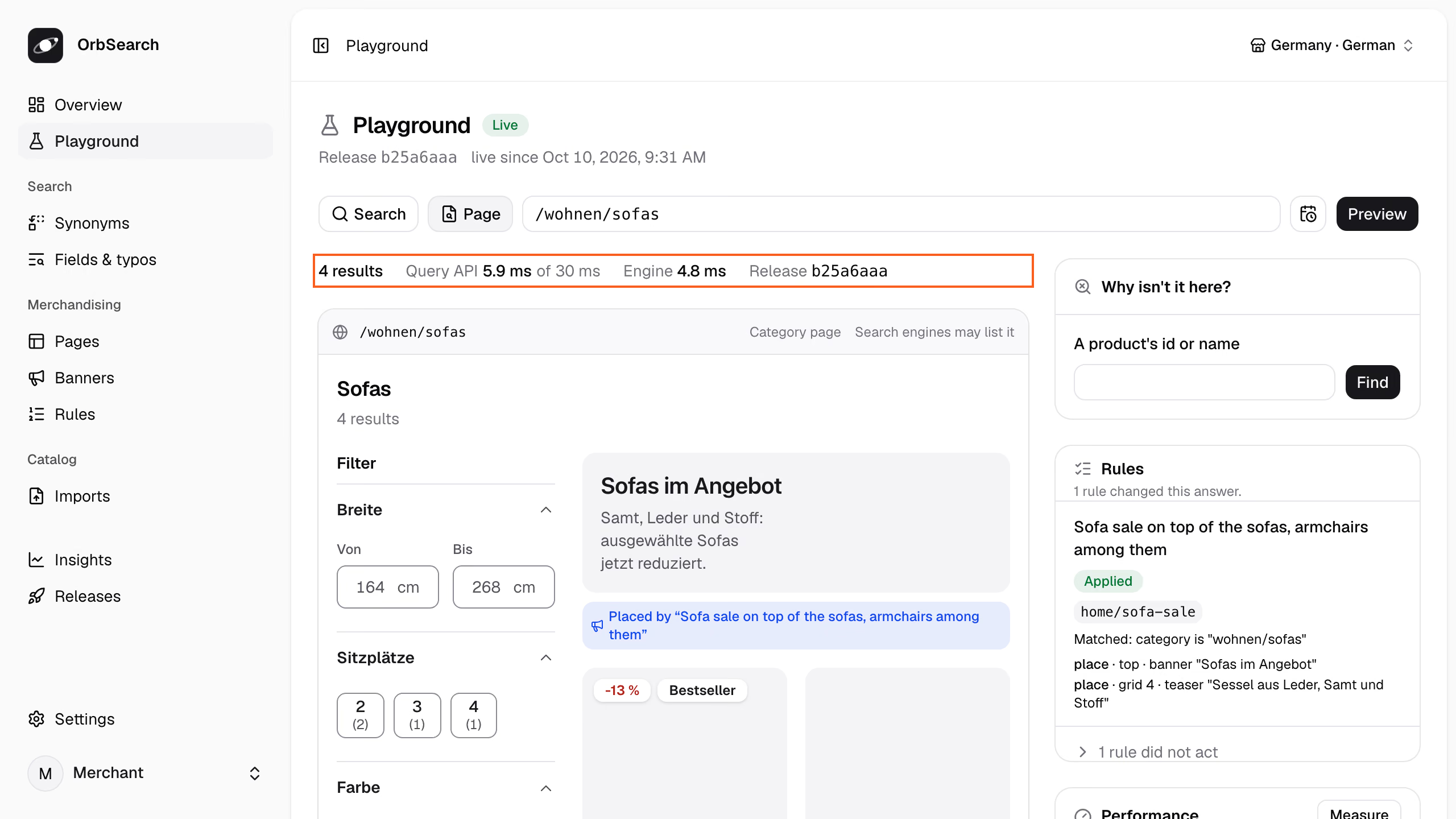
Panel · Playground
The **Playground** shows any search or page of the shop. Type what a shopper types, or a URL of the shop, and press **Preview**:
- The strip above the page says what it is: its kind, where a redirect leads, whether search engines may list it.
- The line above it holds the answer's numbers: the results, the Query API's time against its budget, the engine's share and the release.
- **Performance** keeps them copyable for a bug report, and **Measure** sends the preview 20 times for its p50, p95 and slowest round trip.
The channel and language in the top bar, shared with Pages and Rules, decide what it answers in, and a playground link carries them. On **Pages**, **Preview this page** shows the draft's page and opens it in the Playground.
**Through the API:**
`POST /api/v1/preview/page` opens a URL of the shop as a shopper would, with a draft's files in place of the live release's:
```sh title="Terminal"
curl -s -H "Authorization: Bearer $key" $api/imports/$draft | jq '{url: "/wohnen/sofas", files}' \
| curl -s -H "Authorization: Bearer $key" -H 'Content-Type: application/json' -d @- $api/preview/page \
| jq -r '.results | (.trace.steps[] | select(.step == "sort") | .reason),
(.sections[] | select(.type == "product") | .hits[] | "\(.entity) \(.fields.sale_price // .fields.price)")'
```
```text title="Answer: 200 · 31 ms · release 6950b4be"
The category wohnen/sofas sets price_asc as the default sort of its page and the pages below it.
product:SOFA-ASKA-2 649.0
product:SOFA-NIKO-SCHLAF 799.0
product:SOFA-LUND-3 1299.0
product:SOFA-VIDAR-ECK 1899.0
```
The sofas come lowest price first, as the trace's sort step says. `POST /api/v1/preview/search` answers a search against what is live, and both may fix `time` to see a scheduled rule on its day.
A preview reads the live indexes. What a draft changes in them, such as a rule's pins or a new attribute, shows once
it is published.
**Reference:** [`POST /api/v1/preview/page`](/docs/reference/management-api#preview-page) · [`POST /api/v1/preview/search`](/docs/reference/management-api#preview-search)
## How a publish goes live
Publishing makes a release the active configuration, and an [index run](/docs/reference/glossary#index-run) takes it live, doing only what the change needs. You see how before anything goes live.
**In the panel:**
Synonyms, Fields & typos and Banners publish from a bar that says how the draft goes live, such as "Goes live at once." On Pages and Rules, **Review and publish** compares the draft with what is live and says the same before **Go live**.
**Through the API:**
Ask how the draft would go live:
```sh title="Terminal"
curl -s -H "Authorization: Bearer $key" $api/imports/$draft/publication | jq -r .course.sentence
```
```text title="Answer: 200 · 27 ms"
Goes live at once: only categories.json changed what the Query API reads.
```
Publish it with the version you reviewed, so a draft changed since is refused:
```sh title="Terminal"
curl -s -X POST -H "Authorization: Bearer $key" "$api/imports/$draft/publish?version=$version" | jq -r .next
```
A release stored whole publishes with `POST $api/releases//publish`. Searches read it once the run succeeds, and keep what was live if it fails. A draft you do not publish is discarded:
```sh title="Terminal"
curl -s -X DELETE -H "Authorization: Bearer $key" $api/imports/$draft | jq -r .state
```
```text title="Answer: 200 · 17 ms"
discarded
```
A publish takes one of three ways:
- **Switch:** only what the Query API reads changed, such as rules, the layout of pages, patterns, routes or redirects. It goes live at once; a pin took about 0.2 s on the demo's 5,215 products.
- **Settings:** only the synonyms, the order of a type's searched fields or how many typos its words forgive. The engine applies them to the live indexes within moments, without reindexing.
- **Rebuild:** what the documents are built from changed, such as the fields a type searches, channels, attributes, overlays, the feed mapping, ranking signals, the facets pages count, or the catalog. New indexes are built beside the live ones while the shop keeps answering.
A rebuild also runs after an update of OrbSearch, when the engine lost its indexes, and when a sale window or an [overlay](/docs/overlays) ends. The answer's `course.because` names the cause and, for a rebuild, `estimate_seconds` its time. Every trace names how the live run went live as `trace.live`.
**Reference:** [`Course`](/docs/reference/management-api#Course) · [`GET .../publication`](/docs/reference/management-api#show-import-publication) · [`POST .../publish`](/docs/reference/management-api#publish-import) · [`DELETE /api/v1/imports/{import}`](/docs/reference/management-api#discard-import)
## Roll back
A [rollback](/docs/reference/glossary#rollback) publishes an earlier release again. It goes live with the current catalog, by the same three ways, and the release the live one replaced is marked previous.
**In the panel:**
**Releases** lists the releases, the last published first, each marked **Live**, **Going live**, **Previous** or **Was live**. A row's menu offers **Publish this release** or **Roll back to this release**, in a dialog that says how it would go live. **Index runs** below says how each run went live, with its **Report**.
**Through the API:**
```sh title="Terminal"
previous=$(curl -s -H "Authorization: Bearer $key" $api/releases | jq -r '.data[] | select(.role == "previous") | .id')
curl -s -H "Authorization: Bearer $key" $api/releases/$previous/publication | jq -r .course.sentence
curl -s -X POST -H "Authorization: Bearer $key" $api/releases/$previous/publish | jq -r .next
```
Each listed release carries its `role` and the `course` it last went live by.
To go back to an earlier catalog together with its release, publish the import it came with again ([Importing and mapping](/docs/importing)).
**Reference:** [`GET /api/v1/releases`](/docs/reference/management-api#list-releases) · [`POST /api/v1/releases/{release}/publish`](/docs/reference/management-api#publish-release)
## Validation
Every write is checked whole before it is kept. A violation answers `422` with the file, a JSON pointer and what is wrong. Here a search test asks for a channel the store lacks:
```sh title="Terminal"
jq -n '{files: [inputs | {(input_filename | split("/") | last): .}] | add}
| .files["tests.json"].tests[0].request.channel = "at"' tests/fixtures/home/*.json \
| curl -s -H "Authorization: Bearer $key" -H 'Content-Type: application/json' -d @- $api/releases \
| jq -r '.violations[] | "\(.file) \(.pointer): \(.message)"'
```
```text title="Answer: 422 · 23 ms"
tests.json /tests/0/request/channel: "at" is not a channel in channels.json; the channels are de.
```
Each file must match its schema, unknown fields included, and every reference between files must hold. Category and product ids belong to the catalog and are not checked. An index run checks again with the files it derived; if they do not fit, it fails and what was live stays.
**Reference:** [`422`](/docs/reference/problems#422)
## Search tests
A search test is a request, exactly as the Query API receives it, and what must stay true about its answer. "3-sitzer grau" (three-seater grey) must resolve to both filters:
```json title="tests/fixtures/home/tests.json (trimmed)"
{
"tests": [
{
"id": "three-seater-in-grey",
"request": { "query": "3-sitzer grau" },
"expect": { "resolved": { "filters": { "color": "grey", "seats": 3 } } }
}
]
}
```
A test can expect the `redirect`, what the query `resolved` to, the `rules` applied, the order of `sections`, and its `results`, such as the `first` hit. A trace's `request` can be copied into a test as it is.
OrbSearch checks search tests when a release is stored, but never runs them. A test whose answer changed does not
stop a publish.
Storing refuses a test that expects nothing, a request the Query API would refuse, and a rule, type or field that does not exist.
**Reference:** [`tests.json`](/docs/reference/release-files/tests) · [`expect`](/docs/reference/release-files/tests#expect)
## Defaults and zero configuration
A release need not write every file: every index run derives the ones it leaves out from the catalog, so they follow it. A search with `debug=1` names them:
```sh title="Terminal"
curl -s 'http://127.0.0.1:7800/v1/search?query=sofa&debug=1' | jq -c '.trace.derived'
```
```json title="Answer: 200 · 5.1 ms · release b25a6aaa"
["types.json"]
```
The home store writes `types.json` but leaves out which attributes are exempt from typos, so that part is derived. A written file wins whole, except `categories.json`, which derives the parts it leaves out. [Your own catalog](/docs/your-own-catalog) goes live with no files at all, and [the import report](/docs/import-report) gives each [derived setting](/docs/reference/glossary#derived-setting) its reason.
## JSON Schemas
Each release file has a JSON Schema, generated from the contract at `contracts/schema/.json`. Name it in the file's `$schema` key, and an editor checks and completes the file as you type:
```json title="tests/fixtures/home/synonyms.json (trimmed)"
{
"$schema": "../../../contracts/schema/synonyms.json",
"synonyms": { "de": { "groups": [["sofa", "couch"]] } }
}
```
The Query API keeps `$schema` as written.
## Next
- [Rules](/docs/rules): pin, boost, bury, hide and redirect, the changes a draft carries most.
- [Pages and their filters](/docs/pages): each page's facets and sorting, previewed before they go live.
- [The import report](/docs/import-report): what a run read, left out and derived.
# Rules: pin, boost, bury, hide, redirect
Put a product first, move others up or down, hide one or send a search elsewhere, each with a rule whose condition and effects the trace explains.
A [rule](/docs/reference/glossary#rule) changes what a search or a category page answers: when its condition holds (`when`), its effects take place (`then`). Rules stand in an order, and where two disagree, the higher one wins. Here are the home store's rules, first to last:
```sh title="Terminal"
curl -s -H "Authorization: Bearer $key" $api/rules | jq -c '.rules[] | {id, state: .state.id, summary}'
```
```json title="Answer: 200 · 5.4 ms · release b25a6aaa"
{"id":"home/sofa-sale","state":"active","summary":"Places banner \"Sofas im Angebot\" on top, places teaser \"Sessel aus Leder, Samt und Stoff\" at 4 on \"Sofas\""}
{"id":"home/out-of-stock-last","state":"disabled","summary":"Buries availability is \"out_of_stock\" (strong)"}
{"id":"home/guides-for-questions","state":"disabled","summary":"Orders the sections content, product, category when query starts with \"wie\" or \"welche\" or \"welcher\" or \"welches\" or \"how\" or \"which\" and on search"}
```
The sale stands on the sofa page, and the other two rules are switched off. `summary` is the Query API's own line, which the panel shows too.
**Reference:** [`rules.json`](/docs/reference/release-files/rules) · [`GET /api/v1/rules`](/docs/reference/management-api#list-rules)
## Effects
A rule holds at least one effect. This one puts the Niko sofa bed first in every search that contains "sofa":
```json title="rules.json"
{
"id": "niko-leads-every-sofa-search",
"description": "Niko leads every sofa search",
"when": { "query": { "contains": "sofa" } },
"then": { "pin": [{ "entity": "product:SOFA-NIKO-SCHLAF", "position": 1 }] }
}
```
The effects merchants reach for most:
- **Pin** puts a product at a position, counted from 1, wherever it meets the request's filters.
- **Boost** and **bury** weigh products up or down within relevance, `slight`, `medium` or `strong`: `{ "where": { "availability": "out_of_stock" }, "strength": "strong" }`.
- **Hide** takes a product out, such as an outdoor rug: `{ "entity": "product:TEPPICH-MARE" }`. A hide beats a pin.
- **Filter** narrows the results, `{ "where": { "availability": "in_stock" } }`, and the answer lists it with `source: "rule"`.
- **Redirect** sends the shopper to a page, such as `{ "to": "content:guide-samt-pflege" }` (velvet care), or to a URL.
Before the query is read, [`resolve`](/docs/reference/release-files/rules#then.resolve) decides what a word means and [`rewrite`](/docs/reference/release-files/rules#then.rewrite) removes words. [`sections`](/docs/reference/release-files/rules#then.sections) orders the sections, and `place` puts [banners and teasers](/docs/banners) beside the results.
**Reference:** [`then`](/docs/reference/release-files/rules#then) · [`pin`](/docs/reference/release-files/rules#then.pin) · [`boost`](/docs/reference/release-files/rules#then.boost) · [`hide`](/docs/reference/release-files/rules#then.hide) · [`filter`](/docs/reference/release-files/rules#then.filter) · [`redirect`](/docs/reference/release-files/rules#then.redirect)
## Conditions
`when` reads the request, and all its keys must hold. A rule without one always applies:
```json title="tests/fixtures/home/rules.json (trimmed)"
{ "when": { "query": { "starts_with": ["wie", "welche"] }, "on": "search" } }
```
- `query` compares the words typed: `is`, `contains` (whole words), `starts_with` or `empty`. It reads them literally, so "couch" does not contain "sofa", though the two are synonyms.
- `category` holds on a category page: `is` that page, `within` it and the pages below.
- `on` names the surface: `search`, `category_page` or `autocomplete`.
- `resolved`, `channel`, `locale` and `context` read more of the request, and `any`, `all` and `not` combine conditions.
**Reference:** [`when`](/docs/reference/release-files/rules#when) · [`query`](/docs/reference/release-files/rules#when.query) · [`resolved`](/docs/reference/release-files/rules#when.resolved)
## What the trace says
The [trace](/docs/reference/glossary#trace) names every rule a request met and what became of it. Here is the sofa page's:
```sh title="Terminal"
curl -s 'http://127.0.0.1:7800/v1/search?on=category_page&category=wohnen/sofas&debug=1' \
| jq -c '.trace.steps[] | select(.step == "rules") | .rules[] | {rule, state, matched, reason} | del(.. | nulls)'
```
```json title="Answer: 200 · 3.6 ms · release b25a6aaa"
{"rule":"home/sofa-sale","state":"applied","matched":"category is \"wohnen/sofas\""}
{"rule":"home/out-of-stock-last","state":"inactive","reason":"disabled"}
```
The sale applied on `wohnen/sofas` (living/sofas), and the bury is switched off. `home/guides-for-questions` waits for a question such as "wie" (how), so this request could not meet it and the trace leaves it out.
| Step | Decision |
| ------- | ------------------------------- |
| `rules` | Applied: home/sofa-sale |
| `rank` | SOFA-ASKA-2 first of 4 products |
OrbSearch's own steps took 0.48 ms and the engine's call 1.74 ms, 2.22 ms in all.
A rule ends in one state:
- `applied`: every effect took place.
- `partly_applied`: some effects were `moved` or `skipped`, each with a `reason`, such as "position 1 taken by niko-leads-every-sofa-search".
- `not_applied`: it matched, but a higher rule's redirect ended planning.
- `not_matched`: the condition failed, and `failed` names the part.
- `inactive`: switched off or outside its schedule, and `reason` says which.
**Reference:** [`rules` step](/docs/reference/trace#rules) · [`state`](/docs/reference/trace#rules.rules.state)
## Add a rule
To put the Niko sofa bed first in every sofa search, add the rule to a [draft](/docs/reference/glossary#draft). Shoppers see nothing of it until you publish.
**In the panel:**
**Merchandising → Rules** lists the rules in the order they win in, each with its state and what it does. A mark such as **1 conflict** says what a higher rule takes from it.
1. Press **Start a draft**, then **New rule**.
2. Under **Applies to**, choose **Searches that contain words**, type `sofa` under **Words** and press Enter.
3. Under **Then**, choose **Add an effect** → **Pin products**, and pick "Niko Schlafsofa" (sofa bed) under **Add a product**. It takes position 1.
4. To run it for a while, set **Starts** and **Ends** under **Only between (optional)**.
5. **Save** puts the rule first. Drag its handle, or press the arrow keys on it, to move it.
**Review and publish** says how the draft goes live and publishes it, and **Discard** throws it away.
**Through the API:**
Start a draft with the store's export, then add the rule, first in the order unless `position` says otherwise:
```sh title="Terminal"
draft=$(curl -s -X POST -H "Authorization: Bearer $key" -H 'Content-Type: application/x-ndjson' \
--data-binary @tests/fixtures/home/catalog.jsonl "$api/imports?name=catalog.jsonl" | jq -r .import.id)
version=$(curl -s -H "Authorization: Bearer $key" $api/imports/$draft | jq -r .version)
jq -n --arg version "$version" '{version: $version, name: "Niko leads every sofa search", fields: {
when: {trigger: {kind: "query", matching: "contains", phrases: ["sofa"]}},
then: {pin: [{entity: "product:SOFA-NIKO-SCHLAF", position: 1}]}}}' \
| curl -s -H "Authorization: Bearer $key" -H 'Content-Type: application/json' -d @- $api/imports/$draft/rules \
| jq -c '.rules.rules[] | {id, state: .state.id, conflicts}'
```
```json title="Answer: 201 · 65 ms"
{"id":"niko-leads-every-sofa-search","state":"active","conflicts":null}
{"id":"home/sofa-sale","state":"active","conflicts":null}
{"id":"home/out-of-stock-last","state":"disabled","conflicts":null}
{"id":"home/guides-for-questions","state":"disabled","conflicts":null}
```
Where a higher rule takes something from a rule, such as its pin's position, `conflicts` says so in a sentence.
Open the search page for "sofa" with the draft's files. `redirect=0` keeps the search page instead of the sofa page the query names:
```sh title="Terminal"
body=$(curl -s -H "Authorization: Bearer $key" $api/imports/$draft | jq '{url: "/suche?q=sofa&redirect=0", files}')
curl -s -H "Authorization: Bearer $key" -H 'Content-Type: application/json' -d "$body" $api/preview/page \
| jq -c '.results.trace.steps[] | select(.step == "rules") | .rules[0]
| {rule, state, effects: [.effects[] | {effect, target, placed}]}'
```
```json title="Answer: 200 · 8.7 ms · release 7750c384"
{"rule":"niko-leads-every-sofa-search","state":"applied","effects":[{"effect":"pin","target":"product:SOFA-NIKO-SCHLAF","placed":1}]}
```
A preview searches the live index. A pin, boost or bury the draft adds or changes shows in the trace, but moves hits
only once the draft is live. Hides, filters, redirects, banners and switching a rule on or off show at once.
Ask how the draft goes live, then publish it with `POST $api/imports/$draft/publish`, or discard it:
```sh title="Terminal"
curl -s -H "Authorization: Bearer $key" $api/imports/$draft/publication | jq -r .course.sentence
curl -s -X DELETE -H "Authorization: Bearer $key" $api/imports/$draft | jq -r .state
```
```text title="Answer: 200 · 16 ms"
Goes live at once: only rules.json changed what the Query API reads.
discarded
```
Every write names the draft's `version` and is refused with `409` if the draft changed since. A rule the fields cannot express, such as the bury, changes through the draft's files.
**Reference:** [`POST .../rules`](/docs/reference/management-api#create-rule) · [`PATCH .../rules/{rule}`](/docs/reference/management-api#change-rule) · [`PUT .../position`](/docs/reference/management-api#move-rule) · [`RuleFields`](/docs/reference/management-api#RuleFields) · [`POST /api/v1/preview/page`](/docs/reference/management-api#preview-page)
## Who wins
Rules run in three phases: `resolve` and `rewrite`, then the highest redirect, then the effects that shape the results. Where two rules collide:
- **Two decide one term, redirect, or set the section order:** the higher one.
- **Two pin one product, or boost or bury one target:** the higher one's position or strength.
- **Two pins ask for one position:** the higher one takes it, the other moves to the next free one.
- **A hide and a pin of one product:** the hide, whichever rule is higher.
- **A redirect and rules that shape:** the redirect, and the others are `not_applied`.
- **Filters, hides and removed words:** all of them apply.
A rule that holds a redirect beside effects that shape the results or place banners is refused, since the redirect would end planning first.
**Reference:** [`conflicts`](/docs/reference/management-api#ListedRule.conflicts)
## Schedules
A schedule runs a rule for a while, such as Black Week:
```json title="rules.json (trimmed)"
{ "schedule": { "from": "2026-11-23T00:00:00+01:00", "until": "2026-11-30T00:00:00+01:00" } }
```
`from` is included, `until` is not, and either end may be open. The Query API checks it against the time the request arrived, never a time the request brings. Before the window the rule is `inactive`, with the reason "schedule starts 2026-11-23T00:00:00+01:00". A preview takes `time`, so you can see the first day before it comes.
**Reference:** [`schedule`](/docs/reference/release-files/rules#schedule) · [`time`](/docs/reference/management-api#preview-page.time)
## Limits
A request switches on at most 4 boost and bury targets and 100 pins per section, in rule order, and the trace marks the rest "skipped: limit of ...". A pin needs a type listed one tile per product, so a type listed per variant or per color skips it.
**Reference:** [`targets_per_query`](/docs/reference/limits#targets_per_query) · [`pins_per_query`](/docs/reference/limits#pins_per_query) · [every limit](/docs/reference/limits)
## Next
- [Sponsored products](/docs/sponsored-products): sell a pin to a brand, and count its views and clicks.
- [Banners and teasers](/docs/banners): place a campaign above, among or below the results.
- [Releases](/docs/releases): draft, preview, publish and roll back.
# Search and browse
One endpoint answers every search, category page and search box; send a link or a JSON body and read what comes back.
The [Query API](/docs/reference/glossary#query-api) answers every search, category page and search box at one endpoint, `/v1/search`, on port 7800. It needs no key, so a storefront calls it from the browser or from its own server:
```sh title="Terminal"
curl -s 'http://127.0.0.1:7800/v1/search?query=sofa' | jq -c '[.sections[] | select(.type == "product") | .hits[].entity]'
```
```json title="Answer: 200 · 5.4 ms · release b25a6aaa"
["product:SOFA-ASKA-2","product:SOFA-LUND-3","product:SOFA-NIKO-SCHLAF","product:SOFA-VIDAR-ECK"]
```
`on` says where a request comes from: `search` by default, `category_page` for a [category page](/docs/category-pages), `autocomplete` for the [search box](/docs/autocomplete). Rules can tell them apart.
## Send a request
`GET` takes the plain fields as URL parameters, so a link is enough. `POST` takes the whole request as JSON, and only it carries `filters`, `dismissed`, `facets` and `context`:
```sh title="Terminal"
curl -s http://127.0.0.1:7800/v1/search -H 'Content-Type: application/json' \
-d '{ "query": "sofa", "filters": { "color": ["grey"] } }' | jq -c '.filters[] | {where, source}'
```
```json title="Answer: 200 · 4.9 ms · release b25a6aaa"
{"where":{"color":["grey"]},"source":"shopper"}
{"where":{"category":{"within":"wohnen/sofas"}},"source":"query"}
```
Every filter that narrowed the products comes back with its `source`: the shopper chose grey, and the query named the sofas. [Facets and filters](/docs/facets) says what `filters` can choose.
**Reference:** [`POST /v1/search`](/docs/reference/query-api#search) · [`GET /v1/search`](/docs/reference/query-api#search-by-url)
## Sections and hits
An answer holds one [section](/docs/reference/glossary#section) per entity type, in the order of `ranking.json`'s `sections`. `listed` names the type the page lists:
```sh title="Terminal"
curl -s 'http://127.0.0.1:7800/v1/search?query=sofa&per_page=2' \
| jq -c '.listed, (.sections[] | {type, total, hits: [.hits[].entity]})'
```
```json title="Answer: 200 · 4.6 ms · release b25a6aaa"
"product"
{"type":"category","total":1,"hits":["category:wohnen/sofas"]}
{"type":"product","total":4,"hits":["product:SOFA-ASKA-2","product:SOFA-LUND-3"]}
{"type":"content","total":2,"hits":["content:guide-sofa-finden","content:guide-teppichgroesse"]}
{"type":"brand","total":0,"hits":[]}
```
- **The listed section** pages through its results and carries the [facets](/docs/reference/glossary#facet).
- **The sections beside it**, here a category and two guides, come only when something was typed on a search or in the search box. They show up to 6 hits and do not page.
- **Each hit** names its `entity`, the `variant` a tile shows, and `fields`: its type's result fields from `types.json`, in the request's locale and channel.
`release` and `snapshot` name the [release](/docs/reference/glossary#release) and the [snapshot](/docs/reference/glossary#snapshot) that answered. `query_id` names the answer itself: keep it for the [clicks and views](/docs/clicks-and-views) you report. A query that names a whole page also carries a `redirect` ([URLs and redirects](/docs/urls)).
**Reference:** [`sections`](/docs/reference/query-api#search.answer.sections) · [`hits`](/docs/reference/query-api#search.answer.sections.hits) · [`ranking.json` sections](/docs/reference/release-files/ranking#sections) · [`result`](/docs/reference/release-files/types#result)
## Pages and totals
`page` and `per_page` (24 by default, up to 100) page through the listed section, and its `total` counts every match:
```sh title="Terminal"
curl -s 'http://127.0.0.1:7800/v1/search?query=sofa&per_page=2&page=2' \
| jq -c '.sections[] | select(.type == "product") | {total, reachable, hits: [.hits[].entity]}'
```
```json title="Answer: 200 · 3.9 ms · release b25a6aaa"
{"total":4,"reachable":4,"hits":["product:SOFA-NIKO-SCHLAF","product:SOFA-VIDAR-ECK"]}
```
`reachable` says how many of them pages reach: all of them, or the first 1,000 where more match. A total marked `upper_bound` may be higher than the true count, where a range meets a value that differs between a tile's variants. The trace's `assemble` step says which range.
A page past `reachable` answers no hits. Link no page past it, and tell the shopper that filters reach the rest.
**Reference:** [`per_page`](/docs/reference/query-api#search.per_page) · [`reachable`](/docs/reference/query-api#search.answer.sections.reachable) · [`upper_bound`](/docs/reference/query-api#search.answer.sections.upper_bound)
## Count without hits
A filter sheet's "Show 2 results" button needs the total alone. `count_only` answers the listed section's total, without hits, other sections or facets:
```sh title="Terminal"
curl -s http://127.0.0.1:7800/v1/search -H 'Content-Type: application/json' \
-d '{ "query": "sofa", "filters": { "color": ["grey"] }, "count_only": true }' | jq -c '.sections'
```
```json title="Answer: 200 · 3.2 ms · release b25a6aaa"
[{"type":"product","total":2,"reachable":2,"hits":[]}]
```
Facets named in `facets` still come along, as a sheet that counts its own values needs.
**Reference:** [`count_only`](/docs/reference/query-api#search.count_only) · [`facets`](/docs/reference/query-api#search.facets)
## Channel, locale and context
A request is answered in one [channel](/docs/reference/glossary#channel) and one [locale](/docs/reference/glossary#locale), by default the release's first channel and its first locale. The home store's channel `de` sells in German and English:
```sh title="Terminal"
curl -s 'http://127.0.0.1:7800/v1/search?query=sofa&locale=en&per_page=2' \
| jq -c '[.sections[] | select(.type == "product") | .hits[].fields.title]'
```
```json title="Answer: 200 · 4.4 ms · release b25a6aaa"
["Aska two-seater velvet sofa","Lund three-seater sofa"]
```
Titles, labels, URLs and prices follow them. `context` carries the keys `channels.json` declares, such as `{ "customer_group": "b2b" }`, which rules can match on.
**Reference:** [`channel`](/docs/reference/query-api#search.channel) · [`locale`](/docs/reference/query-api#search.locale) · [`context`](/docs/reference/release-files/channels#context)
## Errors
A request that cannot be answered as sent gets a `400`, whose `violations` name each wrong field by its JSON pointer:
```sh title="Terminal"
curl -s 'http://127.0.0.1:7800/v1/search?query=sofa&sort=cheapest' | jq -c '.violations[]'
```
```json title="Answer: 400 · 1.3 ms"
{"pointer":"/sort","message":"\"cheapest\" is not a sort option; the options are relevance, price_asc, price_desc, newest and delivery_time."}
```
An unknown channel, filter field or context value is refused the same way. An unknown category is not an error: it lists nothing. A `503` means nothing is searchable yet or Meilisearch is unreachable.
**Reference:** [Problems](/docs/reference/problems)
## The trace
`debug=1` adds the [trace](/docs/reference/glossary#trace): every step the search took, in order, each with what it decided:
```sh title="Terminal"
curl -s 'http://127.0.0.1:7800/v1/search?query=graues%20Sofa&debug=1' | jq -c '[.trace.steps[].step]'
```
```json title="Answer: 200 · 5.6 ms · release b25a6aaa"
["normalize","resolve","rules","sort","plan","execute","facets","rank","assemble"]
```
The query is read and resolved, rules and the sort are decided, and one call asks Meilisearch. The facets are counted, the hits ranked and the answer assembled. A search that names something and finds nothing adds `relax` steps ([When nothing is found](/docs/no-results)).
`timings` says how long the Query API took, measured at the server. Each request is held to the budget of its kind: 30 ms at p95 for a search or a category page, 15 ms for autocomplete. Building the trace costs a little time of its own.
**Reference:** [The trace](/docs/reference/trace) · [`Timings`](/docs/reference/trace#Timings)
## Next
- [How search understands a query](/docs/query-understanding): what the query named, and how the rest is matched.
- [Facets and filters](/docs/facets): the filters a page offers and how a request chooses them.
- [The client](/docs/client): the same requests from TypeScript.
# Self-hosting
Run OrbSearch in production with Docker Compose on one machine, behind a proxy that terminates TLS.
OrbSearch runs as one Docker Compose stack, the `compose.yaml` at the repository's root. The stack you run in production is the one the repository tests: same services, same images, settings from one `.env` file. This page covers what runs, how to configure it, where your data lives and how to keep it safe.
## What runs
Five services, two of them from one image. Compose builds the `orbsearch` and `control` images from the repository; Postgres and Meilisearch come from their official images.
| Service | Image | Listens on the host | Volume | Job |
| ------------- | ---------------------------------------- | ------------------- | --------------------- | -------------------------------------------------------------------------------------------------------------- |
| `orbsearch` | built from `crates/orbsearch/Dockerfile` | `127.0.0.1:7800` | `storage`, read-only | The Query API (`orbsearch serve`), which storefronts call |
| `indexer` | the same image | - | `storage`, read-write | Index runs (`orbsearch index`): compiles a catalog snapshot and a release into Meilisearch and swaps them live |
| `control` | built from `apps/control/Dockerfile` | `127.0.0.1:8000` | `storage`, read-write | The control plane: the panel, the management API under `/api/v1`, and the schedule that fetches the feed URL |
| `postgres` | `postgres:18.6-trixie` | `127.0.0.1:5432` | `postgres` | Accounts, releases, imports and index runs |
| `meilisearch` | `getmeili/meilisearch:v1.54.3` | `127.0.0.1:7700` | `meilisearch` | The search engine, holding only compiled indexes |
Every part connects to Postgres with a role of its own: `control` owns the schema and its migrations grant `indexer` and `query` what each needs. The `postgres` superuser only creates these roles, once, when its volume is first initialized. The Query API also serves an internal port, 7801, that only the control plane reaches inside the stack's network; it is never published.
Every service restarts unless you stop it. The Query API and the indexer start once Postgres and Meilisearch are healthy; the control plane waits for Postgres.
## Start it
You need Docker, `make` and `openssl` on the machine.
### Write the settings
```sh title="Terminal"
make .env
```
This copies `.env.example` to `.env` and fills every empty secret with a fresh random value. Run it again after an upgrade: it adds only the settings `.env` lacks and never changes a value you have.
### Build and start the stack
```sh title="Terminal"
docker compose up --build --detach --wait
```
`--wait` returns once every service reports healthy. The first build compiles the Rust binary and the panel, which takes a while.
### Create the owner account
Open the panel at `APP_URL` (by default `http://localhost:8000`). The first person to open it creates the owner account; after that, sign-up is closed. Do it before the panel is reachable from the network ([Security](#security)).
The stack runs, so the [Quickstart](/docs/quickstart#keep-the-management-key-at-hand) takes you from its second step to the first search.
Compose names the project, and with it the volumes, after the checkout's folder. Rename the folder and the stack starts again on empty volumes. A second checkout on the same machine gets volumes of its own and needs other ports in its `.env`.
## Settings
Every setting lives in `.env`. After a change, `docker compose up --detach --wait` recreates the services whose settings changed.
| Setting | What it does |
| --------------------------------------- | ---------------------------------------------------------------------------------------------------------------------------------------------------------------------------------------------------------------------------------------- |
| `APP_KEY` | The control plane's encryption key: `base64:` followed by 32 random bytes. It encrypts the panel's cookies, two-factor secrets and the feed URL's credentials, so keep it. |
| `APP_URL` | Where merchants open the panel. Default: `http://localhost:8000`. An `https://` address also makes the panel's session cookies secure. |
| `POSTGRES_PASSWORD` | The Postgres superuser, which only sets up the roles. |
| `DB_PASSWORD` | The control plane's role, `control`. |
| `INDEXER_DB_PASSWORD` | The indexer's role, `indexer`. |
| `QUERY_DB_PASSWORD` | The Query API's role, `query`. |
| `MEILI_MASTER_KEY` | Meilisearch's master key, at least 16 bytes. Only the indexer holds it. |
| `MEILI_SEARCH_KEY` | The Query API's engine key, which may only search and list indexes. The indexer creates it from the master key at start; `make .env` derives it ([Security](#security)). |
| `ORBSEARCH_MANAGEMENT_KEY` | The key of the management API, sent as `Authorization: Bearer `. |
| `PUBLISH_ADDRESS` | The host address the panel and the Query API listen on. Default: `127.0.0.1`, for a proxy on this machine. `0.0.0.0` opens both to the network, without TLS. |
| `CONTROL_PORT`, `ORBSEARCH_PORT` | The host ports of the panel (default 8000) and the Query API (default 7800). Change `APP_URL` with `CONTROL_PORT`. |
| `POSTGRES_PORT`, `MEILISEARCH_PORT` | The host ports of Postgres (default 5432) and Meilisearch (default 7700). Both always listen on 127.0.0.1 only. |
| `TRUSTED_PROXIES` | The addresses of the proxies in front of the panel, comma-separated. Never `*`: the control plane refuses to run with it. |
| `MAIL_*` | A mailer for the panel: `MAIL_MAILER` (such as `smtp`), `MAIL_SCHEME`, `MAIL_HOST`, `MAIL_PORT`, `MAIL_USERNAME`, `MAIL_PASSWORD` and `MAIL_FROM_ADDRESS`. A real mailer turns on email verification; without one, mail goes to the log. |
| `ORBSEARCH_FEEDS_FROM_PRIVATE_NETWORKS` | Optional. `true` lets the [feed URL](/docs/feeds#private-networks) be on a private, loopback or link-local network, such as the shop's own; by default only public addresses are fetched. `make stack` sets it for the flows' local feed. |
| `AI_GATEWAY_API_KEY` | Optional. A Vercel AI Gateway key turns on column suggestions in the import panel. Without it, the import maps with its own rules only. |
| `DEMO_PORT` | The port of the demo storefront that `make demo` and `make e2e` serve on the host. Not part of the stack. |
The settings from `APP_KEY` to `ORBSEARCH_MANAGEMENT_KEY` are required: Compose refuses to start while one of them is empty. The database passwords are set in Postgres when its volume is first initialized, so changing them in `.env` later does not change them in the database.
## TLS
OrbSearch speaks plain HTTP and leaves TLS to a proxy on the same machine, such as Caddy or nginx. With the default `PUBLISH_ADDRESS`, nothing but that proxy reaches the stack.
| Public address, for example | Forward to | Serves |
| ---------------------------- | ---------------- | ------------------------------------------- |
| `https://search.example.com` | `127.0.0.1:7800` | The Query API, for storefronts and browsers |
| `https://panel.example.com` | `127.0.0.1:8000` | The panel and the management API |
Then set `APP_URL` to the panel's `https://` address and `TRUSTED_PROXIES` to the address the proxy connects from, and run `docker compose up --detach --wait`. Postgres, Meilisearch and the internal port stay off the network.
## Security
- **Create the owner account first.** The first visitor of the panel becomes its owner, so create the account before the proxy forwards to it. Until then, with the default `PUBLISH_ADDRESS`, only the machine itself reaches the panel; from your own computer, `ssh -L 8000:127.0.0.1:8000 ` opens it at `http://localhost:8000`.
- **The Query API has no key and no rate limit.** It answers whoever reaches it, as a storefront needs. Limit request rates at the proxy. A short cache of `GET` answers there takes load off too, at the price of a new release or a sale window showing that much later.
- **Each part holds only the engine key it needs.** The indexer holds Meilisearch's master key and creates the Query API's key from it at start: a key that may only search and list indexes, so a Query API that is broken into cannot change or delete the engine's indexes, rules or keys. The control plane holds none. After a new `MEILI_MASTER_KEY`, remove `MEILI_SEARCH_KEY` from `.env` and run `make -B .env` to derive the matching key; by hand it is `printf %s 5e7d2c4a-8f1b-4c3e-9a6d-0b2f4e6a8c1d | openssl dgst -sha256 -hmac "$MEILI_MASTER_KEY"`.
- **The management API allows no browser origin.** It sends no CORS headers, since only scripts, agents and the panel on its own origin call it.
- **Rotate the management key** by giving `ORBSEARCH_MANAGEMENT_KEY` in `.env` a new value and recreating `control`, the one service that reads it. From then on the old key answers 401, and `$key` holds the new one:
```sh title="Terminal"
key=$(openssl rand -hex 32)
sed -i.bak "s/^ORBSEARCH_MANAGEMENT_KEY=.*/ORBSEARCH_MANAGEMENT_KEY=$key/" .env && rm .env.bak
docker compose up --detach --wait control
```
## Where data lives
| Where | What | Back it up |
| -------------------- | ------------------------------------------------------------------------------------------------------------------------------------------------------------------------------------------------------ | ------------------- |
| `postgres` volume | The `orbsearch` database: the owner's account, every release with its files, imports, index runs with their reports, the record of each snapshot, and the search log with its events and daily rollups | Yes |
| `storage` volume | The kept exports as they were uploaded, byte for byte, as `snapshots/`. The control plane writes them; the indexer reads and removes them | Yes |
| `.env` | The settings and secrets | Yes, somewhere safe |
| `meilisearch` volume | The indexes index runs compiled: derived data only | No |
The catalog is never stored in Postgres tables. It lives as snapshots, files that never change once written, and every index run compiles one of them with a release. That is why Meilisearch holds nothing you could lose: one index run rebuilds it from the current catalog and the published release.
### What is kept
A shop that sends a 2 GB export every day would add about 60 GB a month, so the indexer cleans up once it starts and after every index run that goes live. It keeps the snapshot files:
- of the live run, of every run still queued or running, of every draft import, and of an import that failed since the live run went live, so it can be corrected and published again;
- of the current catalog, which publishing a release and rebuilding index;
- of the newest other snapshots that went live, five unless you keep more or fewer under **Settings → Advanced** in the panel, or with `PATCH /api/v1/storage` and `{ "kept_snapshots": 2 }`.
Every other file goes, including those of discarded imports, whose export then carries `removed_at` too, a file nothing names, as an upload whose transaction failed leaves, once it is a day old, and, once a day old, what an upload that died halfway left. Its row stays with the time it was removed, and so does the history of its index runs and their reports. A rollback publishes an earlier release with the current catalog, so it never needs an old snapshot; an import whose export is gone goes live again once the same export is sent again.
The indexer also drops the catalog dictionary and the record of every run that is not live, which only the Query API and the next publish read with the live run (a run that keeps the live indexes carries both on), and deletes the engine indexes no run uses: those of a run that failed or was superseded, and those left when an indexer stopped between swapping a run live and recording it. It never touches an index OrbSearch did not make. It deletes the engine rules that neither the live release nor the one live before it names, so a Query API that has not switched yet still finds the rules of its release. Afterwards it measures the engine's size on disk.
First it checks the engine against Postgres: when the engine swapped in a newer run than the live one, an indexer stopped between the swap and recording it, and the live indexes hold documents no live run describes. The live run is then rebuilt within minutes.
The panel's Releases page shows in one line what the kept snapshots and the engine take, and mutes the catalog of a run whose file is gone. `GET /api/v1/storage` answers the same, and every snapshot in the management API carries `removed_at` once its file is removed:
```sh title="Terminal"
curl -s -H "Authorization: Bearer $key" $api/storage
```
```json
{
"kept_snapshots": 5,
"snapshots": { "count": 7, "bytes": 1288490188 },
"engine": { "bytes": 356515840, "measured_at": "2026-10-08T07:24:33.157+00:00" }
}
```
A fresh stack's indexer waits for the control plane's migrations before its first clean-up.
The search log keeps every answered search, and every click and view storefronts report, 60 days, in one partition per UTC day that the control plane drops when it is older; the daily rollups [Insights](/docs/insights) reads stay.
## Backups
Back up the database, the snapshots and `.env`, together.
```sh title="Terminal"
docker compose stop indexer
docker compose exec --no-TTY postgres pg_dump --username=postgres --format=custom orbsearch > orbsearch.dump
docker compose cp control:/var/lib/orbsearch/snapshots/. ./snapshots
docker compose start indexer
```
The indexer pauses while the database is dumped and the snapshots are copied out of the `storage` volume, so its clean-up cannot remove a file the dump still names; searches go on meanwhile, and runs queued in the pause start once it is back. In this order, every kept snapshot the dump names is in the copy. Snapshots never change once written, so a backup of them only needs to add new files and may drop those the indexer removed.
Leave Meilisearch out. If its volume is lost, the Query API answers 503 until the next index run; queue one with `POST /api/v1/index-runs`, or with **Rebuild index** on the panel's Releases screen.
`docker compose down --volumes` deletes the `postgres` and `storage` volumes too: the releases, the history and every uploaded export.
## Restore
Restore into a stack whose volumes are new, from a checkout of the version you backed up, with the backed-up `.env` in it: its `APP_KEY` decrypts the panel's two-factor secrets, and its database passwords become those of the new roles.
```sh title="Terminal"
docker compose up --detach --wait postgres
docker compose exec --no-TTY postgres pg_restore --username=postgres --dbname=orbsearch < orbsearch.dump
docker compose up --build --detach --wait control
docker compose cp ./snapshots/. control:/var/lib/orbsearch/snapshots
docker compose exec --user root control chown -R www-data:www-data /var/lib/orbsearch/snapshots
docker compose up --build --detach --wait
```
Postgres starts alone first, creating the roles and an empty `orbsearch` database, and takes the dump before the control plane migrates anything. The control plane then starts on the restored database and gets the snapshots back, owned by the user it writes as. Last come the indexer, the Query API and an empty Meilisearch, which holds only derived data: one index run rebuilds it, with `$key` and `$api` from the [Quickstart](/docs/quickstart#keep-the-management-key-at-hand) or **Rebuild index** on the panel's Releases screen.
```sh title="Terminal"
curl -s -X POST -H "Authorization: Bearer $key" $api/index-runs
```
### Move to a new machine
Back up the old machine, restore on the new one, and point your proxy or DNS at it once it searches. Release and snapshot ids stay the same, since they are named by their content. Stop the old stack with `docker compose down`, and keep its volumes until you are sure you will not go back.
## Health and logs
`docker compose ps` shows each service's health: the Query API and the indexer answer `GET /health` on port 7800, the control plane `GET /up` on port 8000, Postgres `pg_isready` and Meilisearch its own `GET /health`.
Every service logs to its container's output, so `docker compose logs --follow indexer` shows what the indexer does. The Query API and the indexer log at the `info` level; the control plane logs to stderr. A failed index run also says why in its `error`, in the management API and on the panel's Releases screen.
## Upgrades
### Back up
Take the backups above first.
### Update the checkout and the settings
Check out the new version of the repository, then run `make .env`, which adds any setting the new `.env.example` brings and keeps your values.
### Rebuild and restart
```sh title="Terminal"
docker compose up --build --detach --wait
```
The control plane migrates the database before it serves a request; if a migration fails, it does not start and says why in its log. The Query API lets open requests finish before it stops, and an index run the restart interrupted is taken up again.
When the new version compiles documents differently, the indexer rebuilds the live run on its own; the shop answers from the old indexes meanwhile. Its log names the build at start, such as `build="916874f12879"`, and a run's `course` says `indexer_changed` with both builds.
The engine is pinned: `compose.yaml` names an exact Meilisearch image, raised only after the contract tests in `tests/meilisearch-contract` pass on the new version. They check the engine behavior OrbSearch relies on, such as rules switched on per request, exact facet counts and how words are split. If you change the image yourself, run them first with `make meilisearch-contract`, which needs Docker and the development toolchain from the README. An engine that starts without its indexes loses nothing: one rebuild brings search back.
# Sorting
Draw a page's sort control from the answer, send the shopper's choice, and read why a page starts in the order it does.
A page starts in its default order, and the answer lists every order it offers. Draw the sort control from the answer's `sorts`:
```sh title="Terminal"
curl -s 'http://127.0.0.1:7800/v1/search?on=category_page&category=wohnen/sofas' | jq -c '.sorts[]'
```
```json title="Answer: 200 · 3.8 ms · release b25a6aaa"
{"code":"relevance","label":"Beste Treffer","default":true}
{"code":"price_asc","label":"Preis aufsteigend"}
{"code":"price_desc","label":"Preis absteigend"}
{"code":"newest","label":"Neueste zuerst"}
{"code":"delivery_time","label":"Schnellste Lieferung"}
```
Each order has the `code` a request sends and a `label` in the request's locale. `default` marks the one the page starts in, here "Beste Treffer" (best match), which is relevance.
**Reference:** [`sorts`](/docs/reference/query-api#search.answer.sorts)
## Sort a page
Send the shopper's choice as `sort`, and leave it out while they keep the default:
```sh title="Terminal"
curl -s 'http://127.0.0.1:7800/v1/search?on=category_page&category=wohnen/sofas&sort=price_asc' \
| jq -r '.sections[] | select(.type == "product") | .hits[] | "\(.entity) \(.fields.sale_price // .fields.price)"'
```
```text title="Answer: 200 · 3.7 ms · release b25a6aaa"
product:SOFA-ASKA-2 649.0
product:SOFA-NIKO-SCHLAF 799.0
product:SOFA-LUND-3 1299.0
product:SOFA-VIDAR-ECK 1899.0
```
A price sorts by what the shopper pays, so `SOFA-ASKA-2` comes first at its sale price. A page's URL leaves `sort` out at the default, so the default page has one address. An unknown code is refused with a `400` that lists the codes there are ([Errors](/docs/search#errors)).
**Reference:** [`sort`](/docs/reference/query-api#search.sort)
## Where a page starts
A search with words starts by relevance. A page without words starts in its category's default sort. The trace's `sort` step says which, in a sentence:
```sh title="Terminal"
curl -s 'http://127.0.0.1:7800/v1/search?query=sofa&debug=1' \
| jq -r '.trace.steps[] | select(.step == "sort") | .reason'
curl -s 'http://127.0.0.1:7800/v1/search?on=category_page&category=wohnen/sofas&debug=1' \
| jq -r '.trace.steps[] | select(.step == "sort") | .reason'
```
```text title="Answer: 200 · 3.6 ms · release b25a6aaa"
The request has words, which rank by relevance.
The default layout of categories.json sets relevance as the default sort.
```
The home store's layout starts every page by relevance. A [node](/docs/reference/glossary#node) in `categories.json` can set its own default, and the pages below it inherit it:
```json title="categories.json"
{
"nodes": [{ "category": "wohnen/sofas", "sort": { "default": "price_asc" } }]
}
```
The nearest node up the tree that sets a default decides, then the layout's `default`, else relevance. The shopper's choice wins over all of them.
**Reference:** [`default.sort`](/docs/reference/release-files/categories#default.sort) · [`nodes.sort`](/docs/reference/release-files/categories#nodes.sort) · [`sort` step](/docs/reference/trace#sort)
## Define the orders
`relevance` is built in. Every other order is defined in `ranking.json`, by a field and a direction:
```json title="tests/fixtures/home/ranking.json (trimmed)"
{
"sorts": [
{
"code": "price_asc",
"label": { "de": "Preis aufsteigend", "en": "Price: low to high" },
"by": "price",
"direction": "asc"
}
]
}
```
A page offers the `options` its node or the layout lists. Where the release lists none, the answer has no `sorts`, and the page offers no choice. A product without a value for the field comes after those that have one.
**Reference:** [`ranking.json` sorts](/docs/reference/release-files/ranking#sorts) · [`sort.options`](/docs/reference/release-files/categories#default.sort.options)
## Next
- [Facets and filters](/docs/facets): narrow the page the shopper sorts.
- [Category pages](/docs/category-pages): browse a category without words.
- [React components](/docs/react): a sort control drawn from `sorts`.
# Sponsored products
Sell a brand the first place in a search, mark the product as an ad on the storefront, and count its views and clicks for the campaign report.
A sponsored product is a [pin](/docs/reference/glossary#pin) with a campaign: a brand pays for a place, a rule puts its product there, and the campaign names the deal. Here Halvard pays for the first place in every sofa search:
```json title="rules.json"
{
"id": "halvard-autumn",
"description": "Halvard pays for the first place in sofa searches",
"when": { "query": { "contains": "sofa" } },
"then": {
"pin": [{ "entity": "product:SOFA-VIDAR-ECK", "position": 1, "sponsored": { "campaign": "Halvard autumn" } }]
}
}
```
The campaign is your name for the deal, one line of up to 200 characters, and the campaign report counts by it. A [schedule](/docs/rules#schedules) runs the rule for the weeks the brand paid for.
**Reference:** [`sponsored`](/docs/reference/release-files/rules#then.pin.sponsored) · [`pin`](/docs/reference/release-files/rules#then.pin)
## Mark it as an ad
The answer marks the hit with `sponsored`, `{ "campaign": "Halvard autumn" }`. A storefront must show such a tile as an ad and name the campaign in its clicks and views:
- **The React components** do both: the tile's name starts with "Anzeige" (ad), and its reports carry the campaign ([React components](/docs/react#every-ad-is-marked)).
- **A storefront of your own** labels the tile itself and reports with the hit's campaign, such as `search.report.click({ query_id, entity, position, campaign })` ([Clicks and views](/docs/clicks-and-views)).
**Insights → Campaigns** in the panel counts each campaign's views and clicks over the days you choose, and downloads them as a CSV for the brand ([Insights](/docs/insights)).
**Reference:** [hit `sponsored`](/docs/reference/query-api#search.answer.sections.hits.sponsored) · [`GET /api/v1/insights/campaigns`](/docs/reference/management-api#show-campaigns)
## Add a sponsored product
A sponsored pin is added as any [rule](/docs/rules) is, in a [draft](/docs/reference/glossary#draft) that shoppers see nothing of until you publish it.
**In the panel:**
1. In **Merchandising → Rules**, press **Start a draft**, then **New rule**.
2. Under **Applies to**, choose **Searches that contain words**, type `sofa` under **Words** and press Enter.
3. Choose **Add an effect** → **Pin products**, and pick "Vidar Ecksofa mit Schlaffunktion" (corner sofa bed) under **Add a product**.
4. Switch on **Sponsored** under it, and type `Halvard autumn` into the campaign's field, which takes the focus.
5. **Save**, then **Review and publish**.
A sponsored pin without a campaign is not saved, and switching **Sponsored** off makes it an unpaid pin again. The list then sums the rule up as a pin of the Vidar "as a sponsored placement of “Halvard autumn”".
**Through the API:**
Start a draft with the store's export, then add the rule with its campaign:
```sh title="Terminal"
draft=$(curl -s -X POST -H "Authorization: Bearer $key" -H 'Content-Type: application/x-ndjson' \
--data-binary @tests/fixtures/home/catalog.jsonl "$api/imports?name=catalog.jsonl" | jq -r .import.id)
version=$(curl -s -H "Authorization: Bearer $key" $api/imports/$draft | jq -r .version)
jq -n --arg version "$version" '{version: $version, id: "halvard-autumn",
name: "Halvard pays for the first place in sofa searches",
fields: {when: {trigger: {kind: "query", matching: "contains", phrases: ["sofa"]}},
then: {pin: [{entity: "product:SOFA-VIDAR-ECK", position: 1, sponsored: {campaign: "Halvard autumn"}}]}}}' \
| curl -s -H "Authorization: Bearer $key" -H 'Content-Type: application/json' -d @- $api/imports/$draft/rules \
| jq -r '.rules.rules[0].summary'
```
```text title="Answer: 201 · 68 ms"
Pins Vidar Ecksofa mit Schlaffunktion to 1 as a sponsored placement of “Halvard autumn” for searches containing "sofa"
```
Open the search page for "sofa" with the draft's files, and read the pin in the trace:
```sh title="Terminal"
body=$(curl -s -H "Authorization: Bearer $key" $api/imports/$draft | jq '{url: "/suche?q=sofa&redirect=0", files}')
curl -s -H "Authorization: Bearer $key" -H 'Content-Type: application/json' -d "$body" $api/preview/page \
| jq -c '.results.trace.steps[] | select(.step == "rules") | .rules[0].effects[] | {target, placed}'
```
```json title="Answer: 200 · 8.4 ms · release 3774ab70"
{"target":"product:SOFA-VIDAR-ECK as a sponsored placement of “Halvard autumn”","placed":1}
```
The hit carries `sponsored` once the draft is live. A preview searches the live index, which holds no engine rule for the new pin yet, so it finds the Vidar unpaid in its own place.
Publish the draft with `POST $api/imports/$draft/publish`, or discard it:
```sh title="Terminal"
curl -s -X DELETE -H "Authorization: Bearer $key" $api/imports/$draft | jq -r .state
```
```text title="Answer: 200 · 17 ms"
discarded
```
**Reference:** [`POST .../rules`](/docs/reference/management-api#create-rule) · [`Pin`](/docs/reference/management-api#Pin)
## Where it stands
A sponsored pin is placed as any pin is:
- **Once, at its position.** The product shows nowhere else in the list.
- **Only where it belongs.** It shows where it meets the page's category, the shopper's filters and the rules' filters, so a filter never brings an ad that misses it.
- **A hide or a higher pin wins.** A hide of the product beats it, and a higher rule's unpaid pin of the same product takes its place, so the hit is no ad.
- **Like any pin in the order.** Two pins for one position settle as on [Rules](/docs/rules#who-wins), and it counts toward the 100 pins per section a request switches on.
A rule with a sponsored pin is never a category page's grid, so it stays on the Rules screen. The hit's `why` says "A sponsored placement of “Halvard autumn”, pinned to position 1 by the rule “Halvard pays for the first place in sofa searches”."
**Reference:** [`pins_per_query`](/docs/reference/limits#pins_per_query) · [`rank` step](/docs/reference/trace#rank)
## Next
- [Rules](/docs/rules): conditions, schedules and who wins.
- [Insights](/docs/insights): the campaign report and its CSV.
- [Clicks and views](/docs/clicks-and-views): report a tile's views and clicks.
# Status
The limits you meet in OrbSearch today, each stated plainly.
OrbSearch has not had its first public version. Here is what it does not do, so no limit surprises you.
## Running it
- **No packages or images are published.** Compose builds the images from the checkout, and `@orbsearch/client` and `@orbsearch/react` are TypeScript source inside the repository's pnpm workspace.
- **One installation is one shop,** with one management key and one panel account, the owner's. There are no invitations or roles.
- **One machine.** Compose runs one of each service, without replication.
## The panel
- **The panel edits part of a [release](/docs/reference/glossary#release):** synonyms, each type's searched fields and typos, each page's filters, sorting and grid, [rules](/docs/reference/glossary#rule), banners, and how an import's columns are read.
- **The rest goes through the management API:** channels, attributes, ranking, patterns, URLs, redirects, overlays, relations and search tests, as [release files](/docs/releases#the-release-files).
- **A rule the panel's form cannot express** can only be renamed, switched on or off, or moved there.
## Search
- **Built-in language knowledge covers German and English.** The shop's own words resolve in any language, but word endings, color words, price phrases and the import's defaults know only these two. Add what is missing to [`synonyms.json`](/docs/reference/release-files/synonyms) and [`patterns.json`](/docs/reference/release-files/patterns).
- **Search tests are not run.** `tests.json` is checked with its release, but publishing does not run the tests.
- **A category's `where` is not applied.** It is checked, but a category page lists only the products the catalog assigns to it.
- **Two settings are checked but never read:** `never` in `synonyms.json` only refuses edits that would merge its words, and no search reads `relations.json`.
- **Suggested words are counted across channels,** so a brand that one channel does not sell may still be suggested there.
- **Some counts are upper bounds** where a product's variants differ. The answer marks them with `upper_bound`, and the [trace](/docs/reference/glossary#trace) says why.
- **Requests have limits:** a page holds up to 100 hits, and pages reach the first 1,000 matches. A page counts its first 30 [facets](/docs/reference/glossary#facet) and those chosen or asked for; the others come without counts until asked for. [Limits](/docs/reference/limits) lists every limit.
## Insights
- **Clicks and views only.** A storefront reports clicks and views, not purchases or added carts, so there are no conversion numbers.
- **A query reaches the reports** once two page views searched it on the same day.
## The APIs
- **Problems have no types of their own.** Every `type` is `about:blank`; tell [problems](/docs/reference/problems) apart by `status`.
- **The OpenAPI document declares no security scheme.** A generated client adds the `Authorization` header itself.
- **No MCP server.** Agents use the HTTP APIs, and in the browser `@orbsearch/client` registers the WebMCP tools `search`, `get_facets` and `set_filters` ([Agents](/docs/agents)).
## License
OrbSearch is licensed under AGPL-3.0-or-later. The contract crate, `@orbsearch/client` and `@orbsearch/react` are MIT.
# Synonyms
Tell OrbSearch which words mean the same, so a shopper who types "couch" finds the sofas.
Shoppers say "couch" where the shop says "sofa". A [synonym](/docs/reference/glossary#synonym) tells search that the words mean the same, so either one finds the sofas. Here are three entries of the home store's German dictionary, one of each kind:
```sh title="Terminal"
curl -s -H "Authorization: Bearer $key" $api/synonyms \
| jq -r '.dictionaries[] | select(.locale == "de") | .entries[]
| select(.id | IN("de/groups/0", "de/one_way/2", "de/never/0")) | "\(.id) \(.summary)"'
```
```text title="Answer: 200 · 6.7 ms"
de/groups/0 sofa and couch find each other.
de/one_way/2 läufer finds teppich, not the other way round.
de/never/0 sessel and sofa are never merged.
```
- A **group** holds words that find each other.
- A **one-way** entry leads its first word to the others only: "Läufer" (runner) finds the rugs, but "Teppich" (rug) finds no runners.
- A **never** entry keeps look-alike words apart, such as "Sessel" (armchair) and "Sofa". It changes no search.
Each entry's `id` is its place in `synonyms.json`, which a change names. Synonyms are always on, with no condition and no schedule.
**Reference:** [`groups`](/docs/reference/release-files/synonyms#groups) · [`one_way`](/docs/reference/release-files/synonyms#one_way) · [`never`](/docs/reference/release-files/synonyms#never) · [`GET /api/v1/synonyms`](/docs/reference/management-api#list-synonyms)
## A synonym names what its partner names
A word with a synonym also names what its partner names. "Sofa" is the title of the category Sofas, so "couch" names it too, and so does a compound that ends in a synonym:
```sh title="Terminal"
for q in couch tischlampe; do
curl -s "http://127.0.0.1:7800/v1/search?query=$q&debug=1" \
| jq -r '.trace.steps[] | select(.step == "resolve") | .detections[].entry'
done
```
```text title="Answer: 200 · 6.5 ms · release b25a6aaa"
"couch", a synonym of "sofa", and "sofa" is the title "Sofas" of the category wohnen/sofas
"tischlampe" ends in "lampe", a synonym of "leuchte", and "leuchte" is the title "Leuchten" of the category leuchten
```
"Couch" leads to the sofa page `wohnen/sofas`. "Tischlampe" (table lamp) is in no entry, but its last part "lampe" is grouped with "leuchte" (light), which names the category Leuchten. The detection names its entry in `synonym`, such as `de/groups/0`, so the [trace](/docs/reference/glossary#trace) shows which entry decided.
**Reference:** [`resolve`](/docs/reference/trace#resolve) · [`Detection`](/docs/reference/trace#Detection)
## Add a synonym
A shopper searched "Kanapee", an old word for sofa, and found nothing. Add it in a [draft](/docs/reference/glossary#draft), which shoppers see once you publish it.
**In the panel:**
**Search → Synonyms** lists one language's entries, and your first change starts the draft. Type `kanapee, sofa` on the line on top, and it shows what each word finds now and what the line clashes with:
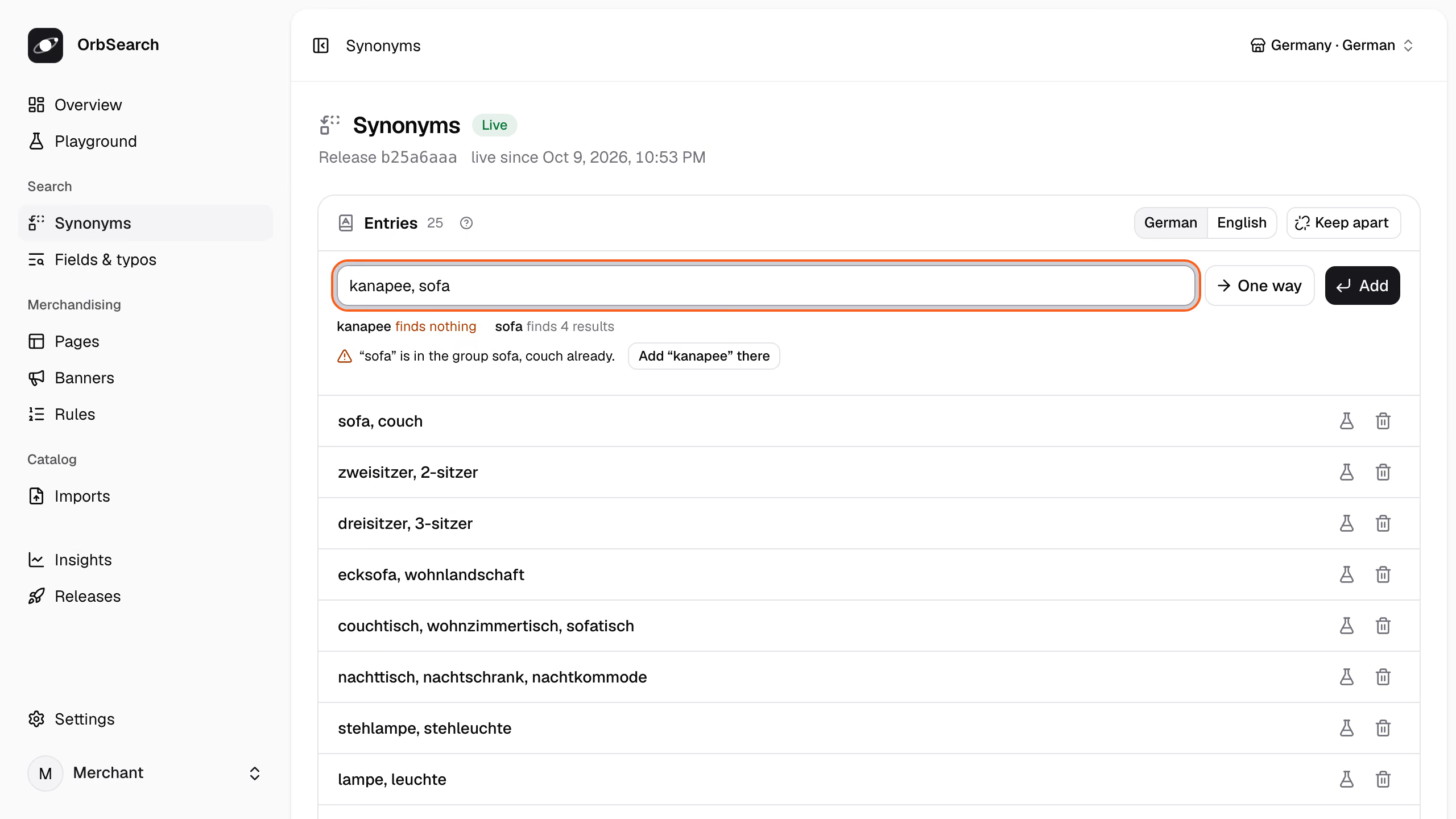
Panel · Search → Synonyms
A word is in one group at most, so the line offers **Add “kanapee” there**, which joins the group of sofa and couch. A line without a clash goes in with Enter; **One way** makes its first word find the others only, and words a never entry keeps apart go in only with **Add anyway**.
The publish bar above the list says how the draft goes live, here within moments and without a rebuild, beside **Publish** and **Discard**. A search that finds nothing in the **Playground** or **Insights** offers **Add a synonym** with its words on this line.
**Through the API:**
Start a draft with the store's export, then add the entry. "sofa" is in a group already, so the add is refused with the entry that holds it:
```sh title="Terminal"
draft=$(curl -s -X POST -H "Authorization: Bearer $key" -H 'Content-Type: application/x-ndjson' \
--data-binary @tests/fixtures/home/catalog.jsonl "$api/imports?name=catalog.jsonl" | jq -r .import.id)
version=$(curl -s -H "Authorization: Bearer $key" $api/imports/$draft | jq -r .version)
jq -n --arg version "$version" '{version: $version, locale: "de", entries: [{kind: "group", words: ["kanapee", "sofa"]}]}' \
| curl -s -H "Authorization: Bearer $key" -H 'Content-Type: application/json' -d @- $api/imports/$draft/synonyms \
| jq -c '.refused[].conflicts[]'
```
```json title="Answer: 422 · 15 ms"
{"id":"taken","word":"sofa","entry":"de/groups/0","words":["sofa","couch"],"sentence":"“sofa” is in the group sofa, couch already."}
```
Add the word to that group instead. A `PATCH` replaces the entry's words:
```sh title="Terminal"
jq -n --arg version "$version" '{version: $version, entry: {kind: "group", words: ["sofa", "couch", "kanapee"]}}' \
| curl -s -X PATCH -H "Authorization: Bearer $key" -H 'Content-Type: application/json' -d @- \
$api/imports/$draft/synonyms/de/groups/0 \
| jq -r '.synonyms.dictionaries[] | select(.locale == "de") | .entries[0].summary'
```
```text title="Answer: 200 · 41 ms"
sofa, couch and kanapee find each other.
```
Open the search page for "kanapee" with the draft's files in place of the live ones:
```sh title="Terminal"
body=$(curl -s -H "Authorization: Bearer $key" $api/imports/$draft | jq '{url: "/suche?q=kanapee", files}')
curl -s -H "Authorization: Bearer $key" -H 'Content-Type: application/json' -d "$body" $api/preview/page \
| jq -c '.location, [.results.sections[] | select(.type == "product") | .hits[].entity]'
```
```json title="Answer: 200 · 32 ms · release 380e9fcc"
"/wohnen/sofas?from=kanapee"
["product:SOFA-ASKA-2","product:SOFA-LUND-3","product:SOFA-NIKO-SCHLAF","product:SOFA-VIDAR-ECK"]
```
The search page `/suche` (search) sends "kanapee" to the sofa page with all four sofas. Ask how the draft goes live, then publish it with `POST $api/imports/$draft/publish`, or discard it:
```sh title="Terminal"
curl -s -H "Authorization: Bearer $key" $api/imports/$draft/publication | jq -r .course.sentence
curl -s -X DELETE -H "Authorization: Bearer $key" $api/imports/$draft | jq -r .state
```
```text title="Answer: 200 · 16 ms"
Goes live within moments: synonyms.json changed only settings the engine applies without reindexing.
discarded
```
A write on a draft that changed since its `version` is refused with `409`. `POST .../synonyms/check` answers what the panel's line shows, without writing.
**Reference:** [`POST .../synonyms`](/docs/reference/management-api#add-synonyms) · [`PATCH .../synonyms/{synonym}`](/docs/reference/management-api#change-synonym) · [`POST .../synonyms/check`](/docs/reference/management-api#check-synonym) · [`POST /api/v1/preview/page`](/docs/reference/management-api#preview-page)
A draft that changes only synonyms goes live as settings, within moments and without a rebuild ([Releases](/docs/releases)).
## Traps and limits
- **Words are folded.** Entries are lowercased, and "Weiß" and "weiss" (white) are one word, in an entry as in a search.
- **`never` guards edits only.** It refuses an added or changed entry that merges its words, unless the write says `despite_never`. A `synonyms.json` written whole keeps such a group, and the list names the clash in its `conflicts`.
- **Each language has its own dictionary.** A locale reads its own, else that of its shorter tag: `de-CH` reads `de`, as the list's `reads` says.
- **A compound counts by its last part.** An entry for "lampe" reaches "Tischlampe" too.
- **A preview shows what a synonym names, not what it finds in text.** The engine keeps the live synonyms until you publish, so "kanapee" previews through the sofa category, while a synonym for a word in product texts shows once live.
**Reference:** [`despite_never`](/docs/reference/management-api#add-synonyms.despite_never) · [`SynonymList`](/docs/reference/management-api#SynonymList)
## Next
- [Patterns](/docs/patterns): turn a phrase such as "bis 220 cm" into a filter.
- [How search understands a query](/docs/query-understanding): everything a query can name.
- [Releases](/docs/releases): draft, preview, publish and roll back.
# Theming
Every --orb-* token, the contrast pairs the defaults meet, the slots parts carry, and the components' styles with or without Tailwind.
The components' look is a set of `--orb-*` tokens and a stylesheet of classes that read them. [Customize](/docs/customize) shows the steps; this page lists what they work with:
```css title="apps/shop/app/app.css"
@import "@orbsearch/react/orbsearch.css";
@import "./theme.css";
```
## The tokens
Each token starts with `--orb-`; after the first in a row, the table names the rest by what follows:
| Tokens | Set |
| ----------------------------------------------------------------------- | ---------------------------------------------------------------------------------------- |
| `--orb-color-ground`, `surface`, `well` | The page, panels and popups, the well behind a photo |
| `--orb-color-ink`, `ink-muted`, `line`, `line-strong` | Text, quieter text, lines; `line-strong` outlines a control |
| `--orb-color-accent`, `on-accent`, `accent-soft` | The one action color, text on it, a chosen value's tint |
| `--orb-color-hover`, `sale`, `rating`, `focus`, `scrim` | A hovered row, sale prices, filled stars, focus rings, what dims the page behind a sheet |
| `--orb-font-sans`, `font-display`, `display-weight`, `tracking-display` | Type |
| `--orb-text-display`, `text-display-sm` | The size of a page's title |
| `--orb-radius-control`, `radius-card`, `radius-sheet`, `radius-row` | Corners of controls, tiles and popups, the sheet, a facet's value row |
| `--orb-shadow-pop` | A popup's shadow |
| `--orb-spacing-target`, `spacing-gutter` | The smallest target (2.75rem), the side margin on a phone |
| `--orb-container-shop`, `aspect-media` | How wide a page's content grows, a product photo's frame |
| `--orb-tile-columns`, `tile-columns-md`, `tile-columns-xl` | Tiles in a row: 2, 3 from 48rem, 4 from 80rem |
| `--orb-grade-width`, `grade-step`, `grade-shape`, `grade-tip` | A grade's badge, such as an energy class |
| `--orb-swatch-count` | A swatch's count `beside` its name or `on` it |
| `--orb-ease-out-soft`, `motion-fast`, `motion-base` | Motion's curve, a press or popover (140 ms), a sheet or panel (220 ms) |
| `--orb-motion-wait` | How long a quick answer may take before the results' photos dim (150 ms) |
Every default stands in the `:root` block of `packages/react/orbsearch.css`. `packages/react/src/theme.css` explains each one, written without the prefix Tailwind's `prefix(orb)` adds: its `--color-ink` is `--orb-color-ink`.
## Contrast the defaults meet
The default colors meet WCAG 2.2 AA in these pairs:
- **Text:** `ink`, `ink-muted`, `sale` and `accent` reach 4.5:1 on `ground`, `surface`, `well` and `accent-soft`.
- **Lines and marks:** `line-strong`, `rating` and `focus` reach 3:1 on `ground` and `surface`.
Keep these pairs when a theme changes a color, or the shop fails AA where the components met it.
## Slots and states
Every part carries a `data-slot` attribute to select it by, such as `search-input`, `suggestions`, `product-tile`, `tile-price`, `rating`, `price-now`, `facet`, `filter-chip`, `sheet` or `load-more`. Some say their state too:
- `data-field` and `data-kind` on a [facet](/docs/reference/glossary#facet), `data-kind` on a suggestion.
- `data-sold-out` on a tile; the ad label's slot is `tile-sponsored` or `suggestion-sponsored`.
- `data-source` on a chip: `shopper`, `query` or `rule`.
- `data-placement` (`top`, `grid` or `bottom`) and `data-kind` (`banner` or `teaser`) on a `banner`.
Load rules that select them after the components' styles, as a theme.
## Without Tailwind
`orbsearch.css` holds the tokens' defaults and every class the components use, unlayered, so a reset such as `button { all: unset }` loses to it. Import it once, as a stylesheet or from JavaScript, and your theme after it. A shop whose own Tailwind has no prefix uses it too.
## With Tailwind v4
Build the components' classes with your own Tailwind, under the `orb` prefix they are written with, as the demo's `app/styles/app.css` does:
```css title="apps/shop/app/app.css"
@import "tailwindcss/theme.css" prefix(orb);
@import "@orbsearch/react/theme.css";
@import "tailwindcss/preflight.css" layer(base);
@import "tailwindcss/utilities.css" source(none);
/* The shop's own files, and the components' source, relative to this file. */
@source "../";
@source "../../../packages/react/src";
```
Your own classes use the prefix too, such as `orb:text-ink`. `theme.css` adds `orb:hover:`, which applies only to a pointer that hovers, and `orb:press`, the components' press for a button of yours; set `--orb-press-scale: 0.98` on one as wide as its panel.
## Next
- [Customize](/docs/customize): tokens, slots, swapped parts and components of your own, step by step.
- [Accessibility](/docs/accessibility): what a theme keeps for keyboard and screen reader users.
- [React components](/docs/react): the parts the slots belong to.
# Types and attributes
Say what each entry of the catalog is and what its values mean, so "164 cm" filters as a width and "Samt" shows as velvet in English.
Every [entity](/docs/reference/glossary#entity) in the catalog has one [type](/docs/reference/glossary#type), such as product or category, and its properties are [attributes](/docs/reference/glossary#attribute), such as color and width. `types.json` says how each type is searched and shown, `attributes.json` what each value means. Here is the sofa `SOFA-ASKA-2` on an English page:
```sh title="Terminal"
curl -s 'http://127.0.0.1:7800/v1/product?id=SOFA-ASKA-2&locale=en' \
| jq -c '.product | (.details[] | select(.attribute | IN("material", "width", "seats"))),
(.variants[] | {id, color: .details[0].values})'
```
```json title="Answer: 200 · 2.4 ms · release b25a6aaa"
{"attribute":"material","label":"Material","values":["Engineered wood","Velvet"]}
{"attribute":"width","label":"Width","values":[164],"unit":"cm"}
{"attribute":"seats","label":"Seats","values":[2]}
{"id":"SOFA-ASKA-2-GRAU","color":["Grey"]}
{"id":"SOFA-ASKA-2-SALBEI","color":["Sage"]}
```
The catalog writes "Holzwerkstoff", "Samt", "164 cm", "Grau" and "Salbei". `attributes.json` makes them options with English labels, a width in centimeters and a color per variant.
## Types
Each entity names its type, such as `"type": "product"`. `types.json` lists the types a [release](/docs/reference/glossary#release) searches, and for each what it searches, returns and lists:
```json title="tests/fixtures/home/types.json (trimmed)"
{
"types": [
{
"type": "product",
"search": ["title", "brand", "keywords", "attributes.color", "description"],
"result": ["title", "url", "image", "price", "sale_price", "badges", "signals.rating"],
"details": ["color", "material", "upholstery", "width", "seats"]
},
{ "type": "category", "search": ["title", "keywords", "description"], "result": ["title", "url", "path"] }
]
}
```
- `search` names the searched fields in priority order ([Fields and typos](/docs/fields-and-typos)).
- `result` names the fields a hit returns, badges and signals such as the rating included.
- `details` names the attributes a product page lists, in this order.
`product`, `service`, `category`, `content` and `brand` are built in. Any other code is a type of the merchant's own, with the `capabilities` it needs: `variants`, `offers` or `tree`. Only listed types are searched; an entity of another type is left out and reported.
**Reference:** [`types.json`](/docs/reference/release-files/types) · [`capabilities`](/docs/reference/release-files/types#capabilities) · [`result`](/docs/reference/release-files/types#result) · [`details`](/docs/reference/release-files/types#details)
## Attributes
An attribute says what one property's values mean: their type, their unit and, for an option, the values it knows. Here are the home store's color and width:
```json title="tests/fixtures/home/attributes.json (trimmed)"
{
"attributes": [
{
"code": "color",
"type": "option",
"label": { "de": "Farbe", "en": "Color" },
"level": "variant",
"values": [
{
"code": "sage",
"label": { "de": "Salbei", "en": "Sage" },
"aliases": ["salbei", "salbeigrün", "sage green"],
"group": "green",
"swatch": "#9CAF92"
}
],
"groups": [{ "code": "green", "label": { "de": "Grün", "en": "Green" }, "aliases": ["grün", "grünes"] }],
"color_groups": true,
"filterable": true,
"detect_in_query": true
},
{
"code": "width",
"type": "quantity",
"label": { "de": "Breite", "en": "Width" },
"unit": "cm",
"filterable": true
}
]
}
```
Each value has a label per locale, aliases for other spellings, a swatch and a group: sage shows under green. `color_groups` places a value without a group by the color words in its name, and `level: variant` lets the color differ between [variants](/docs/variants).
Both attributes are `filterable`, so pages offer them as [facets](/docs/reference/glossary#facet). `detect_in_query` reads "graues Sofa" (grey sofa) as a filter by grey ([How search understands a query](/docs/query-understanding)).
**Reference:** [`type`](/docs/reference/release-files/attributes#type) · [`values`](/docs/reference/release-files/attributes#values) · [`groups`](/docs/reference/release-files/attributes#groups) · [`color_groups`](/docs/reference/release-files/attributes#color_groups) · [`filterable`](/docs/reference/release-files/attributes#filterable)
## How values are read
Each type reads what the catalog writes its own way:
| `type` | The catalog writes | It becomes | Filters as |
| ------------ | ------------------------------ | ------------------------------------------- | -------------------------- |
| `option` | "Grau", "GRAU", "salbeigrün" | The value it names: grey, sage | `list`, `swatch` |
| `quantity` | "164 cm", "6 ft", `164` | 164, 182.88 and 164 in the attribute's unit | `range`, `buckets`, `list` |
| `number` | `2`, "1,5" | 2, 1.5 | `range`, `list` |
| `boolean` | `true`, "ja", "nein" (yes, no) | true, false | `toggle` |
| `text` | Free text | Searchable text | Never |
| `identifier` | A GTIN or a model number | Text matched exactly | Never |
`date` and `range` are read too. A value that does not fit, such as a width in kilograms, is left out, its entity stays searchable without it, and the [import report](/docs/import-report) lists it.
In the panel, an import that leaves `attributes.json` out lists what it derived under **Set up for you → Product details**, each with **Why**. The panel does not change an attribute: its **Filters and search** step only chooses whether a detail is a filter, searched or not used.
**Reference:** [`unit`](/docs/reference/release-files/attributes#unit)
## Spellings
A spelling is the value whose code, label or alias it matches, whatever its case, accents or ß: "Weiß", "weiss" and "WEISS" are all white. A spelling nobody listed becomes a value of its own, labeled as written, and the live [index run's](/docs/reference/glossary#index-run) report lists it:
```sh title="Terminal"
curl -s -H "Authorization: Bearer $key" $api/live \
| jq -c '.report.values.derived[] | select(.attribute == "color") | {value, label, groups, placed: .placed.by}'
```
```json title="Answer: 200 · 12 ms"
{"value":"klarglas","label":"Klarglas","groups":["clear"],"placed":"name"}
{"value":"rauchglas","label":"Rauchglas","groups":null,"placed":"nothing"}
```
The pendant lamp comes in Klarglas (clear glass) and Rauchglas (smoked glass), which `attributes.json` does not list. `color_groups` placed Klarglas in the group clear by its name; Rauchglas names no color, so it stands alone in the color facet until the merchant gives it a group.
**Reference:** [`aliases`](/docs/reference/release-files/attributes#values.aliases) · [`GET /api/v1/live`](/docs/reference/management-api#live)
## Slugs
A slug is a value's word in URLs, per locale. It is made once from the label and stored:
```json title="tests/fixtures/home/attributes.json (trimmed)"
{ "code": "green", "label": { "de": "Grün", "en": "Green" }, "slug": { "de": "gruen", "en": "green" } }
```
- **CLDR's rules per locale:** Grün is `gruen` in German, Größe (size) `groesse`.
- **Kept when the label changes.** A draft that renames a label keeps its slug. One that changes the slug keeps the old one in `slug_aliases`, so old URLs still lead to the value.
- **One value per slug.** A value nobody listed gets a numbered one, such as `gruen-2`.
A release stored whole with `POST $api/releases` is taken as written: a value without a slug gets one made at every run, counted in `values.unstored`, since a new label would move its URLs.
**Reference:** [`slug`](/docs/reference/release-files/attributes#values.slug) · [`slug_aliases`](/docs/reference/release-files/attributes#values.slug_aliases)
## Next
- [Variants](/docs/variants): products that come in colors and sizes.
- [Channels](/docs/channels): the locales labels and slugs are written in.
- [The import report](/docs/import-report): every value left out or derived.
# URLs and redirects
Serve the merchant's own URLs, keep a listing's state in its URL, and carry the old shop's links over.
OrbSearch imposes no URL: the [catalog](/docs/reference/glossary#catalog) and `routes.json` say where each page sits. In the home store:
| Page | German | English |
| ------------------------------------------ | ----------------------- | ---------------------------- |
| The category `wohnen/sofas` (living/sofas) | `/wohnen/sofas` | `/en/living/sofas` |
| The product `SOFA-ASKA-2` | `/p/aska-2-sitzer-sofa` | `/en/p/aska-two-seater-sofa` |
| Search | `/suche` | `/en/search` |
A category's path and a product's `url` come from the catalog, the search page's path from `routes.json`. A brand's page sits at the brand's `url` while the release has a brand facet.
## A listing's state in its URL
A listing keeps its query, filters, sort and page in its URL, so a link, the back button and a search engine see what the shopper sees. Each state has one spelling, and any other answers `301` to it:
```sh title="Terminal"
for url in '/wohnen/sofas?color=Grau' '/wohnen/sofas?COLOR=grey' '/wohnen/sofas?width.lte=220&color=grey'; do
curl -s -G http://127.0.0.1:7800/v1/resolve --data-urlencode "url=$url" -d results=0 | jq -c '{status, location}'
done
```
```json title="Answer: 200 · 1.5 ms · release b25a6aaa"
{"status":301,"location":"/wohnen/sofas?color=grey"}
{"status":301,"location":"/wohnen/sofas?color=grey"}
{"status":301,"location":"/wohnen/sofas?color=grey&width.lte=220"}
```
A value reads by its label, slug or alias in any case: Grau is grey's German label. Filters stand in alphabetical order with their values sorted. A range is the field with `.gte` and `.lte`, a toggle `1`.
A parameter nothing reads, such as `utm_source`, is ignored, and the `301` keeps it. A value the page cannot read, such as an unknown sort, leads to the URL without it. The reserved `q`, `sort`, `page`, `from`, `ignore` and `redirect` may stand anywhere, so [the client's](/docs/client) links need no redirect.
**Reference:** [`parameters`](/docs/reference/release-files/routes#parameters)
## Resolve a URL
Ask resolve before rendering a byte. It says what the page is, the status to answer with, its robots and, for a listing, the search it runs:
```sh title="Terminal"
curl -s -G http://127.0.0.1:7800/v1/resolve --data-urlencode 'url=/wohnen/sofas?color=grey' -d results=0 \
| jq -c '{type, status, robots, entity}, .breadcrumbs, .request'
```
```json title="Answer: 200 · 3.0 ms · release b25a6aaa"
{"type":"category","status":200,"robots":"noindex,follow","entity":"category:wohnen/sofas"}
[{"title":"Wohnen","url":"/wohnen"},{"title":"Sofas","url":"/wohnen/sofas"}]
{"on":"category_page","channel":"de","locale":"de","category":"wohnen/sofas","filters":{"color":"grey"}}
```
The call itself answers 200; `status` is the storefront's to answer with. Without `results=0`, the listing's `results` come in the same call. A filter state such as grey is `noindex,follow`; the sofa page alone is `index,follow`, with its path as `canonical`.
Resolve tries the legacy table, the search page, categories and brands, filter pages, then products. It answers one of these types:
- `category` or `brand`: a listing, with its `request`, `results` and a category's `breadcrumbs`.
- `search`: the search page, always `noindex,follow`.
- `product`: a product's page, with `product` as [`GET /v1/product`](/docs/product-pages) answers it.
- `redirect`: `location` names the final URL, never a chain.
- `gone`: `410`, a URL removed on purpose.
- `not_found`: `404`, no page OrbSearch knows.
Once its results are known, a listing past its last page, or an indexable one that shows nothing, answers `404` with its body. A search whose query names a whole page, such as `/suche?q=graues+sofa` (grey sofa), [redirects](/docs/reference/glossary#redirect) there with `302`.
**Reference:** [`GET /v1/resolve`](/docs/reference/query-api#resolve) · [`type`](/docs/reference/query-api#resolve.answer.type) · [`robots`](/docs/reference/query-api#resolve.answer.robots)
## routes.json
`routes.json` spells the merchant's URLs, and every field is optional. The home store's names only its search page:
```json title="tests/fixtures/home/routes.json (trimmed)"
{
"search": { "de": "/suche", "en": "/en/search" }
}
```
Other fields rename parameters, such as `color` to `farbe`, set trailing slashes, and say where a search lands that names a whole page.
**Reference:** [`routes.json`](/docs/reference/release-files/routes) · [`search`](/docs/reference/release-files/routes#search) · [`landing`](/docs/reference/release-files/routes#landing) · [`trailing_slash`](/docs/reference/release-files/routes#trailing_slash)
### Filter pages
A filter page gives a combination of filters a clean path that a search engine can rank. The home store lists none; with these lines in `routes.json`:
```json title="routes.json"
{
"filter_pages": {
"facets": ["brand", "color"],
"combinations": [["brand"], ["color"], ["brand", "color"]],
"before_category": { "brand": "marken" }
}
}
```
the sofas get these URLs:
| The sofas with | One URL |
| ------------------ | ------------------------------------------- |
| Halvard | `/marken/halvard/wohnen/sofas` |
| grey | `/wohnen/sofas/color--grau` |
| Halvard in grey | `/marken/halvard/wohnen/sofas/color--grau` |
| grey or anthracite | `/wohnen/sofas?color=anthracite&color=grey` |
A segment is the parameter's name, `--` and the value's slug in the page's [locale](/docs/reference/glossary#locale); marken means brands. Other spellings of these states answer `301` to the path. A filter page with fewer than `min_products` products, 4 by default, stays `noindex`, as the two grey sofas do. [`POST /api/v1/preview/page`](/docs/reference/management-api#preview-page) tries a URL under a draft's files before you publish them.
**Reference:** [`filter_pages`](/docs/reference/release-files/routes#filter_pages) · [`min_products`](/docs/reference/release-files/routes#min_products)
## redirects.json
`redirects.json` carries the old shop's URLs over. It is part of the [release](/docs/reference/glossary#release) and held in memory, so an old URL costs no engine call:
```json title="redirects.json"
{
"redirects": [
{ "from": "/sofas.html", "to": "category:wohnen/sofas" },
{ "from": "/index.php", "query": { "cat": "12" }, "to": "category:wohnen" },
{ "from": "/outlet-2019", "status": 410 },
{ "pattern": "^/kategorie/(.+?)/?$", "url": "/wohnen/$1" }
]
}
```
`/sofas.html` answers `301` to `/wohnen/sofas`, wherever the catalog later moves the sofa page, and `/outlet-2019` answers `410`. Exact entries answer first, then the patterns in order, and a chain of old URLs is followed to its end.
**Reference:** [`redirects.json`](/docs/reference/release-files/redirects) · [`from`](/docs/reference/release-files/redirects#from) · [`pattern`](/docs/reference/release-files/redirects#pattern) · [`status`](/docs/reference/release-files/redirects#status)
## A storefront on resolve
One catch-all route behind the shop's own pages, such as its cart, answers every other path:
```tsx twoslash title="app/routes/page.tsx"
import { createSearch, locationOf } from "@orbsearch/client";
import { data, redirect, type LoaderFunctionArgs, type MetaFunction } from "react-router";
const ORIGIN = "https://shop.example";
export async function loader({ request, url }: LoaderFunctionArgs) {
const userAgent = request.headers.get("user-agent");
const search = createSearch({ endpoint: "https://search.shop.example", ...(userAgent && { userAgent }) });
const page = await search.resolve(url.pathname + url.search, { locale: "de" }, { signal: request.signal });
const location = locationOf(page);
if (location !== null) throw redirect(location, page.status);
if (page.type === "gone" || page.type === "not_found") throw data(null, { status: page.status });
// A listing or a product, with 404 for an empty indexable listing or a page past its last.
return data(page, { status: page.status });
}
export const meta: MetaFunction = ({ loaderData: page }) => [
...(page?.robots ? [{ name: "robots", content: page.robots }] : []),
...(page?.canonical ? [{ tagName: "link", rel: "canonical", href: ORIGIN + page.canonical }] : []),
];
```
`locationOf(page)` percent-encodes a redirect's path, such as `/möbel`, for the `Location` header. A listing renders from `page.results`, a product from `page.product`, with the [React components](/docs/react) or your own.
## Robots
`GET /v1/robots` answers the `Disallow` lines that keep crawlers off every state the release does not make indexable:
```sh title="Terminal"
curl -s http://127.0.0.1:7800/v1/robots | jq -r '.lines[] | select(test("\\*&|color=|width|suche"))'
```
```text title="Answer: 200 · 2.8 ms · release b25a6aaa"
Disallow: /*?*&
Disallow: /*?color=
Disallow: /*?width.
Disallow: /*?width=
Disallow: /suche$
Disallow: /suche?
```
Any URL with a second parameter, each parameter no indexable page uses, and the search page are off limits; `?page=N` alone stays crawlable. Serve the lines in the shop's own `robots.txt`, under `User-agent: *`.
**Reference:** [`GET /v1/robots`](/docs/reference/query-api#robots)
## Limits today
- **URLs are paths.** The storefront puts its own origin in front, as above. Listings carry no `hreflang` alternates; a product carries its own in `alternates`.
- **A product's URL matches only as the catalog writes it,** not in another case or with a trailing slash.
- **The search page wins** where its path is also a category's.
- **The client writes parameters by their codes, onto the page's own path.** So a storefront on the [React components](/docs/react) keeps `parameters` and `filter_pages` empty: a renamed parameter loses a choice after one click, and a filter page's own filter cannot be taken back.
## Next
- [Category pages](/docs/category-pages): what a category's listing answers.
- [Product pages](/docs/product-pages): what a product's page answers.
- [React components](/docs/react): pages that render resolve's answer.
# Variants
Sell a product in colors and sizes, each variant with its own price and stock, and show the one the shopper filtered for.
A [variant](/docs/reference/glossary#variant) is one buyable version of a product, such as the Aska sofa in grey or in sage (Salbei). Each variant carries its own options, price and stock, and the product holds what they share:
```json title="tests/fixtures/home/catalog.jsonl, SOFA-ASKA-2 (trimmed)"
{
"type": "product",
"id": "SOFA-ASKA-2",
"title": { "de": "Aska 2-Sitzer-Sofa aus Samt", "en": "Aska two-seater velvet sofa" },
"categories": ["wohnen/sofas"],
"attributes": { "seats": 2, "width": "164 cm", "upholstery": "Samt" },
"varies_by": ["color"],
"variants": [
{
"id": "SOFA-ASKA-2-GRAU",
"attributes": { "color": "Grau" },
"price": 749.0,
"availability": "in_stock",
"stock": 12
},
{
"id": "SOFA-ASKA-2-SALBEI",
"attributes": { "color": "Salbei" },
"price": 749.0,
"sale_price": 649.0,
"availability": "in_stock",
"stock": 4
}
]
}
```
`varies_by` names the attributes the variants differ by, and no two variants share the same values of them. A product without variants is its own single variant, with its offer on itself. An export with one row per variant, such as a CSV file, groups its rows into products by a parent column ([Importing and mapping](/docs/importing)).
**Reference:** [`varies_by`](/docs/reference/catalog/entity#varies_by) · [`variants`](/docs/reference/catalog/entity#variants)
## Attributes that differ per variant
An attribute at `level: variant` may differ between a product's variants, such as the home store's color and size:
```json title="tests/fixtures/home/attributes.json (trimmed)"
{ "attributes": [{ "code": "color", "type": "option", "level": "variant" }] }
```
Every other attribute belongs to the product, the default `level`. The level tells facets and filters that one product may hold several values at once. A release without `attributes.json` derives it: an attribute the catalog writes on variants becomes a variant's.
**Reference:** [`level`](/docs/reference/release-files/attributes#level)
## A filter picks the variant
A tile stands for the whole product, every color included, until the shopper chooses a variant's value. Then it shows the first variant that meets every choice, and names it in `variant`:
```sh title="Terminal"
curl -s http://127.0.0.1:7800/v1/search -H 'Content-Type: application/json' \
-d '{"on": "category_page", "category": "wohnen/sofas", "filters": {"color": "green"}}' \
| jq -c '.sections[] | select(.type == "product") | .hits[] | {entity, variant, color: .fields["attributes.color"]}'
```
```json title="Answer: 200 · 4.4 ms · release b25a6aaa"
{"entity":"product:SOFA-ASKA-2","variant":"SOFA-ASKA-2-SALBEI","color":"Salbei"}
{"entity":"product:SOFA-LUND-3","variant":"SOFA-LUND-3-MOSS","color":"Moosgrün"}
```
Sage (Salbei) and moss green (Moosgrün) both belong to the group green. Each tile takes its variant's values, and its title, URL and photos where the variant has its own, so the Aska shows sage. Without a filter, `variant` is left out and the Aska's tile lists both colors.
The tile's offer stays the whole product's. Under a grey filter the Aska shows grey, but still at the 649 € sale
price only sage has; the [product page](/docs/product-pages#variants) has each variant's own offer.
A facet counts tiles, so with one tile per product a sofa counts once, however many of its variants match. Where variants differ, some counts can only be [upper bounds](/docs/reference/glossary#upper-bound), and the answer marks them ([Upper bounds](/docs/facets#upper-bounds)).
**Reference:** [`variant`](/docs/reference/query-api#search.answer.sections.hits.variant)
## A tile per product, variant or color
`listing` in `types.json` says what one tile stands for:
```json title="types.json"
{ "types": [{ "type": "product", "listing": { "axis": "color" } }] }
```
- `"product"`, the default: one tile per product.
- `"variant"`: one tile per variant, with the variant's own offer.
- `{ "axis": "color" }`: one tile per value of an attribute the variants differ by. The bed `BETT-NORA` lists twice: grey, which comes in three sizes, and sage.
A finer tile shows its first variant's title, URL and photos, and a product that does not vary by the axis stays one tile. The axis is one option, quantity or boolean at `level: variant`. Changing `listing` rebuilds the indexes in an [index run](/docs/reference/glossary#index-run).
**Reference:** [`listing`](/docs/reference/release-files/types#listing)
## Next
- [Product pages](/docs/product-pages#variants): each variant with its options and offer.
- [Live prices and stock](/docs/prices-and-stock): change a variant's price between two catalogs.
- [Facets and filters](/docs/facets): the choices that pick a variant.
# Your own catalog
Send the export your shop already writes and search it, without writing any configuration first.
Your shop's [export](/docs/reference/glossary#export) goes live as it is: CSV, Excel, a Google Merchant Center feed or JSON. OrbSearch derives the channel, the attributes, the filters and the sorting from the data itself.
This page sends the example store's export, a German Excel CSV, with the stack and the `$key` and `$api` of the [Quickstart](/docs/quickstart#keep-the-management-key-at-hand).
### Publish an empty release
A [release](/docs/reference/glossary#release) without files lets the catalog decide every setting:
```sh title="Terminal"
empty=$(curl -s -H "Authorization: Bearer $key" -H 'Content-Type: application/json' -d '{"files": {}}' $api/releases \
| jq -r .id)
curl -s -X POST -H "Authorization: Bearer $key" $api/releases/$empty/publish >/dev/null
```
### Send the export
Send the file as your shop writes it, and wait for its [index run](/docs/reference/glossary#index-run):
```sh title="Terminal"
run=$(curl -s -X PUT -H "Authorization: Bearer $key" -H 'Content-Type: text/csv' \
--data-binary @tests/fixtures/feeds/home/export.csv $api/catalog | jq -r .run.id)
until curl -s -H "Authorization: Bearer $key" $api/index-runs/$run \
| jq -e '.state | IN("queued", "running") | not' >/dev/null; do sleep 1; done
curl -s -H "Authorization: Bearer $key" $api/index-runs/$run | jq -c '{state, entities: .report.entities}'
```
```json title="Answer: 200 · 19 ms"
{"state":"succeeded","entities":37}
```
The indexer recognizes the format, the encoding and the delimiter from the bytes. The content type only names the file.
### See what it derived
The run's report gives every [derived setting](/docs/reference/glossary#derived-setting) its evidence. Here is why the column `Farbe` (color) became the attribute `color`:
```sh title="Terminal"
curl -s -H "Authorization: Bearer $key" $api/index-runs/$run \
| jq -c '.report.defaults.reasons[] | select(.setting == "color") | .reason'
```
```json title="Answer: 200 · 17 ms"
{"by":"values","type":"option","share":100,"values":40,"distinct":24}
{"by":"varies","products":14}
{"by":"colors","share":97}
{"by":"faceted"}
```
Its values read as options and differ between a product's variants. Of its values, 97 % are color words, so Grau and Hellgrau (light grey) join the group grey. Pages filter by it, so a query that names a color is read as that filter.
### Search
The quickstart's search works on the export too:
```sh title="Terminal"
curl -s 'http://127.0.0.1:7800/v1/search?query=graues%20Sofa&debug=1' \
| jq -c '.resolution, [.sections[] | select(.type == "product") | .hits[].entity], .trace.derived'
```
```json title="Answer: 200 · 5.1 ms · release 44136fa3"
{"category":"wohnen/sofas","filters":{"color":"grey"},"text":"","complete":true}
["product:SOFA-ASKA-2","product:SOFA-NIKO-SCHLAF"]
["attributes.json","categories.json","channels.json","ranking.json","rules.json","types.json"]
```
The same two sofas, and `trace.derived` names the six release files the run derived instead of reading them.
## When the defaults are not enough
Write the file you want to decide yourself into the release, such as [`attributes.json`](/docs/reference/release-files/attributes). A file the release writes is yours, and the run keeps deriving the files it leaves out ([Defaults](/docs/releases#defaults-and-zero-configuration) says how the two meet).
The words of an export tell German from English only. A column named for its language, such as `Name FR`, adds that locale; a shop in another language names its locale in [`channels.json`](/docs/reference/release-files/channels).
## Next
- [Importing and mapping](/docs/importing): check what an export becomes before it goes live, and correct how its columns are read.
- [Releases](/docs/releases): write the release files you want to own.
- [Concepts](/docs/concepts): how a catalog and a release meet.
# Your storefront
Run a shop on the home store in a few minutes, with the search box, listing and product pages of the React components.
From an empty folder to a shop with search, filters and product pages, in six files. You need the stack with the home store from the [Quickstart](/docs/quickstart), and every command runs from the repository root.
The two packages, `@orbsearch/client` and `@orbsearch/react`, are not on npm yet. So the shop lives inside the repository's pnpm workspace, as the demo storefront in `apps/demo` does, and uses React Router.
### Create the app
Make the folder `apps/shop` with its manifest and its Vite config:
```json title="apps/shop/package.json"
{
"name": "shop",
"private": true,
"type": "module",
"dependencies": {
"@orbsearch/client": "workspace:*",
"@orbsearch/react": "workspace:*",
"@react-router/node": "catalog:",
"isbot": "catalog:",
"react": "catalog:",
"react-dom": "catalog:",
"react-router": "catalog:"
},
"devDependencies": {
"@react-router/dev": "catalog:",
"@types/react": "catalog:",
"@types/react-dom": "catalog:",
"vite-plus": "catalog:"
}
}
```
```ts title="apps/shop/vite.config.ts"
import { reactRouter } from "@react-router/dev/vite";
import { defineConfig } from "vite-plus";
export default defineConfig({ plugins: [reactRouter()] });
```
`catalog:` takes the versions the whole workspace uses.
### Make a client per page load
Every search of one page load names the same page view, which [Insights](/docs/reference/glossary#insights) counts queries by. So the shop makes a client per request on the server, and one in the browser:
```ts twoslash title="apps/shop/app/search.ts"
import { createSearch } from "@orbsearch/client";
const endpoint = "http://127.0.0.1:7800";
// One client per page load: the server's for each request, the browser's with the page view the server named.
export function searchFor(pageView: string, userAgent?: string | null) {
return createSearch({ endpoint, pageView, ...(userAgent && { userAgent }) });
}
```
The browser asks the same address for suggestions and "Load more", so it must reach the [Query API](/docs/reference/glossary#query-api) too. It needs no key.
### Answer every path
One route answers every path. It asks `resolve` what the path is, a listing, a product, a redirect or nothing, and renders the page for it:
```ts title="apps/shop/app/routes.ts"
import { route, type RouteConfig } from "@react-router/dev/routes";
export default [route("*", "routes/shop.tsx")] satisfies RouteConfig;
```
```tsx title="apps/shop/app/routes/shop.tsx"
import { isListing, locationOf } from "@orbsearch/client";
import { ListingPage, ProductPage, listingView } from "@orbsearch/react";
import { data, redirect, useLoaderData, type LoaderFunctionArgs } from "react-router";
import { searchFor } from "../search.ts";
export async function loader({ request, url }: LoaderFunctionArgs) {
const pageView = crypto.randomUUID();
const search = searchFor(pageView, request.headers.get("user-agent"));
const page = await search.resolve(url.pathname + url.search, { locale: "de" }, { signal: request.signal });
const status = { status: page.status };
if (isListing(page)) {
const listing = listingView(page, { path: url.pathname, locale: "de" });
return data({ kind: "listing" as const, listing, pageView }, status);
}
if (page.product) {
return data({ kind: "product" as const, product: page.product, path: url.pathname, pageView }, status);
}
const location = locationOf(page);
if (location !== null) throw redirect(location, page.status);
throw data(null, status);
}
export default function Shop() {
const shown = useLoaderData();
if (shown.kind === "product") {
return ("routes/shop");
const pageView = shown?.pageView;
// The browser's searches count as the page load the server answered.
const search = useMemo(() => searchFor(pageView ?? crypto.randomUUID()), [pageView]);
const listing = shown?.kind === "listing" ? shown.listing : undefined;
return (
void navigate(href, {
...(replace && { replace }),
...(keepScroll && { preventScrollReset: true }),
})
}
>
{children}