Pages and their filters
Choose the filters and sorting of each page, so the sofa page offers width and seats and the lamp page the light source.
Shoppers on the sofa page narrow by width and seats, on the lamp page by the light source. categories.json lays out each page's facets and sorting: default for every page, nodes for the categories that differ.
{
    "default": {
        "facets": ["category", { "field": "price", "display": "histogram" }, "style", "on_sale", "availability"]
    },
    "nodes": [
        {
            "category": "wohnen/sofas",
            "facets": [
                "width",
                { "field": "seats", "kind": "list", "display": "buttons" },
                "color",
                "upholstery",
                "price"
            ]
        },
        { "category": "leuchten", "facets": ["room", "light_source", "material", "color", "price"] }
    ]
}
A node names a category of the catalog, such as the sofas wohnen/sofas (wohnen: living) or the lamps leuchten. Its list replaces the one the page would inherit, whole and in its order.
Reference: default · nodes · where
Where a page's settings come from
A page takes its facets from the nearest node up the tree that lists some, else from default. The management API says which, for any page:
curl -s -H "Authorization: Bearer $key" -H 'Content-Type: application/json' \
  -d '{"category": "wohnen/sofas"}' $api/pages/settings | jq -c '.facets | .origin, [.facets[].field]'
curl -s -H "Authorization: Bearer $key" -H 'Content-Type: application/json' \
-d '{"category": "leuchten/stehleuchten"}' $api/pages/settings | jq -c '.facets | .origin, [.facets[].field]'{"from":"page"}
["width","seats","color","upholstery","shape","features","seat_height","price","delivery_days","brand"]
{"from":"category","category":"leuchten","title":"Leuchten"}
["room","light_source","color_temperature","features","material","color","price","energy_class"]The sofa page sets its own. The floor lamps (Stehleuchten) have no node, so they take those of the lamps (Leuchten) above them. A page with no node above it takes default, and so does the search page, unless its query names a category.
Groups, the default sort and the sort options are inherited the same way, each on its own: a node that sets only its sort keeps the facets above it.
Reference: POST /api/v1/pages/settings · origin
How a facet is shown
A facet is a field code, or an object that says how to count and draw it:
[
    { "field": "seats", "kind": "list", "display": "buttons" },
    { "field": "price", "display": "histogram" },
    {
        "field": "color_temperature",
        "kind": "buckets",
        "buckets": [
            { "to": 3300, "label": { "de": "Warmweiß", "en": "Warm white" } },
            { "from": 3300, "to": 5300, "label": { "de": "Neutralweiß", "en": "Neutral white" } },
            { "from": 5300, "label": { "de": "Tageslichtweiß", "en": "Daylight" } }
        ]
    }
]
kind decides what is counted: a list, swatches, a range, buckets, a toggle or the hierarchical category tree. display decides how the storefront draws it, such as the seats as buttons. The lamps count color temperature in three buckets, and the price is a range drawn as a histogram, which no other field has.
A field code alone is shown as default shows it, else in its natural kind: a list for options, a range for numbers. The settings answer marks such a facet shown_as_default.
Reference: kind · display · buckets · every key of a facet · shown_as_default
Groups
A group draws several facets of a page under one heading. The home store has none, but the sofa page could gather width and seat height under "Maße" (measures):
{
    "category": "wohnen/sofas",
    "groups": [{ "group": "measures", "label": { "de": "Maße", "en": "Measures" }, "facets": ["width", "seat_height"] }]
}
A group stands where its first facet stands, and its facets keep their own settings. With "display": "finder", they stand side by side as selects, so each must be shown as select. The panel shows a group as one row; you write groups in categories.json.
Sorting
sort.default sets the order a page without words starts in, and sort.options the orders shoppers can choose:
{
    "category": "wohnen/sofas",
    "sort": { "default": "price_asc", "options": ["relevance", "price_asc", "price_desc"] }
}
The options are relevance and the sorts of ranking.json. A search with words starts by relevance, and the shopper's own choice wins over both. The home store starts every page by relevance; Sorting shows the storefront's side.
Reference: sort · default.sort
The grid
A category page's first places can hold products the merchant chooses: the page's grid. It is a rule that pins products while nothing is typed:
{
    "id": "grid-of-sofas",
    "description": "Grid of Sofas",
    "when": { "category": { "is": "wohnen/sofas" }, "query": { "empty": true } },
    "then": {
        "pin": [
            { "entity": "product:SOFA-NIKO-SCHLAF", "position": 1 },
            { "entity": "product:SOFA-VIDAR-ECK", "position": 2 }
        ]
    }
}
The pins hold within the shopper's filters, and the page's own order follows them. A grid pins up to 100 places. The panel arranges it on the page, and Rules lists it among the other rules.
What the run derives
Write only what differs. Whatever the release leaves out of categories.json is derived from the catalog on every index run:
{ "nodes": [{ "category": "wohnen/sofas", "facets": ["width", "seats", "color", "price"] }] }From this file, the run derives the default facets from what the products carry, and the sorting from relevance and the sorts of ranking.json. It adds a node for each category of 24 products or more whose products carry other filters than it would inherit. The sofa node stays as written.
A derived setting says derived: true in the settings answer, with the run's reason, and the panel marks it Chosen for you.
Change a page
A change waits in a draft until you publish it, whether you make it in the panel or through the API.
Merchandising → Pages shows the shop's pages as a tree, the Search page on top. Choose Sofas: its Filters and Sorting say where they come from, Set here, From Leuchten, From all pages or Chosen for you.
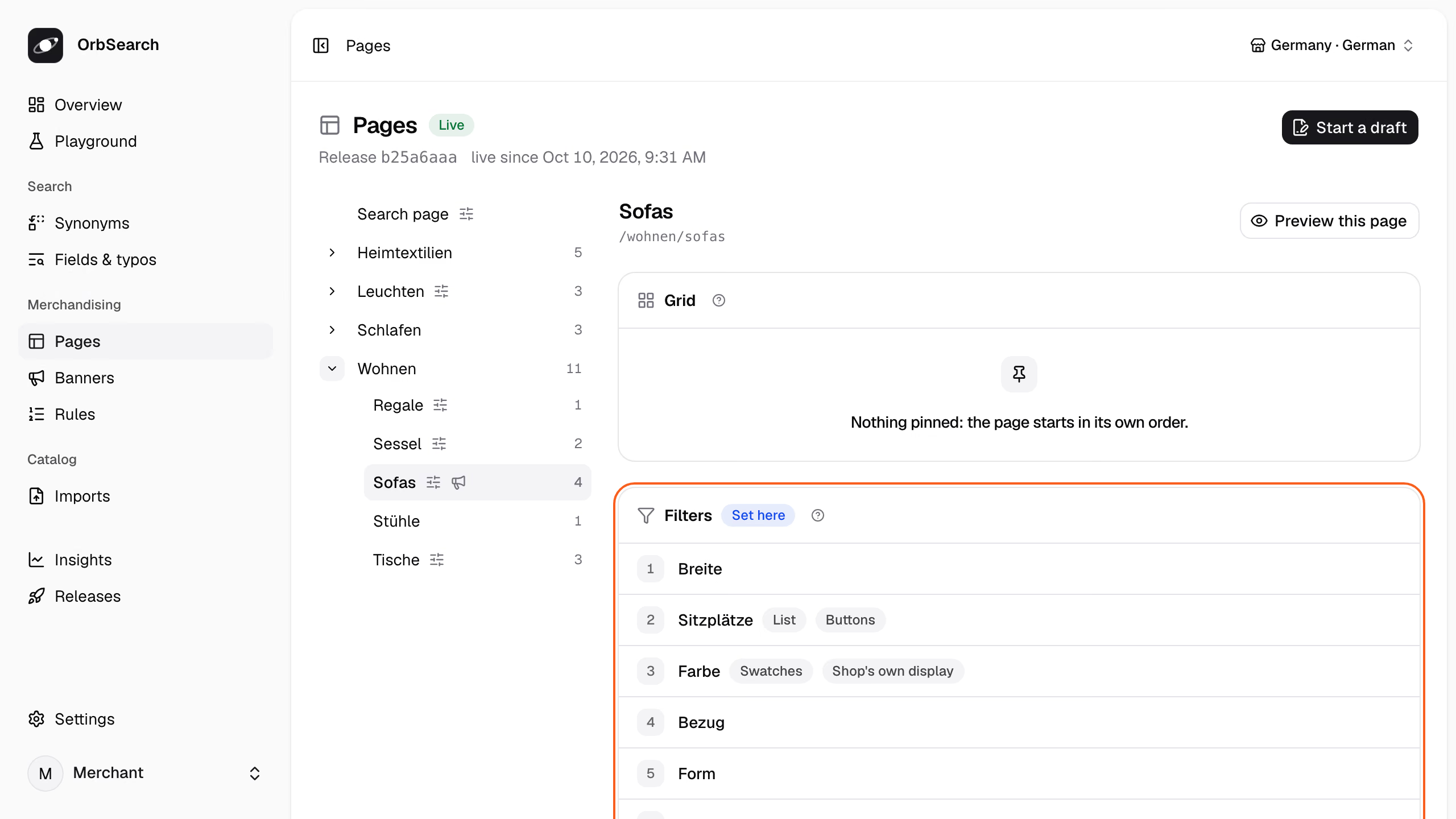
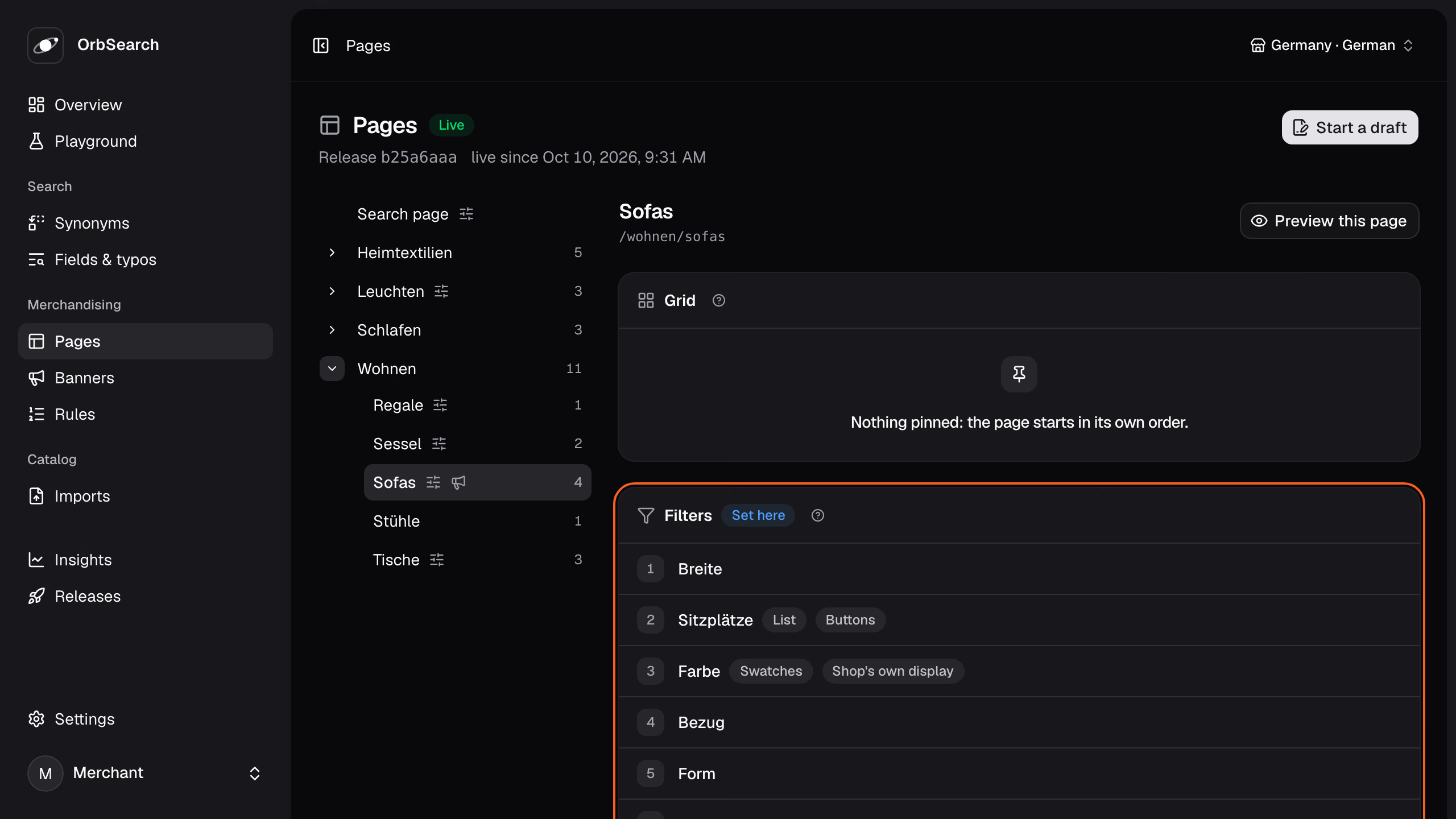
Click Start a draft, then change the page:
- Filters: drag a filter, or press ↑ and ↓ on its handle. Add a filter adds one, and its pencil opens Kind, Display and the rest, each Automatic until you choose.
- Sorting: Starts with sets the default sort, and Shoppers can choose lists the options in their order.
- Grid: Pin a product puts it on the page's first places, and the tiles reorder like the filters.
On a page that inherits, Write my own takes a card's settings over, and Reset hands them back.
Preview this page shows the page as shoppers will see it, with the draft's filters and sorting over the live products; the draft's pins show once it is live. Review and publish opens the draft's review, which publishes it.
Start a draft from the home store's export, and put the sale toggle first on the sofa page:
draft=$(curl -s -X POST -H "Authorization: Bearer $key" -H 'Content-Type: application/x-ndjson' \
  --data-binary @tests/fixtures/home/catalog.jsonl "$api/imports?name=catalog.jsonl" | jq -r .import.id)
version=$(curl -s -H "Authorization: Bearer $key" $api/imports/$draft | jq -r .version)
jq --arg version "$version" '{version: $version, files: {"categories.json":
      ((.nodes[] | select(.category == "wohnen/sofas") | .facets) |= ["on_sale"] + .)}}' \
    tests/fixtures/home/categories.json \
  | curl -s -X PATCH -H "Authorization: Bearer $key" -H 'Content-Type: application/json' -d @- $api/imports/$draft \
| jq -c '.files | keys'["categories.json"]The draft now holds a categories.json of its own. Send its files with the page to see the sofa page as the draft lays it out:
curl -s -H "Authorization: Bearer $key" $api/imports/$draft \
  | jq '{category: "wohnen/sofas", files}' \
  | curl -s -H "Authorization: Bearer $key" -H 'Content-Type: application/json' -d @- $api/pages/settings \
| jq -c '[.facets.facets[].field]'["on_sale","width","seats","color","upholstery","shape","features","seat_height","price","delivery_days","brand"]Ask how publishing it would go live:
curl -s -H "Authorization: Bearer $key" $api/imports/$draft/publication | jq -r .course.sentenceGoes live at once: only categories.json changed what the Query API reads.Publishing takes the draft live:
curl -s -X POST -H "Authorization: Bearer $key" $api/imports/$draft/publish | jq -r .nextHere, discard it instead:
curl -s -X DELETE -H "Authorization: Bearer $key" $api/imports/$draft | jq -r .statediscardedHow a change goes live
Most changes to a page go live at once. A change to what the release counts rebuilds the search, such as buckets for the seat height, which no page counts yet:
{ "field": "seat_height", "kind": "buckets", "buckets": [{ "to": 45 }, { "from": 45 }] }The order of facets, labels, groups, the sorting and every display but the histogram change only what the Query API reads, so publishing them is a switch.
A field, kind, show or set of buckets no other page counts changes what the documents hold. So does a price histogram where none was, or removing the last facet over a field. Publishing those rebuilds the search, while the shop answers from the live release.
The draft's publication and Preview this page say which way a draft goes live; Releases has the rest.
Reference: GET .../publication
Next
- Facets and filters: read the facets in an answer and send the shopper's choices.
- Banners and teasers: put a campaign on the sofa page.
- Releases: draft, preview, publish and roll back.