Releases: draft, preview, publish, roll back
Change the search configuration in a draft, see it as shoppers will, publish it the way the change needs and go back to an earlier release.
A release is the shop's whole search configuration as files, one JSON file per area, kept as a version that never changes. Every search answer names the release and the snapshot it came from, and GET /api/v1/live names the same pair:
live=$(curl -s -H "Authorization: Bearer $key" $api/live)
curl -s 'http://127.0.0.1:7800/v1/search?query=sofa' \
| jq -c --argjson live "$live" '{release: (.release == $live.release_id), snapshot: (.snapshot == $live.snapshot_id)}'{"release":true,"snapshot":true}A release is named by its content, so the same files always make the same release, whatever their whitespace or key order. The commands use $key and $api from the Quickstart.
Reference: GET /api/v1/live · StoredRelease
The release files
A release holds up to fourteen files, each optional:
types.jsonandattributes.json: what is searched and what each value means (Types and attributes)channels.json: the markets with their languages and currency (Channels)categories.json: each page's facets and sorting (Pages)synonyms.json: words that find each other (Synonyms)patterns.json: phrases that become filters, such as "3-sitzer" (three-seater) (Patterns)rules.json: pins, boosts, buries, hides and redirects (Rules)ranking.json: signals, weights and sort orders (Ranking)overlays.json: corrections and badges for catalog data (Overlays)routes.jsonandredirects.json: the shop's URLs and the old shop's (URLs and redirects)feed.json: how the export's columns are read (Importing and mapping)tests.json: search tests (below)relations.json: what a link between entities means, such as a product'sbrand; checked, read by no search
Settings → Advanced lists the live release's files under Release files, each opening read only. Download release saves them as one zipped folder, the files a team keeps in Git.
Store a folder of files as a release, each file keyed by its name. This stores the home store's:
jq -n '{files: [inputs | {(input_filename | split("/") | last): .}] | add}' tests/fixtures/home/*.json \
  | curl -s -H "Authorization: Bearer $key" -H 'Content-Type: application/json' -d @- $api/releases | jq -r .id
Storing changes nothing shoppers see. It answers 201 with a new release, or 200 when the same files were stored before.
Reference: POST /api/v1/releases · GET /api/v1/releases/{release}
Change in a draft
Changes go into a draft first, so shoppers see nothing until you publish it. A draft is an import: the live catalog, or a new export, with the files it changes.
Synonyms, Fields & typos, Pages, Banners and Rules all write the one working draft. Your first change starts it; on Pages and Rules, Start a draft first. The badge beside the title then reads Draft, and Discard throws the draft away.
Start an import with the catalog, then change its files. This sorts the sofa page wohnen/sofas (wohnen: living) by price, lowest first:
draft=$(curl -s -X POST -H "Authorization: Bearer $key" -H 'Content-Type: application/x-ndjson' \
  --data-binary @tests/fixtures/home/catalog.jsonl "$api/imports?name=catalog.jsonl" | jq -r .import.id)
version=$(curl -s -H "Authorization: Bearer $key" $api/imports/$draft | jq -r .version)
version=$(jq --arg version "$version" '{version: $version, files: {"categories.json":
      ((.nodes[] | select(.category == "wohnen/sofas")).sort = {default: "price_asc"})}}' \
    tests/fixtures/home/categories.json \
  | curl -s -X PATCH -H "Authorization: Bearer $key" -H 'Content-Type: application/json' -d @- $api/imports/$draft \
  | jq -r .version)
A file you send replaces the published release's file whole, and the draft reads the others from it. Each write names the version you read, and a draft changed since refuses it with 409.
The panel writes the newest draft, so a merchant in the panel and an agent on the API work on the same one.
Reference: POST /api/v1/imports · PATCH /api/v1/imports/{import}
Preview
A preview, in the Playground or through the API, answers as shoppers will be answered, with the trace that says why.
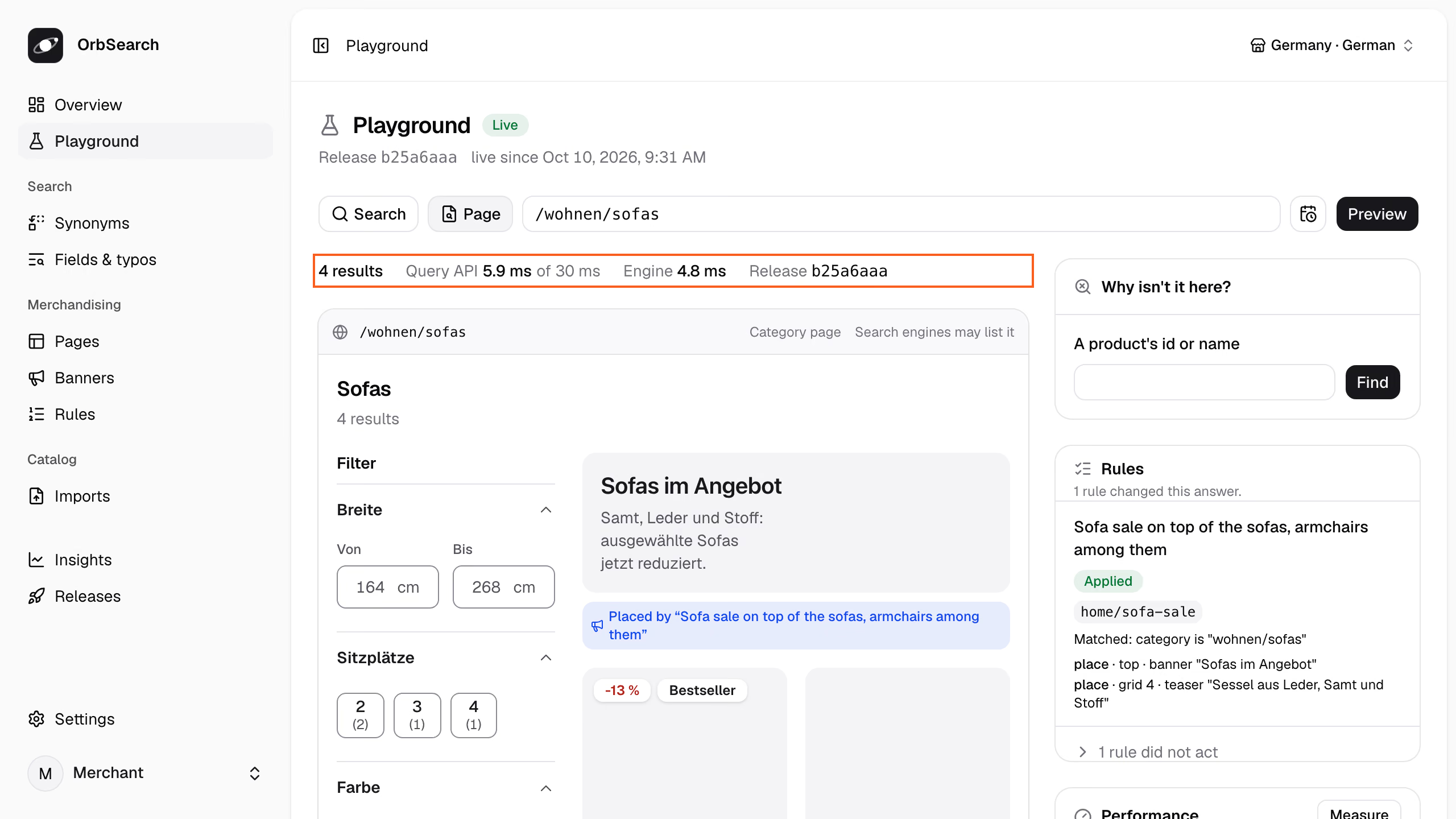
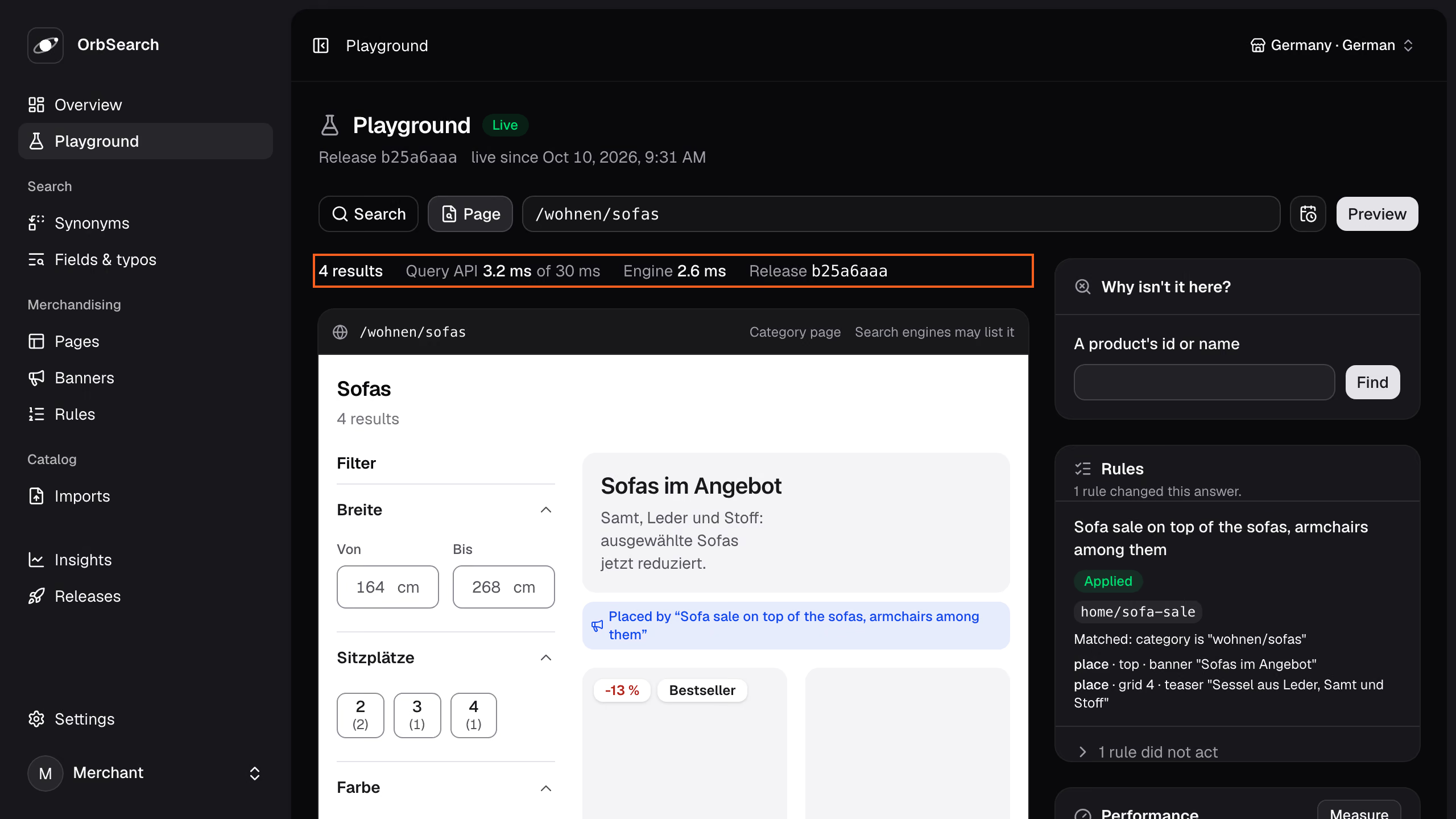
The Playground shows any search or page of the shop. Type what a shopper types, or a URL of the shop, and press Preview:
- The strip above the page says what it is: its kind, where a redirect leads, whether search engines may list it.
- The line above it holds the answer's numbers: the results, the Query API's time against its budget, the engine's share and the release.
- Performance keeps them copyable for a bug report, and Measure sends the preview 20 times for its p50, p95 and slowest round trip.
The channel and language in the top bar, shared with Pages and Rules, decide what it answers in, and a playground link carries them. On Pages, Preview this page shows the draft's page and opens it in the Playground.
POST /api/v1/preview/page opens a URL of the shop as a shopper would, with a draft's files in place of the live release's:
curl -s -H "Authorization: Bearer $key" $api/imports/$draft | jq '{url: "/wohnen/sofas", files}' \
  | curl -s -H "Authorization: Bearer $key" -H 'Content-Type: application/json' -d @- $api/preview/page \
  | jq -r '.results | (.trace.steps[] | select(.step == "sort") | .reason),
(.sections[] | select(.type == "product") | .hits[] | "\(.entity) \(.fields.sale_price // .fields.price)")'The category wohnen/sofas sets price_asc as the default sort of its page and the pages below it.
product:SOFA-ASKA-2 649.0
product:SOFA-NIKO-SCHLAF 799.0
product:SOFA-LUND-3 1299.0
product:SOFA-VIDAR-ECK 1899.0The sofas come lowest price first, as the trace's sort step says. POST /api/v1/preview/search answers a search against what is live, and both may fix time to see a scheduled rule on its day.
Reference: POST /api/v1/preview/page · POST /api/v1/preview/search
How a publish goes live
Publishing makes a release the active configuration, and an index run takes it live, doing only what the change needs. You see how before anything goes live.
Synonyms, Fields & typos and Banners publish from a bar that says how the draft goes live, such as "Goes live at once." On Pages and Rules, Review and publish compares the draft with what is live and says the same before Go live.
Ask how the draft would go live:
curl -s -H "Authorization: Bearer $key" $api/imports/$draft/publication | jq -r .course.sentenceGoes live at once: only categories.json changed what the Query API reads.Publish it with the version you reviewed, so a draft changed since is refused:
curl -s -X POST -H "Authorization: Bearer $key" "$api/imports/$draft/publish?version=$version" | jq -r .nextA release stored whole publishes with POST $api/releases/<id>/publish. Searches read it once the run succeeds, and keep what was live if it fails. A draft you do not publish is discarded:
curl -s -X DELETE -H "Authorization: Bearer $key" $api/imports/$draft | jq -r .statediscardedA publish takes one of three ways:
- Switch: only what the Query API reads changed, such as rules, the layout of pages, patterns, routes or redirects. It goes live at once; a pin took about 0.2 s on the demo's 5,215 products.
- Settings: only the synonyms, the order of a type's searched fields or how many typos its words forgive. The engine applies them to the live indexes within moments, without reindexing.
- Rebuild: what the documents are built from changed, such as the fields a type searches, channels, attributes, overlays, the feed mapping, ranking signals, the facets pages count, or the catalog. New indexes are built beside the live ones while the shop keeps answering.
A rebuild also runs after an update of OrbSearch, when the engine lost its indexes, and when a sale window or an overlay ends. The answer's course.because names the cause and, for a rebuild, estimate_seconds its time. Every trace names how the live run went live as trace.live.
Reference: Course · GET .../publication · POST .../publish · DELETE /api/v1/imports/{import}
Roll back
A rollback publishes an earlier release again. It goes live with the current catalog, by the same three ways, and the release the live one replaced is marked previous.
Releases lists the releases, the last published first, each marked Live, Going live, Previous or Was live. A row's menu offers Publish this release or Roll back to this release, in a dialog that says how it would go live. Index runs below says how each run went live, with its Report.
previous=$(curl -s -H "Authorization: Bearer $key" $api/releases | jq -r '.data[] | select(.role == "previous") | .id')
curl -s -H "Authorization: Bearer $key" $api/releases/$previous/publication | jq -r .course.sentence
curl -s -X POST -H "Authorization: Bearer $key" $api/releases/$previous/publish | jq -r .next
Each listed release carries its role and the course it last went live by.
To go back to an earlier catalog together with its release, publish the import it came with again (Importing and mapping).
Reference: GET /api/v1/releases · POST /api/v1/releases/{release}/publish
Validation
Every write is checked whole before it is kept. A violation answers 422 with the file, a JSON pointer and what is wrong. Here a search test asks for a channel the store lacks:
jq -n '{files: [inputs | {(input_filename | split("/") | last): .}] | add}
    | .files["tests.json"].tests[0].request.channel = "at"' tests/fixtures/home/*.json \
  | curl -s -H "Authorization: Bearer $key" -H 'Content-Type: application/json' -d @- $api/releases \
| jq -r '.violations[] | "\(.file) \(.pointer): \(.message)"'tests.json /tests/0/request/channel: "at" is not a channel in channels.json; the channels are de.Each file must match its schema, unknown fields included, and every reference between files must hold. Category and product ids belong to the catalog and are not checked. An index run checks again with the files it derived; if they do not fit, it fails and what was live stays.
Reference: 422
Search tests
A search test is a request, exactly as the Query API receives it, and what must stay true about its answer. "3-sitzer grau" (three-seater grey) must resolve to both filters:
{
    "tests": [
        {
            "id": "three-seater-in-grey",
            "request": { "query": "3-sitzer grau" },
            "expect": { "resolved": { "filters": { "color": "grey", "seats": 3 } } }
        }
    ]
}
A test can expect the redirect, what the query resolved to, the rules applied, the order of sections, and its results, such as the first hit. A trace's request can be copied into a test as it is.
Storing refuses a test that expects nothing, a request the Query API would refuse, and a rule, type or field that does not exist.
Reference: tests.json · expect
Defaults and zero configuration
A release need not write every file: every index run derives the ones it leaves out from the catalog, so they follow it. A search with debug=1 names them:
curl -s 'http://127.0.0.1:7800/v1/search?query=sofa&debug=1' | jq -c '.trace.derived'["types.json"]The home store writes types.json but leaves out which attributes are exempt from typos, so that part is derived. A written file wins whole, except categories.json, which derives the parts it leaves out. Your own catalog goes live with no files at all, and the import report gives each derived setting its reason.
JSON Schemas
Each release file has a JSON Schema, generated from the contract at contracts/schema/<file>.json. Name it in the file's $schema key, and an editor checks and completes the file as you type:
{
    "$schema": "../../../contracts/schema/synonyms.json",
    "synonyms": { "de": { "groups": [["sofa", "couch"]] } }
}
The Query API keeps $schema as written.
Next
- Rules: pin, boost, bury, hide and redirect, the changes a draft carries most.
- Pages and their filters: each page's facets and sorting, previewed before they go live.
- The import report: what a run read, left out and derived.